





t33j4y
Members
-
Joined
-
Last visited
Everything posted by t33j4y
-
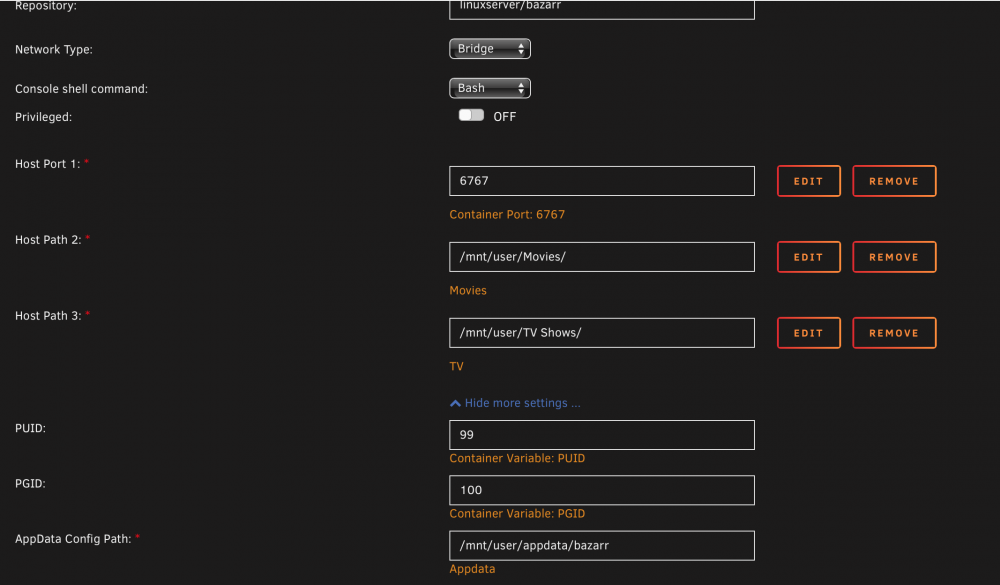
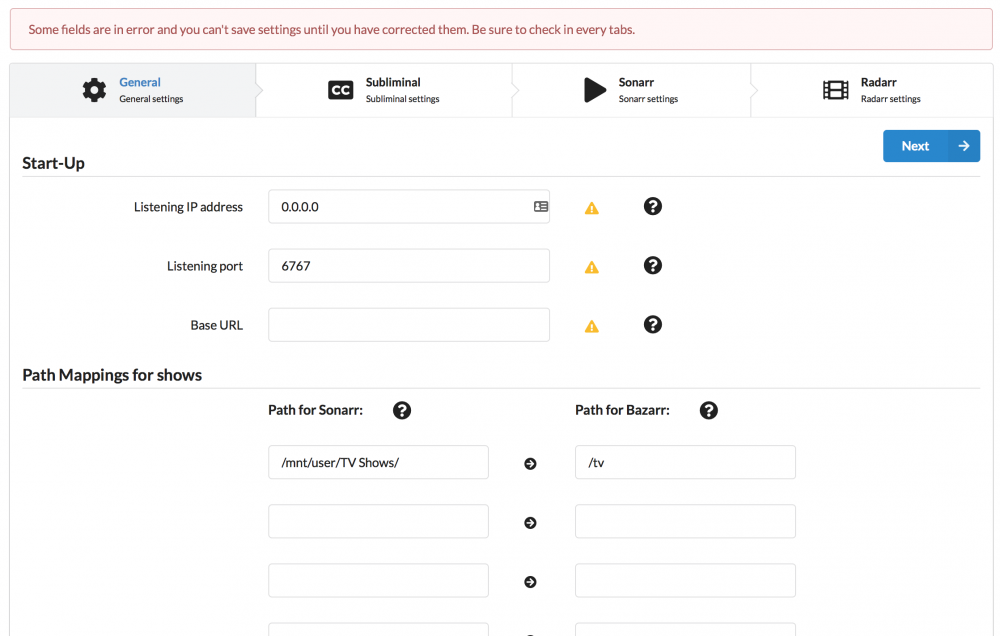
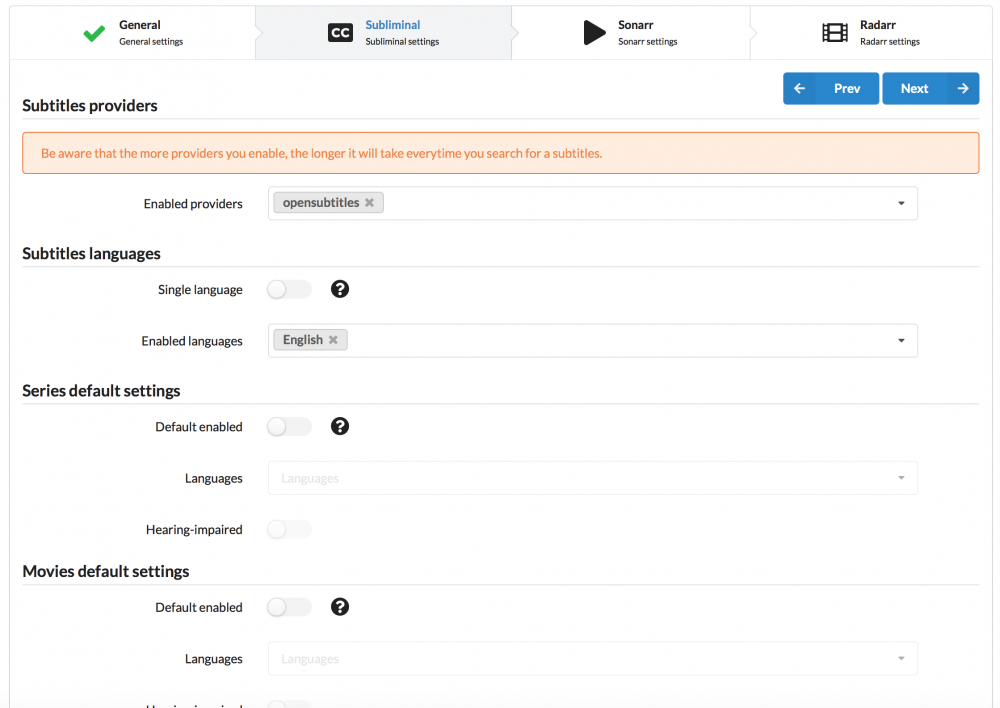
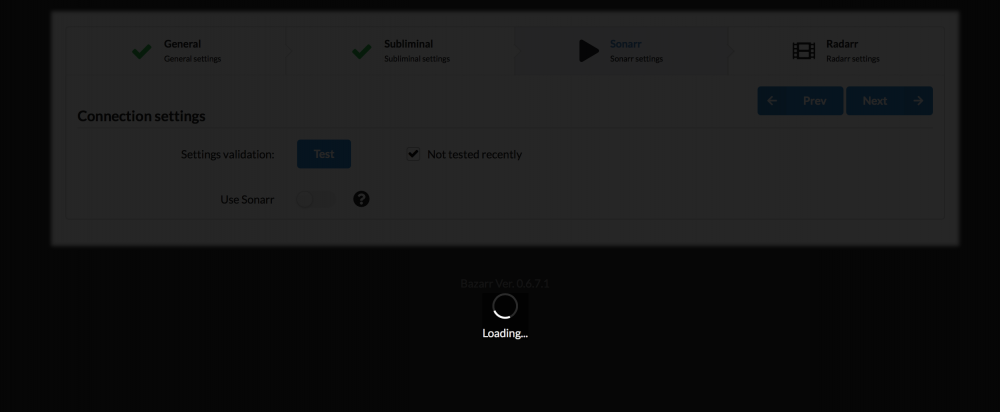
I am having some trouble getting this to work properly. I read the preceding posts about paths and feel sure that I have them correct. My problem is that when I have done the general settings page in the UI as well as the Subliminal page, I am left with a "Loading page" that just seems to be stuck. Note that I am not using Radarr which is why there are no entries for that in the UI, but only in the docker template (as I didn't want it to throw an error if it was missing. I have attached screenshots and would appreciate if someone who has it working could point out where I went wrong Thanks in advance!
-
That sounds plausible - my server had resumed to normal fan operation this morning so something must have settled during the night. Will hold off on installing the update as all seems quiet now and I am leaving for a four day business trip. Can fiddle around with it when I return - I know it will haunt me if it doesn't work out and I leave the family with full tilt fan noise coming from the office
-
So, just took the update and my fans have been spinning like crazy ever since :-( Running a X11SSM-F
-
Lothar, thanks for the input. Good link! I did pick up on the thresholds needing change, but picked up on it in this post by dmacias earlier in the thread. So I changed it through the interface :-)
-
I stand corrected and humbly apologize :-(
-
Ermm. Ok - I certainly did not mean to offend anyone, but based on what I read in the 6.4.1 release thread, he seemed to be in control of the plugin. Thank you for the input - will try to reinstall from CA as you suggest.
-
I just lost my SABnzbd docker install due to still having Squid's "Advanced Buttons" plugin installed while updating the docker :-( If at all, I would like to avoid having to configure everything over again when re-installing. I have a recent copy of the of the appdata folder. Any suggestions on how I minimize the effort involved in getting this back on its feet? Thanks in advance for any help!
-
Alright, makes a lot of sense :-) Does the HDD temp sensor work off of the highest reading across the disk pool or the average of the pool?
-
You may have to factory reset the bmc. Also remove the .config files from the ipmi plugin directory on the flash drive. And make sure that the load config toggle switch is off on the sensor editor. Found this and toggled the switch to "OFF", after restarting the server. So far it seems to be holding the config without going full blast. Can see on the Readings tab that RPM is actually adjusting. *fingers crossed* Still wondering why the CPU fan - a Noctua NH-L9x65 rated at RPM 600 - 2500 ± 10% seems to never go under 1000RPM, even though the fan speed minimum is 31. So compensating for the ± 10%, 31% gives a range of 775-852 for lowest RPM, as long as temp is below 40 degrees. But even when temp is below 40 degrees, it still hovers at around 1000.
-
You asked about the error messages - here's an example: So, some progress now. Setting to Full Speed seems to have helped - pulsing is gone and the plugin seems to have regained control over rpm. I have edited the three Lower Critical values for the case fans to be at 300/300/300 and the cpu fan at 500/500/500. Case fan thresholds for temp are 35/40 and for rpm 40/100 CPU fan thresholds for temp are 40/60 and for rpm 31/100 I'm gonna fiddle around with it now to find final and sensible settings :-) Thank you so much for putting me back on track! Edit: Spoke to soon :-( After changing the RPM settings, it is now back to full blast... Did the following to recover: 1. Uninstalled IPMI plugin 2. Removed IPMI folder in /config/plugins/ 3. Shutdown server 4. Reset BMC to factory (from within BMC) 5. Changed fan speed to Full Speed 6. Started unRaid 7. Installed IPMI plugin 8. Changed Lower Critical Values: case fans to be at 300/300/300 and the cpu fan at 500/500/500 and set settings to reload on unRaid start 9. Set IPMI plugin to - Case fan thresholds for temp are 35/40 and for rpm 40/100 - CPU fan thresholds for temp are 40/60 and for rpm 31/100 10. Enabled Fan Control Still, full blast :-/ I should have just kept my fingers off of it, instead of trying to adjust more. 11. Repeat the above, plus full power down and mains lead removed. And now, it worked. But only for 2 mins after which it stepped RPM up to full again on fans 1-4. Even if the temp thresholds weren't reached :-( CPU fan is at 1000 which does not correspond to the threshold temp of 40 as it is at 35.


-
Thanks! I will try out what you advise as soon as I return from work. I can definitely run the commands manually if you want. What are they, please? :-)
-
So, I am at my wits end here :-( Trying to get this plugin working on 6.4.1 with 4x Noctua PWM case fans (2x 1200RPM and 2x 1500RPM) + 1x Noctua PWM CPU cooler (max 2200RPM) on a SuperMicro X11SSM with support for PWM. I set the SuperMicro fan control at "Standard" in BMC and install the plugin. Configure case fans to react to HDD temp and CPU cooler to react to CPU temp. Configure fan control for case fans to min/max temp of 30/40 on HDD and fan speed to 40%/100% Configure fan control for CPU fan to min/max temp of 30/60 on CPU and fan speed to 40%/100% If I leave it like this, the fans pulse up and down endlessly, throwing hundreds and hundreds of warnings in the event log. I then tried adjusting the lower thresholds as advised earlier in the thread to 300/300/300, the idea being that if the plugin is set for lowest fan speed above this, it will never trigger bios to try and adjust (causing the pulsing) and everything is good. Unfortunately, what happens is that all fans immediately go to full blast. This change seems irreversible, at least through "conventional" ways. Tried disabling plugin, adjusting lower thresholds back to default, uninstalling the plugin, cycling through the modes in the SM IPMI interface. The only thing that reverts it is resetting BMC to factory default. Any advice on what to do would be much appreciated. Thanks in advance!
-
Hi Squid. Have you had a chance to dig deeper into this? :-) Thanks.
-
I just ran the steps again to be sure - it outputs matching md5 :-/ Will await your feedback in a couple of days :-) Thank you for your support!
-
Output before tripping: root@Tower:~# md5sum /mnt/user/TV\ Shows/SquidBa* 762e371d252f2575c7fe47af3d3d05f2 /mnt/user/TV Shows/SquidBait-DO_NOT_DELETE.docx 1812b82cd617c7cc6acab62809a1d531 /mnt/user/TV Shows/SquidBait-DO_NOT_DELETE.jpg c5ec9350bdf66275683fc8a58b8aae85 /mnt/user/TV Shows/SquidBait-DO_NOT_DELETE.pdf a01288d5973fc030b51db2f5a0cb9f03 /mnt/user/TV Shows/SquidBanking-DO_NOT_DELETE.xlsx Output after tripping: root@Tower:~# md5sum /mnt/user/TV\ Shows/SquidBa* 762e371d252f2575c7fe47af3d3d05f2 /mnt/user/TV Shows/SquidBait-DO_NOT_DELETE.docx 1812b82cd617c7cc6acab62809a1d531 /mnt/user/TV Shows/SquidBait-DO_NOT_DELETE.jpg c5ec9350bdf66275683fc8a58b8aae85 /mnt/user/TV Shows/SquidBait-DO_NOT_DELETE.pdf a01288d5973fc030b51db2f5a0cb9f03 /mnt/user/TV Shows/SquidBanking-DO_NOT_DELETE.xlsx
-
EDIT: You fixed the quote :-)
-
Disabled AFP on "offending" share. SSh'ed in and ran the command you listed. Re-enabled AFP Accessed share (which triggered RP) Output: root@Tower:~# inotifywait --fromfile /boot/config/plugins/ransomware.bait/file> Setting up watches. Watches established. /mnt/user/TV Shows/SquidBait-DO_NOT_DELETE.docx CLOSE_WRITE,CLOSE root@Tower:~# <st -e move,delete,delete_self,move_self,close_write Setting up watches. Watches established. /mnt/user/TV Shows/SquidBait-DO_NOT_DELETE.pdf CLOSE_WRITE,CLOSE root@Tower:~#
-
I get "xattr: command not found". :-/
-
Just reproduced the problem from my Macbook - so it happens when accessing from both my Mac mini and my MBP. Will try to ssh in and check before and after as suggested :-)
-
So, I never had something trigger Squidbait until tonight. Got sick of waiting for SMB network access to come around when connecting from my Mac, so I enabled AFP for the specific share I wanted to access. After briefly listing the share contents in Finder, Squidbait kicked off and shut down access: Ransomware Protection: 08-09-2017 21:57 Possible Ransomware Attack Detected Possible Attack On /mnt/user/TV Shows/SquidBait-DO_NOT_DELETE.docx While I am not entirely ruling out that some mischief is going on, I find it more likely that MacOS and it's incessant need to disperse dot-files allover is at work. Anyone have insights? Cheers, T. Edit: Just reset the permissions and tried accessing via AFP - triggered again. No issue when accessing over SMB apart from the horribly slow speed when listing large network shares.
-
I have now migrated my subscription to Small Business and migrated to the Crashplan Pro docker by jlesage. What caused the most grief was that the actual subscription got stuck in a 30 day trial instead of the Migration subscription, so I had to get CP Support to intervene (For those who would need to get in touch with them - use the chat function as email is hopeless) Want to say a BIG thank you to gfjardim for the docker that I have been using since I don't know when. Had it not been for this change by CP, I would have stayed with that :-)
-
Thanks trurl - that fixed it :-)
-
After upgrading to unRaid 6.3, Fix Common Problems throws a warning: "inotify-tools set to install - inotify-tools is set to be installed by the NerdPack plugin. This package is now included in unRaid 6.3RC6+, and NerdPack should be set to not install it." The issue is that when I go to NerdTools to uncheck "inotify-tools" it isn't there at all. I have the following versions running: * Fix Common Problems version: 2017.02.03b * NerdTools version: 2017.02.06 Altthough I can't find evidence of it in the release notes, I figure that NerdTools has already build in check for unRaid version and removed install option for inotify-tools if it senses 6.3 RC6 or later. Perhaps you can update Fix Common problems to handle accordingly? Thank you for a great plugin!
-
Check my post above to see what I did. Basically, let it go until it finishes trying (and failing) to move files to the cache. Verify by watching the log. Then manually shut down/reboot. Fix the offending share's cache settings. Finally, invoke the mover to move data back to the array. There needs to be a way to stop the mover in situations like this. I second this. I am right now watching unRaid trying to move a large user share onto the cache (due to using - wrongly - Prefer setting), and of course failing due to lack of space. Have tried pkill mover and killall rsync to no avail. It seems that my option is to wait it out - which I will then have to. Implementing a "Stop Mover" function would be very helpful.
-
This is spot on - my computer 1 is a laptop with touchscreen (Lenovo Y2P) - I have a nagging feeling that if I'd stayed with W8, I wouldn't have been facing this. Not very happy with the W10 upgrade overall :-/ Cheers, Thomas Seems this is a NoVNC problem - https://groups.google.com/forum/#!topic/novnc/bOpKeuZCd7s




