






JorgeB
Moderators
-
Joined
-
Last visited
Everything posted by JorgeB
-
The problem was the flash drive dropping offline This should not happen when you just use another USB port
-
This should not happen, possibly an issue with the devices, or they were busy. Would need the diags to see.
-
No, but it will keep the same one you choose. Yes, it will import the existing filesystem, as chosen above. Whatever you prefer, but if you want to presrver datasrts, zfs replication is the best option.
-
If sdf is the flash drive, it got disconnected, or there are issues with it.
-
It's for disk1; if it's still enabled in the BIOS, HPA can be re-enabled after a reboot like mentioned.
-
Doubt any kernel parameters will help, most likely you will need to wait for a kernel fix.
-
This thread is not the best place for back-and-forth support; please create a new one on the general support forum.
-
You can still disable HPA on the Unraid side, but if it's still enabled in the BIOS, it can happen again after a reboot. Type hdparm -N /dev/sdb
-
Auto doesn't wipe anything. Can you clarify what happened?
-
It's not logged as a disk problem, and SMART looks OK, so it's most likely a power/connection issue. Since there are UDMA CRC errors, the SATA cable would be the first place to start. I'm seeing in the logs what looks like a container constantly restarting; see if you can find out which one by looking at their uptimes.
-
OK, so the disk is not physically smaller; HPA is enabled: Jun 1 09:59:44 Tower kernel: ata9.00: HPA detected: current 7814035055, native 7814037168 You need to disable this:
-
I missed before that besides the partition layout being wrong, the disk is actually a little smaller than it should be (for a normal 4TB disk) User Capacity: 4,000,785,948,160 bytes [4.00 TB] This is the normal capacity, and what you also have for the other 4TB disks. User Capacity: 4,000,787,030,016 bytes [4.00 TB] So you will need a normal 4TB disk to replace it with. Was that disk always disk1?
-
I would still replace the cable; that way you can rule that out if it happens again.
-
And also the current fdisk -l output for that disk.
-
If the rebuild started with the 14 TB disk, the filesystem was already expanded, so there's not an easy way to reduce it now. You can mount the new 12TB disk with UD, copy all the data from the emulated disk there, then do a new config with the 12 TB disk in use and resync parity.
-
Post new diags.
-
If they are still dropping, it's probably best to wait for the new cable. Also make sure the power is good, especially if both share something like a power splitter.
-
I've not seen that help with a similar issue, but it won't hurt, so it's worth a try.
-
It's worth trying with a different flash drive using a stock install, no key needed, just to see if it boots.
-
Firmware update should be pretty safe, and you can do it from Unraid:
-
Wrong partition layout, with the array stopped (and assuming disk1 is still sdb), type: sgdisk -o -a 8 -n 1:32K:0 /dev/sdb Reboot the server. Disk1 should then show as "wrong." Go to Tools - New Config - Keep All - Apply. Back on main check that all disks are assigned as before but with a blue icon, check "parity is already valid", start the array and post new diags.
-
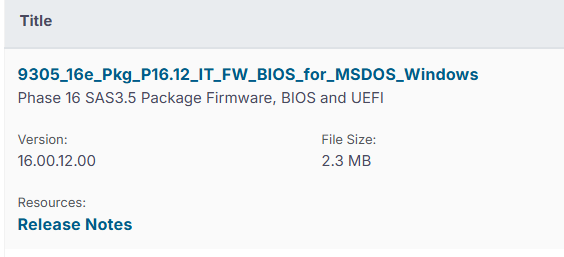
Broadcom's site has 16.00.12.00 https://www.broadcom.com/support/download-search?pg=Storage+Adapters,+Controllers,+and+ICs&pf=Legacy+Host+Bus+Adapters&pn=SAS+9305-16e+Host+Bus+Adapter&pa=&po=&dk=&pl=&l=true
-
Not really sure, @blahblahblahblah can we hide this?
-
If no data was written to the emulated disks, i.e., after they got disabled, you can do a new config, check parity is already valid, and then run a correcting parity check.
-
You can do that, and rebuild both at the same time, but make sure the emulated disks are mounting and the contents look correct before rebuilding on top.



