






JorgeB
Moderators
-
Joined
-
Last visited
Everything posted by JorgeB
-
Cables don't mention if they are forward breakout or reverse breakout; only the former will work.
-
No, you can still use the flash drive for boot, just not for licensing.
-
This suggests some hardware or BIOS issue; not much you can do on the Unraid side.
-
You can use the file manager or your favorite tool to move some files to another disk, move disk to disk, e.g., from /mnt/disk2 to /mnt/disk3
-
Only if you are not booting UEFI, but it never hurts.
-
Fash drive should only have one partition, and if there are more, Unraid should be on the 1st one, 7.3 is more strict with that. Backup the flash drive, recreate it using the USB tool, then restore the config folder; that should do it.
-
Delete /config/network-rules.cfg on the flash drive and reboot
-
So it's resolved? Date changing is normal, since it's a new key.
-
Please post the diagnostics when it's showing missing key.
-
Do the NVME drives show up as a UEFI boot option? Post a photo of the board boot menu.
-
Boot is not finishing; does it work with a stock install? If yes, it would suggest a problem with the current config, if that is the case you can restore just the bare minimum, like the key, super.dat and the pools folder for the assignments, also copy the docker user templates folder (\config\plugins\dockerMan\templates-user), if all works you can then reconfigure the server or try restoring a few config files at a time from the backup to see if you can find the culprit.
-
Not sure what you mean, as mentioned, you can set whichever NIC you want as eth0
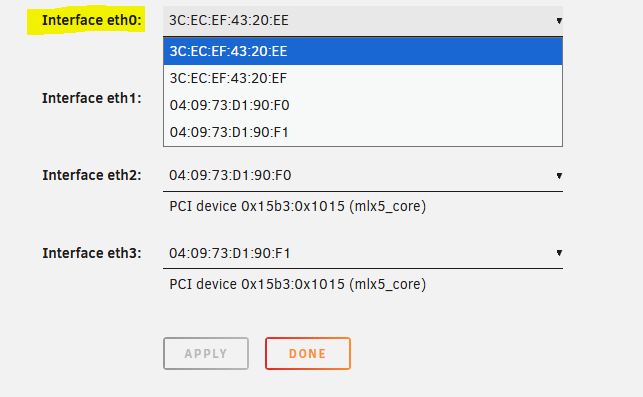
-
A wrong checksum typically means a RAM issue, run memtest on the server, much less likely, but it could also be a bad flash drive.
-
What controller are the HDDs connected to? Not all are supported for internal boot.
-
Turn the test off if that's an option, or remove the plugin and retest.
-
It's not all 3xxx, since 9300-8i works fine, at least for me, but it could be with the -16i and -24i models.
-
May 29 19:56:25 Tower kernel: nvme nvme0: controller is down; will reset: CSTS=0xffffffff, PCI_STATUS=0xffff May 29 19:56:25 Tower kernel: nvme nvme0: Does your device have a faulty power saving mode enabled? May 29 19:56:25 Tower kernel: nvme nvme0: Try "nvme_core.default_ps_max_latency_us=0 pcie_aspm=off pcie_port_pm=off" and report a bug May 29 19:56:25 Tower kernel: nvme 0000:01:00.0: Unable to change power state from D3cold to D0, device inaccessible May 29 19:56:25 Tower kernel: nvme nvme0: Disabling device after reset failure: -19 NVMe device is dropping offline, see if this helps: on Main click on the flash drive, scroll down to "Syslinux Configuration", make sure it's set to "menu view" and add this to your default boot option, after "append initrd=/bzroot" nvme_core.default_ps_max_latency_us=0 pcie_aspm=off pcie_port_pm=off e.g.: append initrd=/bzroot nvme_core.default_ps_max_latency_us=0 pcie_aspm=off pcie_port_pm=off Reboot (or power cycle the server if just a reboot doesn't bring the device back) and then see if it makes a difference.
-
Post the diagnostics after an update attempt
-
Post new diags after it happens again to see if this time there's something logged.
-
A boot pool currently can only have 1 or 2 devices.
-
I don't see any issues logged. Do you still have the problem if you disable CA auto update?
-
You should sync the config folder from the internal boot pool to the flash drive first. You can see here for more info: https://forums.unraid.net/topic/198440-73xx-version-moving-boot-drive-nvmessd-to-another-drive-nvmessd/#findComment-1619744 You can use either, whatever you prefer; each has its own beneficts. Make a license transfer, the same as if you changed the flash drive.
-
You must set the new NIOC as eth0, that can be done in Settings - Network Settings - Interface Rules (reboot required).
-
With Turbo Write, it should be faster than that, assuming no controller bottleneck and it's writing to only one disk at a time. Please post the diagnostics during a large file transfer.
-
Nope, but overlay2 is recommended over native for Docker folders for both zfs and btrfs.


