






JorgeB
Moderators
-
Joined
-
Last visited
Everything posted by JorgeB
-
You can create an issue here: https://github.com/unraid/45d-drivemap
-
I recommend an image; in my experience, folders can sometimes cause weird issues.
-
Crash is still the Docker service only, correct? I still don't see anything logged, and the last line on the syslog is from 06:29 am. You could try recreating the Docker image to see if it helps. https://docs.unraid.net/unraid-os/troubleshooting/common-issues/docker-troubleshooting/#re-creating-the-docker-image-file Then: https://docs.unraid.net/unraid-os/troubleshooting/common-issues/docker-troubleshooting/#reinstalling-docker-applications Also see below if you have any custom docker networks: https://docs.unraid.net/unraid-os/troubleshooting/common-issues/docker-troubleshooting/#restoring-docker-custom-networks
-
Disk1 mounted, and the issue should be resolved. As for Docker, it looks like the original image was on disk1, so when that disk stopped mounting, a new one was created in the pool , which is the better place for that. Assuming appdata is all there, and it should be, you should be able to just restore the apps: https://docs.unraid.net/unraid-os/troubleshooting/common-issues/docker-troubleshooting/#reinstalling-docker-applications Also see below if you have any custom docker networks: https://docs.unraid.net/unraid-os/troubleshooting/common-issues/docker-troubleshooting/#restoring-docker-custom-networks If all looks good, you can then delete the old docker image from disk1
-
Using what? A default Unraid install has only the mover, not a backup/mirroring utility.
-
This seems impossible; they must have been using NTFS from the beginning. My suggestion would be to back them up and clear the partitions, then reformat as XFS. You can clear the partitions by doing a new config, then clicking on each disk and "ERASE"
-
Sorry about that, typo, corrcted it in case someone else finds this in thefuture. OK, disk1 is now showing the correct size; you can now recreate the partition again to use the full capacity.
-
Only this vdev is showing normal writes, are they still showing in parallel sometimes?

-
Yes. you can register the trial with the same or different email. Not clear if you then plan to buy a new license or just transfer the key, if transferring, you will need to use the same email; if new, you can use whatever you want.
-
You are using encryption, which makes things more complicated, but stop the array; if disk1 was imported, manually export it with zpol export Start the array, when disk1 is showing unmountable, and post the output from zpool import -d /dev/mapper/md1p1
-
The shutdown timer was exceeded. Time how long it takes to top the array, then add 30 seconds to that and set it in Settings - Disk Settings - Shutdown Timeout.
-
When you run hdparm -N on that disk, it should show something like this (with different numbers) /dev/sda: max sectors = 3907027055/3907029168, HPA is enabled If yes, you then run hdparm -N p3907029168 /dev/sdX where the number is the second one from before, the larger one, also, replce X with the correct identifier Then reboot and post new diags.
-
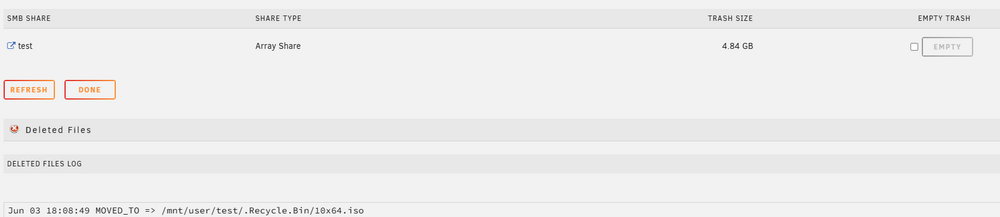
Please confirm if the files are not being moved to the Recycle Bin folder or just not showing in the trash/share stats Appears to be working correctly for me, this is with 7.3.1
-
First thing, this disk appears to be having power/connection issues: Device Model: ST18000NM000J-2TV103 Serial Number: ZR53Z3RQ Check/replace its cables and post new diags.
-
Try booting in safe mode.
-
Could be related to the kernel upgrade; does it still work if you downgrade?
-
Read SMART means Unraid detected the drive is up, it's not what is making them spin up. Try booting in safe mode and leave all the drives to retest, also make sure nothing is accessing the disks over SMB
-
I think that should be OK
-
You can ignore that message.
-
Did you import it before or after the array started? If it was mounted, Unraid cannot import it, and it will show unmountable.
-
A kernel change can sometimes affect things like that, where in some boards or hardware it worked with the previous kernel, and it doesn't with the current one. If that's the case, a future kernel update may also resolve the issue.
-
Not that I'm aware, the way I see it is if it's only writing to one disk or multiple.
-
The UUID doesn't match the pool, how did you format that disk? Also post the output from zpool import (withthe array started)
-
Does creating a new VM with the same settings but a new vdisk work?
-
Those stats suggest one of the devices dropped offline in the past, scrub the pool, and if there are no errors or all errors are corrected, reset the stats and keep monitoring, if it drops again, replace the cables for that device.

