






JorgeB
Moderators
-
Joined
-
Last visited
-
Currently
Viewing Topic: [Support] Subarr - The GUI Bazaar wishes it had (and the one Subgen never has had)
Everything posted by JorgeB
-
You will need to find out which segment of the network is limiting the speed.
-
Python segfaulted, which is not normal, you can try booting in safe mode to rule out a plugin issue and/or running memtest in case it's a hardware problem.
-
Emulated disk is mounting, if contents look correct you can rebuild. https://docs.unraid.net/unraid-os/using-unraid-to/manage-storage/array/replacing-disks-in-array/#re-enabling-a-disabled-disk-rebuilding-onto-itself
-
I did a quick test and confirmed the 4Kn parity is indeed the issue. It still works if the replacement disk is also 4Kn, in case you have one available, the other option would be doing a parity swap. I'll raise this with LT, it should be a pretty rare occurrence, but if it's an easy fix, it would be worth doing it, IMO.
-
That means the test failed, and the device should be replaced.
-
Please post the diagnostics.
-
Unfortunately, there's nothing relevant logged, this can also be a hardware issue, one thing you can try is to boot the server in safe mode with all docker containers/VMs disabled, let it run as a basic NAS for a few days, if it still crashes it's likely a hardware problem, if it doesn't start turning on the other services one by one, including the individual docker containers.
-
TPM is only supported for bare metal, not even passing through a TPM module can be used with a virtualized install, you can still use internal boot, but will need to keep the flash drive for licensing.
-
Iperf confirms it's a LAN problem; there's possibly some gigabit segment on the it, limiting the speed.
-
Enable the syslog server and post that together with fresh diagnostics if it happens again.
-
Jun 6 17:27:41 Rocinante php-fpm[8273]: [WARNING] [pool www] child 329491 exited on signal 9 (SIGKILL) after 476.489707 seconds from start Jun 6 17:35:04 Rocinante php-fpm[8273]: [WARNING] [pool www] child 333974 exited on signal 9 (SIGKILL) after 276.942640 seconds from start Jun 6 17:44:05 Rocinante php-fpm[8273]: [WARNING] [pool www] child 336161 exited on signal 9 (SIGKILL) after 644.283148 seconds from start Jun 6 17:50:42 Rocinante php-fpm[8273]: [WARNING] [pool www] child 341492 exited on signal 9 (SIGKILL) after 555.157480 seconds from start Jun 6 18:25:33 Rocinante php-fpm[8273]: [WARNING] [pool www] child 346740 exited on signal 9 (SIGKILL) after 589.301096 seconds from start In my experience, these errors can be the result of the server being close to exhausting the memory, GUI can become extremely slow, like 1 minute to open the dashboard, try limiting the memory for VMs/docker services, or adding a little more RAM. It could also be one or more containers hogging the CPU, try pinning only some cores to them, and leave cores 0/1 available for Unraid. Also, recommend trying a couple of other things, go to Settings - Global share settings and set the Number of fuse File Descriptors to the max, and enable this: https://docs.unraid.net/unraid-os/release-notes/7.0.0/#excessive-flash-drive-activity-slows-the-system-down
-
Normal syslog starts over after every boot. Enable the syslog server and post that after the next crash.
-
Try rebooting, if it still shows the same, post the diagnostics.
-
It's possible with mirrors only, not raidz, your pool has raidz vdevs, so not possible. While I never tested this, it may be possible, if you have extra SATA ports, to add a new vdev with the smaller devices to the existing special and dedup vdevs, then remove the other vdev (using the CLI), I can test this later to confirm if you like.
-
There's a known issue with the stock Syslinux UEFI bootloader and newer AGESA, you can use the Limine bootlçader if you want to boot from a flash drive; internal boot is not affected since it uses the Grub bootloader. https://forums.unraid.net/topic/196349-black-screen-after-usb-boot-msi-x870e-carbon-ryzen-9950x-rtx-4070-ti-super/#findComment-1607672
-
Apparently NVMe device dropped offline; power off the server, not just reboot, then post new diagnostics after the array starts.
-
Please post the complete diagnostics, and make sure you confirm the downaloed file in Chrome so that it gets renamed to zip
-
This suggests a hardware problem, nothing to do with Unraid, if you have a speaker connected, remove all the RAM and see if the board gives 3 long beeps after power up, to see if it's still partially alive.
-
Unraid 7.2.x will automatically create a 2048 starting partition for the rebuilt disk if one of the parity devices is the same size and is also using a 1MiB aligned partition, I think the issue here may be the fact that parity is 4Kn, I never tested in that scenario. I will make some tests to confirm, hopefully today if I have the time.
-
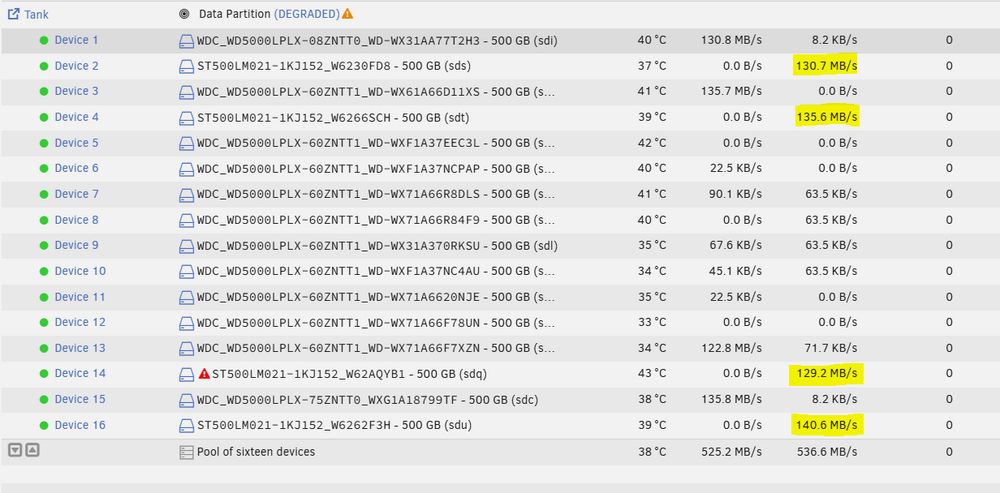
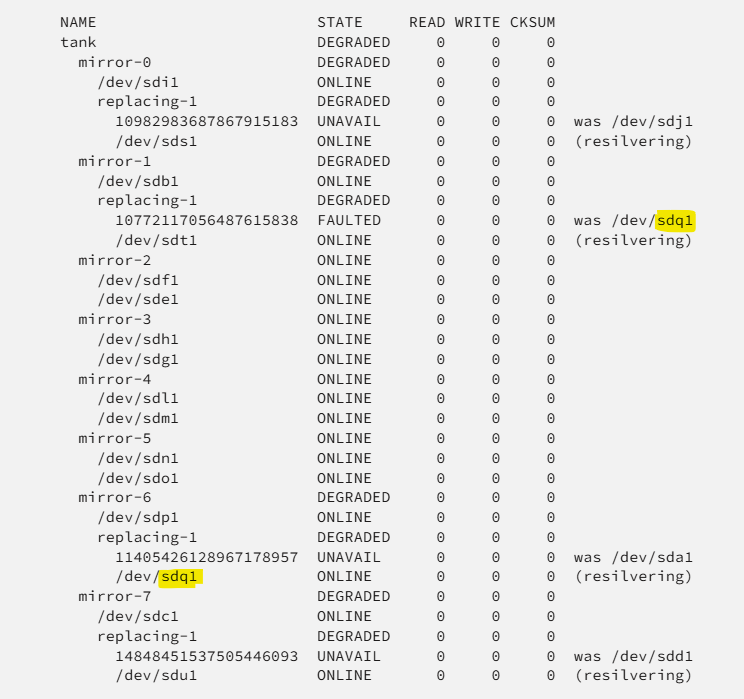
I think newer OpenZFS releases should no longer scrub the full pool during a mirror resilver, and I cannot replicate that unless it's related to the number of vdevs you have in the pool, which would be weird. In my testing, the disks being re-silvered are constantly written at their approximate max speed, and the other disks have small reads (only in the KB/s), which I assume are metadata related during the scrub, but no data appears to be scrubbed outside the disks being resilvered. The highlights of the devices are the ones being resilvered. Also still haven't found why sometimes it starts a parallel resolver, other times not. I did find why it can show the "cant_open" errors for some devices. In the example above, you can see it's showing device 14 as "offline/cant_open", it can happen if the disk being resilvered has the same /dev/sdX as a disk that was previously being used on the pool, and also being resilvered (likely only if the previous disk is listed before the new one in the zpool status output) This is just a display issue, and will correct itself once the resilver finishes, but now that I know what causes it, I'll create a bug report.
-
7.3.0 has a bug replacing a device from a RAIDZ pools, but it should have been easily recoverable if you didn't do anything else. Since the pool was reformatted, there is not much to do now, but make sure you update to 7.3.1
-
Look in the syslog for name of the corrupt file after the scrub, that file should be deleted, restore from a backup, then scrub again and confirm 0 errors.
-
Please post the diagnostics.
-
In that case, my suggestion would be to wait for a new Unraid release with a newer kernel and retest.
-
NIC is linking at 2.5GbE, where are you transferring the files to? Array or a pool? Also run an iperf test in both directions between the server and the PC you are copying from and post the results.



