






JorgeB
Moderators
-
Joined
-
Last visited
Everything posted by JorgeB
-
Let's start with the pool, one of the devices reporting corruption errors, also the docker image, start by scrubbing the pool and post the result from the GUI.
-
Rebuild finishes without errors; keep using the server normally; any more issues post new diags.
-
TPM devie is being foudn but is failign to create a key Jun 12 15:33:23 Unraid emhttpd: ECC CreatePrimary failed on /dev/tpmrm0: 0x9A2 - falling back to RSA-2048 Jun 12 15:33:23 Unraid emhttpd: CreatePrimary failed on /dev/tpmrm0 (both templates tried): 0x9A2 Jun 12 15:33:23 Unraid emhttpd: No usable public area obtained from /dev/tpmrm0 Look for a BIOS update, also any option to "clear" the TPM device in the BIOS, then try again.
-
This is very bizarre; the first thing I recommend is to reboot, then post new diags after array start.
-
If the driver is really missing, and an in-tree driver exists, best bet is to make a feature request from it, but please post the diagnostics first.
-
This looks to me more like an issue on the Mac side, can you browse the shares from another device, like a phone or table if you don't have a PC?
-
Sever is constantly running out of RAM, only about 66 MB was free in the normal zone, which was already below the kernel's minimum watermark. The biggest consumers appear to be Docker containers; stop then and retest, or try to limit their RAM usage.
-
You can first try to move the data to other disks; you can use the mover to empty the disk (as described here): https://docs.unraid.net/unraid-os/using-unraid-to/manage-storage/file-systems/#converting-to-a-new-file-system-type After that's done, you need to shrink the array, there are two options, 1st one is typically the recommended way, requiring a parity sync: https://docs.unraid.net/unraid-os/using-unraid-to/manage-storage/array/removing-disks-from-array/#removing-data-disks
-
Looks good, no errors during the rebuild. P.S. Recommend updating Unraid, 6.12 is very old now.
-
Not seeing anytjong that suggests a disk problem. When there's pool activity, the latency is getting backed up massively inside the asynchronous queues (asyncq_wait up to 1 second) and the rebuild queues (rebuild wait up to 1 second). Try to avoid any pool activity for a few minutes; also, change apply values: echo 4 > /sys/module/zfs/parameters/zfs_vdev_rebuild_min_active echo 12 > /sys/module/zfs/parameters/zfs_vdev_rebuild_max_active echo 4194304 > /sys/module/zfs/parameters/zfs_rebuild_max_segment echo 134217728 > /sys/module/zfs/parameters/zfs_rebuild_vdev_limit Note, these values are not persistent; they will get back to default after a reboot, but use them for now just to see if it makes any difference; let the resilver run for 10 to 15 minutes without any pool activity, ideally, and see if there's any difference.
-
Possibly, there's also this tool New ISO Installer for testing - Announcements - Unraid
-
The server is correctly registered at the moment. Note that since the server doesn't have TPM, you must leave the flash drive connected for the licensing when booting from an internal pool; licenses cannot be tied to that, only a flash drive or TPM.
-
Please post the diagnostics
-
Pool has some single profile chunks, so it's not possible to just re-add the missing device. You can do this: with the array running type btrfs balance start -f -dconvert=single,soft -mconvert=single,soft /mnt/cache once that's done type btrfs device remove missing /mnt/cache stop the array, and reimport he pool wit the singe device on main click on the first device for that pool and then "remove pool" back on main, create a new pool with the same name and 1 slot assign the good pool device, leave the filesystem set to auto start the array to import the pool once the pool is imported as single, stop the array change the slots to 2 assign the other device start array to begin balance
-
If you mean GUI errors, pools are not monitored before 7.3.x. If you want to troubleshoot this more, please start a new thread in the general support forum and post the diagnostics.
-
Please post new diags with the array started.
-
There are a lot of plugins installed, some deprecated; my first suggestion would be to boot in safe mode and retest, but before rebooting, do this: Uninstall the Connect plugin first (Plugins tab) Then open a terminal window and type or copy/paste unraid-api stop mv /boot/config/plugins/dynamix.my.servers/ /boot/config/plugins/dynamix.my.servers.bak/ Now reboot in safe mode, reinstall the Connect plugin, and try registering the server once more.
-
You need to re-enable it: https://docs.unraid.net/unraid-os/using-unraid-to/manage-storage/array/replacing-disks-in-array/#re-enabling-a-disabled-disk-rebuilding-onto-itself
-
Not sure what you mean by that, but do it when you can.
-
Please post the diagnostic in case there's something visible there.
-
The server was rebooted after the disk got disabled so we can't see what happened, but SMART looks fine, so most likely a power connection issue, check/replace cables for that disk and resync parity.
-
These should never be used, one SATA plug should never be split into more than two. I think you can just wait, and ideally change that splitter before.
-
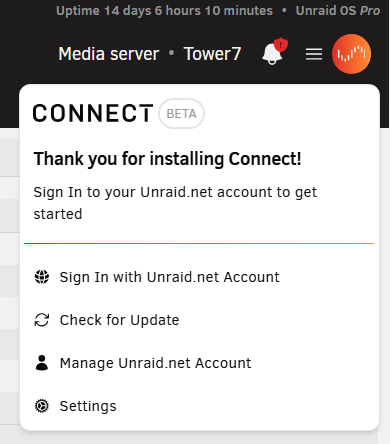
Do you see the orange icon?
-
It's not logged as a disk problem, so most likely a power/connection issue.
-
See if this thread helps unraid connect showing offline, CSRF Token error - Connect Plugin Support - Unraid




