






JorgeB
Moderators
-
Joined
-
Last visited
Everything posted by JorgeB
-
Upload failed, please try again.And don't forget the screenshot.
-
Jun 9 20:52:57 NAS1 kernel: __vm_enough_memory: pid: 5571, comm: docker, bytes: 549760008192 not enough memory for the allocation A Docker container just tried to allocate 549,760,008,192 bytes of memory. That is 549 GB of RAM. Try recreating the Docker image in case something is corrupted, then restore your assp one by one https://docs.unraid.net/unraid-os/troubleshooting/common-issues/docker-troubleshooting/#re-creating-the-docker-image-file Then: https://docs.unraid.net/unraid-os/troubleshooting/common-issues/docker-troubleshooting/#reinstalling-docker-applications Also see below if you have any custom docker networks: https://docs.unraid.net/unraid-os/troubleshooting/common-issues/docker-troubleshooting/#restoring-docker-custom-networks If issues continue, it could also be bad RAM.
-
Seems to be OK for now.
-
See if you can get the diagnostics, or at least the syslog, then type "reboot" in the CLI, if it doesn't start to reboot after 5 minutes, you may need to force it.
-
They shouldn't be, and there's nothing else there. If possible, try booting in safe mode and disable Docker and VM services; basically, use the server as a basic NAS, and see if it still crashes to rule out plugins or other apps.
-
That looks much better, multiple disks being written to in parallel with a decent speed. Keep an eye on reads from other disks that are not part of the resilver, and I mean high-speed reads, in the MB/s, not KB/s, because I don't 'think the whole pool is being scrubbed, at least it's not for me in a similar scenario. It's normal to "scan" the whole pool, but that should only be a metadata scan, not a full data scrub.
-
Scrub the pool and post the results from the GUI
-
That has SATA port multipliers and is not recommended; it doesn't mean it's the problem, but it should be replaced anyway https://forums.unraid.net/topic/102010-recommended-controllers-for-unraid/ Try connecting or swapping the disks that are not being detected to the onboard SATA controller.
-
If you can, I would try with a different model disk to confirm if that is the issue.
-
Again, no associated controller errors. This is looking more to me like a firmware/kernel issue with that disk; I see that it's a different model than the other ones.
-
Please attach the complete zip and a screenshot from Main.
-
Multiple disks are not being initialized correctly, can you post a link to the Asmedia controller you are using? It appears to have port multipliers, which are a known problem.
-
Shares are correct, so it's mostly what Itimpi mentioned.
-
That should not make any difference, main issue I would try would be to replace the power cable for the SATA drive, to see if it helps with the noises.
-
You can use it again, TPM is not permanently blacklisted, unlike flash drives.
-
It should be fine to go directly to 7.3.1, read the release notes for 7.3.0 and 7.3.1, and always goof to create a flash drive backup just in case.
-
In the diags, system folder, there's a plugins.txt file that lists all the installed plugins, and this first line there, means Unraid is unable to reach the internet. Could not download current plugin versions
-
If it happens again, try recreating the flash drive and/or using a different USB port.
-
Btrfs detected a checksum error on the Docker image: Jun 9 07:56:52 Tower kernel: BTRFS warning (device loop2): csum failed root 505 ino 15795 off 110592 csum 0x2c24046c expected csum 0xd1100c87 mirror 1 Jun 9 07:56:52 Tower kernel: BTRFS error (device loop2): bdev /dev/loop2 errs: wr 0, rd 0, flush 0, corrupt 1, gen 0 This could be bad RAM.
-
Macvlan is no longer an issue since 6.12.11, kernel panics should always show in the syslog.
-
Correct, and it will need to be a new flash drive. Should be fine as long as the controllers are being passed through and the devices have their original IDs.
-
Nope, TPM only works with a bare metal install, you can stil use an internal boot pool, but will need to keep the flash drive for licensing.
-
Still a similar issue: Jun 9 00:27:33 Midgard kernel: python3[32588]: segfault at ffffffffffffffff ip ffffffffffffffff sp 000014c3f02cfbd8 error 15 likely on CPU 14 (core 28, socket 0) Jun 9 00:27:33 Midgard kernel: Code: Unable to access opcode bytes at 0xffffffffffffffd5.
-
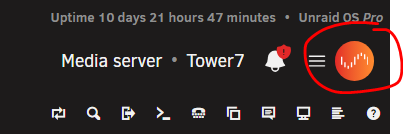
Do you see the Connect icon in the top right?
-
Please post the diagnostics to see the current status



