






JorgeB
Moderators
-
Joined
-
Last visited
Everything posted by JorgeB
-
Apparently NVMe device dropped offline; power off the server, not just reboot, then post new diagnostics after the array starts.
-
Please post the complete diagnostics, and make sure you confirm the downaloed file in Chrome so that it gets renamed to zip
-
This suggests a hardware problem, nothing to do with Unraid, if you have a speaker connected, remove all the RAM and see if the board gives 3 long beeps after power up, to see if it's still partially alive.
-
Unraid 7.2.x will automatically create a 2048 starting partition for the rebuilt disk if one of the parity devices is the same size and is also using a 1MiB aligned partition, I think the issue here may be the fact that parity is 4Kn, I never tested in that scenario. I will make some tests to confirm, hopefully today if I have the time.
-
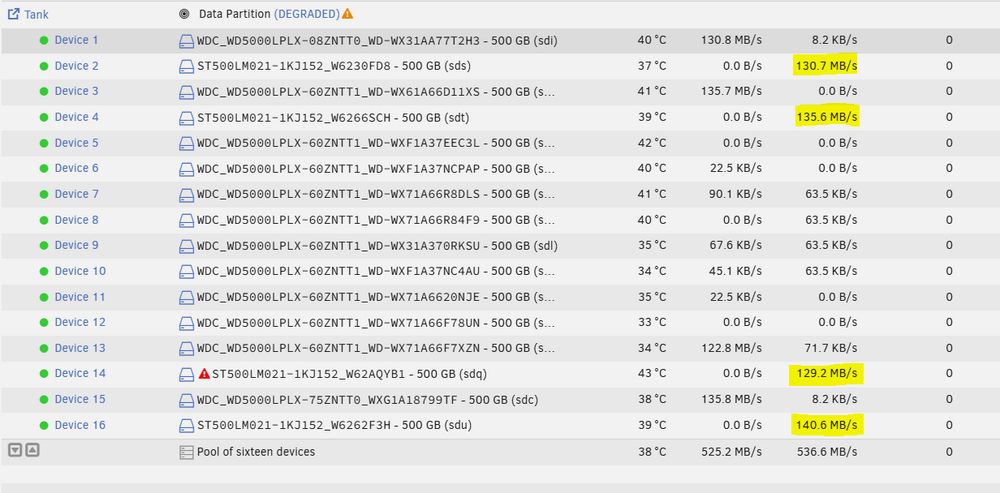
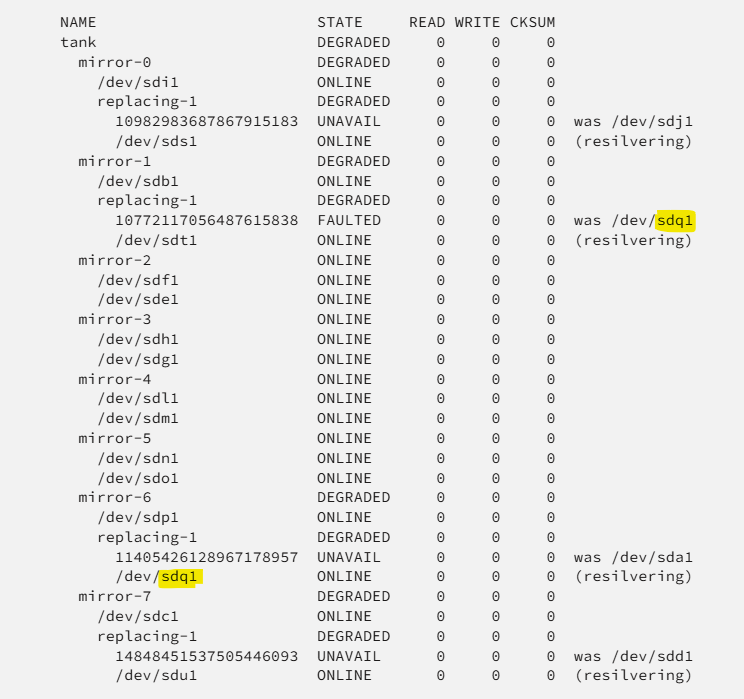
I think newer OpenZFS releases should no longer scrub the full pool during a mirror resilver, and I cannot replicate that unless it's related to the number of vdevs you have in the pool, which would be weird. In my testing, the disks being re-silvered are constantly written at their approximate max speed, and the other disks have small reads (only in the KB/s), which I assume are metadata related during the scrub, but no data appears to be scrubbed outside the disks being resilvered. The highlights of the devices are the ones being resilvered. Also still haven't found why sometimes it starts a parallel resolver, other times not. I did find why it can show the "cant_open" errors for some devices. In the example above, you can see it's showing device 14 as "offline/cant_open", it can happen if the disk being resilvered has the same /dev/sdX as a disk that was previously being used on the pool, and also being resilvered (likely only if the previous disk is listed before the new one in the zpool status output) This is just a display issue, and will correct itself once the resilver finishes, but now that I know what causes it, I'll create a bug report.
-
7.3.0 has a bug replacing a device from a RAIDZ pools, but it should have been easily recoverable if you didn't do anything else. Since the pool was reformatted, there is not much to do now, but make sure you update to 7.3.1
-
Look in the syslog for name of the corrupt file after the scrub, that file should be deleted, restore from a backup, then scrub again and confirm 0 errors.
-
Please post the diagnostics.
-
In that case, my suggestion would be to wait for a new Unraid release with a newer kernel and retest.
-
NIC is linking at 2.5GbE, where are you transferring the files to? Array or a pool? Also run an iperf test in both directions between the server and the PC you are copying from and post the results.
-
Please post the diagnostics for the 1st issue, for the 2nd one, you should post it in the existing plugin support thread.
-
ZFS doesn't allow that, you would need to remove and recreate the subpools, if using mirrors, removing those is not allowed with RAIDZ.
-
Do they spin down in maintenance mode?
-
Enable the syslog server and post that if it crashes again.
-
Could be an issue with that specific container and the newer Docker engines, so it may be worth to retest after a downgrade.
-
Scrub the pool and if there aren't any uncorrectable errors, reset the stats and keep monitoring; if more errors show up, there's still a problem.
-
Nope, I also have some, look for a BIOS update.
-
Jun 5 16:16:22 Chimaera emhttpd: error: get_fs_sizes, 8551: Input/output error (5): statfs: /boot Jun 5 16:16:22 Chimaera kernel: sd 12:0:0:0: [sda] tag#0 UNKNOWN(0x2003) Result: hostbyte=0x00 driverbyte=DRIVER_OK cmd_age=0s Jun 5 16:16:22 Chimaera kernel: sd 12:0:0:0: [sda] tag#0 Sense Key : 0x3 [current] Jun 5 16:16:22 Chimaera kernel: sd 12:0:0:0: [sda] tag#0 ASC=0x11 ASCQ=0x0 Jun 5 16:16:22 Chimaera kernel: sd 12:0:0:0: [sda] tag#0 CDB: opcode=0x28 28 00 00 00 21 c0 00 00 01 00 Jun 5 16:16:22 Chimaera kernel: critical medium error, dev sda, sector 8640 op 0x0:(READ) flags 0x0 phys_seg 1 prio class 2 Jun 5 16:16:22 Chimaera kernel: FAT-fs (sda1): FAT read failed (blocknr 6592) Flash drive problem.
-
Look in the syslog for the list of correct file(s), delete/restore them from a backup, then run another scrub to confirm 0 errors and reset the stats, then keep monitoring the pool; if new errors show up, there's still a problem.
-
Nvidia is still using a driver; it could be just the order they are initiated with both kernels. Try binding the GPU to vfio-pci
-
If the GPU is still being passed there it would explain the issue, see if the hardware IDs didn't change; they can change with a kernel update.
-
Missing files and filesystem corruption is possible, but typically only after the filesystem is not mounting and you repair the filesystem; in this case, xfs_repair, if the corruption is bad enough, can move some lost files/folders to lost+found, never seen that happen without logged signs of corruption and the user then runing xfs_repair.
-
Both are set to array only, so the mover won't touch them. Also, note that you need to disable the Docker and VM services first.
-
You can try reseating them, or testing just two, then the other two.
-
Not in the diags posted: 01:00.0 VGA compatible controller [0300]: NVIDIA Corporation GA104 [GeForce RTX 3070] [10de:2484] (rev a1) Subsystem: Micro-Star International Co., Ltd. [MSI] Device [1462:3909] Kernel driver in use: nvidia Kernel modules: nouveau, nvidia_drm, nvidia Unraid is likely using the monitor output, hence the blinking cursor.



