





dboonthego
Members
-
Joined
-
Last visited
Everything posted by dboonthego
-
You shut down two independent servers and now they both have the same problem when powered up? You situation isn't clear, to me at least. You have console access, but not GUI? Are you attempting GUI remotely or locally? Follow this to get diagnostics: https://docs.unraid.net/unraid-os/manual/troubleshooting/#System_Diagnostics
-
Aim for bigger and fewer, but consider your needs. If you've been getting by just fine with 3 2TB disks, does it make sense to replace with 3 20TB disks plus potentially retaining the 3x 2TB? Probably not. I personally haven't seen a significant price difference between 2 smaller vs 1 bigger capacity of same brand.
-
Potential feature enhancement or is it fundamentally never possible? I bought a 2 cycle preclear and have buyer's remorse. After 8 hours, 1st cycle is on step 1 of 5 and 60% progress. Just ride the wave?
-
Thanks for sharing. I'm not sure it's what I'm after though. I'm in process of disk to disk copies and received a balloon alert that the destination disk is reaching capacity, but I could not find the event in the syslog. Should it be there? I was hoping to find a list of built-in notifications Unraid is capable of sending (if it exists) so I can pick out only those I desire to get my attention quickly. I already have a pseudo on-call paging setup so if I know the subject or content in advance, I can filter and allow it in. Essentially, I want to be "paged" for some, but not all alerts. Things like if a disk is hot, fails, parity check has errors, etc. I've been casually reading them thus far.
-
I'd like to setup custom alerting on specific event notifications that reach my mailbox to better get my attention. Is there a documented list of possible events? Primarily interested in errors or warnings that affect the health of the array. Stuff like this: unRAID Status: Warning [%server%] - Disk %var% is hot (%var%) unRAID Status: Notice [%server%] - array health report [%var%]
-
A good back up (preferably stored in another location) will save you from theft, natural disaster, or doing something stupid like writing a script to move all your files and forget the trailing slash/ in the destination.
-
Thanks. That threw me for a loop.
-
At 2:30 he says "To be using encrypted disks we have to be using https." Does he mean you need https to use unBalance?
-
It's funny, I watched the video after replying and was surprised mine was selected for review. Then when he talks about 5 year warranty on inexpensive items and says all of them are getting trashed I got scared. I was relieved it ranked #2 😀 I didn't mean to get your hopes up, but I mainly just included link for visual reference. Good luck. Odds are you'll be fine with whatever you go with.
-
This thread discusses the SanDisk stuff. https://forums.unraid.net/topic/119052-psa-on-sandisk-usbs
-
Check out the manual. This is about replacing the flash stick, but contains recommendations. There is a note about SanDisk and counterfeit GUIDs. Maybe that's why you mention shipped by SanDisk? I would also say make sure the drive isn't one of those encrypted containers. https://docs.unraid.net/unraid-os/manual/changing-the-flash-device I've used the 2.0 version of this for the last 7 years with no issues. I already owned it, but choose it because of it's smaller physical size (never heard of a big stick for cooling). It's 16 GB and I'm not even using 1 GB. I just took advantage of the 15% discounted basic license and coincidentally happen to have another 32 GB which I'll use for the new license. https://www.amazon.com/Kingston-Digital-DataTraveler-DTSE9G2-16GB/dp/B00SOL9ZSA
-
Will you be replacing the disk? Or reducing your data disk count? Assuming you're reducing. To convert your 14tb to parity, the exsiting data needs to go somewhere else. I'm sure Unbalance makes this task easy, but to do it manually, target some disks with the most free space and copy some source directories that will fit on destination. You might have to create the destination subfolder first. Same command with subs included should work and you should consider your share settings to make sure the dest disk is included in your configuration. You'll have to repeat until you find a new home for all the files. Once data is copied, you can unassign and assign to parity. rsync -avPX /mnt/disk1/subfolder/ /mnt/disk2/subfolder/
-
I haven't used unbalance and it's been several years since I've copied a disk, but I did it manually from console making sure to specify disks, not shares. Assuming destination disk2 has enough free space. Like this: rsync -avPX /mnt/disk1/ /mnt/disk2/
-
Does the Unraid OS update notification compete with unassigned devices notification in the banner? Meaning if both are available, do they cycle over each other front to back, back to front or show as separate notifications? I can't recall specifically. I swear I clicked to update unassigned devices, but apparently I clicked the OS upgrade link and I guess it just proceeds without any confirmation :-/ I wasn't prepared to do that, but hopefully all is good.

-
Yes, all is good now. I almost want to revert to 6.9 for curiosity sake and see if simply setting SSL from 'Auto' to 'Yes' would have done it. I never tried it. I thought it would lock me out of the GUI.
-
I'm not using an unraid.net cert; just the self-signed [server].local cert. The irony is I went down this HTTPS rabbit trail while preparing to upgrade the OS. I successfully upgraded to 6.11.5 and set SSL=Yes and it works. The options are different now (No, Yes, Auto) vs. (No, Yes Strict). Pre-upgrade with SSL=Auto, I saw nothing listening on 443. Not sure why that was, but it's the reason for the [RST, ACK] reset packets. Maybe I just needed to set SSL=Yes instead of Auto? Or maybe the upgrade resolved it? Or maybe I'll never know? ¯\_(ツ)_/¯
-
When I navigate to the Unraid Web GUI using HTTPS 443, the browser returns "This site can't be reached. [server] refused to connect" ERR_CONNECTION_REFUSED. Wireshark capture shows the Unraid server is receiving a [SYN] packet and immediately replies with [RST,ACK]. Unraid acknowledged the connection but doesn't like something and closed it. I've always used the GUI over HTTP 80 and to be honest I don't know if 443 has ever worked, but Settings=>Management Access has SSL/TLS set to Auto and HTTPS port is set to 443. Unraid version is 6.9.1. I'm not trying to connect from internet, just trying to connect from within local network with self-signed cert. Any ideas?
-
#1 - An 8TB needs to be the parity (has to be equal or larger than other data disks). It sounds like you have existing data on them. You can assign parity, data, cache disks, but keep in mind they will be formatted. It is also recommended to pre-clear them first with unassigned devices pre-clear plugin. #2 - You can define file distribution on a per share basis and also choose to include or exclude specific disks. Fill up, span evenly, most available space. etc. #3 - It's not recommended to expose your server to the internet. Most routers have VPN option. You can use that with openvpn software/mobile app to connect. #4 - Cache disk is not required, but definitely recommended for performance; especially if you plan to run dockers/VMs. If you set your share(s) to use cache, files are copied faster to cache and moved slower to parity protected array off hours via scheduled job. Data while on single cache disk is susceptible to loss due to failure, but a 2nd cache in a pool buys you fault tolerance. #5 - You can store a VM on any disk, but this is typically your cache disk. There is a plug-in called Unassigned Devices which allows the ability to mount a disk and use it outside of parity protection. You can control the location of the virtual disks from VM setup settings. Unraid places them by default in a domains share on cache. I don't think unraid supports direct disk VMs. I haven't used unraid for VMs much. Hope this helps you.
-
I'm looking to purchase one or more controller(s) to maximize my SATA ports while maintaining Unraid stability. Right now, I'm using all six onboard SATA 6Gb/s connections for 2 SSD cache, 1 HDD parity, and 3 HDD data. Slots available: (2) PCIe x1, (2) PCIe x16, (1) M.2 32Gb/s I was considering purchasing these cards having JMicron JMB582 Chipset on the recommended list. Any input?? IO CREST 2 Port SATA III PCI-e 3.0 x1 IO CREST Internal 5 Port Non-RAID SATA III 6GB/s M.2 B+M
-
See 4 posts up. The work-around is to use previous version v1.24.2. Edit the docker settings and change the repository value to jlesage/handbrake:v1.24.2
-
I pulled down version 1.24.2 by editing the docker repository value. from: jlesage/handbrake to: jlesage/handbrake:v1.24.2 The automatic conversion immediately kicked off without permission issue.
-
Is nobody else experiencing permission issues? I'm at a loss. If anyone has any ideas, please share. I've tried: Re-installing the docker, using defaults Created new public handbrake share with watch and output folders. Verified permissions unraid watch folder permissions: drwxrwxrwx 1 nobody users 51 Aug 1 18:10 watch/ unraid output folder permissions: drwxrwxrwx 1 nobody users 6 Aug 1 18:04 output/ container watch folder permisions: drwxrwxrwx 1 app users 51 Aug 1 18:10 watch container output folder permissions: drwxrwxrwx 1 app users 6 Aug 1 18:04 output Set "Use cache pool" in share settings to 'No' (also tried 'Yes' with #5 below) Tried all 3 read/write access modes (read/write ..slave.. shared) ID if the user the application runs as: 99 ID of the group the applicaion runs as: 100 I struggle to understand if this is on unRAID or Handbrake side. This seems to be the code where the error come from. # Skip video if it is not readable. if [ ! -r "$video" ]; then log "Skipping '$video': not readable, check permissions." return fi
-
Error: [autovideoconverter] Skipping '/watch/TEST_MOVIE': not readable, check permissions. Unraid: 6.9.1 Handbrake 1.5.1 I'm new to using this HandBrake docker and am also having trouble with auto video conversion /watch. A manual conversion of the same folder is successful so the path(s) are read/writeable. Any ideas? Shares: /watch : /mnt/user/movies/TEST/ : (public) /output : /mnt/user/mkv/ : (public) Watch folder permissions: drwxrwxrwx 1 nobody users 32 Jul 26 21:22 TEST_MOVIE/
-
Okay, thanks for the link. So it seems one and two way sync are future enhancements. That compounds my confusion about the sync option though.
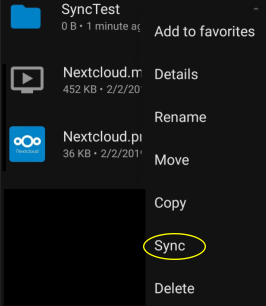
-
It's set to keep the file in the original location, but auto upload is working well. Taping the folder's three dot menu from the Android Nextcloud app shows "Add to Favorites, Details, Rename, Move, Copy, Sync, Delete" as available options. It's Sync that I don't understand. What does this do? I haven't been able to determine; it doesn't seem to do anything. My goal is to keep the auto upload folder in sync with the device. I have auto upload configured on the phone's camera folder. New photos are uploaded to server as expected. When photos are deleted from the phone, I'd like them to be deleted from the server.




