






interwebtech
Members
-
Joined
-
Last visited
Everything posted by interwebtech
-
This is new since then. I'm about to try something that came to me as an epiphany. All my shares are set to use "all drives". I wonder if I exclude 1 & 8 until they are done clearing and get added to the array as proper members.
-
I am in the process of replacing two drives (1 & 8 are clearing as New). Long story how we got to the point of dropping two drives of Plex content and adding new disks to replace them. If you want all the bone-headed backstory see here. I thought I had fixed the errors previously by letting Plex scan all its shares and "emptying the trash" to rid of the now missing titles. Once I found that the errors had returned tonight, I rescanned the TV share and found some more missing. I'm guessing Plex just isn't being thorough in marking the missing stuff? Can someone steer me in the right direction so I can get this back under control? tower-diagnostics-20241210-1833.zip
-
This is fixed by the remove 2 disks and rebuild parity. Self-inflicted data loss.
-
End result was deciding to sacrifice the contents of drive 1 & 8 (just plex stuff). Currently doing a "new config" parity rebuild without the two drives. Once done I will format the now "new" drives as XFS and put them back into the array. Then I can get going on converting the remaining 9 reiserfs disks.
-
Current status is I've unassigned disk one and disc eight. (The ones complaining about being smaller). That way I can at least have Plex running. No redundancy so hoping everything goes well until I can get back into stable condition. Tell me if this is valid option . Remove disc one and disc 8. Try to move the data off either one or eight to other drives with space available. Once it's empty, install one of the 20 TB new drives format as xfs and then repeat the procedure with the remaining disabled disc. EDIT: I am assuming I can move data from a drive that is being emulated. Is this true or am I deluded?
-
I have run into a snag. I put the 2x 12TB back in but it won't let me start the array once I have assigned them to their slots. Stopped. Replacement disk is too small. The replacement disk must be as big or bigger than the original. tower-diagnostics-20241208-0841.zip
-
Thanks Jorge. That explains a lot. Have stopped the rebuild and will put D1 & D8 originals back in and go from there. The purpose of the new drives was to make space to start the conversion process for the 11 reiserfs drives I have (ugh). I was able to upgrade D18 to 20TB as it was already XFS. That will have to be enough to get started.
-
SABnzbd reports 0 B Free Space (Temp Folder) when I try and download nzb files. That led to opening the syslog and its completely full of repeating errors of not finding any of the folders emhttpd: error: get_fs_sizes, 7834: No such file or directory (2): statfs: /mnt/user/SABNZB_downloads Likely related to the data rebuild that is running. I need some help. tower-diagnostics-20241208-0012.zip
-
Just noticed the Format option is showing for Disk 1. Should I stop and do that or will the rebuild take care of it?

-
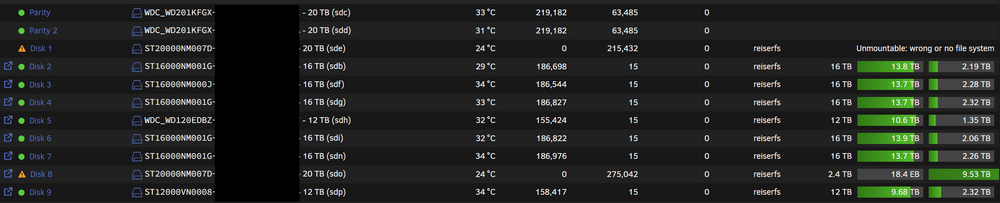
New drives came today. Trying to replace bad drive disk 1 (removed couple days ago) and replace/upgrade good drive disk 8. Dual parity so it should be okay, right? I am getting an error on drive 1 "Unmountable: wrong or no file system" but it appears to be participating in the data rebuild (drive writes incrementing). Drive 8 is also participating but is showing the weird capacity values like drive 1 did before (see previous post) Size: 2.4TB, Used: 18.4EB, Free 9.53TB (this looks right, it was a 12 now being replaced with a 20). I just started the data rebuild. What's going on here? (ps pic is just first 9 disks) tower-diagnostics-20241207-1829.zip
-
The answer to both questions was YES. Started array and cache pool was restored. All dockers appear to be present.
-
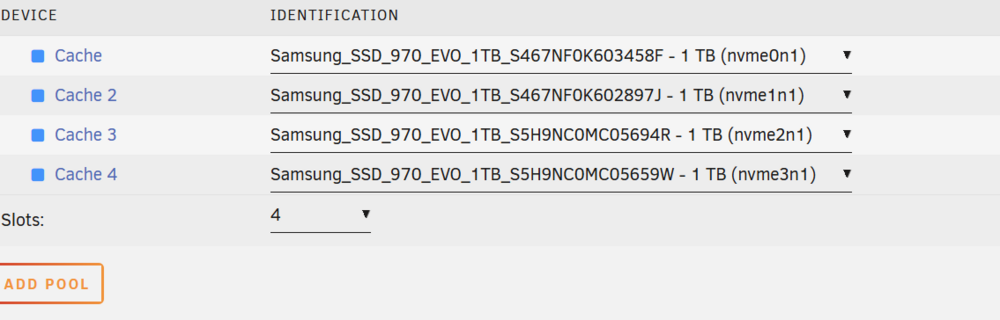
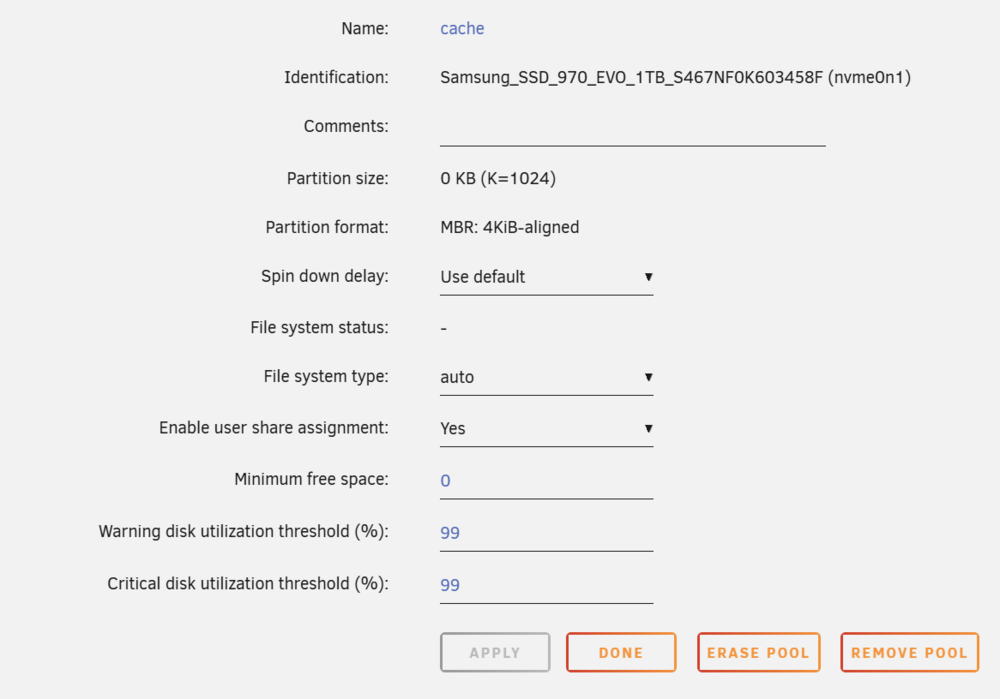
Need some reassurance I'm on the right path to restore my cache pool. I have setup (not committed yet) the pool based on the device IDs unRaid had assigned to the drives (see pic). The cache was formatted as BTRFS. Do I need to specify that in the cache Settings or will "auto" pick it up automatically? (see other pic)
-
UPDATE: I'm returning the disk with odd behavior. So basically I need help getting my Cache Pool back online. (I have 2 more disks coming Saturday so disk 1 will be replaced soon)
-
EDIT: ignore the stuff about disk 1 weirdness (its being replaced). I do still need help with my cache Pool. How can I recover it? I just spent the last 2 days replacing 2 disks (older wd 5400 shucked drives with wd red pro 20TB) in my array. I have dual parity so I was doing both at the same time. Disk 1 (the problem child) and disk 18 (seems to be okay). So the rebuild completed with no errors today. Last night I noticed something odd on the Main page where disk 1 was showing odd capacity stats (far right column). It claimed to be 2.5TB with 18PB free space. Since it was otherwise doing okay I figured it was cosmetic issue. Once the rebuild completed the capacity oddness remained so I figured I'd try a reboot. That's where it went sideways. On reboot it hung trying to mount disk 1 (problem child). I let it go for a far amount of time but it was obvious a hang. Both parity and disk 1 LED where lit solid no blinking. I forced a reboot (reset button) and it got stuck at the same place. I got the idea to zap the volume on disk 1 and see if it would rebuild properly a second time. I deleted the volume using disk management on my windows laptop w/external drive via USB. Added the drive back to server and started up but didn't recognize that the disk had changed and hung again. I shut down and pulled the drive, restarted to get to a "missing disk" state. That worked BUT now it would not let me start the array because my cache pool config disappeared (error: Wrong Pool State cache - too many wrong or missing devices). I have 4x 1TB nvme that was confg'd as 2TB RAID1. I don't have any idea which order thay were in so I'm reluctant to start added a new pool. Not sure what to do at this point. I'm ready to try and exchange disk one for a new one if that would help but I really need my plex server back up in the meantime. Not sure if diags will tell the whole story as there were multiple reboots during this process. tower-diagnostics-20241205-1416.zip
-
Its showing now with no changes made. Must have been some server mischief.
-
The title sez it all.
-
(creating new thread as my issue doesn't seem to be mover tuning related) Noticed my cache filling up and saw it hadn't run since upgrading to 7 beta. Found the thread regarding others with tuning mod issues. I wasn't running the tuning addon to begin with nor am not running the mod now. However in my troubleshooting, I did install it and tried the mitigation (go file) offered in the support thread, Multiple reboots in between to try and bring about changes. None of the attempts worked. I press the "move" button and nothing happens. I have tried it both from the Main, Array Operation tab as well as Settings, Scheduler, Mover Settings, Move Now. Diags attached. tower-diagnostics-20240703-1019.zip
-
What does "Enable NVME power monitoring" do? Found in global disk settings. Toggling Help doesn't provide any context. Google fu fails me.
-
Pretty sure its harmless as the only disks not listed in the error email are SSDs in the cache pool. Is this something that going to be repeated often? Logs attached just in case. Ps. I did not initiate the Trim operation. Report came about 2 hours after upgrade to 7.x ========================================== cron for user root /sbin/fstrim -a -v | logger &> /dev/null fstrim: /mnt/disk18: the discard operation is not supported fstrim: /mnt/disk17: the discard operation is not supported fstrim: /mnt/disk16: the discard operation is not supported fstrim: /mnt/disk15: the discard operation is not supported fstrim: /mnt/disk14: the discard operation is not supported fstrim: /mnt/disk13: the discard operation is not supported fstrim: /mnt/disk12: the discard operation is not supported fstrim: /mnt/disk11: the discard operation is not supported fstrim: /mnt/disk10: the discard operation is not supported fstrim: /mnt/disk9: the discard operation is not supported fstrim: /mnt/disk8: the discard operation is not supported fstrim: /mnt/disk7: the discard operation is not supported fstrim: /mnt/disk6: the discard operation is not supported fstrim: /mnt/disk5: the discard operation is not supported fstrim: /mnt/disk4: the discard operation is not supported fstrim: /mnt/disk3: the discard operation is not supported fstrim: /mnt/disk2: the discard operation is not supported fstrim: /mnt/disk1: the discard operation is not supported fstrim: /boot: the discard operation is not supported tower-diagnostics-20240701-1018.zip
-
Welcome aboard!
-
Uneventful update. Nothing to report. Thanks team!
-
This is combined "possible bug" report and request for guidance on correct settings. Before a recent change in behavior I had Mover set to not run if a parity check (it also applied to data rebuild) was in progress. I prefer this method. The new behavior has the parity check pause then letting mover run and then resuming the parity check once mover completes. Notifications sent at each step of the process. I experienced this recently with my scheduled quarterly automatic parity check. Fast forward to now... I am at the tail end of a data rebuild (larger disks replacing old array members) and I notice the behavior is slightly different. Mover runs on schedule but data rebuild is NOT paused (at least GUI doesn't indicate it is). No notifications sent (logical since no pause occurred?). Rebuild drops to 3mbps and shows completion expected in several days. Note it was at 97.5% complete when this occurred. I let this process continue figuring maybe an hour or so to move roughly 50GBs (guessing). Several hours later and its still not done yet. This is when I noticed that the rebuild had not been paused before the mover started. At that time I manually paused it. Files were finally moving at a faster pace and should be done shortly. Side note I earlier shut off plex docker & Roon server; external NUC reads unRaid share where music files live; when I noticed they were both running file read/processing maintenance that was likely causing some contentention with the rebuild AND mover also running. Okay so bug report is regarding the different behavior between a parity check vs data rebuild and scheduled Mover runs. I would think they would be consistent (pause, send notifications, etc). Second, how to I configure this new behaviour to NOT pause parity checks or data rebuilds for Mover runs. I prefer the array operations complete as quickly as possible. I want Mover disabled when the array is doing either of these. It used to be a single checkbox that did that. Diagnostics attached. Note these were gathered while data rebuild was manually paused and mover was finishing up its run. tower-diagnostics-20230717-0750.zip PS. I have the Parity Check Tuning plug-in installed
-
Grats!
-
Script completes without error. Thanks! Unraid Status: 2022-10-10 00:48 Plex Preloader has finished 0 preloaded (from Disk) / 475 skipped (already in RAM)
-
Error moved but still persists Script location: /tmp/user.scripts/tmpScripts/Plex_Preloader/script Note that closing this window will abort the execution of this script 2022-10-07 10:16:22 Available RAM: 30G 2022-10-07 10:16:22 Amount of videos that can be preloaded: 482 (each video occupies 61M) 2022-10-07 10:16:22 /tmp/user.scripts/tmpScripts/Plex_Preloader/script: line 106: syntax error near unexpected token `head' 2022-10-07 10:16:22 /tmp/user.scripts/tmpScripts/Plex_Preloader/script: line 106: ` seconds=$(time ( head -c "$preload_head_size" "$file" >/dev/null ) 2>&1 )'


