






interwebtech
Members
-
Joined
-
Last visited
Everything posted by interwebtech
-
I don't know if this is an RC issue or not but I am running RC2 so here it is. Several of us had this a while back. I just had it again now. Docker image disk utilization warnings for (*%, 99%, 100% and then "returned to normal level" all with no intervention by me. I have 3 users watching Plex (2 remote). I am downloading and converting audio files from music share on the array and uploading the changed files to replace the originals (via cache pool). There isn't anything running that adds files to the docker image. Logs attached but I don't see anything in UR's logs. tower-diagnostics-20180513-1839.zip
-
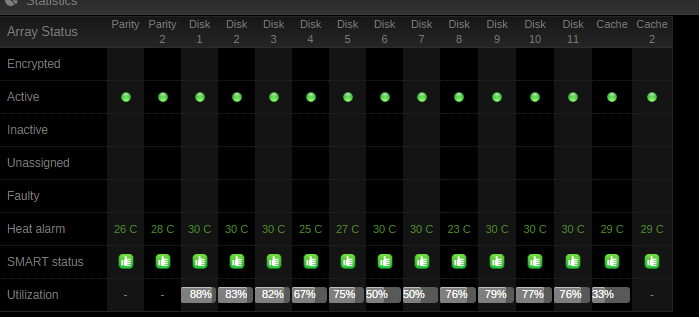
Beta 3a still not seeing the 5 drives on my Areca (11 drives in the array, 2x parity, 2x cache): System Bus Tree Host bridge: Advanced Micro Devices, Inc. [AMD] RS780 Host Bridge PCI bridge: Advanced Micro Devices, Inc. [AMD] RS780/RS880 PCI to PCI bridge (PCIE port 3) SATA controller: ASMedia Technology Inc. ASM1062 Serial ATA Controller (rev 01) 2 Drives SATA controller: Advanced Micro Devices, Inc. [AMD/ATI] SB7x0/SB8x0/SB9x0 SATA Controller [AHCI mode] 6 Drives PCI bridge: Advanced Micro Devices, Inc. [AMD] RS780 PCI to PCI bridge (ext gfx port 0) RAID bus controller: Areca Technology Corp. ARC-1280/1280ML 24-Port PCI-Express to SATA II RAID Controller 0 Drives You didn't address the report directly before but I'm getting the impression you aren't going to support this controller even though it works with UnRaid. unRaid added special drivers to get at these drives in v6.x. I can try and dig up the forum posts from way back when this was addressed. See pic that UR sees all my drives.
-
Not seeing the drives on my Areca controller. ARC-1280/1280ML 24-Port PCI-Express to SATA II RAID Controller Areca Technology Corp. RAID bus controller No drives detected Current Link Speed: 2.5GT/s width x8 (2 GB/s max throughput) Maximum Link Speed: 2.5GT/s width x8 (2 GB/s max throughput) Bus: 32 bits @ 33MHz Driver: arcmsr Capabilities: storage pm msi pciexpress bus_master cap_list rom ps. just noticed it misidentifying the model number. I have Areca ARC-1231ML
-
Great job as usual. Thank you for your efforts.
-
Not your docker. Yours works perfectly. Sorry, I posted this here because I picked up on the availability of PMS docker with Comskip integration in this thread. I didn't give the whole version string because others have been admonished for posting them in the past.
-
I have found this docker does not comply with the "VERSION" parameter. I need to go back one version to 1.7.5.4035 to get MKV from the DVR (devs switched it to TS which forces transcode in shield TV) but it just does "latest" no matter what I put in the field. The log shows no attempt to retrieve the version wanted. I left the question on author's Docker repository but thought I might ask the experts here too.
-
I did this one today and ran a test on a daytime show. Did pretty good (missed 1 commercial tho).
-
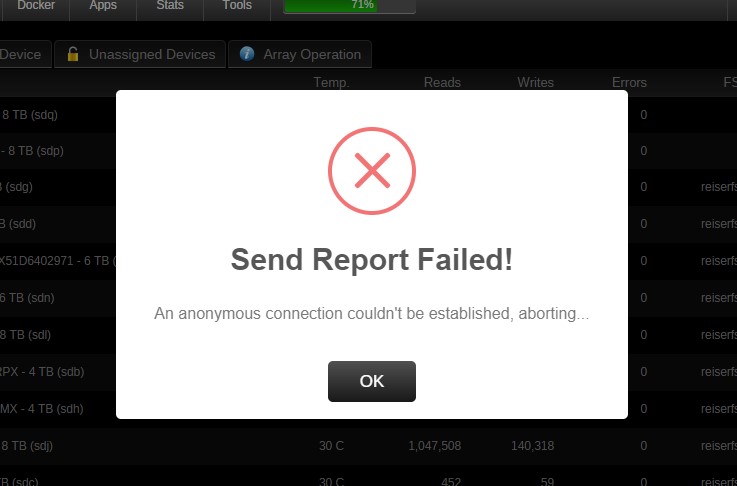
Just finished Preclear of a Seagate 8TB Archive drive and got the popup to share stats anonymously but it keeps failing. IKs there something I need to set at my end?
-
I uninstalled both plugins (nerd & speedtest), deleted their config folders and reinstalled in this order: 1. nerdpack 2. then turned on python 2x in nerdpack (it automagically added untempter for preclear when applied) 3. speed test (watched install popup and it installs Python in its own folder, maybe it should check?) No longer shows an update available in nerdpack. Probably got wires crossed over time as I have had these installed since you offered them.
-
Installed update but nerd tools still shows update available for python-2.7.13-x86_64-1.txz. I looked at both nerd tools and speed test plug-in folders and they each have their own copy of Python. \\tower\flash\config\plugins\NerdPack\packages\6.4 = python-2.7.13a-x86_64-2.txz (7/4/17 14043 KB)) \\tower\flash\config\plugins\speedtest = python-2.7.13-x86_64-1.txz (7/6/17 14338 KB)
-
No disks listed for preclear now with plugin updated to 7/8. Thanks!
-
2 array disks listed in Preclear (were also listed in UD but now fixed with the latest version), 4TB data disk & 8TB parity. I have updated plugins as well as reinstalling. Logs attached. tower-diagnostics-20170707-0806.zip TOWER-preclear.disk-20170707-0803.zip
-
Yes. Also tried uninstall and reinstall.
-
I thought this was fixed. The disks are not listed in UD but have now migrated to Preclear. Same disks (sdp, sdb)
-
Yes. Same response on hitting Apply to reinstall. ps. forgot to mention Speed Test works fine even though nerd tools complains python is missing.
-
Seems to be something up with python update function. Processing Packages... screen-4.6.0 package up to date, checksum ok. tmux-2.5 package up to date, checksum ok. utempter-1.1.6 used by plugin: preclear.disk utempter-1.1.6 package up to date, checksum ok. python-2.7.13 used by plugin: speedtest python-2.7.13 package missing! Cleaning up packages... All packages processed...
-
verified fixed here. Thanks.
-
here ya go tower-diagnostics-20170702-1533.zip
-
I noticed yesterday I have two array members (8TB & a 4TB) listed in UD. Not sure how long they have been in there as I seldom wander in there. Pretty sure they shouldn't be there just by virtue of them being members in the array?I snagged a second Extend for $50 off Amazon's price.I have a docker from an outside source (MySQL from the official source at https://hub.docker.com/_/mysql/, which at the time was the only way to get the latest version). When I run CA's "Installed Apps" view, all are displayed except that one. I know you can't give the level of detail you have for CA registered apps but is it possible to show at least the icon and link to the repository? No critical reason other than completeness.after restarting the docker, did you do into plex and see if its latest version? I'm glad my help is entertaining for you.Docker updates are about the container, not the app specifically. To get the latest version of the app, restart the docker. You can click the log link just after restarting to watch it retrieve and install latest version of Plex.Pretty sure it is asking for your server's NAT IP on your local wi-fi network.




