






interwebtech
Members
-
Joined
-
Last visited
Everything posted by interwebtech
-
9/16/2016 update appears to have a typo somewhere: plugin: updating: NerdPack.plg plugin: downloading: https://raw.githubusercontent.com/dmacias72/unRAID-plugins/master/archive/tablesorter-2.27.6-x86_64-1.txz ... done +============================================================================== | Upgrading tablesorter-2016.02.12-x86_64-1 package using /boot/config/plugins/tablesorter/tablesorter-2.27.6-x86_64-1.txz +============================================================================== Pre-installing package tablesorter-2.27.6-x86_64-1... Removing package /var/log/packages/tablesorter-2016.02.12-x86_64-1-upgraded-2016-09-18,09:00:43... Verifying package tablesorter-2.27.6-x86_64-1.txz. Installing package tablesorter-2.27.6-x86_64-1.txz: PACKAGE DESCRIPTION: # tablesorter (FORK) # # tablesorter is a jQuery plugin for turning a standard HTML # table with THEAD and TBODY tags into a sortable table without page # refreshes. tablesorter can successfully parse and sort many types # of data including linked data in a cell. This forked version adds # lots of new enhancements including: alphanumeric sorting, pager # callback functons, multiple widgets providing column styling, ui # theme application, sticky headers, column filters and resizer, # as well as extended documentation with a lot more demos. # https://github.com/Mottie/tablesorter Executing install script for tablesorter-2.27.6-x86_64-1.txz. Package tablesorter-2.27.6-x86_64-1.txz installed. Package tablesorter-2016.02.12-x86_64-1 upgraded with new package /boot/config/plugins/tablesorter/tablesorter-2.27.6-x86_64-1.txz. plugin: downloading: https://raw.githubusercontent.com/dmacias72/unRAID-plugins/master/archive/NerdPack-2016.09.16-x86_64-1.txz ... done plugin: downloading: https://raw.githubusercontent.com/dmacias72/unRAID-plugins/master/archive/NerdPack-2016.09.16-x86_64-1.md5 ... done +============================================================================== | Upgrading NerdPack-2016.09.10-x86_64-1 package using /boot/config/plugins/NerdPack/NerdPack-2016.09.16-x86_64-1.txz +============================================================================== Pre-installing package NerdPack-2016.09.16-x86_64-1... Removing package /var/log/packages/NerdPack-2016.09.10-x86_64-1-upgraded-2016-09-18,09:00:45... Verifying package NerdPack-2016.09.16-x86_64-1.txz. Installing package NerdPack-2016.09.16-x86_64-1.txz: PACKAGE DESCRIPTION: # Nerd Tools unRAID Plugin # # unRAID plugin wrapper for extra packages, mostly CLI, for advanced # users. Use at your own risk. Not officially supported by LimeTech. # # Supports: apr, apt-util, bwm-ng, cpio, git, iftop, inotify, iotop, # iperf, kbd, lftp, lshw, neon, p7zip, perl, python, readline, screen, # sshfs-fuse, strace, subversion, unrar, utempter, vim # # https://github.com/dmacias72/unRAID-plugins # Executing install script for NerdPack-2016.09.16-x86_64-1.txz. Package NerdPack-2016.09.16-x86_64-1.txz installed. Package NerdPack-2016.09.10-x86_64-1 upgraded with new package /boot/config/plugins/NerdPack/NerdPack-2016.09.16-x86_64-1.txz. Processing Packages... Warning: preg_grep() expects parameter 2 to be array, string given in /usr/local/emhttp/plugins/NerdPack/scripts/packagemanager on line 60 Warning: array_filter() expects parameter 1 to be array, string given in /usr/local/emhttp/plugins/NerdPack/scripts/packagemanager on line 64 Warning: array_values() expects parameter 1 to be array, null given in /usr/local/emhttp/plugins/NerdPack/scripts/packagemanager on line 66 Warning: array_values() expects parameter 1 to be array, null given in /usr/local/emhttp/plugins/NerdPack/scripts/packagemanager on line 68 Warning: array_values() expects parameter 1 to be array, null given in /usr/local/emhttp/plugins/NerdPack/scripts/packagemanager on line 69 Warning: preg_grep() expects parameter 2 to be array, string given in /usr/local/emhttp/plugins/NerdPack/scripts/packagemanager on line 60 [continues for each dohicky] All packages processed... ----------------------------------------------------------- NerdPack has been installed. This plugin requires Dynamix webGui to operate Copyright 2016, dmacias72, eschultz Version: 2016.09.16 ----------------------------------------------------------- plugin: updated oh my lol The following error or errors occurred while posting this message: The message exceeds the maximum allowed length (20000 characters).
-
check the unRaid 6.2 release post. There is a requirement to redo your dockers due to version change.
-
Thanks for speedy follow up. I am all good now.
-
You need to update the plugin (Dynamix SCSI Devices that is) afterwards your devices return The plug-in was not listed when I looked. Checking now while on RC5 Updating them all before I try again. Thanks.
-
SCSI Devices (unRAID 6.2 only) does not survive update to 6.2 stable Plug-in disappears and disk are all unassigned again. I bet its the version check
-
I know how port forwarding works -- the problem is that it isn't working which makes me think there must be something special about dockers. I've been googling for a couple of hours with no luck. I currently have the PlexServer port forwarded to the same port on the IP of the unRaid server. Needs to be forwarded to the port Plex is on. Default is 32400. Plex has capability to set it automatically. That's how mine worked at least. Using Actiontec FiOS modem.
-
IIRC, you must recreate your Docker image once you move to 6.2. As long as you installed all your dockers via Community Apps plugin you can reinstall without losing any settings or data no probs once your done. I can't find the precise instructions. I would wait until someone who recalls them answers
-
using SSH to connect so begone the both of them! lol
-
Pushbullet just needed to be restarted. Notifications working again (all those backlogged showed up at once lol). Still 8 commits behind tho.
-
Mine has stropped sending Pushbullet notifications. Even the test fails. Claims to be 8 commits behind in version. Restarting the docker has no effect. Stays at old version even though the log shows it finds newer. 2016-09-03 16:07:32 - INFO :: MainThread : Comparing currently installed version with latest GitHub version 2016-09-03 16:07:32 - DEBUG :: MainThread : Requesting URL via GET method: https://api.github.com/repos/drzoidberg33/plexpy/compare/a07f54ca33ed2ce1c8ce7adbe31e7cbfaeb18e98...2a701a6dfea6ef4abda0c6db5f23f59d2a251a35 2016-09-03 16:07:32 - DEBUG :: MainThread : In total, 8 commits behind 2016-09-03 16:07:32 - INFO :: MainThread : New version is available. You are 8 commits behind 2016-09-03 16:07:32 - INFO :: MainThread : PlexPy PlexTV :: Requesting URLs for server... 2016-09-03 16:07:32 - INFO :: MainThread : PlexPy Config :: Writing configuration to file 2016-09-03 16:07:34 - INFO :: MainThread : PlexPy Config :: Writing configuration to file 2016-09-03 16:07:34 - INFO :: MainThread : PlexPy PlexTV :: Using user-defined URL. 2016-09-03 16:07:34 - INFO :: MainThread : PlexPy Pmsconnect :: Requesting name from server... 2016-09-03 16:07:34 - INFO :: MainThread : PlexPy PlexTV :: Requesting users list refresh... 2016-09-03 16:07:34 - INFO :: MainThread : PlexPy Config :: Writing configuration to file 2016-09-03 16:07:34 - INFO :: MainThread : PlexPy PlexTV :: Using user-defined URL. 2016-09-03 16:07:34 - INFO :: MainThread : PlexPy Pmsconnect :: Requesting name from server... 2016-09-03 16:07:34 - INFO :: MainThread : PlexPy PlexTV :: Requesting users list refresh... 2016-09-03 16:07:36 - INFO :: MainThread : PlexPy PlexTV :: Users list refreshed. 2016-09-03 16:07:36 - INFO :: MainThread : PlexPy Pmsconnect :: Requesting libraries list refresh... 2016-09-03 16:07:36 - INFO :: MainThread : PlexPy Pmsconnect :: Libraries list refreshed. 2016-09-03 16:07:36 - INFO :: MainThread : Scheduled background task: Check GitHub for updates 2016-09-03 16:07:36 - INFO :: MainThread : Scheduled background task: Refresh Plex server URLs 2016-09-03 16:07:36 - INFO :: MainThread : Scheduled background task: Refresh Plex server name 2016-09-03 16:07:36 - INFO :: MainThread : Scheduled background task: Check for active sessions 2016-09-03 16:07:36 - INFO :: MainThread : Scheduled background task: Refresh users list 2016-09-03 16:07:36 - INFO :: MainThread : Scheduled background task: Refresh libraries list 2016-09-03 16:07:36 - INFO :: MainThread : Scheduled background task: Backup PlexPy database 2016-09-03 16:07:36 - INFO :: MainThread : Scheduled background task: Backup PlexPy config 2016-09-03 16:07:36 - INFO :: MainThread : PlexPy WebStart :: Web server authentication is enabled, username is 'interweb-tech' 2016-09-03 16:07:36 - INFO :: MainThread : PlexPy WebStart :: Starting PlexPy web server on http://0.0.0.0:8181/ A newer version is available. You're 8 commits behind. Update or Close
-
You should remove Preclear Beta from your system. The new script has been integrated in the normal Preclear Script plugin. I am a bit confused. I updated beta preclear plugin and it appears to have removed itself. Came here and read your note about them merging. Installed Preclear from CA (btw, beta is still listed in there). Opened plugin and noted the version it sees is "Present, version 0.6-beta". Am I on the latest version or not?
-
Yep. Customer never quite understands that 3rd one tho... hard enough to pitch the 2nd round. LOL I've recently come across work from over a decade ago that could have used a 4th run through.
-
I find it offensive that you don't add the T from tools to the acronym. <duck and cover>
-
I updated to 2016.08.18 yesterday right after you posted. Just checked for updates and 2016.08.18b shows as available.
-
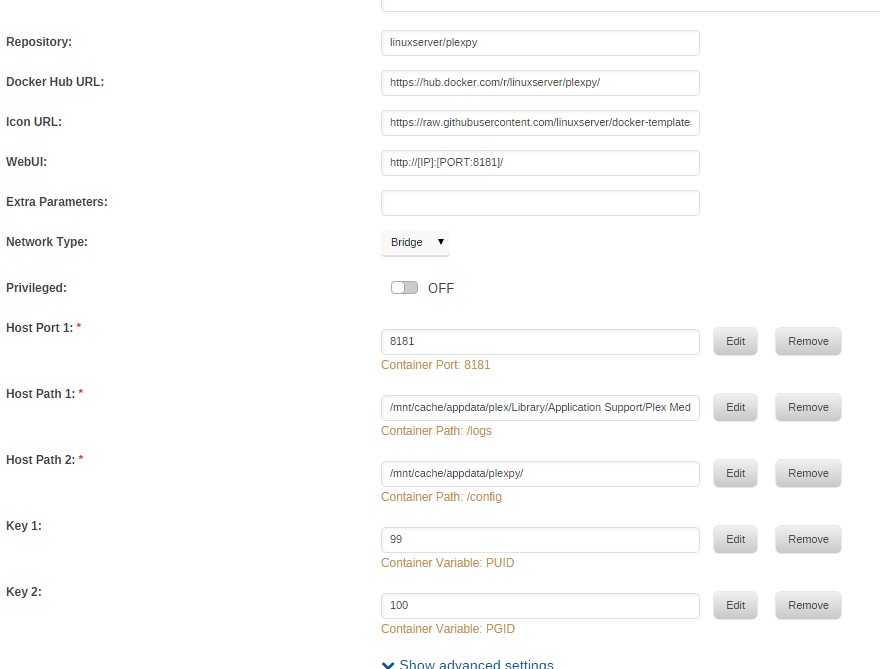
Mine is working great. Maybe someone can get a fix from my settings. Also try running the Fix Common Problems plug-in to see if you have other issues getting in the way (found in Community Applications add-on).
-
thanks bonienl
-
You can ignore that warning. There are no files created hence the "missing" file message. I am still getting this on every reboot. Can it be cleaned up? Thanks
-
my mappings are all in that post That is the full output of the attempt to install.
-
I am guessing the docker download is probably supposed to be larger than 514 B. Fails to install. Pulling image: linuxserver/hydra:latest IMAGE ID [latest]: Pulling from linuxserver/hydra. IMAGE ID [a03be5b52c0f]: Already exists. IMAGE ID [f6b6112e832f]: Already exists. IMAGE ID [11b8b96c8a86]: Already exists. IMAGE ID [5e57b4f45c56]: Already exists. IMAGE ID [bd6fd2be2780]: Already exists. IMAGE ID [fd2796691e2d]: Already exists. IMAGE ID [2b8dc15bb642]: Pulling fs layer. Downloading 100% of 399 B. Verifying Checksum. Download complete. Extracting. Pull complete. IMAGE ID [ce893b71e4ad]: Pulling fs layer. Download complete. Extracting. Pull complete. Status: Downloaded newer image for linuxserver/hydra:latest TOTAL DATA PULLED: 514 B Command: root@localhost:# /usr/local/emhttp/plugins/dynamix.docker.manager/scripts/docker run -d --name="hydra" --net="bridge" -e TZ="America/Los_Angeles" -e HOST_OS="unRAID" -e "PUID"="99" -e "PGID"="100" -p 5075:5075/tcp -v "/mnt/cache/downloads/":"/downloads":rw -v "/mnt/cache/appdata/hydra":"/config":rw linuxserver/hydra 945d31ea1bfb5e2208ccc5ff03ca8553de11384e30854328a263b90d5d3a384d docker: Error response from daemon: Container command not found or does not exist.. The command failed.
-
updated with no issues.
-
Why not just change the /config mapping to point to some folder on the array? Of course you'd need to move it all there too.
-
You have to delete the docker.img and re-create your containers again. thanks. That fixed it. Also fixed the ability to assign docker default appdata location to /cache/ Bunch of odd docker log entries while it installed. Anything that I need to fix here? ... Setting up plexmediaserver (1.0.3.2461-35f0caa) ... OK Processing triggers for ureadahead (0.100.0-16) ... Processing triggers for mime-support (3.54ubuntu1.1) ... ‘/defaults/plexmediaserver’ -> ‘/etc/default/plexmediaserver’ *** Running /etc/my_init.d/90_chown_plex_owned_files.sh... *** Running /etc/my_init.d/999_advanced_script.sh... *** Running /etc/rc.local... *** Booting runit daemon... *** Runit started as PID 121 Starting Avahi daemon Starting Plex Media Server. Starting dbus-daemon Found user 'avahi' (UID 104) and group 'avahi' (GID 107). Successfully dropped root privileges. avahi-daemon 0.6.31 starting up. dbus_bus_get_private(): Failed to connect to socket /var/run/dbus/system_bus_socket: No such file or directory WARNING: Failed to contact D-Bus daemon. avahi-daemon 0.6.31 exiting. dbus[134]: [system] org.freedesktop.DBus.Error.AccessDenied: Failed to set fd limit to 65536: Operation not permitted 6 3000 /config/Library/Application Support d Aug 2 12:02:25 Tower syslog-ng[132]: syslog-ng starting up; version='3.5.3' Starting Avahi daemon Found user 'avahi' (UID 104) and group 'avahi' (GID 107). Successfully dropped root privileges. avahi-daemon 0.6.31 starting up. No service file found in /etc/avahi/services. *** WARNING: Detected another IPv4 mDNS stack running on this host. This makes mDNS unreliable and is thus not recommended. *** socket() failed: Address family not supported by protocol Failed to create IPv6 socket, proceeding in IPv4 only mode socket() failed: Address family not supported by protocol Joining mDNS multicast group on interface docker0.IPv4 with address 172.17.0.1. New relevant interface docker0.IPv4 for mDNS. Joining mDNS multicast group on interface eth0.IPv4 with address 192.168.1.8. New relevant interface eth0.IPv4 for mDNS. Network interface enumeration completed. Registering new address record for 172.17.0.1 on docker0.IPv4. Registering new address record for 192.168.1.8 on eth0.IPv4. Registering HINFO record with values 'X86_64'/'LINUX'. Server startup complete. Host name is Tower.local. Local service cookie is 2948598702.
-
Tried to update from Docker UI based on "update available" message. Got this error on download popup: Error: layers from manifest don't match image configuration. Deleted Plex docker and reloaded linuxserver template but still get the same error docker: layers from manifest don't match image configuration. No plex at all right now
-
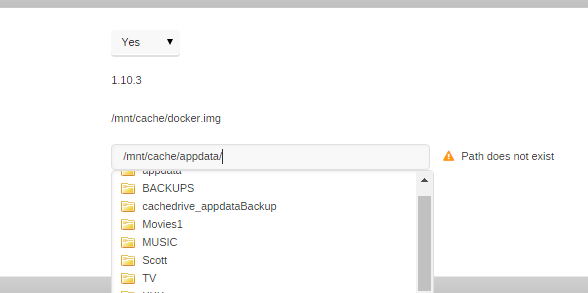
Only thing I can see that is >> user are my volume mappings for media shares in Plex. I did not get this warning with 6.1.9. Wrong thread... But, the first "error" probably says default docker appdata location. Its adjustable within settings - docker, and wouldn't have done anything on 6.1 since that option didn't exist. The dynamix scsi thing is all because bonienl has as of yet not published it to CA (probably because it may be a WIP). That warning is basically to stop people from running 6.0 plugins, etc since CA only has 6.1+ compatible plugins I wish you kids wouldn't squabble like that. May need to be whitelisted? I am unable to change the path to a /cache/ path. the helpful drop down only shows User shares. I put in the path manually and saved and it claims the path doesn't exist. See Screen. [FIXED] by deleting and recreating docker.img
-
Fix Common Problems is giving me 2 false positives since upgrade to 6.2 RC. Only thing I can see that is >> user are my volume mappings for media shares in Plex. I did not get this warning with 6.1.9. I wish you kids wouldn't squabble like that. May need to be whitelisted?

