






interwebtech
Members
-
Joined
-
Last visited
Everything posted by interwebtech
-
SCSI Devices plug-in errors. My drives picked up as before so it is working. first install: installed plug-in using URL. Commented out existing lines in Go file, rebooted. awk: fatal cannot open file '/var/log/packages/dynamix.scsi.devices' for reading (no such file or directory) chmod: missing operand after '644' Tower login: basename: missing operand
-
bump
-
Use the Community Applications (CA) plug-in to manage plugins and dockers. It will take care of all that. http://lime-technology.com/forum/index.php?topic=40262.0
-
people running 6.2 beta have reported phantom update notifications. If you have v1.x, you are on the latest. To get latest, restart the Plex docker.
-
you can watch the update from default by opening the plex docker log to the right of the icon as soon as you restart the docker.
-
I have not seen those in Plex logs, however they have been sighted in UnRaid logs and IIRC they are harmless communication with windows 10 pcs (vague recollection)? You should not have them with the latest 6.1.9 version as they have been suppressed.
-
So THAT is what that file (*.lck) is for. I thought it indicated that it had something locked and had failed to finish. I keep deleting it when I see it. I will just leave it alone now. I also recently had some permissions issue with trying to upgrade to Plex 0.9.17.2. The new version moves files/codecs used with Channels and my misfit install (first needo, then limetech, then needo, then linuxserver, back to needo, and finally linuxserver) failed with permission denied errors when running the codec updates for channels. Channels are broken. Decided to wipe Plex appdata and start fresh with linuxserver. After all that Channels still broken, Plex support looking into it, and I have 1500 movies to review for matching errors. But I have a PMS docker that is clean and proper now.
-
w00t! lol thanks.
-
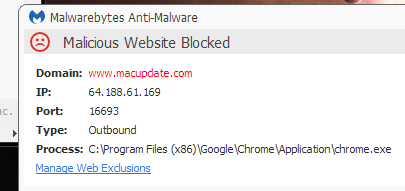
I am getting a Malwarebytes warning on the CA page.
-
ControlR ControlR will be installed on your device soon.
-
It’s Slinky; it’s Slinky. For fun it’s a wonderful toy. What walks down stairs, alone or in pairs And makes a slinkety sound? A spring, a spring, a marvelous thing! Everyone knows it’s Slinky. It’s Slinky; it’s Slinky. For fun it’s a wonderful toy. It’s fun for a girl and a boy. Source: a YouTube video of the commercial.
-
Alone or in pairs...
-
The words performance, conservative, powersave, or demand do not occur (not in related lines anyway). In the past, I thought I used to see more conventional governor lines, with those options listed. But v6 *may* have changed it for my CPU. Edit: did some research, my CPU may need powernow_k8 loaded, and it's not. It's remotely possible that I never turned Cool&Quiet on in my BIOS, but I know I used to see the CPU drop to 1000MHz, now it's stuck at 2411MHz. I checked lsmod, and acpi_cpufreq is listed! It's not in my syslog. The plot thickens... I'm sure you haven't finished, but "Max Freq. Latency" needs explanation, help. The unit is "ms", a time duration, but the word 'Freq' implies "things per time unit", not sure what "Max Freq. Latency" actually means. If it means 'maximum latency', then I assume you are selecting the highest of a number of readings? If so, then the average latency might also be useful. Another similar tweakable option you may be interested in is the "io scheduler". There's been considerable discussion of it in the past here. There have been requests before about the 'turbo write' option (which can dramatically speed writes to the array), requests for an ability to schedule it for certain times of the day. Since you've added scheduling, you might be interested in using it again for 'turbo write'? (sorry, my writing is often awkward, wish I could do better) The driver is found by 'cpufreq-info -d'. It seems you don't have a driver loaded. The governors used are found by 'cpufreq-info -g'. I thought the acpi-cpufreq driver was the default for amd processors. I guess not. I will add a default indicating the driver and governor cannot be determined. Go to a command line and type 'cpufreq-info -o'. This will display the cpus, scaling frequencies, and governor for each cpu. Let me know the output of these commands. Try to load the driver using 'monprobe powernow_k8' and then see if the driver and governor can be determined. If so I may ave to add an option to install a driver. The Max Freq. Latency is supposed to be the max time between frequency changes. It comes from the 'cpufreq-info -y -m' command. It is not controllable and I am not sure it really means anything to us. I will probably just remove it. Scheduling Turbo Write is something I think LT should implement. I am not sure about the io scheduler. I haz AMD too so here ya go: CPU: AMD FX-8350 Eight-Core @ 4000
-
no
-
I have a clean bill of health now. Thanks for the great tool. The changes I made to Plex uncovered one feature I did not even know was broken... theme songs on TV show screens now working.
-
root@Tower:~# ethtool -g eth0 Ring parameters for eth0: Cannot get device ring settings: Operation not supported
-
here is output for both login as: root root@tower's password: Linux 4.1.18-unRAID. root@Tower:~# ethtool -a eth0 Pause parameters for eth0: Cannot get device pause settings: Operation not supported root@Tower:~# ethtool -k eth0 Features for eth0: rx-checksumming: on tx-checksumming: off tx-checksum-ipv4: off tx-checksum-ip-generic: off [fixed] tx-checksum-ipv6: off tx-checksum-fcoe-crc: off [fixed] tx-checksum-sctp: off [fixed] scatter-gather: off tx-scatter-gather: off tx-scatter-gather-fraglist: off [fixed] tcp-segmentation-offload: off tx-tcp-segmentation: off [requested on] tx-tcp-ecn-segmentation: off [fixed] tx-tcp6-segmentation: off [requested on] udp-fragmentation-offload: off [fixed] generic-segmentation-offload: off [requested on] generic-receive-offload: on large-receive-offload: off [fixed] rx-vlan-offload: on tx-vlan-offload: on ntuple-filters: off [fixed] receive-hashing: off [fixed] highdma: off [fixed] rx-vlan-filter: off [fixed] vlan-challenged: off [fixed] tx-lockless: off [fixed] netns-local: off [fixed] tx-gso-robust: off [fixed] tx-fcoe-segmentation: off [fixed] tx-gre-segmentation: off [fixed] tx-ipip-segmentation: off [fixed] tx-sit-segmentation: off [fixed] tx-udp_tnl-segmentation: off [fixed] fcoe-mtu: off [fixed] tx-nocache-copy: off loopback: off [fixed] rx-fcs: off rx-all: off tx-vlan-stag-hw-insert: off [fixed] rx-vlan-stag-hw-parse: off [fixed] rx-vlan-stag-filter: off [fixed] l2-fwd-offload: off [fixed] busy-poll: off [fixed] hw-switch-offload: off [fixed] root@Tower:~#
-
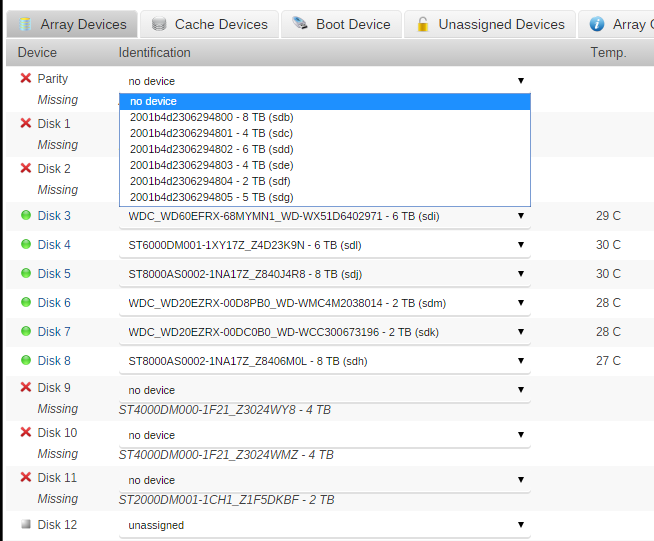
What is the content of that file? udev is also ran by unRAID upon startup and it should find the relevant devices. Here is the thread out of which all of this came. http://lime-technology.com/forum/index.php?topic=38487.0 That persistent-rules file is based on unRAID v5, was it ever tried to run on unRAID v6 without copying this file? FYI the rules file in v6 has been updated to support new NVMe cards as well, overwriting it with an 'old' file will loose such support. I commented out the lines and rebooted. See pic. LOst my drive labels insomuch that unRaid can't tell which one is which and couldn't start the array. I am putting them back in
-
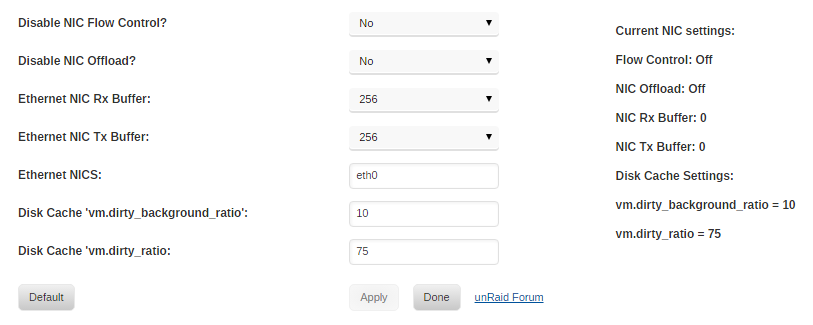
Great job!! Here to help with the testing phase. Errors on console when plugin is run. I removed my disk RAM cache lines from go and the plug-in tells me it set them successfully One thing I noticed (may be error related) is the Nic buffers didn't seem to take. Cannot get device pause settings: Operation not supported /usr/local/emhttp/plugins/tips.and.tweaks/scripts/rc.tweaks : Line 46: [:=:] unary operator expected Cannot get device ring settings: Operation not supported Cannot get device ring settings: Operation not supported
-
getting an error about URL trying to install from CA: plugin: installing: https://github.com/dlandon/unassigned.devices/raw/master/tips.and.tweaks.plg plugin: downloading https://github.com/dlandon/unassigned.devices/raw/master/tips.and.tweaks.plg plugin: downloading: https://github.com/dlandon/unassigned.devices/raw/master/tips.and.tweaks.plg ... failed (Invalid URL / Server error response) plugin: wget: https://github.com/dlandon/unassigned.devices/raw/master/tips.and.tweaks.plg download failure (Invalid URL / Server error response)
-
What is the content of that file? udev is also ran by unRAID upon startup and it should find the relevant devices. Here is the thread out of which all of this came. http://lime-technology.com/forum/index.php?topic=38487.0
-
I would love to get stuff out of my Go. I think this one (support for my Areca RAID card) probably won't meet plug-in criteria since it needs to install before emhttp is launched. Would be even better if LT would add this to 6.2
-
Here's one to add. Need lots of RAM. Really shines when you don't have a cache drive to speed up writes. add to Go file. The number is a percentage of your RAM. # set size of write cache to RAM sysctl vm.dirty_ratio=75
-
Preclear Beta 2016.03.24a : Getting this on console screen after reboot with new disk to be precleared yet... Not sure if presense of new disk is related but thought I would mention it. I recently uninstalled preclear and installed the beta in anticipation of new disk. The message is repeated twice. Disk is connected to SATA3 on mobo.
-
what doeshdparm -N /dev/sdX where sdx is one of those drives so I know how to exclude them This is a retail 2TB Seagate drive (ST2000DM001 - 2 TB (sdf)) Linux 4.1.18-unRAID. root@Tower:~# hdparm -N /dev/sdf /dev/sdf: SG_IO: bad/missing sense data, sb[]: f0 00 05 00 00 00 00 0b 00 00 00 00 20 00 00 00 02 00 00 00 00 00 00 00 00 00 00 00 00 00 00 00 SG_IO: bad/missing sense data, sb[]: f0 00 05 00 00 00 00 0b 00 00 00 00 20 00 00 00 00 00 00 00 00 00 00 00 00 00 00 00 00 00 00 00 max sectors = 0/1, HPA is enabled root@Tower:~#

