Govnah
Members
-
Joined
-
Last visited
Everything posted by Govnah
-
Yes, you have to be on 7.0.0-beta.1 for the plugin. The disks do blink when accessed. Thanks
-
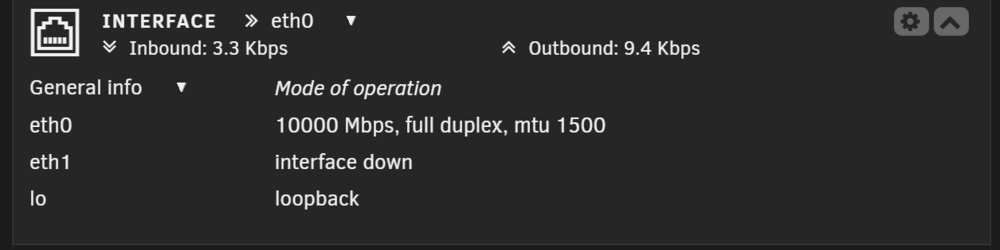
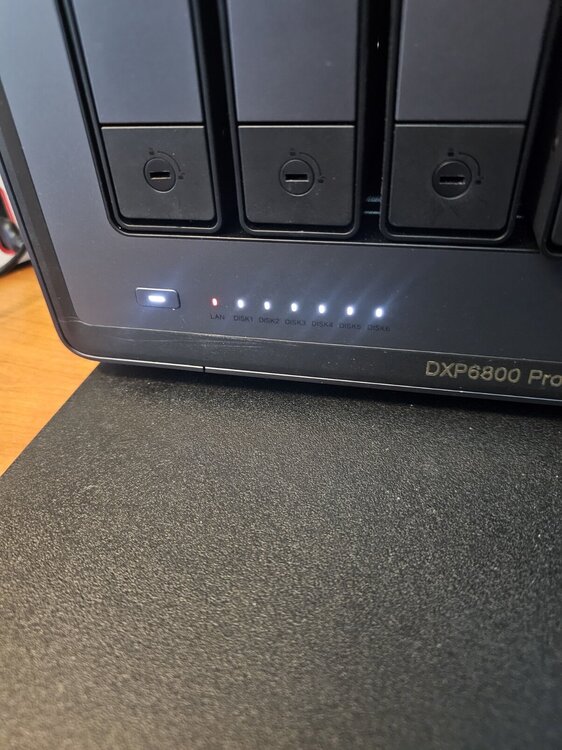
Just some feedback, updated as instructed, network light is orange/red even though I am connected at 10Gb, see attached. All lights for disks are white w/ only 1-3 slots populated, they blink when accessed. I do have all the M.2 slots populated, so should 4-6 slots show lit even though I don't have any disks in slots 4-6? Thanks
-
First all, thank you for the plugin! Some feedback, I have a 6800DXP and all lights are solid (expected behavior?), but I only have 1-3 slots populated w/ disks. Also, is the LAN LED/light suppose to be red. If you need logs, glad to provide them. Thanks
-
+1 as a tester, I have a 6800DXP. Thanks
-
Looks like a kernel panic based on the log, see attached and direction would be appreciated. Thanks unraid-prod-diagnostics-20231104-2052.zip
-
I have come to the end of my rope on traoubleshooting issues w/ 6.12.3. Ever since upgrading to 6.12.x multiple issues in contrast to 6.11.x rock solid. My main issue is I can't perform a clean shutdown and/or reboot, always hangs on unmounting disks, sync filesystems, or just hangs the GUI. I have to ssh and do a kill command on the shutdown process and then the box will reboot, unclean. I have attached a diagnostic file for some direction/assistance. Thanks unraid-prod-diagnostics-20230727-0639.zip
-
-
An error occurred during backup. RETENTION WILL NOT BE CHECKED! Please review the log. ab.debug.log
-
I ran this on 6.12RC2 and after ~hour and ~400GB of space and still running I aborted the backup. Will not abort after 30 minutes, "Waiting on Current Task to Finish." Had to reboot. Will follow-up w/ a diagnostic file.
-
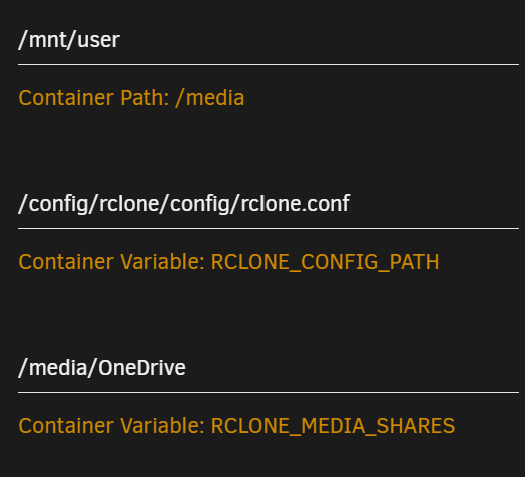
It does not, here is my directory structure in OneDrive/remote: My Files from left; Pictures Apps Documents Public Music etc... So what I am attempting is to sync/remotetolocal from the above OneDrive root (including all the directories listed) to the root of /mnt/user/OneDrive. So the question, if I wanted to sync the entire OneDrive (remote) to /mnt/user/OneDrive (local) what would be the paths for "Container Path" and "Rclone_Media-Shares"? All OneDrive directories are in the root of OneDrive, I don't have a "media" directory w/ all the directories underneath that. I think I understand the logic, but just can't seem to come w/ the correct variables to achieve what I am trying to accomplish, just simply synching OneDrive to /mnt/user/OneDrive. Thanks
-
Revisting from an unsuccessful effort, I am attempting to "remotetolocal (OneDrive to unRAID). I have a share on unRAD for OneDrive located at /mnt/user/OneDrive. I have tried every possible combination I can think related to the following: Log: 2022-12-02 18:44:13,542 DEBG 'start-script' stdout output: [info] Running rclone copy from remote 'remote:/media/OneDrive' to local share '/media/OneDrive'... 2022-12-02 18:44:14,953 DEBG 'start-script' stdout output: [info] rclone copy finished Any help would be appreciated. Thanks
-
Yup, it's the same and will create another config and rename. Thanks for the reply!
-
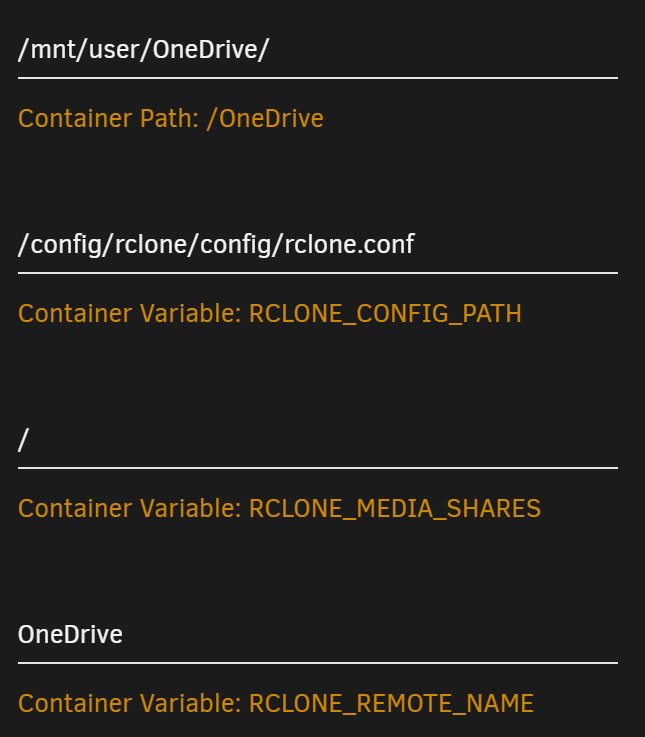
Trying to Sync from OneDrive to unRAID share named OneDrive. The issue I can't seem to deteremine the correct paths to sync data from OneDrive to the unRAID OneDrive share. The data always syncs to the root / of the container when I login to the console. Below is the settings: I have tried every combination of paths I can think of, only to sync to the root of the container from the console rather to the OneDrive share located at /mnt/user/OneDrive. Any suggestions would be appreciated.
-
Did you create a rclone.conf and what does the log say...
-
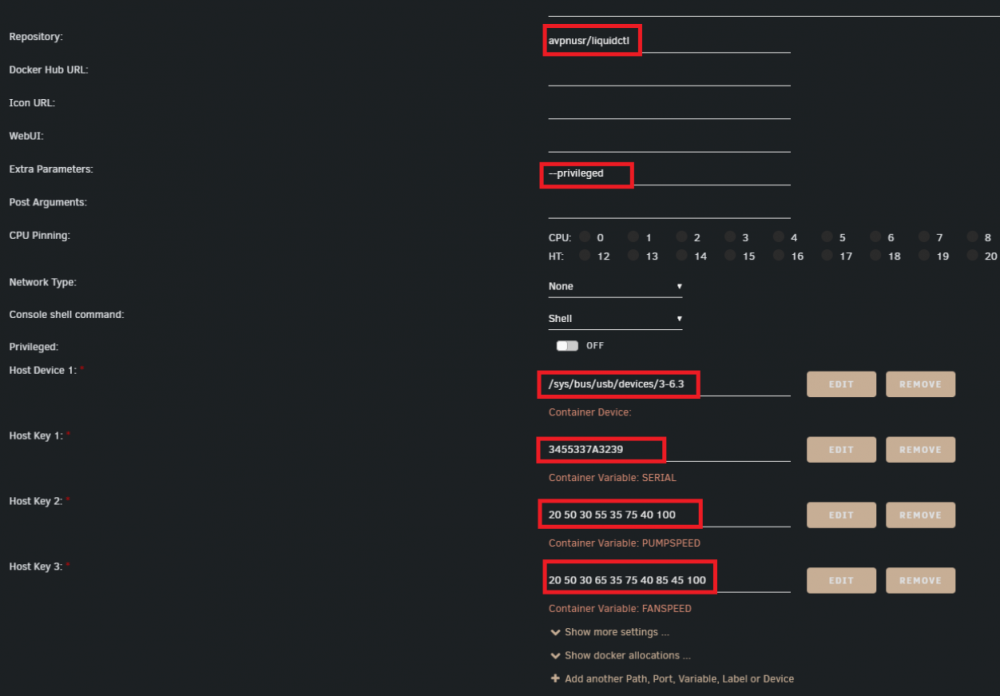
Yes, 6.10 RC1 and I will take a look. So the information provided For the Serial I assume is: iSerial 3 00000000001A Based on the output below: root@unRAID-Prod:/dev/bus/usb/009# lsusb -D /dev/bus/usb/009/004 Device: ID 1e71:2007 NZXT NZXT USB Device Device Descriptor: bLength 18 bDescriptorType 1 bcdUSB 2.00 bDeviceClass 0 bDeviceSubClass 0 bDeviceProtocol 0 bMaxPacketSize0 64 idVendor 0x1e71 NZXT idProduct 0x2007 bcdDevice 2.00 iManufacturer 1 NZXT. - Inc. iProduct 2 NZXT USB Device iSerial 3 00000000001A bNumConfigurations 1 Configuration Descriptor: bLength 9 bDescriptorType 2 wTotalLength 0x0029 bNumInterfaces 1 bConfigurationValue 1 iConfiguration 0 bmAttributes 0xc0 Self Powered MaxPower 100mA Interface Descriptor: bLength 9 bDescriptorType 4 bInterfaceNumber 0 bAlternateSetting 0 bNumEndpoints 2 bInterfaceClass 3 Human Interface Device bInterfaceSubClass 0 bInterfaceProtocol 0 iInterface 0 HID Device Descriptor: bLength 9 bDescriptorType 33 bcdHID 1.11 bCountryCode 0 Not supported bNumDescriptors 1 bDescriptorType 34 Report wDescriptorLength 412 Report Descriptors: ** UNAVAILABLE ** Endpoint Descriptor: bLength 7 bDescriptorType 5 bEndpointAddress 0x81 EP 1 IN bmAttributes 3 Transfer Type Interrupt Synch Type None Usage Type Data wMaxPacketSize 0x0040 1x 64 bytes bInterval 1 Endpoint Descriptor: bLength 7 bDescriptorType 5 bEndpointAddress 0x01 EP 1 OUT bmAttributes 3 Transfer Type Interrupt Synch Type None Usage Type Data wMaxPacketSize 0x0040 1x 64 bytes bInterval 1 can't get device qualifier: Resource temporarily unavailable can't get debug descriptor: Resource temporarily unavailable Device Status: 0x0001 Self Powered

-
Us the Liquidctl docker app for my AIO cooler: avpnusr/liquidctl - Docker Image | Docker Hub Prerequisites I highly recommend to use the following plugin for UnRAID from the Community Applications: Libvirt Hotplug USB Determine your USB-serial and "bus port" I use this for easy detection of the serial of the USB-device, as which the AIO-cooler will be detected. As there is no guarantee, the AIO-cooler will be mapped to the container alone, the serial explicitly addresses this device. Also you need the "port" from the usb bus, so you can map the device to the container. In my example this would be /sys/bus/usb/devices/3-6.3

-
Trying to use this plugin to determine my NZXT AIO cooler and can't determine how to perform the following: Installed the plugin and attached to VM, but no idea how to obtain the information posted above, and suggestions? Thanks

-
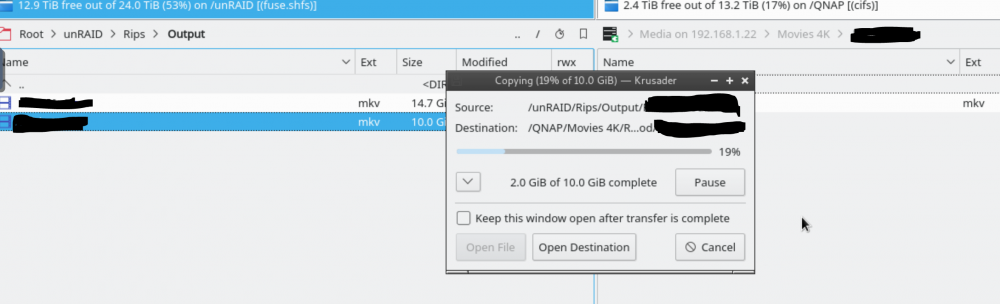
FIle copy crashing/freezing krusader when copying a large file ~10GB to QNAP NAS. I have a SMB mapping from KRUSADER to a share on my QNAP NAS and I have been unsuccessful copying large files from the unRAID NAS to the QNAP NAS, starts out fine and ~2GB of data copied, KRUSADER crashes and I can't restart it w/ out rebooting unRAID. Is this just a limitation of KRUSADER or do I have a configuration issue? I have read just about suggestion posted and re-installed KRUSADER w/ same results. Both NAS are attached w/ bonded interfaces and configured correctly on the switch. Thanks
-
Damn I feel like an idiot! Thanks for the reply/solution.
-
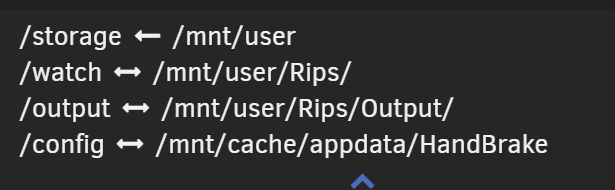
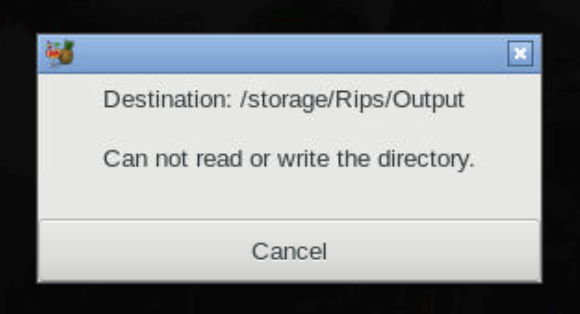
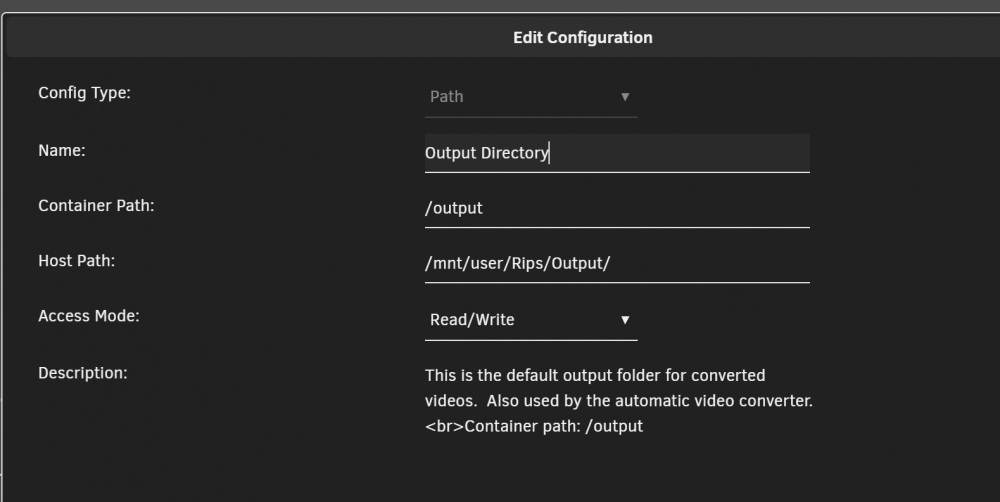
Successfully setup MakeMKV and HandBrake and the automated process works fine however, when using the HandBrake GUI and load a source file I receive the following error: Below are my mappings: I have read the FAQ and this thread multiple time without success, I also attempted to create a symlink and that didn't work. Any suggestions would be appreciated. Do I need to create a symlink for /storage/Rips/Output for /mnt/user/Rips/Output? Thanks