bdydrp
Members
-
Joined
-
Last visited
Everything posted by bdydrp
-
Thanks @JorgeB Just as i thought Cheers
-
Thanks The sale is not from a shop - Just a ex user Unraid licene is a Starter Lifetime (presumably old licence scheme) For some reason i thought the sale is linked to an email (licence tied to usb) therefore you couldnt transfer to a new owner
-
Hi, Im looking at buying a second premade server of local market place and saw it comes with an unraid licence installed Now, im guessing i wont be able to use that licence and need to buy a new one for myself?
-
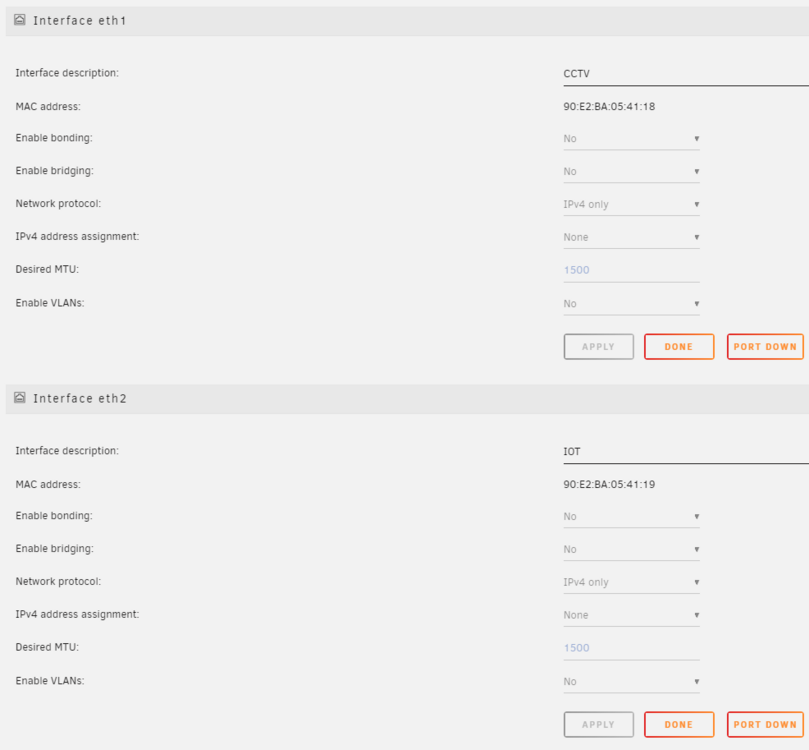
So i had to default my network setting and start again But for some reaosn now, i cant get the docker service to see my 2 custom interfaces - All mac's, IP's, vlan tags in switch remains the same Scratching my head as to why i cant select eth1 or 2 in my docker containers Any one see what im missing? Cheers

-
OK - After more investigating, I was using the wrong External Storage type - I had to enable it in the config.php file All works now - I can see my files as i should Now have just discovered that sharing is not allowed of external storage folder/files....


-
Got owncloud installed and running and hopingsomeone could pont me in the right direction Trying to get external storage going to be able to share some folders I have added this in the container settings: And this in the external storage settings: Cant seem to get it to work From the logs, i can see a message ""could not resolve host: asbuilt" Any tips? Cheers
-
Thanks Thought i would ask anyway Cheers
-
Is it possible within this docker container to run early access versions like 7.5.169? I have an open ticket about the topolgy of my network because it shows my switch is uplinked from an AP, which it is clearly not. They have suggested to run the early access version, so just asking if its possible, if not, all good Cheers
-
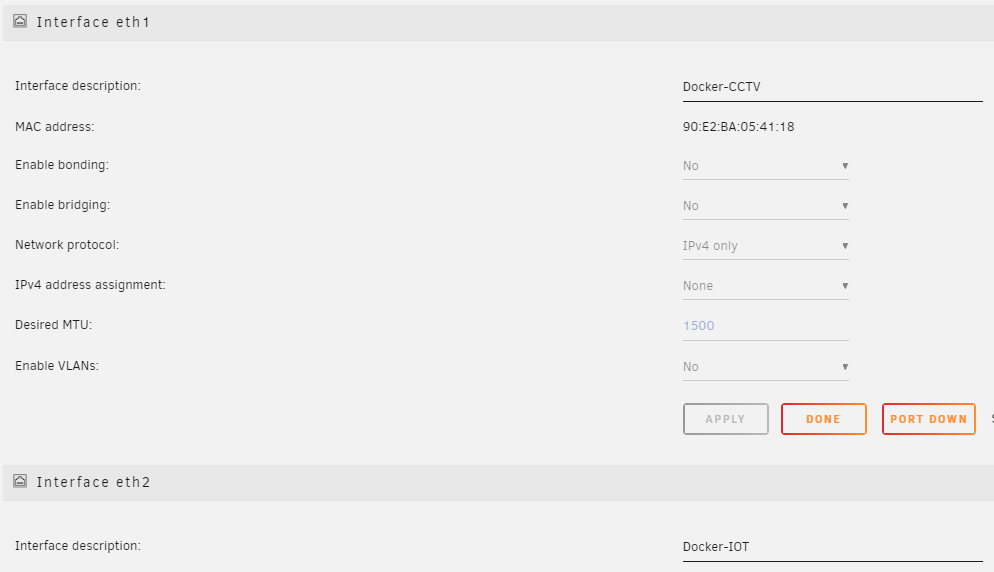
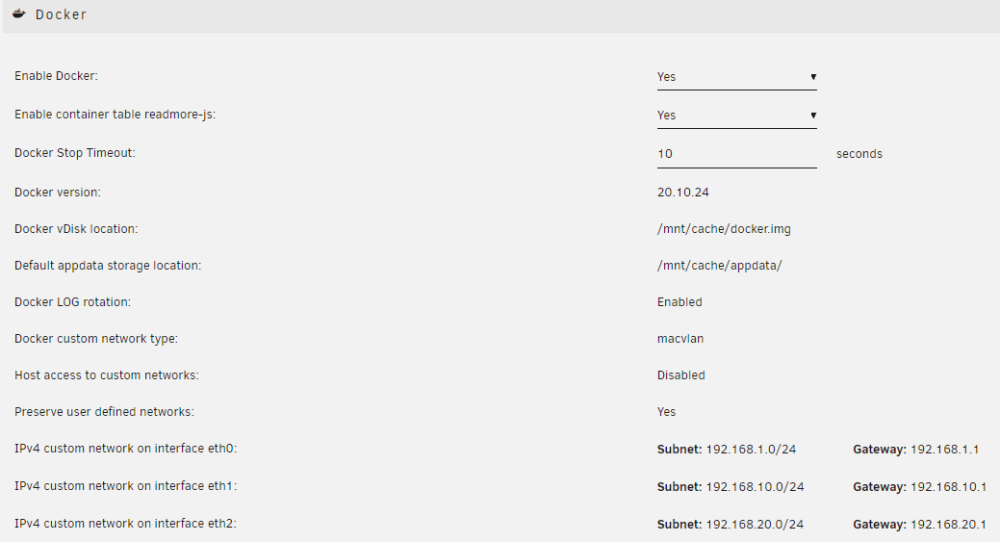
After reading about some call trace issues, ive folowed other guides to seperate docker containers on their own interface And since i have a quad port installed, i thought i could set up 1 interface of for my IOT and 1 for CCTV This is my network settings page And my docker settings: Ive removed my VM and reinstalled, but now i cant select eth1 as my network source in vm config The only option to select is virbr0 any pointers Cheers tower-diagnostics-20230729-1650.zip
-
Are you using influxdb2 with flux query?
-
Downgraded unraid and all works normally again.. Something in the latest os breaks grafana.... need to try and sort out what!!
-
Anyone else have an issue with grafana starting, after upgrading OS to 6.11.1? Edit: got it starting again by removing --user 99:100 from extra parameters! Now tho, grafana wont connect to influxdb. All settings within grafana/ influx are the same as they were before upgrading unraid
-
Where do i find extended logs of Node Red?? My NR container stopped, and the logs from the webui dont go back far enough.. Any one have any suggestions on how i can get a notiifcation when NR stops?? Thanks
-
Hi All, I was wondering if there is a way i can get a notifiation when one of my docker container stops? I already use telegram notifications for unraid system notifcations - so adding to this would be great. Thanks
-
Yes.. Thats another possibility ! Cheers
-
Not sure if i should post this in this mqtt thread or Nginx Proxy Manager thread, but since i have NPM woking for other proxys, i thought i would start here What i would like to do is be able to reach my mqtt broker form outside my local network. I have a duckdns name set..eg. mymqtt.duckdnsorg In NPM have a a host a ssuch But on my phone or nodered i cant access my mqtt broker Is this possible to achieve? I know i can leave my vpn running 24/7 on the phone, and just access it that way. but i'm looking for a different solution so i dont have to do that on my wifes phone Cheers

-
Thanks Well, im well and truly stumped aswell!!! Just for my sanity. /CCTV is a 2 disk cache pool when passing this through to the VM, the only way is to specify /mnt/cctv in the 2nd vdisk slot in the template, which will automatically create vdisk2.img?
-
ok - going to have to revive my thread as now the drive almost full acording to unraid - still have ~945gb free in windows I have tried the scsi option again but cant install driver from within device manager I have added the 'unmap' option within the xml <disk type='file' device='disk'> <driver name='qemu' type='raw' cache='writeback' discard='unmap'/> <source file='/mnt/cctv/Windows 10/vdisk2.img' index='3'/> NOt sure where else/what else to do here now? Would changing from Raw to qcow2 be of any use? if so, how do i go about this Cheers all
-
No worries! - Thanks for trying. Because the disk in not "thin provisioned", is this why unraid shows different disk usage to the VM?
-
OK - Removed VM and started form scratch. Here is my XML ```<?xml version='1.0' encoding='UTF-8'?> <domain type='kvm' id='10'> <name>Windows 10</name> <uuid>3478ddfa-c348-a835-863f-073d6505593b</uuid> <description>BlueIris CCTV</description> <metadata> <vmtemplate xmlns="unraid" name="Windows 10" icon="windows.png" os="windows10"/> </metadata> <memory unit='KiB'>2621440</memory> <currentMemory unit='KiB'>2621440</currentMemory> <memoryBacking> <nosharepages/> </memoryBacking> <vcpu placement='static'>4</vcpu> <cputune> <vcpupin vcpu='0' cpuset='4'/> <vcpupin vcpu='1' cpuset='10'/> <vcpupin vcpu='2' cpuset='5'/> <vcpupin vcpu='3' cpuset='11'/> </cputune> <resource> <partition>/machine</partition> </resource> <os> <type arch='x86_64' machine='pc-i440fx-5.1'>hvm</type> </os> <features> <acpi/> <apic/> <hyperv> <relaxed state='on'/> <vapic state='on'/> <spinlocks state='on' retries='8191'/> <vendor_id state='on' value='none'/> </hyperv> </features> <cpu mode='host-passthrough' check='none' migratable='on'> <topology sockets='1' dies='1' cores='2' threads='2'/> <cache mode='passthrough'/> </cpu> <clock offset='localtime'> <timer name='hypervclock' present='yes'/> <timer name='hpet' present='no'/> </clock> <on_poweroff>destroy</on_poweroff> <on_reboot>restart</on_reboot> <on_crash>restart</on_crash> <devices> <emulator>/usr/local/sbin/qemu</emulator> <disk type='file' device='disk'> <driver name='qemu' type='raw' cache='writeback'/> <source file='/mnt/cache/domains/Windows 10/vdisk1.img' index='4'/> <backingStore/> <target dev='hdc' bus='virtio'/> <boot order='1'/> <alias name='virtio-disk2'/> <address type='pci' domain='0x0000' bus='0x00' slot='0x06' function='0x0'/> </disk> <disk type='file' device='disk'> <driver name='qemu' type='raw' cache='writeback' discard='unmap'/> <source file='/mnt/cctv/Windows 10/vdisk2.img' index='3'/> <backingStore/> <target dev='hdd' bus='scsi'/> <alias name='scsi0-0-3'/> <address type='drive' controller='0' bus='0' target='0' unit='3'/> </disk> <disk type='file' device='cdrom'> <driver name='qemu' type='raw'/> <source file='/mnt/cache/isos/Windows 10 Pro x64 en-US Activated.iso' index='2'/> <backingStore/> <target dev='hda' bus='ide'/> <readonly/> <boot order='2'/> <alias name='ide0-0-0'/> <address type='drive' controller='0' bus='0' target='0' unit='0'/> </disk> <disk type='file' device='cdrom'> <driver name='qemu' type='raw'/> <source file='/mnt/cache/isos/virtio-win-0.1.208.iso' index='1'/> <backingStore/> <target dev='hdb' bus='ide'/> <readonly/> <alias name='ide0-0-1'/> <address type='drive' controller='0' bus='0' target='0' unit='1'/> </disk> <controller type='usb' index='0' model='ich9-ehci1'> <alias name='usb'/> <address type='pci' domain='0x0000' bus='0x00' slot='0x07' function='0x7'/> </controller> <controller type='usb' index='0' model='ich9-uhci1'> <alias name='usb'/> <master startport='0'/> <address type='pci' domain='0x0000' bus='0x00' slot='0x07' function='0x0' multifunction='on'/> </controller> <controller type='usb' index='0' model='ich9-uhci2'> <alias name='usb'/> <master startport='2'/> <address type='pci' domain='0x0000' bus='0x00' slot='0x07' function='0x1'/> </controller> <controller type='usb' index='0' model='ich9-uhci3'> <alias name='usb'/> <master startport='4'/> <address type='pci' domain='0x0000' bus='0x00' slot='0x07' function='0x2'/> </controller> <controller type='pci' index='0' model='pci-root'> <alias name='pci.0'/> </controller> <controller type='ide' index='0'> <alias name='ide'/> <address type='pci' domain='0x0000' bus='0x00' slot='0x01' function='0x1'/> </controller> <controller type='sata' index='0'> <alias name='sata0'/> <address type='pci' domain='0x0000' bus='0x00' slot='0x04' function='0x0'/> </controller> <controller type='virtio-serial' index='0'> <alias name='virtio-serial0'/> <address type='pci' domain='0x0000' bus='0x00' slot='0x05' function='0x0'/> </controller> <controller type='scsi' index='0' model='lsilogic'> <alias name='scsi0'/> <address type='pci' domain='0x0000' bus='0x00' slot='0x09' function='0x0'/> </controller> <interface type='bridge'> <mac address='52:54:00:dc:4d:93'/> <source bridge='br0.10'/> <target dev='vnet0'/> <model type='virtio-net'/> <alias name='net0'/> <address type='pci' domain='0x0000' bus='0x00' slot='0x03' function='0x0'/> </interface> <serial type='pty'> <source path='/dev/pts/0'/> <target type='isa-serial' port='0'> <model name='isa-serial'/> </target> <alias name='serial0'/> </serial> <console type='pty' tty='/dev/pts/0'> <source path='/dev/pts/0'/> <target type='serial' port='0'/> <alias name='serial0'/> </console> <channel type='unix'> <source mode='bind' path='/var/lib/libvirt/qemu/channel/target/domain-10-Windows 10/org.qemu.guest_agent.0'/> <target type='virtio' name='org.qemu.guest_agent.0' state='connected'/> <alias name='channel0'/> <address type='virtio-serial' controller='0' bus='0' port='1'/> </channel> <input type='tablet' bus='usb'> <alias name='input0'/> <address type='usb' bus='0' port='1'/> </input> <input type='mouse' bus='ps2'> <alias name='input1'/> </input> <input type='keyboard' bus='ps2'> <alias name='input2'/> </input> <graphics type='vnc' port='5900' autoport='yes' websocket='5700' listen='0.0.0.0' keymap='en-us'> <listen type='address' address='0.0.0.0'/> </graphics> <video> <model type='qxl' ram='65536' vram='65536' vgamem='16384' heads='1' primary='yes'/> <alias name='video0'/> <address type='pci' domain='0x0000' bus='0x00' slot='0x02' function='0x0'/> </video> <memballoon model='virtio'> <alias name='balloon0'/> <address type='pci' domain='0x0000' bus='0x00' slot='0x08' function='0x0'/> </memballoon> </devices> <seclabel type='dynamic' model='dac' relabel='yes'> <label>+0:+100</label> <imagelabel>+0:+100</imagelabel> </seclabel> </domain> Windows still cant find driver! So now, not really sure what im doing wrong!!
-
hmmmmm - i still get sam error Perhaps, ill remove the vm and start form scratch
-
If i change disk to SCSI - It wont find the driver Leaving as sata, Right Clicking on the driver and installing indicates driver installed, but does not change to thin provisioned. I have added the "discard=unmap option" to the xml
-
I have run a disk defrag, WIndows doesnt show the vdisk as "Thin provisioned" - Should it? Also, unraid is still showing that im at 280GB free, when windows disk is showing at 740GB free And ive noticed that windows vm is running much slower now, with unraid cpu running bit higher
-
Sorry, should read better!! I have added the option and now running a disk defrag and optimize I note, it doesnt have the disk listed as "Thin provisioned drive", but will wait until defrag is finished Thanks again
-
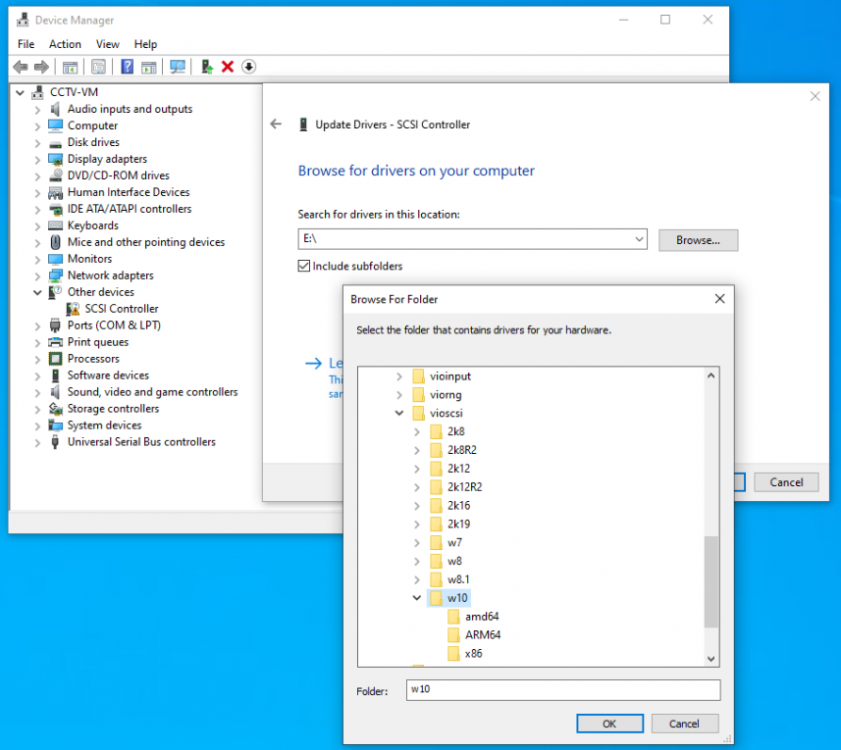
I have changed bus to scsi, but when trying to install the drivers within windows, it fails. Cant find drivers