





bdydrp
Members
-
Joined
-
Last visited
Everything posted by bdydrp
-
Thanks - I will give that a try Thanks
-
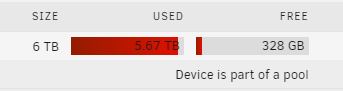
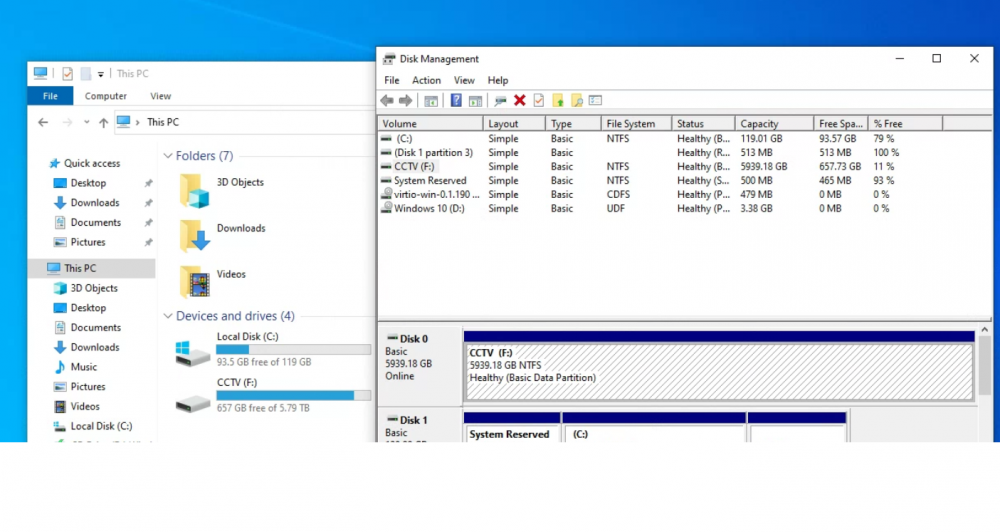
I've set up a cache pool and combined them to make as 1 large drive (2x3TB) I/m trying to understand why unriaid is telling me me cache is almost full ~320GB free, yet Win10 VM shows as ~657GB Free. When allocating disk in Win 10 disk management, i set the size just under 6TB. But i have also noticed, that unraid VM allocation is only showing 5TB, i know when i created the vdisk, i set its szize to 6TB. Any care to explain, so i can understand whats happening Cheers tower-diagnostics-20211104-2235.zip

-
Thanks. Now you mention windows update, I do recall that happening when the vm booted back up!! Oddly, after my last post, I realised that sbm1 was turned OFF within unraid, so I disabled that feature within windows anyway. \\tower, still didn't work, but accessing via IP did ( i already set up windows credentials to match that of unraid user, except I used the IP as the network name instead of Tower) But since I can access via IP, I'm not too fussed that \\tower doesn't work Thanks - I will have a read through the linked doc Cheers
-
I too cannot get \\tower to work, nor does tower appear in 'network' under windows 10 It was working, but since a reboot of the win10 vm, it stopped. The tower is visible in explorer ONLY via the IP\share I have followed the TL:DR sticky, except i dont have that setting in regedit! I have also enabled SMB1/CIFs in windows features. Anyone know what would cause it to work one day the stop after a reboot?
-
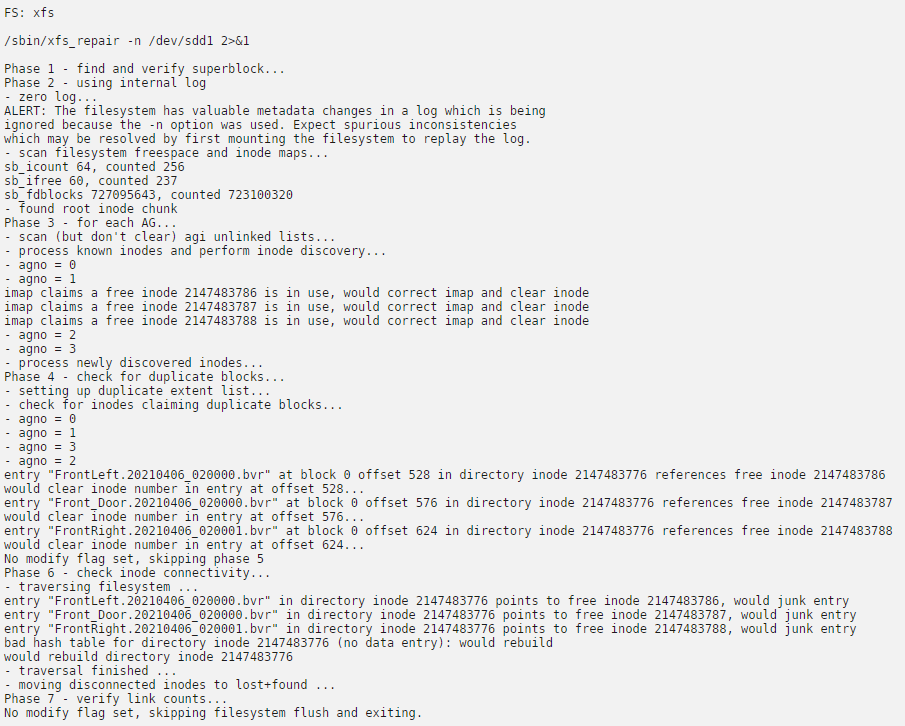
So after shutting down server to remove a different failed drive, upon reboot i seem t o able to access smarts which indicates passed without error also, ran filesystem check again, with different results tower-smart-20210408-2144.zip
-
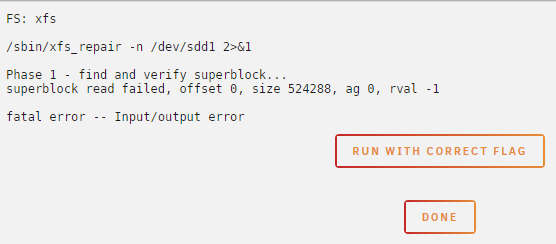
After rebooting system because disk went offline, I clicked the check mark to run file system check This is the result: Same result if i press 'run with correct flag' I'm going to assume here my disk is pretty much toast??
-
Went back over my config line by line and found a missing 'comma' at the end of a line!!! Argrhhhhhh. Something so simple causing me lots headaches!!
-
Thanks - I will do
-
It was prior to me posting! I had reformatted the drive and got it working again, then it "unmounted" and hence my post before going any further. Now overnight i was running an extended SMART test and woke to find the drive disconnected and shown as historical on the dash Obviously i have an issue somewhere with the drive itself, cabling or HBA card. Just need to narrow it down! I have new diagnostics - Not sure if they show how/when drive was connected/disconnected tower-diagnostics-20210406-1045.zip

-
Ill need to post my config file shortly then, because, clearly im blind and cant see the error!
-
I have setup a next cloud instance and when following spaceinvaders instructions for editing the config.php file i now get this error: Internal Server Error The server encountered an internal error and was unable to complete your request. Please contact the server administrator if this error reappears multiple times, please include the technical details below in your report. More details can be found in the webserver log. I have been able to get this working in the past using exact same method I use nginx proxy manager and have this set correctly - other proxy hosts work! Error log attached error-edit.log
-
Thanks! What would cause the disk to unmount by itself? Now i understand why it shows as full! This time i was able to unmount then remount the disk and it started working again..... Which checkmark sorry?? I didnt see any previously? When you say move disk to a pool device - how? As in part of the array or a pool within UD I do plan to add an extra drive for recordings and was hoping to show both disk as 1 big disk EDIT: Just found explanation of UD Pooling - Reading that now!
-
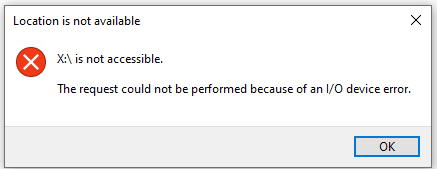
I'll start by posting it here as disk in question is part of UD, but can start new topic if needed if its just an unraid issue!! I have a WD Purple 3tb drive in UD that I use to store recording from blueiris in a WIn10 VM. After a couple of days the drive shows at 100% full, rendering the share inaccessible via windows share.. I know for a fact that the drive could NOT be full from recordings as it errors out only after a few days. I have reformatted the drive numerous times to get it back to usable state. The last line of my syslog is: make_connection_snum: '/mnt/disks/CCTV' does not exist or permission denied when connecting to [CCTV] Error was Input/output error What could be causing my drive to constantly fail or seem like its full? and not respond? Logs attached Cheers tower-diagnostics-20210405-2010.zip
-
Where can i find the installation logs? Ive installed a module which has an install error the and module creator has asked for an installation log. But for the life of me i cant find it Cheers
-
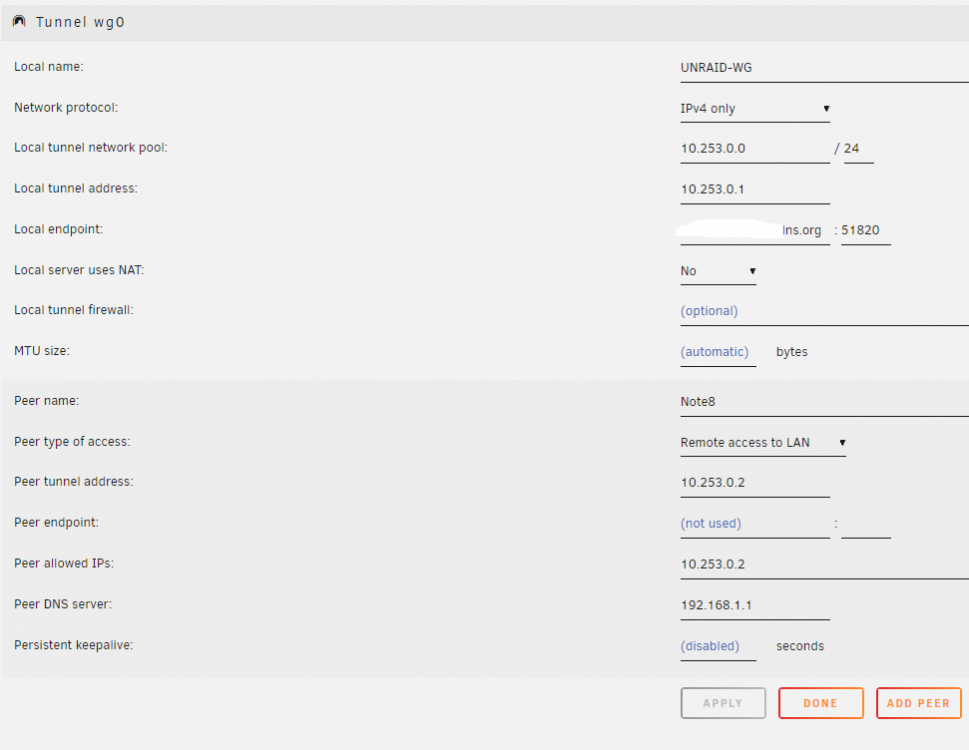
Still having issues with this!! Can only access devices on main lan not VLANS I have done a traceroute from my peer device (android tablet) with wifi off and WG on. And noticed that the hop goes to a completely different network 1st hop - 10.252.52.102 2nd hop - 10.252.52.106 3rd, 4th, etc - No response The Local tunnel address is 10.253.0.1 Where would 10.252 come from?
-
Anyone have this working with containers on a vlan and pfsense? Still struggling to get this to work as per my post above
-
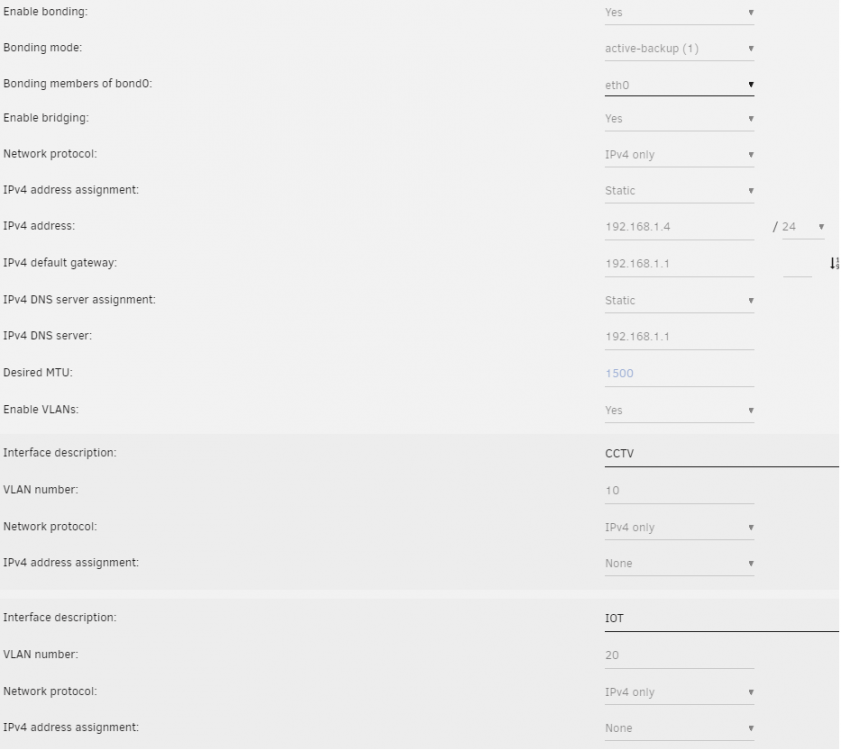
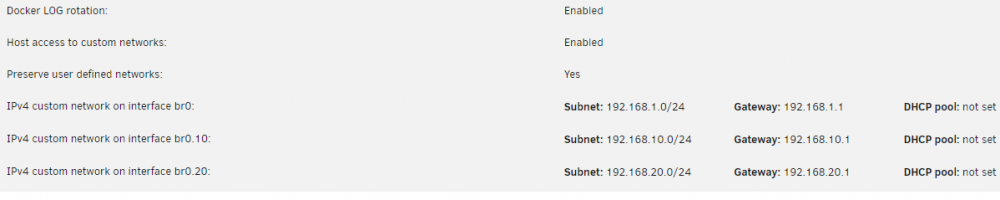
I have been trying for ages now to setup WG to access my dockers on my VLAN Local access works fine! I suspect it is something i'm missing in pfSense! Here are my unraid settings: And pfSense setting: Anyone see anything obvious i have missed? I've read thru a number of threads and just cant pin point my issue Thanks


-
Hi, i have this sorted now precisely as you described I'm using pfSense and I have my IOT vlan blocked form accessing my main lan. But above this rule, i added another rule, so that Nodered docker IP on vlan20 can access main lan. Has been working well Cheers
-
Must have been still live. I've just checked unifi ui, and can no longer see unraid with a DHCP IP!!!!
-
I also found that you had to remove the IP address assignment in your VLAN settings This was the only way it would show up in the drop down box when adding new apps and selecting the interface! Leaving out the IP assignment, Unraid webui has still assigned itself a DHCP address. I can see this in my unifi software. And its a random IP inside my DHCP pool aswell. Somewhere in the middle!!!


-
Thanks Jellyfin definitely works locally, so i will try and see if i can access another container on my network EDIT: so i have tried a number of different IP:PORT NUMBERS and it seems there is 2 containers i cant reach NodeRed @ 192.168.20.10:1880 and Unifi @ 192.168.1.4:8443 as well as Jellyfin container. But i can reach other devices on my network which have a web interface So im at a loss, as to why i cant reach 3 containers. AFAIK, there is nothing blocking incoming requests via proxy
-
So i tried removing the container completely and re-installing. My duck DNS name just resolves the the Congratulations landing page.. Now at a loss as to the cause
-
hoping someone could help me track down an issue. I'm no longer able to access my proxy hosts from external. I have mydomain.duckdnsorg set to forward to my Jellyfin docker container - But i keep getting error 504 Gateway timeout. When i disable the proxy, i'm greeted with the Congratulations landing page! I have double checked that duckdns has the correct external IP - which it does! Also, to double check port forward rules are working, i disabled them, and my domains just time out. With the testing ive done, i can only put it down to NPM not forwarding to proxy hosts?? Is there something else i can check?? Cheers
-
Thanks I've somewhat figured it out with a rule in pfsense to only allow my NodeRed Docker IP (192.168.20.10) to communicate to Unraid (192.168.1.4). All other traffic on VLAN 20 is blocked to main lan
-
I have a situation with one of my dockers on a vlan (.20 network) needing to write files to unraid (.1 network) Is this what Streams would be used for? Or could someone explain what they are? I have NodeRed on br0.20 and a my alexa pallete, needs access to read/write a file to my cache drive residing on host network When i disable my firewall rule to block VLAN 20 to Main Lan, the node works. I'm unsure if streams (or is correct application) would work, or i need to look at my firewall rules to only allow access to unraid Thanks


