





Seige
Members
-
Joined
Everything posted by Seige
-
I do see those lines in the log as well. Not sure if it has anything to do with geoip2 or not
-
The LuaJIT error seems to be gone since the last push?! Thanks for taking care of that, if it is not just on my end 👍
-
Would it be possible to run multiple instances of the letsencrypt container? All instances would have to have the same port mapping (i presume). Would this be possible by defining custom docker networks for each instance of letsencrypt and would http validation still work? Thank you for the help!
-
I have the same issue, always comes back with "0 B pulled" on all of my containers. I think amazonaws have some issues, tracert does time out in my case, also.
-
These ports are required for running TS: 9987 (UDP) 10011 (TCP) 30033 (TCP) (for file transfers) Did you specify the internal ports and protocols correctly? In what network type mode are you running the container? You might want to try it in "host". The error message "Unable to open /config/licensekey.dat, falling back to limited functionality" is shown, because you have not purchased a full server licese and are operating a server which can only host up to 32 clients (i.e. limited functionality). Also you might want to consider removing the "enable reporting to server list" option in the server settings, or you server will be listed in their public server list. If you are still having issues you can also test the official TS docker. There is a short guide I wrote, just in case.
-
This is a very brief description of your problem. What is the exact error in the log? If it used to work and now is suddenly broken, it might be because of an issue of your port 80 routing (at least in my experience this is very often the culprit). Do you know how to access the docker command line and run a cert renewal test? This usually gives you a more detailed error message.
-
It is working again, thank you!
-
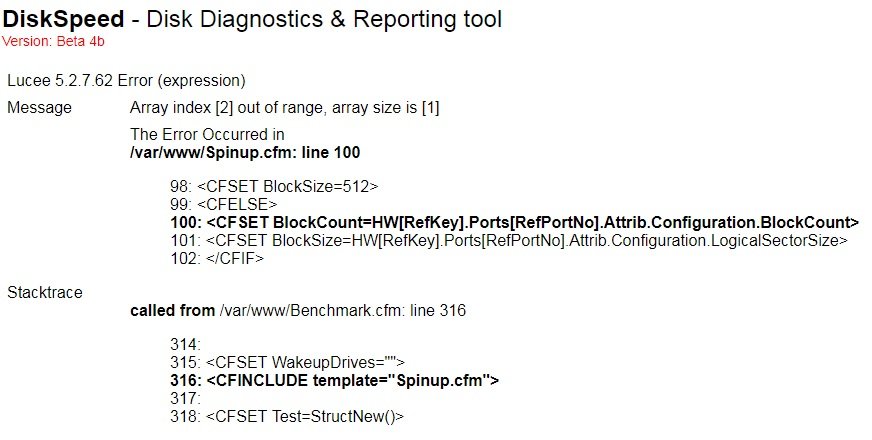
For a while now, I also get the array index out of range error, when trying to run a benchmark. It does not spin up any drives. Scanning works fine. Here is a screenshor of the error: I tried to reboot the server and pulled a fresh image with a new appdata folder. No changes. Do you have any idea what might cause this? Thank you!
-
How is you M1015 installed? These controller gets very warm, even under idle. With rising ambient temperatures this could also be the culprit. I would highly recommend installing the Noctua NF-A4x10 FLX on top of the heat sink. If you are up for it replace the thermal compound with something better. Mine was dried up and flaky. I used a small cable tie to hold the fan in place, but others are using screws (image is not from a M1015, but results are pretty much the same) : I leave it running at full speed, it is rather quiet and the heat sink is cool to the touch, even under load. Try the cables first, as suggested by @johnnie.black, but maybe also consider installing the fan.
-
Just wanted to also credit you for the help, ofc I am aware of the fierce competition in the unRaid docker landscape... I usually also fall back to MC, but Krusader is proving very useful in conjunction with unassigned devices for backups/images I create of machines outside my network. Additionally, MC needs something like screen to work after closing the terminal etc.
-
Thank you @CHBMB and @binhex, I have set an additional host path and mapped a folder on my cache drive. It seems to be working for now. There is indeed an option to set the temp folder through the Krusader settings, but I think a drive mapping is cleaner. ?
-
Thank you for your work, @binhex! I played around with the docker and have 3 quesions/issues for now: 1. If I browse a tar archive, it fills up the docker image due to temporary files being created (I presume). Since I also deal with larger files the docker images gets filled up pretty much completely. Is there a way around this? Maybe with another host path? 2. Unraid is mounted via /media. I have changed the mounting point to /mnt/ instead of /mnt/user/ so I can access disk shares. Is the "trash folder" still reliably created in the user shares and not the top level of the disk shares? 3. Is there a better/convenient way to deal with file permissions? I would much prefer to have the option to maintain ownership and permissions of files, especially when creating backups. Thank you!
-
I am glad you found a solution. I guess your problem was beyond my expertise in the end. Permissions seems to be sensitive with Nextcloud/SQL.
-
Do you have ONLYOFFICE or other addons installed in Nextcloud? Please enable logging to debug level (0) in Nextcloud and define a logfile location, if not already done, following this: https://docs.nextcloud.com/server/13/admin_manual/configuration_server/logging_configuration.html Post the logfile if possible. Please check the file beforehand for IDs or PWs.
-
You can see the internal ips in your Docker overview. This is how network bridges are handled in unRaid. I highlighted the one of MariaDB: Please try to edit your config.php as suggested and replace the line of: 'dbhost' => 'ben-server', with 'dbhost' => '192.168.189.24', This at least avoids any issues with Nextcloud having to resolve your domain. If it does not work you can try to add the port also and remove the port from the subsequent line, which leads to: 'dbhost' => '192.168.189.24:3306', 'dbport' => '', Please try this and let me know if it works. P.S.: If unRaid's webinterface is on 444 then, according to your docker overview, Nextcloud is using the same port. If this is so, you have to change one of either.

-
Hi, I am not an expert, but is the second MariaDB container running on a separate port, or also 3306? Maybe also change the db host to your unraid ip instead of going through your internet domain. You can edit that in the config.php. The 172.x.x.x ips are the “internal” ips unraid uses if you use a bridged network connection, e.g. if you want to forward a container port to a different external port. out of curiosity, do you access the unraid web interface unencrypted? Cause port 80 is exposed and that is usually reserved for that. To be fair you intercept that with let’s Encrypt.
-
Hi, What is the best way to maintain/upgrade the database? My most recent pull is on 10.1.32. Is there a reason why it is on 10.1 and e.g. not on 10.2? Many thanks Sebastian
-
Thanks CHBMB! I fiddled around for the last couple of days and found out that this was in fact the reason. I reverted back to using all relevant containers in bridged mode with 80/81 port forwarding. It works now. To be honest, I have not fully understood why it needs to be on the exact same IP. What if I would like to have nginx on a separate machine?! Is there some documentation specifically on that somewhere? Also, I am intending to throttle the bandwidth for Nextcloud through nginx (unfortunately, Nextcloud has no traffic management). As far as I can tell, this should be possible with: limit_rate Ideally, nginx would only throttle external connection and not within the same network. Will play around with that. Cheers
-
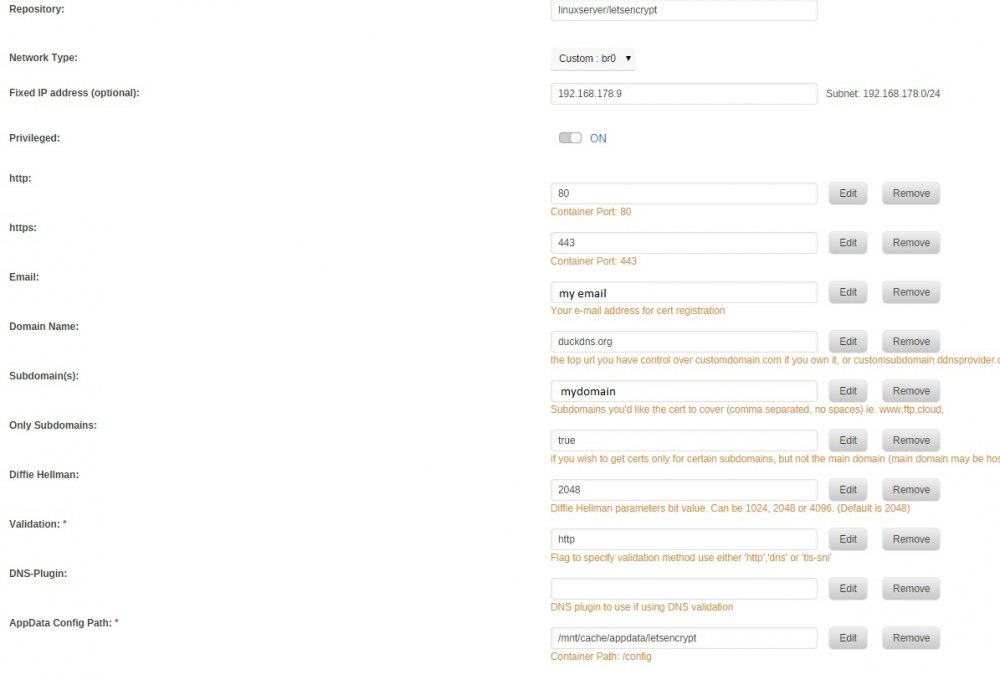
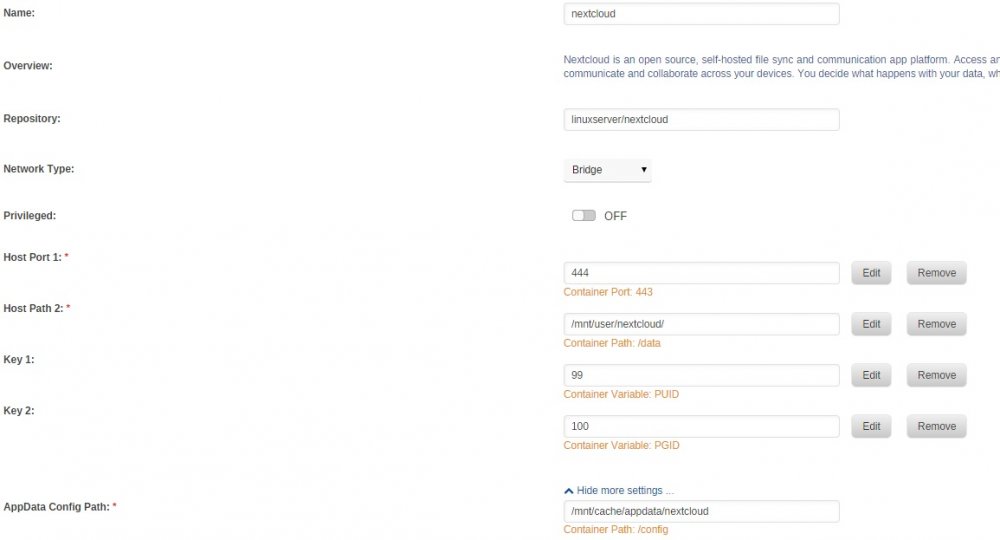
Hi, I tried to install Nextcloud with the Letsencrypt reverse proxy as explained in the first post. I use duckdns for my domain. Once I edit the "proxy.conf" and generate "nextcloud", I cannot connect to Nextcloud anymore, but get an error 502: The same happens if I try to access Nextcloud with the internal IP. Accessing Letsencrypt still leads to this, so I guess that should be fine: I configured the Letsencrypt docker with custom:br0 and gave it a unique IP, as I had issues with port forwarding on my router. Here are the two docker configs: Letsencrypt: Nextcloud I generated the config file "nextcloud" in "/mnt/user/appdata/letsencrypt/nginx/site-confs": server { listen 443 ssl; root /config/www; index index.html index.htm index.php; server_name mydomain.duckdns.org; ###SSL Certificates ssl_certificate /config/keys/letsencrypt/fullchain.pem; ssl_certificate_key /config/keys/letsencrypt/privkey.pem; ###Diffie–Hellman key exchange ### ssl_dhparam /config/nginx/dhparams.pem; ###SSL Ciphers ssl_ciphers 'ECDHE-RSA-AES128-GCM-SHA256:ECDHE-ECDSA-AES128-GCM-SHA256:ECDHE-RSA-AES256-GCM-SHA384:ECDHE-ECDSA-AES256-GCM-SHA384:DHE-RSA-AES128-GCM-SHA256:DHE-DSS-AES128-GCM-SHA256:kEDH+AESGCM:ECDHE-RSA-AES128-SHA256:ECDHE-ECDSA-AES128-SHA256:ECDHE-RSA-AES128-SHA:ECDHE-ECDSA-AES128-SHA:ECDHE-RSA-AES256-SHA384:ECDHE-ECDSA-AES256-SHA384:ECDHE-RSA-AES256-SHA:ECDHE-ECDSA-AES256-SHA:DHE-RSA-AES128-SHA256:DHE-RSA-AES128-SHA:DHE-DSS-AES128-SHA256:DHE-RSA-AES256-SHA256:DHE-DSS-AES256-SHA:DHE-RSA-AES256-SHA:AES128-GCM-SHA256:AES256-GCM-SHA384:AES128-SHA256:AES256-SHA256:AES128-SHA:AES256-SHA:AES:CAMELLIA:DES-CBC3-SHA:!aNULL:!eNULL:!EXPORT:!DES:!RC4:!MD5:!PSK:!aECDH:!EDH-DSS-DES-CBC3-SHA:!EDH-RSA-DES-CBC3-SHA:!KRB5-DES-CBC3-SHA'; ###Extra Settings### ssl_prefer_server_ciphers on; # ssl_session_cache shared:SSL:10m; ### Add HTTP Strict Transport Security ### add_header Strict-Transport-Security "max-age=63072000; includeSubdomains"; add_header Front-End-Https on; client_max_body_size 0; location / { proxy_pass https://192.168.178.5:444/; # proxy_max_temp_file_size 2048m; include /config/nginx/proxy.conf; } } I left the "default" file in that folder. Should this be deleted or edited? I tried to play around with that option, but it did not really help. Finally, I edited "config.php" in "/mnt/user/appdata/nextcloud/www/nextcloud/config" <?php $CONFIG = array ( 'memcache.local' => '\\OC\\Memcache\\APCu', 'datadirectory' => '/data', 'instanceid' => 'oc0bihhsnmqg', 'passwordsalt' => '7MJmDxvWQ5LZ2bOByhhVON5HKqd2PQ', 'secret' => 'ICE63sRU/DF6tV1f+LxE6MsfEV6GIyKUugtvj0+gFkzH111U', 'trusted_domains' => array ( 0 => '192.168.178.5:444', 1 => 'mydomain.duckdns.org', ), 'overwrite.cli.url' => 'https://mydomain.duckdns.org', 'overwritehost' => 'mydomain.duckdns.org', 'overwriteprotocol' => 'https', 'dbtype' => 'mysql', 'version' => '13.0.0.14', 'dbname' => 'nextcloud', 'dbhost' => '192.168.178.5:3306', 'dbport' => '', 'dbtableprefix' => 'oc_', 'dbuser' => 'user', 'dbpassword' => 'PASSWORD', 'installed' => true, ); Again, I just left "config.sample.php" as it. Not sure what is causing this issue, I guess the lin is broken somewhere. I would appreciate some insight, as I have no real clue what is causing this particular issue. Many thanks! Sebastian

-
Thanks for the replies! I was intending to use it before recycling/donating old drives.
-
Would anybody be able to tell me what the "Erase All the Disk" operation exactly does? I could not find conclusive documentation on that. Is it essentially zeroing the entire drive without writing the preclear signature on it? Or does it fill the disk with random bites? Many thanks!
-
I am testing some scenarios with UAD and came across two questions I could not find a definitive answer to. Is it only possible to create a single partition in UAD on a hard drive? It is not possible for the drives outside of the array to spin down? Would unmounting help? Many thanks! EDIT: Ok the USB drive seems to have spun down.
-
Unfortunately, it makes no difference.
-
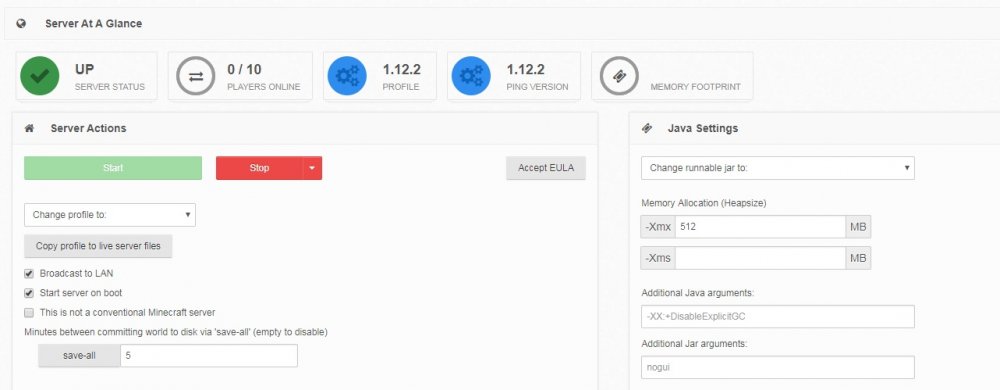
Thanks for your response, I mean the "memory footprint" shown in the server overview. Mine looks like this: The field is empty no matter what I do. Depending on the xmx settings the total available memory shown in the server view seems to change, but knowing the actual footprint would be helpful. As I said, it used to work. I googled around, after all it might be a Mineos issue, but I wasn't able to find something useful.
-
@clowrym Thank you for your work and the hint regarding hexparrots change in his update routs. Even though I am very late to the party, I much appreciate it. Does anyone happen to have an idea on why the memory footprint of my single server in the MineOS GUI is blank? Also it seems it does not adopt the -Xmx setting. The available free memory always corresponds to Unraid's memory. It used to be the same as the -Xmx setting. I suspect it changed with an Unraid update a while back. Thanks!



