





superloopy1
Members
-
Joined
-
Last visited
Everything posted by superloopy1
-
I don't understand it as I have two servers both generating the same warning. First one says smtower should be smtower.local and second one says tower should be Tower, I'm just going to ignore the warnings. My systems work as it is now. Think a bit more testing should've gone into this before releasing to the wider world ...
-
will do / have done ... thanks.
-
"INVALID CERTIFICATE 1" warning?? 'Your xxtower_unraid_bundle.pem certificate is for 'xxtower' but your system's hostname is 'xxtower.local'. Either adjust the system name and local TLD to match the certificate, or get a certificate that matches your settings. Even if things generally work now, this mismatch could cause issues in future versions of Unraid. The local TLD can be adjusted here: ' First time ever seeing this out of Fix Common Problems, can someone explain to me why and what's changed? I presume FCP has been 'tightened' without a mention ... I only ever use my machine on local network. Thanks.
-
Fisrt time ever seeing this out of Fix Common Problems, can someone explain to me why and what's changed? I presume FCP has been 'tightened' without a mention ... I only ever use my machine on local network. Thanks.
-
Hi guys, running plex locally for my own consumption, now want to let my daughter access remotely. Bit unsure about all of this, but i'd be happier if it was all running through a vpn, what does anyone think? Is plex safe enough to give remote access out and then just forget about things or is a vpn a reasonable starting point? If so, then what's needed to run the vpn, i currently run other dockers through their own baked in vpns which is a simple enough process but cant seem to find a plex equivalent? thanks for your time.
-
SOLVED! Deleting and recreating my appdata folder and redonloading latest image sorted it. I now have a fresh 'evaluation period' , yay! Think i may have run up against a coded usage threshold somewhere along the line. It DOES get a bit of use, but not a lot of use. I did consider purchasing a key but cant see anywhere where it could/would be accepted. All of those help menus appear to do nothing? Thanks for you help, appreciated!
-
Nope, it's fine, maybe i've hit some inbuilt threshold counter? I'm busy deleting appdata folder and reinstalling from scratch, let you know how that goes. Thanks.
-
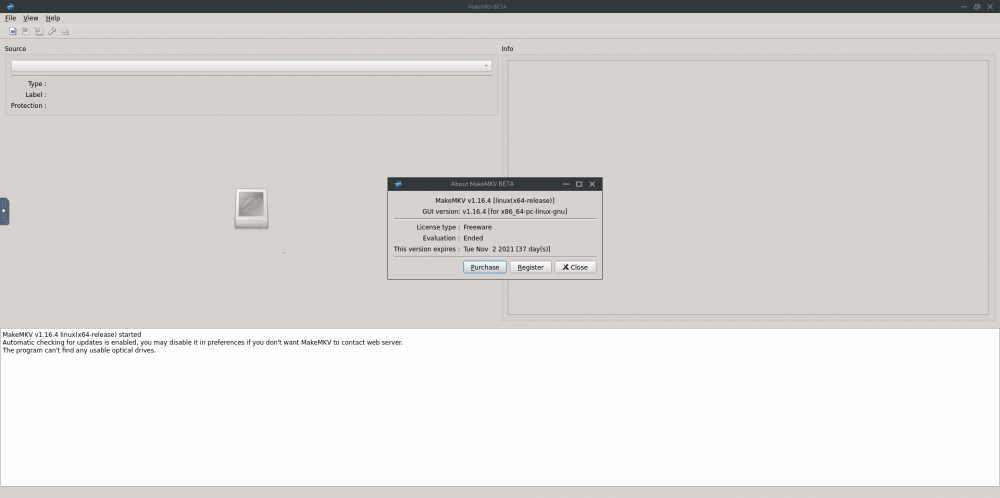
This is what i am now getting, bear in mind that i've used this program without any issues as late as 2 days ago. I've forced update and also deleted / recreated image. Strange one, only difference being the evaluation ended in my case?
-
Had already tried that, repeated a force-update and still the same .... 'Evaluation period has expired ....' It does say that this version is to expire on 2nd Nov but still fails to open, with the above message. Using the 'purchase' tab just does nothing so how do i sort this?Hmmm ... i missed this one, thanks for responding though. Seems it was nothing to do with my end, speeds cam back after a couple of days, i did nowt!Needs a key refresh for those of us tightwads who only use this occasionally, Binhex where are you, k've tried a force update and zilch, i can wait ;>)Nobody to take a look?Guys, just a quick question, hopefully someone can push me in the right thought direction to resolve the problem. I recently upgraded NZBGETVPN docker via the install menu which it threw up to the latest version 1.21 All seemed to go ok but since then my download speeds have halved. Checked vpn ip and it seems to be using the selected location, in my case London via a PIA vpn. I normally get the full speed out of my 200Mb line of around 22/23 MB/s but since the upgrade i'm barely getting 8/9 at a push. Any ideas what could be causing this, is there something in the docker config needs tweaking or changing? Is wireguard an issue and how do i check what protocol i'm currently using? I know nothing of the setup thats the problem here ... Here's an extract of my supervisor log, just the setup options, do they look ok? 2021-08-31 21:07:40.206840 [info] System information Linux d96757588c45 5.10.28-Unraid #1 SMP Wed Apr 7 08:23:18 PDT 2021 x86_64 GNU/Linux 2021-08-31 21:07:40.272304 [info] OS_ARCH defined as 'x86-64' 2021-08-31 21:07:40.329106 [warn] PUID not defined (via -e PUID), defaulting to '99' 2021-08-31 21:07:40.413974 [warn] PGID not defined (via -e PGID), defaulting to '100' 2021-08-31 21:07:40.490229 [warn] UMASK not defined (via -e UMASK), defaulting to '000' 2021-08-31 21:07:40.529665 [info] Permissions already set for volume mappings 2021-08-31 21:07:40.593252 [info] Deleting files in /tmp (non recursive)... 2021-08-31 21:07:40.639231 [info] VPN_ENABLED defined as 'yes' 2021-08-31 21:07:40.680060 [warn] VPN_CLIENT not defined (via -e VPN_CLIENT), defaulting to 'openvpn' 2021-08-31 21:07:40.718761 [info] VPN_PROV defined as 'pia' 2021-08-31 21:07:41.601895 [info] OpenVPN config file (ovpn extension) is located at /config/openvpn/UK London.ovpn 2021-08-31 21:07:41.677550 [info] VPN remote server(s) defined as 'uk-london.privacy.network,' 2021-08-31 21:07:41.714522 [info] VPN remote port(s) defined as '1198,' 2021-08-31 21:07:41.749469 [info] VPN remote protcol(s) defined as 'udp,' 2021-08-31 21:07:41.790635 [info] VPN_DEVICE_TYPE defined as 'tun0' 2021-08-31 21:07:41.829607 [info] VPN_OPTIONS not defined (via -e VPN_OPTIONS) 2021-08-31 21:07:41.868827 [info] LAN_NETWORK defined as '192.168.1.0/24' 2021-08-31 21:07:41.908136 [warn] NAME_SERVERS not defined (via -e NAME_SERVERS), defaulting to name servers defined in readme.md 2021-08-31 21:07:41.947408 [info] VPN_USER defined as 'pxxxxxxx' 2021-08-31 21:07:41.986601 [info] VPN_PASS defined as '*********' 2021-08-31 21:07:42.025723 [warn] STRICT_PORT_FORWARD not defined (via -e STRICT_PORT_FORWARD), defaulting to 'yes' 2021-08-31 21:07:42.065442 [warn] ENABLE_PRIVOXY not defined (via -e ENABLE_PRIVOXY), defaulting to 'no' 2021-08-31 21:07:42.105953 [info] ADDITIONAL_PORTS not defined (via -e ADDITIONAL_PORTS), skipping allow for custom incoming ports 2021-08-31 21:07:42.146519 [info] Starting Supervisor... 2021-08-31 21:07:42,611 INFO Included extra file "/etc/supervisor/conf.d/nzbget.conf" during parsing 2021-08-31 21:07:42,611 INFO Set uid to user 0 succeeded 2021-08-31 21:07:42,617 INFO supervisord started with pid 9 2021-08-31 21:07:43,620 INFO spawned: 'shutdown-script' with pid 171 2021-08-31 21:07:43,622 INFO spawned: 'start-script' with pid 172 2021-08-31 21:07:43,623 INFO spawned: 'watchdog-script' with pid 173 2021-08-31 21:07:43,624 INFO reaped unknown pid 10 (exit status 0) 2021-08-31 21:07:43,655 DEBG 'start-script' stdout output: [info] VPN is enabled, beginning configuration of VPN Looks like i'm missing afew fields which are just being defaulted but are there any significant omissions cos a si say everything has been working at full tilt until the latest update. Is there any way to go back a version?Yeah ... what a dummy I am! Now removed.How do i uninstall this docker folder business, not really got any use for it and its chucking out scary messages cant see any uninstall anywhere? This cant be right ...I agree, for some it is, thats the problem. I've not seen my drives spin back up in some time now so, fortunately, the fix has worked for me. But i do agree it needs resolving.I 'fixed' mine by switching off SMB 'Enable WSD' settings temporarily. This prevents you from 'seeing' your server on the network whih may or may not be an issue for you. It was for me, i am used to dipping in and out of each individual disks contents on a windows pc. So, i re-enabled it and to date disks have spun down as expected. May be worth a go ...Same here tonight for the first time as far as i'm aware. Asolutely nothing running, system standing idle for days, disks spun down. just dipped in to have a look, see alls ok and one cpu pegged at 100% by wsdd process. Switched of in settings and it's aok again. No idea what harm that has done, if any? If i mount a local to remote share time to time will this be affected?Just checked and it's working aok again. I don't have any Privoxy routing at all. That's new to me. Should I be using Privoxy, what protection over and above using binhexs app does it provide?Same here ....Something's broken my SAB after months of flawless running tonight i get 'insmod: ERROR: could not load module /lib/modules/iptable_mangle.ko: No such file or directory' Anyone any ideas? I have no torrenting, pure usenet discussions for me. Nothing has changed and i've no idea how to sort this iptable_mango.ko out .... it's preventing anything from moving on in the setup chain. Edit ... I called the fix command shown in the San log and managed to get past the operable missing problem but am now seeing the same problems as others in that my pia JSON file is unobtainable so San won't start with wireguard. I suppose I have to sit this out for someone to identify the problem.I wont then .... i'll 'let it be' and get on with life. I've got a 32 core cpu doing zilch so doubt i'll miss the mitigated horsepower.I'm confused .... just a lowdown home user, not serving vm's or anything else to anyone. I'm guessing i'm safe to install this, yes? I'd like not to see the errors in my syslog, will this suppress these, i'm doubting it.This message is being logged to my syslog, what does it mean and is any action required? I have looked at a few references online, its been around since 2019 apparently but as i never had a 'vulnerable' cpu config until now i've never seen it. Seems to affect a good few xeon processors so i'm trusting that this has been seen before now but a quick search on here came up with no results for me. Can anyone advise?

