





superloopy1
Members
-
Joined
-
Last visited
Everything posted by superloopy1
-
Why would this require a new thread, just interested?
-
Heres my setup
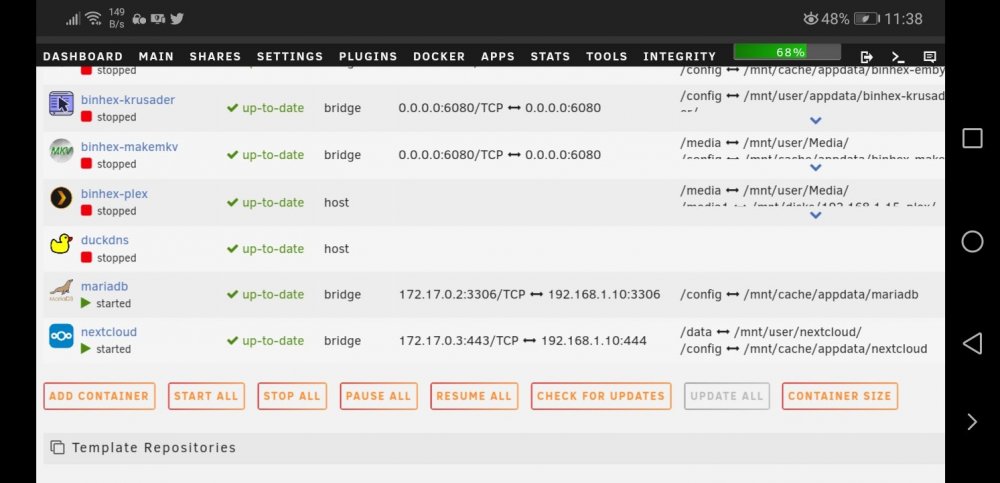
-
I'm almost sure that for nextcloud the advice was that port 444 was recommended to avoid clashing with others. Give it a try.
-
Yup, stay in enclosure (semi open so no heat issues) until tested and precleared then breakout and replace smaller drives in array. Been doing it for a good fewe weeks now and no probs till recently.
-
Unassigned devs not picking anything up atm, i've tried with the next couple of disks and i'm running parity check so will restart server tmro. Thanks for your time.
-
Yup, all 14TB, no brownouts and on ups.
-
Got no free sata ports, that's the problem. I've been running preclears constatntly for a couple of weeks now via usb never had an issue, so what's causing this, and at 99% ... aargghh! Once preclared it goes in as an upgrade and outgoing disk goes to backup server.
-
Looking at log, seems it had an io problem just before ... xtower-diagnostics-20200301-2141.zip
-
tools, diagnostics?
-
Hi ... Just lost my zero'ing of a WD14TB drive at 99% with the following .... Mar 1 21:05:16 xtower preclear_disk_39524A374C425943[5720]: Zeroing: dd output: dd: error writing '/dev/sda': No space left on device Tried to resume the session but it just isnt picking up the device now, seems a strange error message, any ideas?
-
With cache value of yes any writes to share with that value should go onto cache first and then move to the array when mover is enabled. I would write to a share with cache set to yes and then watch for the write activity on the main page. It SHOULD be against the cache disk and parity obviously, only. First line of attack ... no doubt someone will be along with plenty of other advice ...
-
hi ... surprisingly i've managed an up and running syncthing install but i have a problem with a '.syncthing.tmp' copy of each file moved being left behind following a transfer. Both sides say 'up to date' yet the receiving end has double the number of files, half of them these .tmp ones. What am i doing wrong, if anything?
-
Can I just remind people to mark their discussions as (SOLVED) when they have had a satisfactory outcome. I"m not a moderator, just a daily 'browser' of the forum and it's becoming tedious seeing the same open discussions when they should be closed off tidily. It helps everyone. Thanks.l
-
Hi binhex ... i've got a question. I was running this docker, my system seemed to be running a bit fast and hot cpuwise, not a problem, but on the dashboard it was reporting >30 streams open to my 'media' share. When i stopped the docker they went. Strange i thought, considering i was only accessing one folder on my share which works really well for me. But should it be doing this? So i started it again and the same number of streams opened and machine usage increased again. Stopped docker and streams disappear. NOw at first i thought to look at dynamix active streams in an attempt to identify what was going on but these 'ghost' streams do not show up there, so, any ideas?? If not, then reluctantly i'll be returning to makemkv'ing on my pc as i dont want my unraid server thrashing the cpu for any length of time. Otherwise, i love it!! Makes life so much easier all on the one platform. Cheers!Shorty .... my problem is not what you are describing which I believe to be the reporting of 'corrupt' files. In my case the files are not having the hashes built in the first place so any subsequent 'export' jobs fail those files. Why they can't be built is my question? Obviously I can just ignore them, there's only a few. But an answer as to why the extended attributes can't be set on only a handful of files would be more helpful. Other than that the plugin seems to be working just fine. No corrupt files for me.I did move the offending files to another disk and, sure enough, the problem persists. So just what's wrong? Sent from my CLT-L09 using TapatalkHope you get an answer, sorry to butt in but this support page needs to be split into relevant docker support, bungy? I have a short nzbgetvpn question .... am currently using binhex's nzbget but have downloaded bungy's vpn docker image. Can i just copy across the config files from nzbget into nzbgetvpn alongwith a suitable ovpn file in openvpn folder and will it work? Or do i have to setup all of my nzbget settings again?? I'd rather not as it involves recreating everything which is currently working. Is the only difference here the external inclusion of vpn support?Thanks but I mentioned that i had already done that a number of times, including re-exporting following each build to check against. Seems the hashing won't stick with the files? I'm guessing i just relocate the offending files and see if they present problems on a different disk? Sent from my CLT-L09 using TapatalkHi, what does bunker: failed to export with the corresponding xx files skipped messages signify? I've built/rebuilt/lexported and reexported and still get the same files flagged in the syslog ...Guys, now have plex running aok to my knowledge. Quick question ... hwo do you mange the location of metadata and whats the recommended method of backing it up. Mine is sitting in the original folder within appdata. Appdata itself is on cached single ssd. Should i be looking to move it and/or back it up. if i wanted it on its own ssd how do i go about setting it up that way to point at its own metadata 'share'??Just a general plex question ... i have set up a 'basic' plex server which is working just fine for local content only. I have been given a plexpass gift for xmas. How (can?) i integrate it into my existing server with minimal fuss?Just an update ... Sonarr IS running but only at 'host' setting. It was at bridge when screenshotted but unable to connect so had to switch back.Thanks for taking a look, appreciated. Here's a couple of screen shots of run cmd's and config settings. The current position is that both are using 'bridge' setting, Sonarr HAS started but Radarr will not connect with the error message as in screenshot 5. This situation reverses itself depending on which container comes up first, with the non-performing container containing the same error message (other than the port number which depends on the application itself that's failing. I've no idea how this is doing this, i'm no network guy so have only taken a brief look for duplicate ports, cant see any at all. I'm coming round to this being a networking issue rather than the applications themselves as both can and do run in standalone situation, they just cant seem to coexist. Any ideas, fire away!

.thumb.png.2a2b8a78f23b24b62a3b2897a5113d01.png)
.thumb.png.46fa528e2a15ec2e739a19ecace97c0d.png)
.thumb.png.a45f7f08da62a8419edc0f245b5f9855.png)
 Hi ... i have a problem which i inadvertently posted to the 'General Support' section and was recommended to post more specifically so can someone take a look at and see if it jogs anyones memories. I still have the problem, unable to access Sonarr when Radarr is running and vice-versa. The docker runs up but the log indicates a fatal error due to another instance OR a port clash OR permissions failure has caused the error. Anyone any ideas on how to diagnose this, driving me crazy!


.png.167289260eac7c2961bda759305559c7.png)
.png.36496c0fc48ad23c210cfb85150f8277.png)
.png.4b446cc15cfe438e7bad7bac229d590b.png)
