






Nebur692
Members
-
Joined
-
Last visited
-
Hi! nutdrv_qx never recovers after a brief USB disconnect/reconnect of the UPS: upsd reports "Data stale" forever and upsmon can no longer protect the server until NUT is restarted by hand. This matches upstream networkupstools/nut#3487 (https://github.com/networkupstools/nut/issues/3487): libusb_exit(NULL) in nut_libusb_close() hangs the driver in daemon mode on NUT 2.8.3-2.8.5. It was fixed upstream on 2026-06-19 and is planned for NUT 2.8.6 (not released yet). The current plugin package (nut-plugin-2026.06.18) was built one day before that fix. Would you consider backporting that fix into the plugin's NUT 2.8.5 build, or shipping 2.8.6 as soon as it is out? Environment: Unraid 6.18.38 kernel, nut-dw 2026.06.18, NUT 2.8.5, Nilox/Tecnoware 3000VA, nutdrv_qx (Voltronic-QS), vendorid 0665 / productid 5161 ("INNO TECH USB to Serial"), port = auto. What happened (2026-09-23): 21:12:27 kernel: usb 2-1.7: USB disconnect, device number 11 21:12:28 kernel: usb 2-1.7: new low-speed USB device number 12 using ehci-pci 21:12:45 upsd: Data for UPS [ups] is stale - check driver 21:12:48 upsmon: Poll UPS [[email protected]] failed - Data stale (every 5 s from then on) The device re-enumerated cleanly within a second, but the driver logged nothing at the disconnect and never reconnected. "/etc/rc.d/rc.nut restart" fixed it at once. The same happened on 2026-07-20. I could not inspect the stuck driver before restarting it, so the link to nut#3487 is based on matching symptoms rather than a backtrace. Thanks for maintaining the plugin!
-
🇬🇧 Update — a third template: oauth2-proxy The repository has been renamed to unraid-sso-templates, because it now covers more than ZITADEL. The new template is oauth2-proxy: it lets you put the identity provider you already run in front of web apps that have no login of their own. There was already an oauth2-proxy template on CA and it works, but it exposes no settings at all — everything has to be written into a config file by hand. This one exposes every option as its own documented field. One container can protect any number of sites, and the README has the ready-to-paste Nginx Proxy Manager snippet, since NPM has no auth_request field in its UI. 🇪🇸 Actualización — una tercera plantilla: oauth2-proxy El repositorio pasa a llamarse unraid-sso-templates, porque ya no es solo de ZITADEL. La plantilla nueva es oauth2-proxy: permite poner el proveedor de identidad que ya tienes delante de aplicaciones web que no traen login propio. En CA ya había una plantilla de oauth2-proxy, y funciona, pero no expone ni un solo ajuste: todo hay que escribirlo a mano en un fichero. Esta expone cada opción como un campo con su explicación. Un mismo contenedor puede proteger cuantas webs quieras, y el README trae el fragmento listo para pegar en Nginx Proxy Manager, que no tiene campo de auth_request en su interfaz.
-
GitHub: https://github.com/Nebur692/ha-login-approval Image: ghcr.io/nebur692/ha-login-approval:latest Template: https://raw.githubusercontent.com/Nebur692/ha-login-approval/main/ha-login-approval.xml ==================================================================== ENGLISH ==================================================================== Support thread for the ha-login-approval Docker container. WHAT IT DOES It turns your Home Assistant Companion App into your login method. You type your email, you get a push notification with Approve / Reject buttons, and tapping Approve logs you in. No password is involved at any point — this is true passwordless sign-in, not a second factor bolted on in front of a password. It works by acting as a generic external OIDC identity provider, so any relying party that supports "log in with an external OIDC provider" can redirect to it: ZITADEL, Keycloak, Authentik, or in principle any other standards-compliant one. FEATURES - Real passwordless login, confirmed end-to-end against a real ZITADEL instance. The provider itself is a standard OIDC implementation (authorize / token / JWKS / discovery), also tested against Keycloak's own external-IDP flow. - Its own small account directory (email -> assigned devices) in a self-contained SQLite file. It never calls any identity provider's admin API, so it behaves identically no matter which one sits in front of it. - Multiple devices per account, discovered live from your own Home Assistant. - The bridge page speaks the browser's language (English or Spanish, from the standard Accept-Language header — no configuration needed). - One-time recovery codes as an emergency fallback if the push never arrives or you lose the phone. Shown once at generation time, stored only as hashes. - Anti-abuse: an explicit Reject or a wrong recovery code counts toward a 3-strikes block, scoped to that one account + IP, never a global block. A silent timeout does not count. A definitively failed login always redirects back to your identity provider with a proper OIDC error response instead of leaving the browser stuck on a dead page. - Optional GeoIP enrichment (self-hosted MaxMind GeoLite2, no third-party API call per login) adds city / country / ISP to the audit log and to the push notification itself. - Admin panel at http://[IP]:8000/admin — overview, account directory, per-account login history, recovery codes, blocked IPs and page branding. REQUIREMENTS - Home Assistant, with the Companion App installed on at least one device, and a long-lived access token that can call notify.* services and read mobile_app_notification_action events over the WebSocket. - An OIDC-capable identity provider (ZITADEL, Keycloak, Authentik...) where you register this service as a generic external identity provider. - A reverse proxy with a valid TLS certificate (Nginx Proxy Manager, Traefik, Caddy, nginx...). THE ONE THING PEOPLE GET WRONG IDP_ISSUER_URL must be a PUBLIC https:// URL behind your reverse proxy — not a local LAN IP. Both your identity provider's server-to-server calls and the browser of whoever is signing in need to reach it. Put a LAN address there and sign-in will only ever work from inside your own network. Also: don't skip the /data volume. It holds the SQLite database (accounts, recovery codes, audit log, IP blocks, branding) and the GeoIP files. Without it, everything resets whenever the container is recreated. The full step-by-step guide — registering the IDP on the ZITADEL / Keycloak / Authentik side, the admin panel, and every single environment variable — is in the README linked above. Post here for questions, bug reports and feature requests. Bug reports with container logs attached are especially welcome. GitHub issues work too: https://github.com/Nebur692/ha-login-approval/issues If you find it useful, you can support the project here: https://ko-fi.com/nebur69265723 ==================================================================== ESPAÑOL ==================================================================== Hilo de soporte del contenedor Docker ha-login-approval. QUÉ HACE Convierte la aplicación Home Assistant Companion en tu método de acceso. Escribes tu correo, te llega una notificación push con botones Aprobar y Rechazar, y al pulsar Aprobar entras. En ningún momento interviene una contraseña: es acceso sin contraseña de verdad, no un segundo factor colocado delante de una contraseña de toda la vida. Funciona actuando como proveedor de identidad OIDC externo y genérico, así que puede redirigir hacia él cualquier servicio que admita «iniciar sesión con un proveedor OIDC externo»: ZITADEL, Keycloak, Authentik o, en principio, cualquier otro que cumpla el estándar. CARACTERÍSTICAS - Acceso sin contraseña real, comprobado de principio a fin contra una instancia real de ZITADEL. El proveedor es una implementación OIDC estándar (authorize / token / JWKS / discovery), probada también contra el flujo de proveedor externo del propio Keycloak. - Directorio de cuentas propio (correo -> dispositivos asignados) en un fichero SQLite autocontenido. Nunca llama a la API de administración de ningún proveedor de identidad, así que se comporta igual sea cual sea el que tenga delante. - Varios dispositivos por cuenta, descubiertos en vivo desde tu propio Home Assistant. - La página puente habla el idioma del navegador (español o inglés, detectado con la cabecera estándar Accept-Language, sin configurar nada). - Códigos de recuperación de un solo uso como salida de emergencia si la notificación no llega o pierdes el móvil. Se muestran una única vez al generarlos y se guardan solo como hash irreversible. - Antiabuso: un Rechazar explícito o un código de recuperación equivocado suman para un bloqueo a las 3 veces, limitado a esa cuenta y esa IP, nunca un bloqueo global. Que se agote el tiempo sin responder no cuenta. Un acceso fallido de forma definitiva siempre devuelve al proveedor de identidad con la respuesta de error que marca OIDC, en lugar de dejar el navegador plantado en una página muerta. - Enriquecimiento GeoIP opcional (MaxMind GeoLite2 alojado en tu propio servidor, sin llamadas a terceros en cada acceso): añade ciudad, país y proveedor al registro de auditoría y a la propia notificación. - Panel de administración en http://[IP]:8000/admin: resumen, directorio de cuentas, historial de accesos por cuenta, códigos de recuperación, IP bloqueadas y personalización de la página. REQUISITOS - Home Assistant, con la aplicación Companion instalada en al menos un dispositivo, y un token de acceso de larga duración que pueda llamar a los servicios notify.* y leer los eventos mobile_app_notification_action por WebSocket. - Un proveedor de identidad compatible con OIDC (ZITADEL, Keycloak, Authentik...) donde des de alta este servicio como proveedor de identidad externo genérico. - Un proxy inverso con certificado TLS válido (Nginx Proxy Manager, Traefik, Caddy, nginx...). LO QUE TODO EL MUNDO SE EQUIVOCA IDP_ISSUER_URL tiene que ser una URL https:// PÚBLICA detrás de tu proxy inverso, no una IP local. Tienen que llegar hasta ella tanto las llamadas de servidor a servidor de tu proveedor de identidad como el navegador de quien está entrando. Si pones ahí una dirección de tu red local, solo se podrá entrar desde dentro de tu propia red. Y otra cosa: no te saltes el volumen /data. Ahí viven la base de datos SQLite (cuentas, códigos de recuperación, registro de auditoría, IP bloqueadas, personalización) y los ficheros de GeoIP. Sin ese volumen se pierde todo cada vez que se vuelve a crear el contenedor. La guía completa paso a paso —cómo dar de alta el proveedor en ZITADEL, Keycloak o Authentik, el panel de administración y todas y cada una de las variables— está en el README enlazado arriba. Escribe por aquí para dudas, fallos y peticiones de mejora. Los avisos de fallo con el log del contenedor adjunto se agradecen especialmente. También valen las issues de GitHub: https://github.com/Nebur692/ha-login-approval/issues Si te resulta útil, puedes apoyar el proyecto aquí: https://ko-fi.com/nebur69265723
-
=================================================================== ENGLISH =================================================================== Repository: https://github.com/Nebur692/unraid-sso-templates ZITADEL is a self-hosted identity platform (SSO via OIDC/SAML, MFA, user management). The only ZITADEL template previously available on Community Applications was written for ZITADEL's older, single-container architecture. Since ZITADEL v4, the interactive login pages were split into their own separate service — deploying just the core container (as the old template does) leaves every login attempt failing with a silent 404, since the container itself reports healthy. This repository provides two templates that work together and were built directly from ZITADEL's own reference docker-compose files, not guessed: - zitadel — the core/API container, with every variable ZITADEL v4 actually needs to bootstrap correctly on first start. - zitadel-login — the missing login UI container. There was no Community Applications template for this at all before this repository. The README covers install order, a full plain-language reference for every variable, the required reverse-proxy routing, and troubleshooting for the issues that came up while building and testing this against a real deployment (Postgres admin-user mismatches, a ZITADEL master-key env-var bug, a silent token-write failure, and the login-page-vs-admin-console confusion that trips up almost everyone the first time). Post here for any issue, question, or suggestion regarding these templates. =================================================================== ESPAÑOL =================================================================== Repositorio: https://github.com/Nebur692/unraid-sso-templates ZITADEL es una plataforma de identidad autoalojada (SSO vía OIDC/SAML, MFA, gestión de usuarios). La única plantilla de ZITADEL antes disponible en Community Applications estaba escrita para la arquitectura antigua de ZITADEL, de un solo contenedor. Desde ZITADEL v4, las páginas de login interactivas se separaron en su propio servicio — desplegar solo el contenedor principal (como hace la plantilla antigua) deja cualquier intento de login fallando con un 404 silencioso, ya que el propio contenedor se reporta como sano. Este repositorio aporta dos plantillas que funcionan juntas, construidas directamente a partir de los docker-compose de referencia oficiales de ZITADEL, no por suposición: - zitadel — el contenedor principal/API, con todas las variables que ZITADEL v4 necesita de verdad para arrancar correctamente la primera vez. - zitadel-login — el contenedor de login que faltaba. No existía ninguna plantilla de Community Applications para esto antes de este repositorio. El README cubre el orden de instalación, una referencia completa y en lenguaje sencillo de cada variable, el enrutado de proxy inverso necesario, y solución de problemas para los fallos reales encontrados al construir y probar esto contra un despliegue real (usuarios de administrador de Postgres que no coinciden, un bug de ZITADEL con la variable de entorno de la master key, un fallo silencioso al escribir el token, y la confusión entre la página de login y la consola de administración que le pasa a casi todo el mundo la primera vez). Escribe aquí cualquier problema, pregunta o sugerencia sobre estas plantillas.
-
## English Fork of [Rohithkadaveru/ha-pass](https://github.com/Rohithkadaveru/ha-pass), an MIT-licensed Home Assistant tool that creates shareable, time-limited guest links for controlling specific entities (lights, locks, thermostats, fans...). Guests get a mobile-friendly PWA, no HA account or app install needed. All credit for the original design goes to the original author. This fork adds **advance/recurring scheduling** and related features aimed at replacing what a smart-intercom "guest invitation" feature typically offers, while staying self-hosted and auditable. What's new in this fork: - **Advance scheduling** — a link that only activates at a future date/time. - **Recurring weekly windows** — restrict a token to specific weekdays + daily time range. - **Automatic delivery** via any HA notify.* service, configurable lead time. - *buttoninput_button domain support** (e.g. gate/door relay helpers). - **Opt-in entity suggestions** for Access/Lights invitation modes. - **Local-network-only command execution** for access-type domains (checks source IP; honest limitation, not GPS-based). - **Single-device link binding** — first device to open a link claims it. - **Single-use links**, on top of the existing "Never expires" option. - **Bilingual EN/ES UI** — both admin dashboard and guest PWA. None of this touches the original security model — same allowlist, rate limiting, and IP allowlisting from upstream still apply. **Install:** - Home Assistant Add-on: add repository https://github.com/Nebur692/ha-pass-invitations under Settings → Add-ons → Add-on Store → ⋮ → Repositories. - Unraid (standalone container, for HA Core installs without Supervisor): Docker → Add Container → Template repositories → add https://raw.githubusercontent.com/Nebur692/ha-pass-invitations/main/ha-pass-invitations.xml - Docker Compose: see the repo README. Requires a Home Assistant Long-Lived Access Token. Not yet listed in the Community Applications search — the template-repository install method above works regardless. Repo & full docs: https://github.com/Nebur692/ha-pass-invitations Please report issues either in this thread or on GitHub: https://github.com/Nebur692/ha-pass-invitations/issues Disclaimer: not affiliated with, endorsed by, or associated with Home Assistant or Nabu Casa Inc. --- ## Español Fork de [Rohithkadaveru/ha-pass](https://github.com/Rohithkadaveru/ha-pass), una herramienta con licencia MIT para Home Assistant que crea enlaces de invitado compartibles y con caducidad, para controlar entidades concretas (luces, cerraduras, termostatos, ventiladores...). Los invitados usan una PWA pensada para móvil, sin cuenta de HA ni instalar ninguna app. Todo el crédito del diseño original es del autor original. Este fork añade **programación por adelantado/recurrente** y funciones relacionadas, pensadas para sustituir lo que suele ofrecer la función de "invitación de invitados" de un telefonillo inteligente, manteniéndolo autoalojado y auditable. **Novedades de este fork:** - **Programación por adelantado** — un enlace que solo se activa en una fecha/hora futura. - **Ventanas semanales recurrentes** — restringir un token a días concretos + franja horaria. - **Envío automático** por cualquier servicio notify.* de HA, con antelación configurable. - **Soporte de dominio buttoninput_button** (p.ej. helpers de relé de puerta/portón). - **Sugerencias de entidades opcionales** para modos de invitación Accesos/Luces. - **Ejecución de comandos restringida a la red local** para dominios de acceso (comprueba IP de origen; limitación honesta, no es por GPS). - **Vinculación del enlace a un solo dispositivo** — el primero que lo abre lo reclama. - **Enlaces de un solo uso**, además de la opción ya existente "No caduca nunca". - **Interfaz bilingüe EN/ES** — tanto el panel de administración como la PWA de invitado. Nada de esto toca el modelo de seguridad original — la misma lista blanca, rate limiting y lista blanca de IP del original siguen aplicando. **Instalación:** - Complemento de Home Assistant: añade el repositorio https://github.com/Nebur692/ha-pass-invitations en Ajustes → Complementos → Tienda de complementos → ⋮ → Repositorios. - Unraid (contenedor independiente, para instalaciones de HA Core sin Supervisor): Docker → Add Container → Template repositories → añade https://raw.githubusercontent.com/Nebur692/ha-pass-invitations/main/ha-pass-invitations.xml - Docker Compose: ver el README del repo. Requiere un token de acceso de larga duración de Home Assistant. Todavía no aparece en el buscador de Community Applications — el método de repositorio de plantillas de arriba funciona igualmente. Repo y documentación completa: https://github.com/Nebur692/ha-pass-invitations Reporta problemas aquí o en GitHub: https://github.com/Nebur692/ha-pass-invitations/issues Aviso: no afiliado, respaldado ni asociado con Home Assistant ni Nabu Casa Inc.
-
## English Fork of [brianpugh/unraid-claude-code](https://github.com/brianpugh/unraid-claude-code), an Unraid plugin that installs [Claude Code](https://github.com/anthropics/claude-code) CLI — Anthropic's AI-powered coding assistant — on Unraid, with persistent authentication across reboots. This fork exists to fix a boot-time reliability bug and to add a Remote Control feature. All credit for the original plugin design goes to brianpugh — no license was declared on the original repository, so this fork is published with clear credit to the original author rather than any claim of authorship over the base plugin. What changed from upstream: - Fixed a bug where the plugin could become permanently disabled after a reboot: the plugin icon was fetched over the network at boot, and if that single request failed (network not up yet right after a reboot), Unraid aborted the entire plugin install and silently banished it to /boot/config/plugins-error on every future boot. The icon is now embedded inline, removing that dependency entirely. - Added a bilingual (EN/ES, auto-detected) Settings page, a working "Update Claude Code" action, and a live log viewer. - Remote Control: runs claude remote-control as a supervised background process, so you can drive a Claude Code session on this NAS from claude.ai/code or the Claude mobile app — outbound HTTPS only, nothing opened inbound. Always resumes the same session in its configured directory, never starts automatically at boot. Requires a claude.ai OAuth login (Pro/Max/Team/Enterprise). Includes session history, reconnect-to-any-past-session, and auto-recovery if a session gets archived on the claude.ai side. Compatibility: requires Unraid 6.12.0+, verified on 7.3.2. Install (Unraid → Plugins → Install Plugin): https://raw.githubusercontent.com/Nebur692/claude-code-remote-control-unraid-plugin/main/claude-code.plg Repo & full changelog: https://github.com/Nebur692/claude-code-remote-control-unraid-plugin Please report issues either in this thread or on GitHub: https://github.com/Nebur692/claude-code-remote-control-unraid-plugin/issues --- ## Español Fork de [brianpugh/unraid-claude-code](https://github.com/brianpugh/unraid-claude-code), un plugin de Unraid que instala la CLI de [Claude Code](https://github.com/anthropics/claude-code) —el asistente de programación con IA de Anthropic— en Unraid, con autenticación persistente entre reinicios. Este fork existe para arreglar un fallo de fiabilidad en el arranque y añadir una función de Control Remoto. Todo el crédito del diseño original es de brianpugh — el repo original no declara licencia, así que este fork se publica dejando el crédito claro al autor original, sin reclamar autoría del plugin base. Qué cambia respecto al original: - Arreglado un bug por el que el plugin podía quedar **deshabilitado permanentemente tras un reinicio**: el icono se descargaba por red durante el arranque, y si esa petición fallaba (red aún no lista justo tras reiniciar), Unraid abortaba toda la instalación y lo movía en silencio a /boot/config/plugins-error en todos los arranques futuros. Ahora el icono va embebido, eliminando esa dependencia. - Añadida página de Settings bilingüe (EN/ES automático), una acción real de "Actualizar Claude Code", y un visor de logs en vivo. - Control Remoto: ejecuta claude remote-control como proceso supervisado en segundo plano, para controlar una sesión de Claude Code en este NAS desde claude.ai/code o la app móvil — solo conexiones HTTPS salientes, nada abierto hacia adentro. Siempre retoma la misma sesión en su directorio configurado, nunca arranca solo al iniciar Unraid. Requiere login OAuth de claude.ai (Pro/Max/Team/Enterprise). Incluye historial de sesiones, reconexión a cualquier sesión pasada, y recuperación automática si una sesión queda archivada en claude.ai. Compatibilidad: requiere Unraid 6.12.0+, verificado en 7.3.2. Instalación (Unraid → Plugins → Install Plugin): https://raw.githubusercontent.com/Nebur692/claude-code-remote-control-unraid-plugin/main/claude-code.plg Repo y changelog completo: https://github.com/Nebur692/claude-code-remote-control-unraid-plugin Reporta problemas aquí o en GitHub: https://github.com/Nebur692/claude-code-remote-control-unraid-plugin/issues
-
## English Fork of [fabianonline/unraid-zabbix_agent](https://git.schle.nz/fabian/unraid-zabbix_agent), an Unraid plugin that installs and configures zabbix_agentd to monitor an Unraid server from a central Zabbix installation. This fork exists to keep the bundled agent on the Zabbix 6.0 LTS branch and to fix two long-standing bugs. All credit for the original plugin design goes to fabianonline — no license was declared on the original repository, so this fork is published with clear credit to the original author rather than any claim of authorship over the base plugin. What changed from upstream: - Updated the bundled zabbix_agentd from 5.2.1 (Nov 2020) to the official 6.0.47 LTS static build. - Fixed unraid.temperatures: it only matched literal "CPU Temp:""MB Temp:" labels, so boards using coretemp (Intel) or k10temp (AMD) always reported null for CPU temperature. Now takes the highest reading across all matched CPU sensor labels. - Updated zabbix_template.xml to the Zabbix 6.0 export schema. - Added a bilingual (EN/ES, auto-detected) webGUI Settings page for the common options (Server, ServerActive, Hostname, Timeout, TLS PSK). - Added two live log viewers (opt-in file log + zero-setup syslog follow). Compatibility: developed/tested on Unraid 7.3.2; should work on any recent 6.x/7.x install. Install (Unraid → Plugins → Install Plugin): https://raw.githubusercontent.com/Nebur692/unraid-zabbix_agent-6lts/main/zabbix_agent.plg Matching Zabbix template (import on your Zabbix Server): https://raw.githubusercontent.com/Nebur692/unraid-zabbix_agent-6lts/main/zabbix_template.xml Repo & full changelog: https://github.com/Nebur692/unraid-zabbix_agent-6lts Please report issues either in this thread or on GitHub: https://github.com/Nebur692/unraid-zabbix_agent-6lts/issues --- ## Español Fork de [fabianonline/unraid-zabbix_agent](https://git.schle.nz/fabian/unraid-zabbix_agent), un plugin de Unraid que instala y configura zabbix_agentd para monitorizar un servidor Unraid desde una instalación central de Zabbix. Este fork existe para mantener el agente en la rama Zabbix 6.0 LTS y arreglar dos bugs de larga duración. Todo el crédito del diseño original es de fabianonline — el repo original no declara licencia, así que este fork se publica dejando el crédito claro al autor original, sin reclamar autoría del plugin base. Qué cambia respecto al original: - Actualizado zabbix_agentd de 5.2.1 (nov-2020) a la build oficial estática 6.0.47 LTS. - Arreglado unraid.temperatures: solo reconocía "CPU Temp:""MB Temp:", así que placas con coretemp (Intel) o k10temp (AMD) siempre devolvían null. Ahora toma la lectura más alta de todas las etiquetas de CPU reconocidas. - Actualizado zabbix_template.xml al esquema de exportación de Zabbix 6.0. - Añadida página de Settings bilingüe (EN/ES automático) para las opciones comunes (Server, ServerActive, Hostname, Timeout, TLS PSK). - Añadidos dos visores de logs en vivo (log a fichero opcional + seguimiento de syslog sin configurar nada). Compatibilidad: desarrollado/probado en Unraid 7.3.2; debería funcionar en cualquier 6.x/7.x reciente. Instalación (Unraid → Plugins → Install Plugin): https://raw.githubusercontent.com/Nebur692/unraid-zabbix_agent-6lts/main/zabbix_agent.plg Plantilla de Zabbix correspondiente (importar en tu Zabbix Server): https://raw.githubusercontent.com/Nebur692/unraid-zabbix_agent-6lts/main/zabbix_template.xml Repo y changelog completo: https://github.com/Nebur692/unraid-zabbix_agent-6lts Reporta problemas aquí o en GitHub: https://github.com/Nebur692/unraid-zabbix_agent-6lts/issues
-
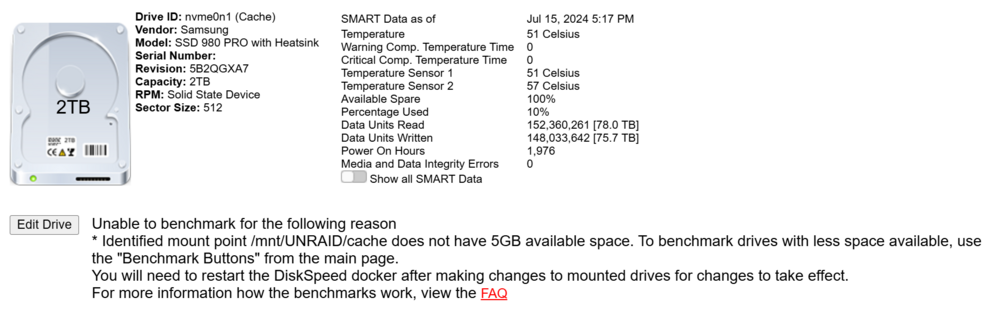
I have this error on the cache disk and I have space to spare:
-
Good afternoon Is this docker no longer updating? The proxy version is 2.11.2 and the one that is installed is 2.10.4
-
Can it be updated to version 2.10.3?
-
Repo: zabbix/zabbix-server-mysql Can it be used to make a Zabbix Proxy? If not, could you make a repository for Zabbix Proxy please?
-
Good afternoon, Do we have any updated jlesage/nginx-proxy-manager repository?
-
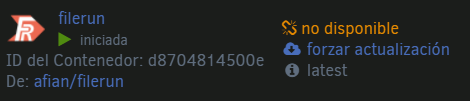
What happened to filerun? https://hub.docker.com/r/afian/filerun/
-
How do I disable unms 2fa?
-
Error install pyopenssl root@cf1619f70874:/# pip3 install pyopenssl Collecting pyopenssl Using cached pyOpenSSL-19.1.0-py2.py3-none-any.whl (53 kB) Requirement already satisfied: six>=1.5.2 in /usr/lib/python3.8/site-packages (from pyopenssl) (1.15.0) Collecting cryptography>=2.8 Using cached cryptography-2.9.2.tar.gz (517 kB) Installing build dependencies ... error ERROR: Command errored out with exit status 1: command: /usr/bin/python3 /usr/lib/python3.8/site-packages/pip install --ignore-installed --no-user --prefix /tmp/pip-build-env-2b_3v_u_/overlay --no-warn-script-location --no-binary :none: --only-binary :none: -i https://pypi.org/simple -- 'setuptools>=40.6.0' wheel 'cffi>=1.8,!=1.11.3; platform_python_implementation != '"'"'PyPy'"'"'' cwd: None Complete output (66 lines): Collecting setuptools>=40.6.0 Using cached setuptools-49.1.0-py3-none-any.whl (789 kB) Collecting wheel Using cached wheel-0.34.2-py2.py3-none-any.whl (26 kB) Collecting cffi!=1.11.3,>=1.8 Using cached cffi-1.14.0.tar.gz (463 kB) Collecting pycparser Using cached pycparser-2.20-py2.py3-none-any.whl (112 kB) Using legacy setup.py install for cffi, since package 'wheel' is not installed. Installing collected packages: setuptools, wheel, pycparser, cffi Running setup.py install for cffi: started Running setup.py install for cffi: finished with status 'error' ERROR: Command errored out with exit status 1: command: /usr/bin/python3 -u -c 'import sys, setuptools, tokenize; sys.argv[0] = '"'"'/tmp/pip-install-tsqrwwx0/cffi/setup.py'"'"'; __file__='"'"'/tmp/pip-install-tsqrwwx0/cffi/setup.py'"'"';f=getattr(tokenize, '"'"'open'"'"', open)(__file__);code=f.read().replace('"'"'\r\n'"'"', '"'"'\n'"'"');f.close();exec(compile(code, __file__, '"'"'exec'"'"'))' install --record /tmp/pip-record-owapn2sj/install-record.txt --single-version-externally-managed --prefix /tmp/pip-build-env-2b_3v_u_/overlay --compile --install-headers /tmp/pip-build-env-2b_3v_u_/overlay/include/python3.8/cffi cwd: /tmp/pip-install-tsqrwwx0/cffi/ Complete output (48 lines): unable to execute 'gcc': No such file or directory unable to execute 'gcc': No such file or directory No working compiler found, or bogus compiler options passed to the compiler from Python's standard "distutils" module. See the error messages above. Likely, the problem is not related to CFFI but generic to the setup.py of any Python package that tries to compile C code. (Hints: on OS/X 10.8, for errors about -mno-fused-madd see http://stackoverflow.com/questions/22313407/ Otherwise, see https://wiki.python.org/moin/CompLangPython or the IRC channel #python on irc.freenode.net.) Trying to continue anyway. If you are trying to install CFFI from a build done in a different context, you can ignore this warning. running install running build running build_py creating build creating build/lib.linux-x86_64-3.8 creating build/lib.linux-x86_64-3.8/cffi copying cffi/vengine_cpy.py -> build/lib.linux-x86_64-3.8/cffi copying cffi/model.py -> build/lib.linux-x86_64-3.8/cffi copying cffi/commontypes.py -> build/lib.linux-x86_64-3.8/cffi copying cffi/error.py -> build/lib.linux-x86_64-3.8/cffi copying cffi/backend_ctypes.py -> build/lib.linux-x86_64-3.8/cffi copying cffi/cparser.py -> build/lib.linux-x86_64-3.8/cffi copying cffi/ffiplatform.py -> build/lib.linux-x86_64-3.8/cffi copying cffi/pkgconfig.py -> build/lib.linux-x86_64-3.8/cffi copying cffi/vengine_gen.py -> build/lib.linux-x86_64-3.8/cffi copying cffi/api.py -> build/lib.linux-x86_64-3.8/cffi copying cffi/lock.py -> build/lib.linux-x86_64-3.8/cffi copying cffi/__init__.py -> build/lib.linux-x86_64-3.8/cffi copying cffi/setuptools_ext.py -> build/lib.linux-x86_64-3.8/cffi copying cffi/cffi_opcode.py -> build/lib.linux-x86_64-3.8/cffi copying cffi/verifier.py -> build/lib.linux-x86_64-3.8/cffi copying cffi/recompiler.py -> build/lib.linux-x86_64-3.8/cffi copying cffi/_cffi_include.h -> build/lib.linux-x86_64-3.8/cffi copying cffi/parse_c_type.h -> build/lib.linux-x86_64-3.8/cffi copying cffi/_embedding.h -> build/lib.linux-x86_64-3.8/cffi copying cffi/_cffi_errors.h -> build/lib.linux-x86_64-3.8/cffi running build_ext building '_cffi_backend' extension creating build/temp.linux-x86_64-3.8 creating build/temp.linux-x86_64-3.8/c gcc -Wno-unused-result -Wsign-compare -DNDEBUG -g -fwrapv -O3 -Wall -fomit-frame-pointer -g -fno-semantic-interposition -fomit-frame-pointer -g -fno-semantic-interposition -fomit-frame-pointer -g -fno-semantic-interposition -DTHREAD_STACK_SIZE=0x100000 -fPIC -I/usr/include/ffi -I/usr/include/libffi -I/usr/include/python3.8 -c c/_cffi_backend.c -o build/temp.linux-x86_64-3.8/c/_cffi_backend.o unable to execute 'gcc': No such file or directory error: command 'gcc' failed with exit status 1 ---------------------------------------- ERROR: Command errored out with exit status 1: /usr/bin/python3 -u -c 'import sys, setuptools, tokenize; sys.argv[0] = '"'"'/tmp/pip-install-tsqrwwx0/cffi/setup.py'"'"'; __file__='"'"'/tmp/pip-install-tsqrwwx0/cffi/setup.py'"'"';f=getattr(tokenize, '"'"'open'"'"', open)(__file__);code=f.read().replace('"'"'\r\n'"'"', '"'"'\n'"'"');f.close();exec(compile(code, __file__, '"'"'exec'"'"'))' install --record /tmp/pip-record-owapn2sj/install-record.txt --single-version-externally-managed --prefix /tmp/pip-build-env-2b_3v_u_/overlay --compile --install-headers /tmp/pip-build-env-2b_3v_u_/overlay/include/python3.8/cffi Check the logs for full command output. ---------------------------------------- ERROR: Command errored out with exit status 1: /usr/bin/python3 /usr/lib/python3.8/site-packages/pip install --ignore-installed --no-user --prefix /tmp/pip-build-env-2b_3v_u_/overlay --no-warn-script-location --no-binary :none: --only-binary :none: -i https://pypi.org/simple -- 'setuptools>=40.6.0' wheel 'cffi>=1.8,!=1.11.3; platform_python_implementation != '"'"'PyPy'"'"'' Check the logs for full command output. root@cf1619f70874:/#


