





mikeyosm
Members
-
Joined
-
Last visited
Everything posted by mikeyosm
-
Yep, I know this, however, you need to develop your own plugin to add a tile which in my mind is more difficult than having an 'add tile' option and being able to edit it.
-
One of the features that brings me back to UNRAID is the fantastic dashboard with the multitude of tiles available OOTB and via plugins. I would really like to see the option of creating your own custom tile. I have some use-cases where by using a combination of APIs, SMART tools, I could add my own stats from other machines/apps.
-
Hi I am experimenting with a RAID 0 ZFS pool and getting odd read/write stats. I created a pool with 2 x WD black nvme PCIe 4.0 2tb drives in RAID 0. Running dd on the ZFS share gives me around 3GB/s. I am expecting closer to 10GB/s given both drives are in RAID 0 effectively doubling the speed no? The drives are rated at 5GB/s write and I get that on a single drive. Is there some tuning I need to do?
-
Is it possible to manually install the nvidia driver if we're using a custom kernel i.e 6.7.3? I am experimenting with thors' custom linux kernels but I can't install the nvidia plugin/driver through CA for obvious reasons. If possible, please detail how. Thanks.
-
Did you ever fix this? I am about to splash out on a 14700K but want to make sure that plex etc work properly before I do.
-
That's good to know and saved me alot of time testing against my x570 3950x unraid host. Looks like Intel is the safest way for the moment but I hit a snag on my z490d4u 11900k build. I can passthrough my tesla p4 gpu to a nested vm in esxi 8 but vgpu psods the esxi host. No matter what I try, the same result. Seems vgpu passthrough is not working but direct gpu passthrough does.
-
I managed to get nested esxi 8 working on my Intel 11th gen with 6.12.6. Waiting for UNRAID 6.13 with newer kernel before trying on my X570 board. One major issue I have with the Intel is that when I passthrough my Telsa P4 to ESXI and power on a VM, the ESXi host PSODs. I am using the following qemu arg in my ESXi template. <qemu:commandline> <qemu:arg value='-machine'/> <qemu:arg value='kernel-irqchip=split'/> <qemu:arg value='-device'/> <qemu:arg value='intel-iommu,intremap=on,caching-mode=on'/> </qemu:commandline> If I dont use this, ESXi does not detect vt-d IOMMU correctly and none of the passed through devices are selectable.
-
All good now, thank you.
-
Here you go. In the meantime, how do I roll back to the previous release of the plugin? 2diagnostics-20240122-1418.zip
-
Only UD shares I cant access. UNRAID array shares are OK. All I did was update the plugin. I cannot access UD shares remotely (from a windows or linux pc). I try and click a folder and nothing happens like it's a permissions issue.
-
@dlandon upgraded to latest UD version just now and it has done something to SMB access. I am not able to access some of my SMB shares.
-
Looks like the issue is fixed in latest kernel 6.5.x OP here https://forum.proxmox.com/threads/nested-esxi-8-0-fails-with-amd-v-implementation-is-incompatible.119874/ Might have to wait a while before we get 6.5 😞
-
Yep.
-
Just tried to run esxi 7 and 8 on unraid 6.12, same issue. I have x570 and 3950x cpu. Anyone managed to get this working?
-
OMG, thank god that fixed it, been tearing my hair out trying to format for the last few hrs! Thanks!

-
Double arrows? Please show me.
-
Iam on 2024.01.17 - still the same problem. I even took the nvme out and formatted in my Windows PC then deleted the volume, then added it back to my UNRAID host. I just cannot format it in UNRAID.

-
@dlandon i am also having another issue, please can you help? I am trying to format one of my NVME drives but after it says the format was succcessful (tried XFS and ZFS), I keep getting UDEV and unable to mount. Here is the log... Jan 20 18:34:41 MOLAB unassigned.devices: Format device '/dev/nvme0n1'. Jan 20 18:34:42 MOLAB unassigned.devices: Device '/dev/nvme0n1' block size: 3907029168. Jan 20 18:34:42 MOLAB unassigned.devices: Clearing partition table of disk '/dev/nvme0n1'. Jan 20 18:34:44 MOLAB unassigned.devices: Reloading disk '/dev/nvme0n1' partition table. Jan 20 18:34:44 MOLAB unassigned.devices: Reload partition table result: /dev/nvme0n1: re-reading partition table Jan 20 18:34:44 MOLAB unassigned.devices: Creating Unraid compatible mbr partition on disk '/dev/nvme0n1'. Jan 20 18:34:46 MOLAB unassigned.devices: Reloading disk '/dev/nvme0n1' partition table. Jan 20 18:34:46 MOLAB kernel: nvme0n1: p1 Jan 20 18:34:46 MOLAB unassigned.devices: Reload partition table result: /dev/nvme0n1: re-reading partition table Jan 20 18:34:46 MOLAB unassigned.devices: Formatting disk '/dev/nvme0n1' with 'zfs' filesystem. Jan 20 18:34:46 MOLAB unassigned.devices: Format drive command: /usr/sbin/zpool create -o compatibility=legacy -o ashift=12 -f 'DATA2' '/dev/nvme0n1p1' 2>&1 Jan 20 18:34:52 MOLAB unassigned.devices: Reloading disk '/dev/nvme0n1' partition table. Jan 20 18:34:52 MOLAB kernel: nvme0n1: p1 Jan 20 18:34:52 MOLAB unassigned.devices: Reload partition table result: /dev/nvme0n1: re-reading partition table

-
URGENT help please. I just swapped 2 XFS SSDs from my old NAS to my new UNRAID server. One of the 4 TB SSDs is detected and mountable, the other shows 'partition' and I cant mount it. Any ideas why? Thank you

-
Please can we have an option of 5 and 10 minutes in the drop down menu for disk spin down times? I have a bunch of very noisy spinners that only sleep at the minimum selectable time value (15 minutes). I would like them to sleep after 5 minutes. I am sure this will please many UNRAID users with noisy drives. Thank you.
-
Thank you, seems odd that you can't use a value less than 15 minutes in UNRAID. I got used to having all my HDDs spin down after 5 coz they are vey noisy. Now with latest UNRAID i am stuck with 15 minutes for all drives. That sucks.
-
I have an issue with my WD 14TB drive sleeping on a custom schedule. I added hdparm -S12 $device to my HDD script in unassigned devices but the drive does not spin down after 60 seconds as per the hdparm -S12 paramater. I have also enabled disk sleep in UNRAID settings to its lowest setting of 15 minutes. How do I get the drive to sleep after 60 seconds and not 15 minutes?
-
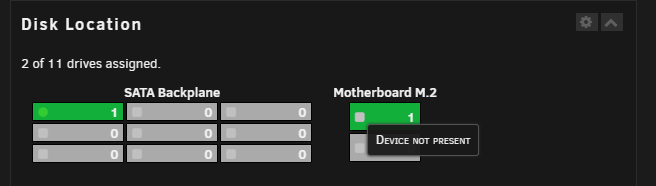
@FlamongOle any chance you could overlay drive temperature in to the dashboard or at the very least include it in the information window when hovering over the drive? Also, I have an nvme that is showing as device not present even though it is detected and showing all info.

-
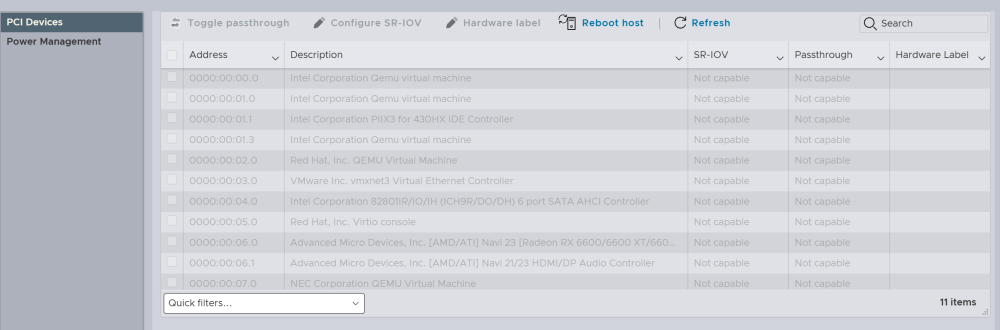
Hello Can anyone recall what is needed to be able to use passthrough devices, GPUs etc directly attached to a guest VM hypervisor such as vmware ESXi 8 running as a guest in UNRAID? I have created the VM, installed ESXi and managed to power on a nested VM. However, my Radeon GPU is greyed out and not available for passthrough. I know this is a niche set up but I thought it might be possible since you can nest esxi inside esxi and pass through IOMMU and vt-d for such a set up. The screenshot below is how ESXi sees the UNRAID IOMMU grouping at the 'guest' level. The AMDGPU is greyed out as you can see. I have added the following my ESXi VM xml. <hyperv> <relaxed state='on'/> <vapic state='on'/> <spinlocks state='on' retries='8191'/> <vendor_id state='on' value='123456789ab'/> </hyperv> What else have I missed?
-
Yeah, I am playing with a VDI broker called Ravada. My plan was to set up a Deb/Ub LXC/LXD, install Ravada, create a Windows VM and set up a VDI pool.


