





tazire
Members
-
Joined
-
Last visited
Everything posted by tazire
-
Im in the middle of trying to flash my 9240-8i at present and i am having a nightmare trying to get into the efi shell.... its literally impossible.... using an old enough motherboard i guess.... ASUS z87-k. No matter what i do it will tell me i cant load into the efi shell due to secure boot issues... I have this turned off but still get the issue. I also have a gigabyte H97 board but I dont see the efi shell option anywhere. I have tried a few different versions of efi shell to try get it to work and nothing... Anyone got through this or know of another way to flash??
-
having an issue with the update to 11.0.3. on the check for expected files it is finding an unexpected .rnd file and it wont update. I havent tried the old manual way as yet but im just curious if anyone else has experienced this??? EDIT Manual update worked fine.
-
thanks for that.



-
Sry i couldnt see your sig so didnt know what you wanted.
-
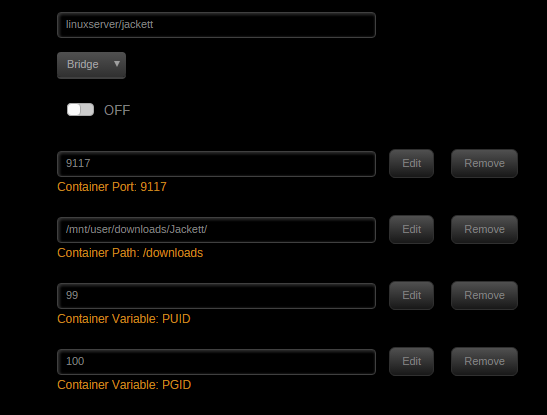
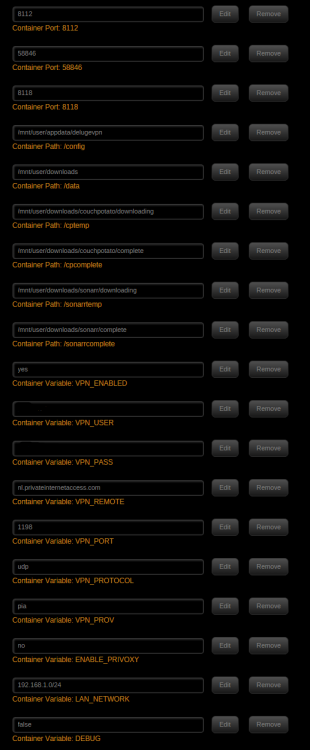
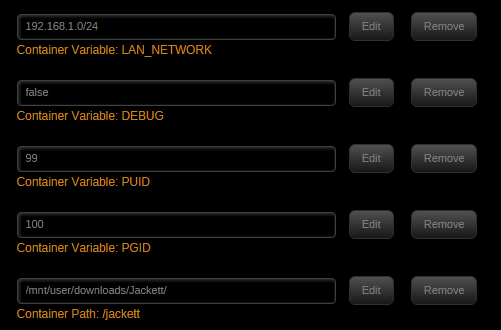
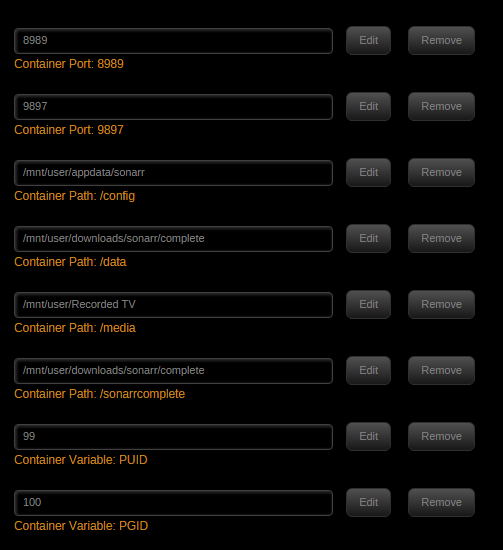
Ok let me start again. Up until now i have been using delugeVPN and sonarr with no issues. I didnt have Jackett installed. I wanted to try expand my indexers and just installed jackett. I set up the indexers i wanted to use in jackett and linked it to sonarr as directed. test on sonarr says everything is working. when i search for missing files using sonarr, i opened the logs on jackett and can see that it is searching the indexers and finding the files. I open deluge and nothing was added. I was just reading what other people were doing and I didnt know if jackett outputted its results to the /download container path and then if i should set deluge to auto download the jackett outputs from that path. bypassing sonarr if that makes sense??
-
Sonarr works fine and deluge will dl everything it gets through other indexers just not through jackett indexers
-
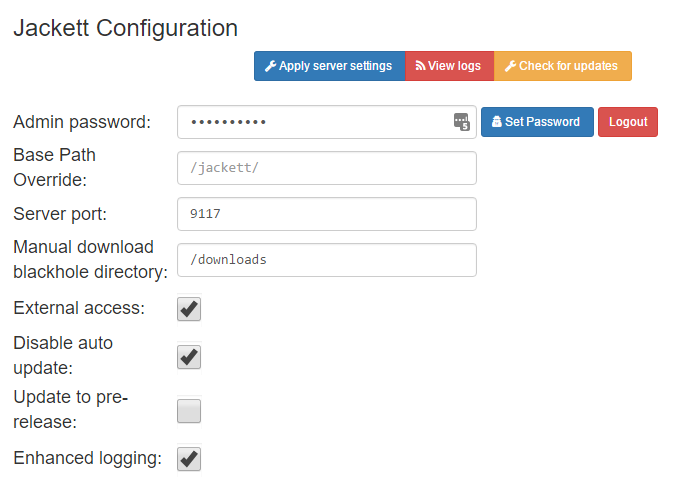
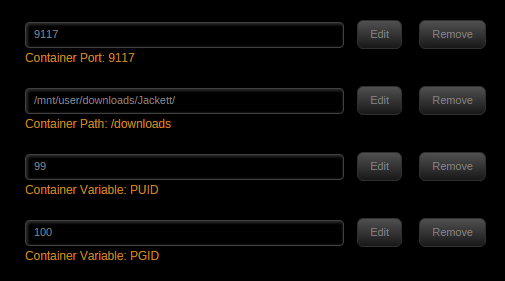
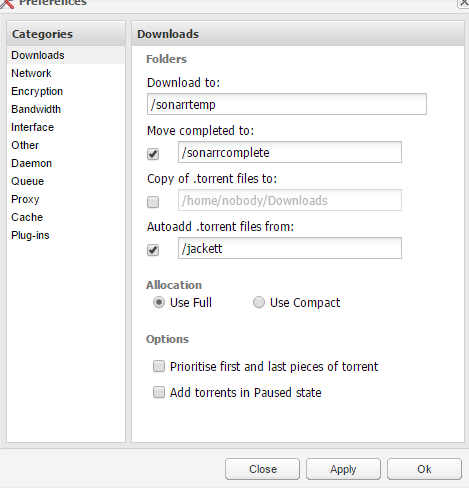
Just looking for a bit of help with the setup on this. I have it installed and working with sonarr in the sense that the logs show the searches and results etc. Just it doesnt appear to be sending the results to deluge. From what i can see the results dont go anywhere. Should the folder i have set as downloads be filling up with these resulting torrents? also i have deluge set to monitor that folder. I've attached my setup. log.txt
-
Ah thank you..... I had entered the full domain where just the sub domain was needed. I entered that and all is working well. thank you. sometimes you need help with the most obvious of tasks!
-
I am having an issue with this docker not updating my ip. logs show this every 5 mins when it tries to update the ip.... /app/duck.conf: line 1: ********************************: command not foundSomething went wrong, please check your settings Tue Mar 21 18:40:02 GMT 2017 I deleted the docker and reinstalled it but no joy. and there is no appdata folder so i have no idea what else to change.... basically i need to update the ip manually atm. the stared out bit is my token Edit*** I updated my token and reinstalled the docker again but i still get an issue... Something went wrong, please check your settings Tue Mar 21 18:50:00 GMT 2017Something went wrong, please check your settings Tue Mar 21 18:55:00 GMT 2017
-
Yes, although the version number has changed. Cool was thinking that alright. Is this something that will come with future updates? or will that be down to the developers of nextcloud? We update the base image, but when there's an update on top of that (ie once you've installed it) then at the moment you have to follow the instructions I posted. The problem comes from making user files persistent in /config and not overwriting config with the update. FWIW the instructions I posted are a recognised way of updating Nextcloud and posted on their site, so not really going off piste.... https://docs.nextcloud.com/server/9/admin_manual/maintenance/upgrade.html I wasnt questioning your tutorial m8. Just currently getting the update core version and I was considering just holding off if i thought an auto update was something that wasnt too far off. Ill prob update using your tutorial soon enough. thanks
-
Yes, although the version number has changed. Cool was thinking that alright. Is this something that will come with future updates? or will that be down to the developers of nextcloud?
-
Do we still use your instructions on updating to the latest version from the first post?
-
binhex I have been using your Plex media server docker for a good while now. I have gotten myself a lifetime plexpass sub and I'm wondering is it easy enough to change my setup to be plexpass as opposed to just plex media server? dont want to have downtime if i can avoid it.
-
no the update didnt work at all for me. i've attached my supervisord if anyone can understand whats going on supervisord.txt
-
does this need to be reinstalled following the 6.2 update? I cant seem to get it back working.
-
Anyone here giving help with owncloud? I dont see a set thread for support on owncloud.
-
Probably a stupid question but what is the difference between this and plex media server?
-
Its strange though as I have used both deluge and rtorrent, both on PIA, and seen massive differences. I have stopped using rtorrent as I just wasnt finding it worked as well as deluge for sincing with sonarr etc. Its a while since i used rtorrent but I believe I averaged 6-7MB/s vs ~1-2MB/s of deluge. I'm gonna let my downloads finish and give rtorrent another go then. Just seemed alot less user friendly to configure. For a noob like me at least.
-
Download and destination folders are set by the download client - NZBGet / SabNZBD I can set a download and destination folder in couchpotato just fine. Just curious if it was possible in sonarr as hautdoge had mentioned it earlier.
-
I am currently using PIA and im on the Netherlands server. anyone know the settings or server I should be connecting to to help my download speeds? Also on a completely unrelated matter but happened to be mentioned earlier.... does anyone know how to set download and destination folders in sonarr? I asked in the sonarr page but all i was told is that it isnt possible.
-
Priority doesnt appear in my downloader options. Also is there any reason my mover would stop working? It seems that it doesnt want to move downloads immediately like it was. I havent changed any settings but i have to psychically go into cp and change options for it to move files. EDIT: Actually just realised that CP for some reason is snatching torrents then setting them to ignored? Any idea why this would happen?
-
Is there any ports I should forward for this btw? I'm trying to at least get this running properly with CP but it doesnt seem to add the torrents for download even though CP says it found a link? When using Deluge it would always queue the torrent if CP found a link. Deluge has just become painfully slow for me.
-
ok i have this working with CP. Although I dont know how to get CP to research my wanted list and add the dl's to rtorrent. sonarr on the other hand doesnt seem to like the scgi:// being placed in the host. And doesnt connect without it.
-
Well thank you again for this. Now.... to get it set up with couchpotato and sonarr and my file system! I tried briefly yesterday with couchpotato just to get the connection between the 2. i used the login details for rutorrent user:admin pw:rutorrent but it doesnt seem to connect. I tried the connections port from rutorrent options as well as the 80 suggested in CP but neither seemed to work.
-
just testing this out and my speeds are ALOT better than with deluge. I think I found my new torrent client. Thanks alot for this.


