





tazire
Members
-
Joined
-
Last visited
Everything posted by tazire
-
i just F5 on the site and it loaded up just fine after getting the above error.
-
Im curious about using rsync for local backups. I essentially want a cache only share to sync to an array only share. Would rsync be the right thing to use or is there something else i should be looking at?
-
Ok i tried to google this and just cant find anything to help. essentially the title says it all really. I am making a few changes. I am moving my appdata off the cache drives onto an nvme drive im expecting. I then want to change my cache drives to RAID 0 and run nextcloud off this only. I currently have duplicati backing up my nextcloud to backblaze but id like to have another share on my array as a direct copy of the nextcloud (cache only) share. for immediate availablity should i have cache drive issues. What is my best option to achive this? rsync the whole share to the other share? and whats the best way to have this occure automatically every day or once a week etc?
-
Ok just in case anyone else finds similar issues. I checked my config and for some reason the version was down as 17.x.x so i changed that to 19.0.0 and all good now
-
Yea that's the steps I followed. But when I get to the update command I get that error in the terminal. I then tried getting into my nextcloud instance and obv maintenance mode was on causing issues... Turned that off and it gave me the update button which I tried which again gave me a similar error to above only on the nextcloud ui EDIT Ok i tried a new install and just copying the old config from the nextcloud back up and it just goes back to the same issue... unfortunately. Also tried to rollback to linuxserver/nextcloud:18.0.4-ls81 but it just gives me the same result.
-
hmmmm just trying to go from version 18.0.6 to 19 I got the following error... Nextcloud or one of the apps require upgrade - only a limited number of commands are available You may use your browser or the occ upgrade command to do the upgrade Set log level to debug Exception: Updates between multiple major versions and downgrades are unsupported. Update failed Maintenance mode is kept active Reset log level im aware this is an issue when you jump a major update but im fairly sure 18.0.6 was the most recent prior to 19? Not really sure where to go with this. Cant update and kinda stuck now. I read this thread https://help.nextcloud.com/t/updates-between-multiple-major-versions-are-unsupported/7094 but this seems to be if you skip a major release. At this point will i have to reinstall?
-
i keep getting the following errors and then ombi becomes very unresponsive... [41m[30mfail[39m[22m[49m: Ombi.Api.Api[1000] StatusCode: InternalServerError, Reason: Internal Server Error, RequestUri: http://x.x.x.x:8989/sonarr/api/Episode?seriesId=46 [41m[30mfail[39m[22m[49m: Ombi.Schedule.Jobs.Sonarr.SonarrSync[2006] Exception when trying to cache Sonarr Newtonsoft.Json.JsonSerializationException: Cannot deserialize the current JSON object (e.g. {"name":"value"}) into type 'System.Collections.Generic.List`1[Ombi.Api.Sonarr.Models.Episode]' because the type requires a JSON array (e.g. [1,2,3]) to deserialize correctly. To fix this error either change the JSON to a JSON array (e.g. [1,2,3]) or change the deserialized type so that it is a normal .NET type (e.g. not a primitive type like integer, not a collection type like an array or List<T>) that can be deserialized from a JSON object. JsonObjectAttribute can also be added to the type to force it to deserialize from a JSON object. a restart of the docker brings it back for a short period until it happens again. Any ideas. I might just do a full fresh install soon.
-
No i never did after. Just couldnt get it working right. I didnt give it an awful lot of thought after the initial effort though.
-
In relation to getting this to work with nextcloud.... If i remove the scan path set will that stop the auto scanning? Then im setting the path to clamav in nextcloud. Then I plan on setting this path in the nextcloud settings. Hope is that clamav instance sits idle until nextcloud activates it to scan uploads?? Just setting this up now so ive no idea if it will work.
-
Same issue here. i just went with the docker and its all working as expected. just left the app alone while its early days.
-
seen this cheers. all sorted
-
The app and community server app within nextcloud did get an update very recently. this is exactly the issue im having. i tried getting the community server app within nextcloud to work when it was updated but still no joy on that. EDIT- Found this on github https://github.com/ONLYOFFICE/onlyoffice-nextcloud/issues/228
-
when using nextcloud webui everything works exactly as it should. onlyoffice opens files as normal. Its only an issue with the android app. Regardless of network i get the same issue when trying to edit a file. it will open the onlyoffice connector and then sit on the loading screen and never actually loads.
-
Looking for a little help with the onlyoffice document server and using it with the nextcloud android app. I have the whole thing setup and working with nextcloud and nginxproxymanager. it works 100% with the webui of nextcloud however when i try to edit my documents with the android app it appears to open the onlyoffice connection but never loads the document.
-
Finding more problems with my install now... cant get it working with my nextcloud android app. works 100% with the webgui. but with the android app it starts to open the onlyoffice editor but hangs on the loading screen. running it though NPM... not sure if i need some custom command NPM to get it working.
-
I'll have to try this i think. Was playing with the idea earlier but didnt have the time to try get it working. Which onlyoffice docker did you use out of curiosity? EDIT - Gave it a few mins and got it working with the docker as you stated. cheers m8
-
Anyone manage to get the onlyoffice app and server running on NC 18 yet? just upgraded to the latest server and app this evening and still no joy with it. This is following upgrading from NC17. I know these apps are all preinstalled on a fresh install. Do/should they work with a fresh install rather than just upgrading? Sorry if this isnt the place to bring this up. been keeping an eye on the githubs trying to solve my issues but havent found fixes yet
-
Sorry m8, just did the update via the terminal with no issues. Clearly just a random error for me im afraid. GL with your issue.
-
I have had a similar issue to you levster. Although my particular instance gets stuck at Step 3. Havent actually tried updating using command line just yet. Also 17.0.1 to 17.0.2 update
-
Ah i checked it just now and sonarr had auto update and all is as it should be. cheers. I know this wasnt really the place for this issue but nice that it could get sorted.
-
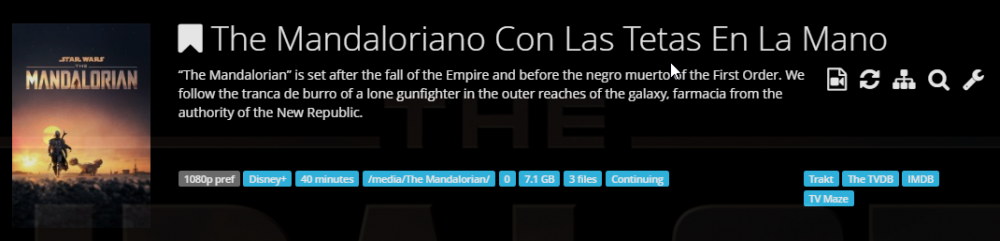
Strange issue and this probably a sonarr issue rather than an issue for here but no amount of googling seemd to show my issue. It seems to be spacifically with the mandalorian. It finds the series in with the spanish name. This in turn causes the episodes to be renamed into the spanish... it only seems to happen to this series. I have added other series since this to check and they all appear fine. I was trying to figure out if there is a way to fix match on sonarr but i dont see anyway.
-
cheers. that did the job
-
im getting this The "X-Frame-Options" HTTP header is not set to "SAMEORIGIN". This is a potential security or privacy risk, as it is recommended to adjust this setting accordingly. Even with the settings included in the new config file. And strangely when i F12 in chrome on my nextcloud tab it appears to be set to SAMEORIGIN... default
-
most recent update seems to start using the new transcoder? starting to see (hw) for transcode and decode now. I can get rid of the script now i take it. working nicely.
-
really hope they get the linux nvidia support up and running. I have this set up as per spaceinvaders video but the slow trans-coding is keeping me from actually using this. got a p4000 in the waiting for this when it does get supported. just out of curriosity, does anyone know if this is something that is being worked on?

