





tazire
Members
-
Joined
-
Last visited
Everything posted by tazire
-
Is that the correct nextcloud file? config.php nextcloud.txt
-
Ok looking for a little bit of help. I started trying to get this all working again using the directions. I started from scratch with it all and got nextcloud and the db up and running without a problem. I had my letsencrypt up and running before hand as i was using it for other containers like ombi etc. I then put in the suggested file with my updated server info and now im getting the following error in the logs Requested domain is not a FQDN because it contains an empty label.ERROR: Cert does not exist! Please see the validation error above. The issue may be due to incorrect dns or port forwarding settings. Please fix your settings and recreate the container I can send my config files if required.
-
is there any way for me to delete the cached token and re add the new one??? EDIT Managed to fix this. had to change the port number for the server as well for some reason. but all sorted
-
I dont see a get token option on my list for plex anyway. And no matter what i do it just always reverts to the cached token atm.
-
Just a quick question. I have recently changed my plex password and with that the plex authorization token has changed. Now ive gone to ombi to try update this but for some reason it just wont work. When i go through the motion of changing it and then pressing the load servers and select my server it automatically put the old auth token back in. I have tried deleting the server in full and starting that from scratch but no joy. As a result i keep getting an error when trying to load the libraries and testing the connectivity.
-
ive found in the last wk or so my rutorrent wont start properly. all was working fine up until recently so im not too sure if its just a recent update to the docker. here is the last few entries in the log after i try to start. 2018-07-01 01:51:58,498 DEBG 'start-script' stdout output:[info] Successfully retrieved external IP address **********2018-07-01 01:51:58,533 DEBG 'rtorrent-script' stdout output:[info] Removing any rTorrent session lock files left over from the previous run...2018-07-01 01:51:58,549 DEBG 'rtorrent-script' stdout output:[info] Attempting to start rTorrent...2018-07-01 01:51:58,552 DEBG 'rtorrent-script' stdout output:Script started, file is /home/nobody/typescript2018-07-01 01:51:58,580 DEBG 'rtorrent-script' stdout output:Script done, file is /home/nobody/typescript2018-07-01 01:51:58,580 DEBG 'rtorrent-script' stdout output:[info] Autodl-irssi not enabled, skipping startup2018-07-01 01:52:27,727 DEBG 'rtorrent-script' stdout output:[warn] Wait for rTorrent process to start aborted2018-07-01 01:52:57,852 DEBG 'rtorrent-script' stdout output:[info] rTorrent not running2018-07-01 01:52:57,853 DEBG 'rtorrent-script' stdout output:[info] Removing any rTorrent session lock files left over from the previous run...2018-07-01 01:52:57,867 DEBG 'rtorrent-script' stdout output:[info] Attempting to start rTorrent...2018-07-01 01:52:57,868 DEBG 'rtorrent-script' stdout output:Script started, file is /home/nobody/typescript2018-07-01 01:52:57,888 DEBG 'rtorrent-script' stdout output:Script done, file is /home/nobody/typescript2018-07-01 01:52:57,888 DEBG 'rtorrent-script' stdout output:[info] Autodl-irssi not enabled, skipping startup2018-07-01 01:53:27,012 DEBG 'rtorrent-script' stdout output:[warn] Wait for rTorrent process to start aborted
-
having an issue with the docker refusing to stop. Logs show 2018-04-23 20:01:56,495 WARN received SIGTERM indicating exit request2018-04-23 20:01:56,496 DEBG killing plexmediaserver (pid 48) with signal SIGTERM2018-04-23 20:01:56,497 INFO waiting for plexmediaserver to die2018-04-23 20:01:59,500 INFO waiting for plexmediaserver to die2018-04-23 20:02:02,504 INFO waiting for plexmediaserver to die2018-04-23 20:02:05,508 INFO waiting for plexmediaserver to die nothing i seem to do will stop the docker now. I am trying to do a reboot but cant due to this hanging. Any ideas?
-
Just curious.... I have rutorrentVPN setup and running and now want to push ahead with this. I have the linuxserver version running at present. For obvious reasons I want to migrate to this version. Is there any conflict using this and rutorrentVPN at the same time? I only ask because of the issues I had migrating from delugeVPN to rutorrentVPN. I couldnt have both running at the same time. Cheers
-
I managed to fix this. It took a full rebuild of each container to get there but I did.... having other issues now though.... first of all the automover seems a bit selective and then sonarr and couchpotato just arent dealing with the files properly once downloaded.... I have had to manually import most downloaded files in sonarr. Strangely the first 4 torrents downloaded and were handled perfectly but since then its just been a bit of a mess.... EDIT Also does anyone use the unpacker for unpacking the compressed torrents? I just activated it but it doesnt seem to be doing anything
-
Yea tbh i just found it very strange that literally the first 4 torrents worked perfectly and since then 0 torrents move. It gives the appearance that the torrents pause on completion because if i right click and start them manually again they get moved. EDIT Ok upon checking again it appears that alot of the torrents have now moved... however sonarr and CP no longer copy them to my media shares like they did at the start.... I can manually import with sonarr but that is not exactly ideal really... Do you find it works more seemlessly not using the automove? main reason i want to use it is that CP or sonarr was moving files that had stalled and that hadnt fully completed.
-
This automove issue is really annoying me atm. I just got this all to play nice with sonarr first 4 files everything went smoothly. moved from /incomplete to /complete. then all of a sudden no more files will get moved.... I have no idea why... Anyone managed to get this working as it should? or is there a way to set this in the rtorrent config file so it doesnt need to use a plugin? EDIT Ok i seem to have figured out that for some reason it has now started to pause the torrents upon completion. which is resulting in them not being moved. I can manually restart them and they seem to be moving ok.... Any idea why this might be happening?

-
hmmm i dont see an uninstall option but i do see a disable option but again it just says disabling and does nothing.
-
ok perfect.... that worked with sonarr. Thanks the same settings appear to have worked on CP too. Thanks for that EDIT... Still the same problem on CP. Test successful but still wont add snatched downloads. Any ideas?
-
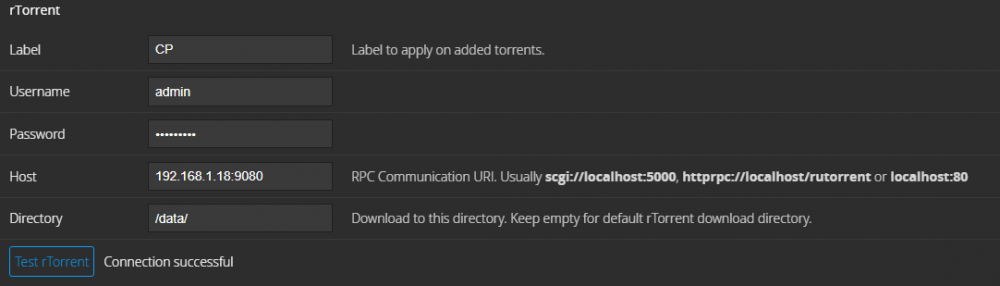
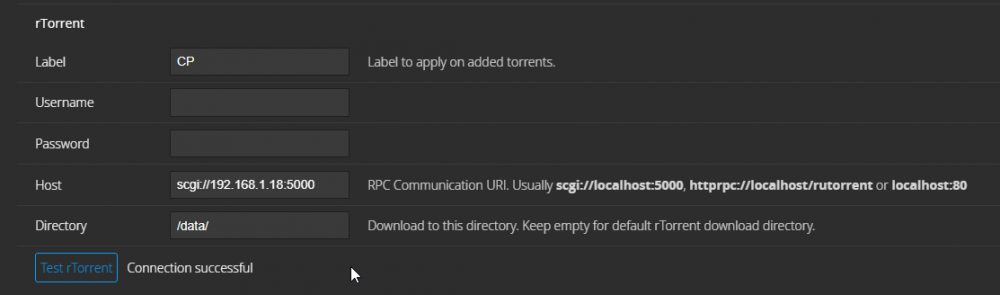
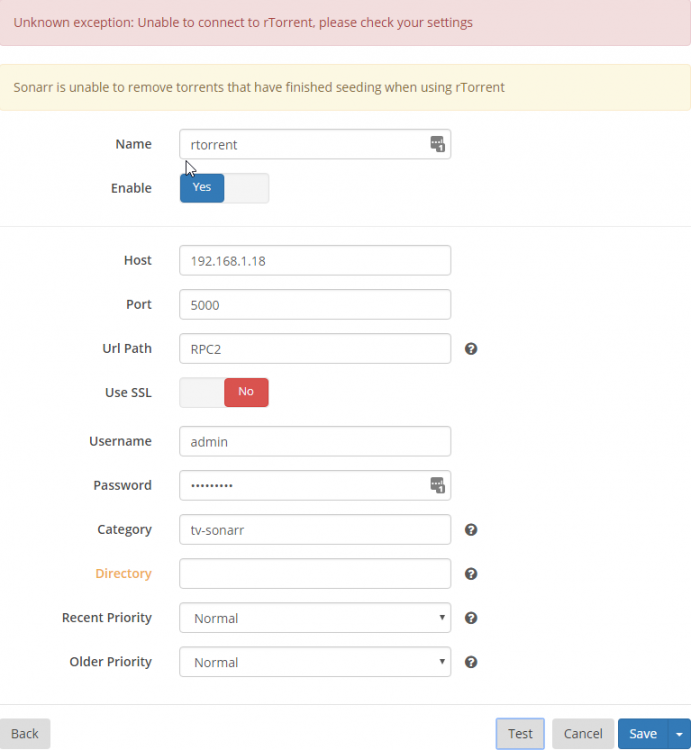
looking for a bit of help getting this to communicate nicely with sonar and CP if I could. At present to start with CP... it will test just fine but wont add torrents after snatching them. With sonarr i just cant get it to communicate at all. If you can help at all that would be great. I can manually add torrents and they work just fine. EDIT Sonarr was tried with and without username and PW. just took the pic like that.
-
I am having an issue with updating the pdf viewer. Nextcloud is telling me there is an update available but when i click the update button in the webui it says updating but doesnt actually do anything at all... logs dont seem to say much either. is there a way to manually do this?
-
I have an unassigned device that i use. I have also used the cache drive prior to that and still never had better than 4mb/s. i had this issue way back on first install and went through everything with you at the time. possible deluge settings etc. still having the same issues with rtorrent too... couchpotato says test successful but will not add any files for download. gonna have to try give that more time when i get the chance i think.
-
I could never get my deluge to use my full bandwidth. even to this day it never goes above 4mb/s dl. i gave rtorrent a go way back when you first released it. I just fancied qbittorrent because thats what i have experience with. I might go back to rtorrent and see how i get on. Thanks anyway
-
just wondering if there is any plan for a qbittorrentVPN docker? i'm very interested in changing from deluge if this is likely to in the pipeline?
-
I was having this issue and used the code mentioned and now although it seems to load it never shows anything other than a grey screen. Just FYI location /ombi { include /config/nginx/proxy.conf; proxy_pass http://192.168.1.18:3579/ombi; } if ($http_referer ~* /ombi/) { rewrite ^/dist/(.*) $scheme://$host/ombi/dist/$1 permanent; } Is that correctly used in the letsencrypt config?
-
im literally just holding off on the v3 release atm. just cos i heard v2 can not be updated to v3 and needs a new build. if its that close to release ill keep waiting.
-
Is the ombi preview close to public release out of curiosity? As in non preview release, I'm aware the preview is available.
-
I managed to get a hold of a custom firmware from merlin and tried changing the NAT loopback from asus's to the maplin loopback and still no joy on this. I cant find anything that indicated NAT hairpin unfortunately. Do my configs at least look ok?
-
Hmmm I wouldnt even know where to start with hairpin NAT. I use an ASUS RT AC68U. not sure if you have any experience with them that you might be able to point me in the right direction? EDIT Also just out of curiosity why is this an issue with nextcloud and not my other containers? And only since going through letsencrypt and not while using duckdns. sorry if this is a stupid question, just trying to learn a bit. EDIT Sorry just one other thing. I dont mind having to manually put in the internal url to access this as long as i can get the android and ios apps working right.
-
Ok I'm not going to lie I dont really know much about that NAT stuff. As you can probably see from my default config I have the method you suggest there but commented out. I did this as I was having issues getting that to work also. Should your method work fine even with the subfolder method on other containers? I'm willing to go back at it if its just going to work as intended.
-
Ok just looking for a little help getting nextcloud working as i'd like. I tried following the directions given in the earlier posts on the nextcloud support thread but it mostly applies to if you want to use the address xxx.server.com. I am trying to get it working with server.com/nextcloud. Currently I am having a couple of issues. Firstly I can access my nextcloud perfectly fine from outside my network with server.com/network however... within my network I am having issues and also I cant get it to play nice with the android app and the windows app either. At present while on the network I cant connect when using the unraid GUI. it sends me to 192.168.1.18:4433 but in order to access it on my network I have to input 192.168.1.18/nextcloud in order to access it. Also if I am on my own network and I go to server.com/nextcloud it redirects me to the correct local ip but does not seem to connect through letsencrypt as I get the insecure notice. Ill attach my configs for reference. Just FYI sonarr and couchpotato work exactly as i'd like with the setup I have. config.php default.txt


