





tazire
Members
-
Joined
-
Last visited
Everything posted by tazire
-
Just to add to this I have followed what you have said and get the same result as rh535.. I didnt need to change the port for my install either. I tried it twice, deleting all files before trying the 2nd time with the same results. Literally identical results to rh535. Essentially from the first pull I just inputted my unraid ip address where it states. bridge mode was set as default as was everything else. Always the same result.
-
I just figured this out. Kasm was the main culprit. I usually have my zfs datasets hidden. When i opened it up it showed that kasm had over 350Gb of data even though it wasnt being calculated during general operations. I'm guessing hidden files werent being shown. Anyway I dont use it often enough and got rid.
-
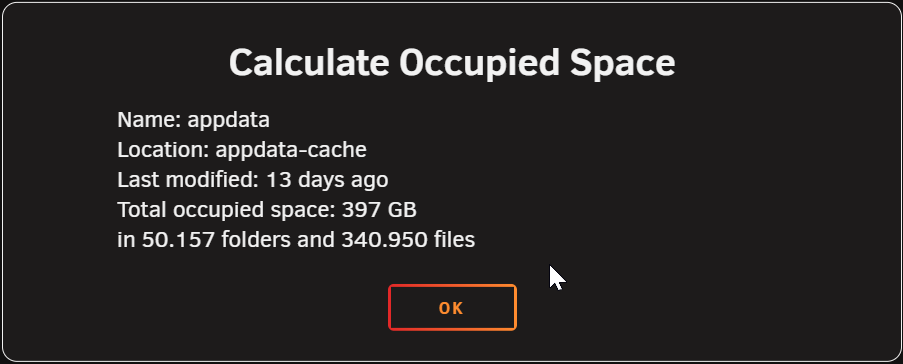
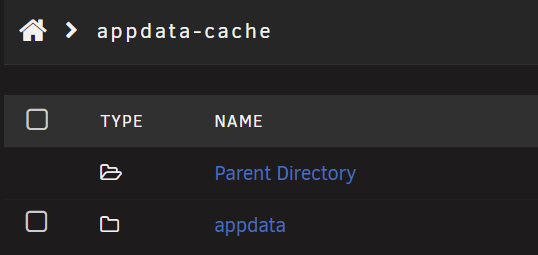
So my appdata cache is currently sitting at 923GB used of 966GB. This pool only has appdata storage (excluding plex which has its own pool) when I calculate the size of the data stored within the appdata folder it shows that there is only 396GB storage in it. This is the only folder on the drive... That I can see. Is there any other reason this pool might be filling up? I've tried restarting docker. server-diagnostics-20251204-2009.zip


-
@JorgeB Had the same issue on W11 and your command resolved it. Cheers. Let me know if you want diagnostics or anything else.
-
I've started getting this error recently too. I've been on 7.1.3 for a while but its only started recently. Will try update once a rebuild is finished.
-
It's ok m8. I got this sorted using the console on the container. Bit of a pain but at least its sorted now!
-
Do you mind posting a step by step? I have been having a nightmare with this. Cant really figure out how to use adminer to get this sorted either. Thanks
-
Have to agree with you on that seller. That's who I used for all my gear and it's never missed a beat. Glad everything has worked out.
-
100% or if like me you cant fit it directly then have a 120mm or 140mm fan directly above it blowing directly at the HBA.
-
Yea I also went with a newer HBA. 9500.. My logic was that its overkill for the task and maybe it wont get as hot! Probably absolute bull**** and I was just convincing myself to spend the money! Either way I haven't had a problem. It was very much plug and play and hasn't missed a beat.
-
For me in the end I just replaced the HBA and I havent had any issues since. I would definitely suggest having a fan blowing air on the HBA's if you feel its overheating. They tend to run fairly hot but they also expect server levels of airflow through them.
-
Ok so between the disk shutdown timeout and immediate shut down request upon power loss this has solved my problem. I'm going to assume the more likely culprit was the shutdown timeout given the other factors I explained earlier. Thanks everyone for the responses.
-
Is there any ram heatsinks that fit this ram? Also do you think you may have to reconsider the CPU upgrade in future because of this? Glad you were able to find a solution.
-
Thanks dude I did see that. But as I have said a manual shut down never results in an unclean shut down and I assumed these settings apply then too. So I never even considered that my settings were an issue. I have re adjusted the disk timeout to be 180. But again there is no way to properly test this without pulling the power on the UPS. Which I'd rather avoid given that others have said it can cause degradation of the batteries. Also the fact that other devices are still running post shut down of the server would indicate that there is sufficient time on the batteries to allow for the shut down. Which is why I was confused about my issue specifically.
-
Weird.... shouldn't this be applied to all shut down requests? Mine is set to 90 seconds. but when a manual shut down is requested it never results in an unclean shut down. It only occurs when a UPS shutdown is requested. I will try to extend it and see what happens. It shouldn't make any difference to my day to day use anyway. Thanks for the suggestion. It does make a lot of sense other than that I never get an unclean shut down when I manually do it.
-
Its a relatively new UPS less than a year old. Its maybe had 3 or 4 extended power off cycles. 2 of those were prolonged both times the server reported an unclean shut down. I don't really want to go chasing the issue if its going to degrade the batteries. I'll just have to sort out a notification on power outage and then I can VPN in and shut it down myself. Not ideal but seems like it might be my only reliable option. I have turned on the logging server and I will monitor that if it happens again. Thanks for all the responses.
-
Yea I get you. I'll set it to 100% so it should shut down immediately upon loss of power. But the reason I don't think that is the issue is because the other UPS powered devices stay on. The 2 attached JBODs will be powered on when the server is power down after a power outage. I never kept logs as the server has been rock solid for years. It's only by chance I found this issue.
-
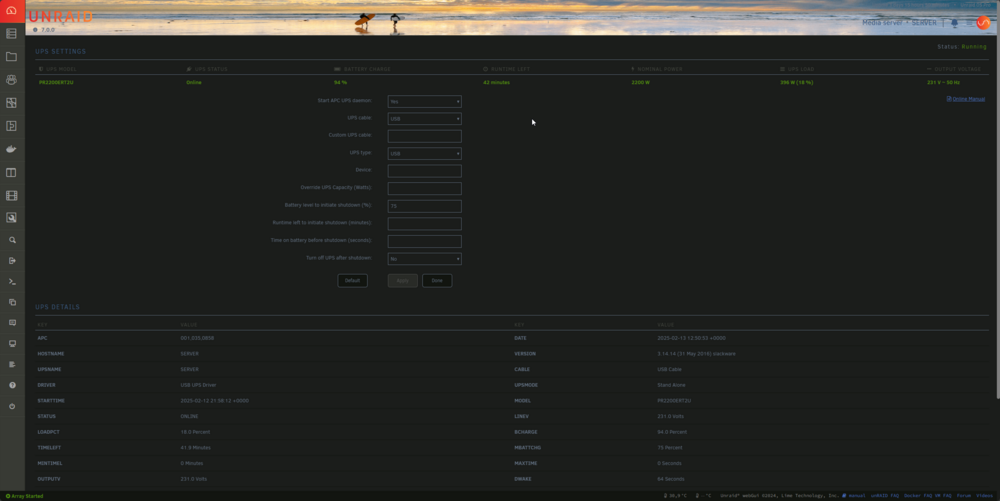
It can take about 2 to 3 minutes and it does shut down cleanly when I initiate it. Its a very large setup as can be seen in my sig. I have it set to shut down on 75% battery remaining just to ensure there is plenty of time. I know its not a battery issue or a time to shut down issue. I can unplug the UPS and I can see it gives an estimated time remaining of 45mins at ~90% load. Thats with a load of roughly 400W. My server maxes out at about 550W when all drives spin up. I wouldnt have even known about this only we had a bad storm here 2 weeks ago and have had a few power cuts since while they are fixing power lines. I've included my settings on the off chance something there is stopping the command being sent correctly.
-
So I think I am having an issue where by if my power goes out and my UPS settings activates a shut down at 75% battery, once the server comes back online it will always say that an unclean shut down has occurred. It will then obv try to run a parity check. I'm curious if this is standard or do I have an issue. I cant find the answer when googling. There is no issue with the UPS in that the server will fully power down while other electronics connected are still running so I know its not the UPS running out of battery before the server powers down. It wouldnt surprise me if this was standard operation but I just wanted to check. UPS - Cyberpower PR2200ERT2U
-
Just looking for a little advice about the assigned ports. I have started to use Immich recently. And it doesn't play nice with cloudflare because of it not breaking down the files into chunks. So any files over 100mb gets blocked. In order to combat this I set a local DNS record on my UDM P so these files will upload when on my home network. In order to ensure the traffic sent on the local DNS rule reached NPM I had to set the ports to the default 80 and 443. This is because I cant set a local port forwarding rule... At least I haven't found how to do it yet. The port forwarding rules only applies to internet traffic. I have this done and all is working just fine. My question is are there any security concerns doing this? or any other reason I shouldn't do it?
-
That's good to know. I'm more checking for my own peace of mind that I remounted the stock cooler correctly. I don't do anything with it to put it under a serious load just yet.
-
How you finding the temps on the a4000? I just got myself one for €400. Had to put the stock cooler back onto the card (it had an aftermarket 4070 cooler). I'm idling at 36. It gets up to 60 real quick (and holds there, 5min test) when transcoding and I havent had an extended transcode yet to see where the load temps stop. Or put a heavier load on it. I know it runs hot and that 60 is absolutely fine, i just want to have something to compare it to.
-
Haha. And its been rock solid for me. XD
-
In same boat... rtorrent thankfully hasnt had the issue YET!!!
-
Anyone know if there is a problem with PIA wireguard in the last day or so? Just woke up this morning and Sab and my privoxyvpn containers are both getting the following error recurring Error: error sending query: Error creating socket Error: error sending query: Error creating socket I use the same wireguard config file on my rtorrentvpn container and its working just fine. EDIT I've tried an updated wg0.conf and i'm getting the same issue. Also tried ovpn and same issue.


