





sjaak
Members
-
Joined
Everything posted by sjaak
-
i tried a 'clean' flashdrive (read as, new setup, only the license key was reused, no configs), so that a config conflict isn't the problem. yep: i think that my hardware has a glitch...
-
GPU are not sharing the same group. with the stock and LS.io version it working fine... After some more reading on the beta version i did make a full backup of the flash drive and upgraded to the 6.9 beta25. it works without problem so i decided to build a beta version... no luck, same behavior, unRAID gpu stays at P0 state and the screen is only showing a blinking stripe in the left upper corner, only the startup and shutdown is visible, local login is not possible... kernel: resource sanity check: requesting [mem 0x000c0000-0x000fffff], which spans more than PCI Bus 0000:00 [mem 0x000c0000-0x000dffff window] kernel: caller _nv000745rm+0x1af/0x200 [nvidia] mapping multiple BARs i tried the prebuilt images from TS, no luck too. Maybe there is a glitch in my hardware, or maybe this is one of the reasons why Limetech didn't include the patch in the official images... for now i'm stick to the LS.io version (the beta) and have to accept that the reset bug will be here...
-
i am not using the Nvidia GPU for the VM, that use the Vega64 (this if why i needed the AMD Reset Bug Patch ) its Passthrought. unRAID use the Geforce gt710 (GUI boot), Plex media server use the geforce 1050ti. with the build from this container the GT710 stays on P0 state and spamming the logbook with the notification, If i switch in the BIOS from the gt710 to the 1050ti (and use it for unraid en plex) then the gt710 is staying on P0 state and spamming the logbook) I am on Threadripper gen1. still doubt to check the beta build out...
-
I finely made time to try this dockercontainer. Got it to work, the Win10 VM works perfectly with the reset bug included, Linux VM not really (2e boot crashed at efi vga to amdgpudrmfb notification) But i found out that the GPU that unRAID using is staying at P0 state, tried if it would work if i switch from GPU, no luck... also its spamming the logbook with: kernel: resource sanity check: requesting [mem 0x000c0000-0x000fffff], which spans more than PCI Bus 0000:00 [mem 0x000c0000-0x000dffff window] kernel: caller _nv000745rm+0x1af/0x200 [nvidia] mapping multiple BARs this is with unRAID 6.8.3 i am not sure if the 6.9 beta doesn't have this issue... (tried Nvidia v450.66, v450.57 and 440.100) did update the vega64 driver on win10 (finely it works!) and switched for now back to the LS.io version)
-
will do soon, if i got some free time
-
i cant found them complete (coffee isn't kicked in yet...) but levelonetech is my information source: https://forum.level1techs.com/t/vega-10-and-12-reset-application/145666 https://forum.level1techs.com/t/navi-reset-kernel-patch/147547 maybe you can ask @Leoyzen for the patches? he is also creating a custom kernel and include those patches. i prefer to chose to install one or bold...
-
Nice to see this! it would also be awesome if it got a option to include the Vega Reset Bug Patch (and/or Navi Reset Bug Patch)...
-
2 GPU's assign to FaH, bold are working, no cpu slot enabled (it still use some cpu cores to pass work to the gpu's, for my setup its using 4 cores +/-75%) config.xml: <slot id='0' type='GPU'/> <slot id='1' type='GPU'/> Docker setting, NVIDIA_VISIBLE_DEVICES: all if you have a nvidia gpu assign to a VM make it disabled for FaH! or the system will crash. I'm not really sure how to do that (i have an AMD card) but if i understand it correct you can change the syslinux configuration: pci-stub.ids=xxxx:xxxx,xxxx:xxxx (IOMMU id, graphic/vga and sound of it!), after change reboot system.

-
it need the cpu to pass work to the gpu. you can limit the docker images for using cpu cores, just assign 1 core to it. also setting in the 'extra parameters': --memory=Xg --cpu-shares=1 (X = how much GB is allowed) so you can also limit the RAM use of it
-
V2020-03-14 here, still on 6.8.2 and its working fine, Thanks for this plugin!
-
I have the same settings, only i have the access mode set to read only (Tautulli don't need write access)
-
i know. but disabled cache use on the share, that also works (i disabled netbios, so no v1 here) i prefer to lose some write speed instead of security...
-
yeah, and at this time of writing this message, the server is 23hours "stable" without suspicious notifications in the logs, however almost 18hours are Parity sync (its slower on 6.8) Dockers and VM are on.
-
its the first time this "half freeze" problem happens. (beside the freezes i had with Ryzen) i running 6.8 now +/- 2 weeks, i don't have a high uptime because the annoying AMD reset bug (vega64).
-
i not sure if this is to right spot to place this, but there did something goes wrong on my server running 6.8. (there are NO diagnostics!!) this morning i had a "half" freezed system. i tried to login on my VM (its always on) after put password in and pressed 'enter' its stops working, only the mouse was working, no keyboard command was accepted. i tried to gain access thought the GUI boot, but firefox freezed while loading the webgui. then i tried to open terminal but i cant type anything there. so, booted my notebook to gains access through ssh, did successful login to it en tried to force a reboot, got the message that says system is going to do a reboot. waited.... well reboot not started, it did nothing. opened en new ssh terminal to get "diagnostic", waited about 30mins and no diagnostics... so there was nothing else then a dirty reboot (i really don't like that) it rebooted and its now doing a paritysync, no strains thing going on... but, now i didn't got any diagnostics, so i setup a remote syslog server, but when i config the syslog service on unraid and saved it i had to restart rsyslog by my self, Unraid didn't restart it after i changed something in the GUI. why doesn't unraid restart it after some gui change?? "sudo /etc/rc.d/rc.rsyslogd restart" did the trick. now i'm going to monitor the system logs remotely, hopefully this was a onetime thing.... edit: Thnx to Domoticz (its running on unRAID) i found out that around 0:15h AM there where no activity recorded from my energy meter (youless LS120), around 9:55h AM it started working again (the moment i did a dirty reboot) no i know why Plex didn't do it scheduling programs... so Docker was "dead", and VM manager was almost dead...
-
"vers=v1.0" in the mount command (on Linux, i don't know how it handled in windows)
-
i just switched my ubuntuVM from nfs to smb and i got this problem too, the windows vm are still fine. however, steam can still see and use the share, i just cant browser it anymore. umount and mount will "fix" it for some time... now i changed the share to data array only and its fine... really hope this will be fixed in a later unraid version...
-
what your network settings?
-
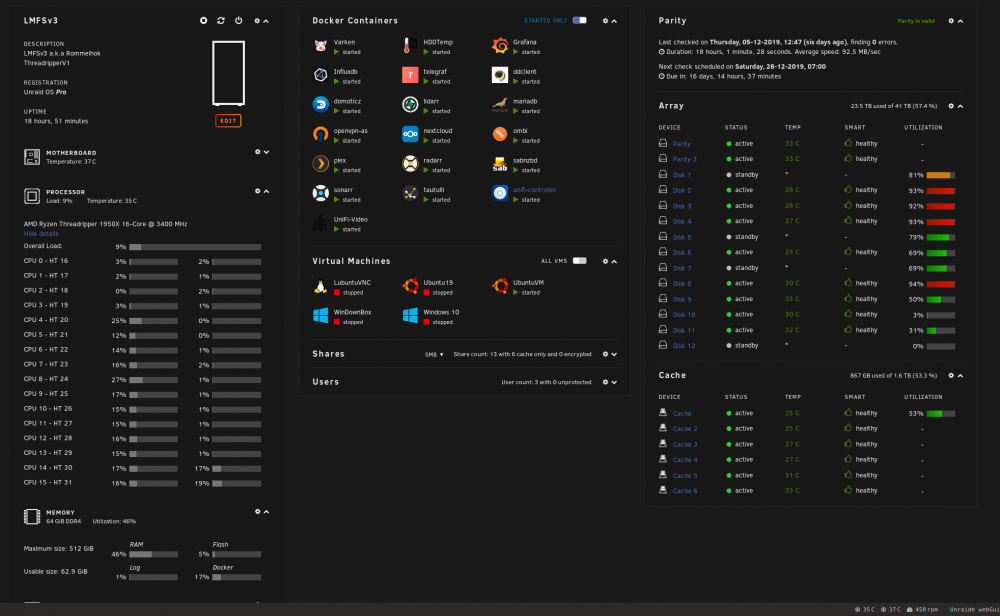
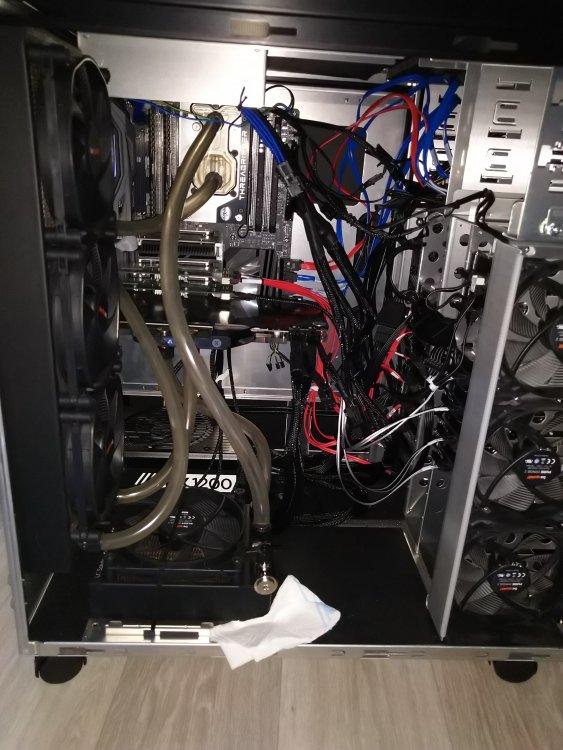
currently 41TB + 1.6TB cache. soon it will be 45TB, waiting on a sas => sata cable... probably it will run out off space in between 6 months... the pic missing the 3rd GPU (GTX1050ti), didn't make pictures at the installation of it... yeah, cable management can be much better, will improve it do soon... (probably not 😇 )
-
WELL, latest update broke it, cant login anymore... can't wait until UBNT release the udm pro so i can get rid of docker and use ubnt stuff only, so i can blame them ... almost everytime it breaks something... edit; switched back to 3.10.5 unmanaged the camera (and reset it to default) remove docker files, and started with a fresh one. now 3.10.10 works... (no backup used, started from scratch)
-
i really would have een file manager in the Unraid Gui, its making the Gui boot much completer with it... i'm not really care to have a file manger in the webgui...
-
Upgraded my Threadrippper server without any problems, i do have an Marvel sas/sata controller what still works fine.
-
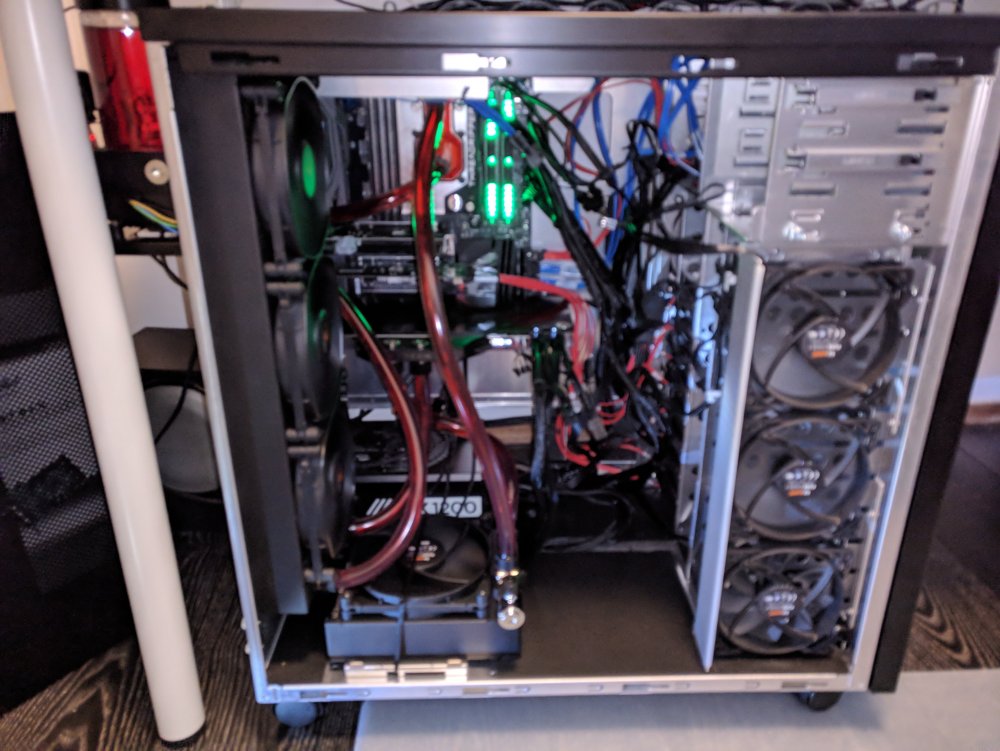
This is mine server/desktop. its water cooled so it is a bit less noisier, especially the Asus strix vega64 is with the stock cooler a bit too noisiest.... i am using it as een server best it also host my daily VM and a second VM for Win10 Gaming, but with the know reset bug from the vega i currently use the daily VM (bold share the same cores en Vega64) slowly upgrading the hdd's, its 71% full, but i think that i first swap the sas/sata card out from a Non-marvel controller card. (its works fine now) Threadripper 1950X Gigabyte Aorus X399 Gaming 7 Corsair Vengeance LPX CMK32GX4M2B3200C16 Corsair Vengeance RGB CMR32GX4M2C3200C16 Asus strix vega64 MSI GeForce GT 710 1GD3H LP (is in use for Unraid Gui) Lian Li PC-D8000B Icy Dock ExpressCage MB326SP-B Supermicro AOC-SAS2LP-MV8 (its a Marvel card) Corsair HX1200 V2 EnerGenie UPS 1500 VA 2x Crucial BX100 250GB 1x Crucial MX500 2,5" 1TB 1x Samsung 830 series SSD 128GB 1x Samsung 850 EVO 250GB 1x Samsung 850 EVO 500GB 6x 4TB hdd 1x 3TB hdd 1x 2TB hdd 2x 1TB hdd watercool setup is fully EKWB on the pic it has just 2 RAM sticks, its now upgraded to 4 RAM stick so it has 64Gb.
-
here too! after 3 days, unifi-video wont use more then 4% RAM, and it stable.
-
I am going to test the JVM_MX here to, its now using 27% of RAM (total ram is 64Gb!) with is to much for me, my desktop is running in this server too... hope the JVM_MX wil work here. it just has 1 camera...




