





-Daedalus
Members
-
Joined
-
Last visited
Everything posted by -Daedalus
-
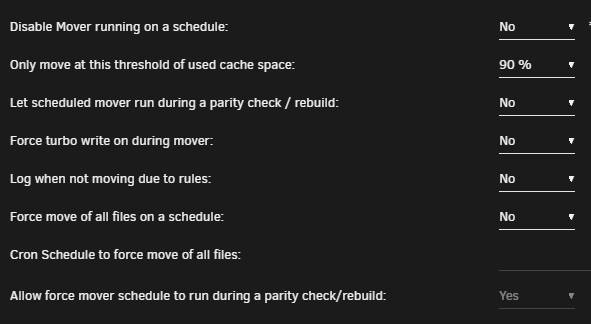
Simple question, unless I'm missing something: It looks like with this plug-in enabled, the default daily mover operation gets overridden, correct? I always thought MT ran in addition to schedule. For my use-case, I'd like the mover to still run daily, but also have this set to move at x%, just in case the cache gets full from a busy day. I realise I could force this via cron, but then it would also trigger during a parity check, which I would rather not happen. If I'm missing something obvious, please let me know. Otherwise, would it be possible to include this option in an update?
-
+1 from me. Would be very handy.
-
Hey cheese, thanks for the help! I did try .110 this morning before work for the steamcache_ip, and it didn't seem to change things, but trying it again now worked. I'm getting "MISS / HIT" output in the log (also for a Windows update that got pulled down at the same time). The only odd thing is that it doesn't seem to keep everything. I install a 1GB game, and I only have 600MB of cached files. I install another 1GB game, and the cache grows to 1.2GB. I'm not even sure how much of it is Steam and how much is from the Windows update. Any idea what might be happening? Looking for content on a different endpoint, maybe? Anyway, it's working, so that's a plus. I'll start re-enabling bits tomorrow to see if it still works with the 'true' flags set (no reason why it wouldn't, but hey).
-
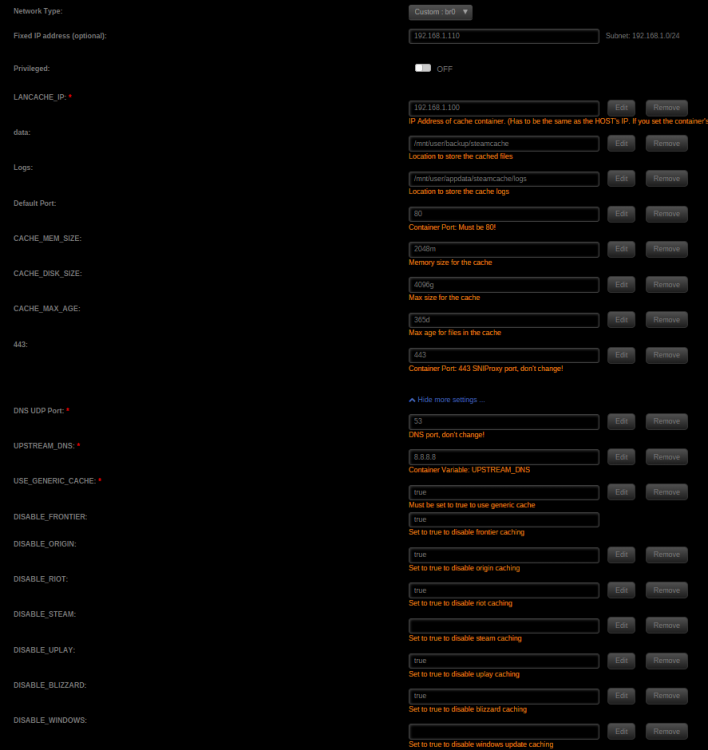
Hey cheese, thanks for the reply! The bootstrap output from before was me manually running it when the container was started. Didn't realise it was run anyway. I changed nothing, restarted the container (for the hundredth time) and it the DNS test in PowerShell works! ... but now when I change a machine's DNS to point to SteamCache, I get a no internet error when trying to download a game. My machine still has internet access though, so I think it's just the Steam servers themselves that can't resolve. I can't login to Steam in this state either. Container config attached. I also tried changing LANCACHE_IP to match the container at x.x.x.110 (the wording was a little unclear which one I should use) but everything's the same. Any help would be great!
-
I do the same, but I would still love to know what the IP is. Right now I have the last group in the description. Ie - Gaming VM with IP 192.168.1.112 gets a description of " 112 | A VM for games". So +1, would definitely be nice to have a more automatic solution for this.
-
Hey guys, Having a little trouble getting this working. I have SteamCache configured to use the host's IP (192.168.1.100). I've tried setting a fixed IP for the container itself as well, that doesn't seem to chance things. When I run bootstrap.sh I'm shown: nginx: the configuration file /etc/nginx/nginx.conf syntax is ok nginx: configuration file /etc/nginx/nginx.conf test is successful 2018/07/29 18:38:35 [emerg] 107#107: bind() to 0.0.0.0:80 failed (98: Address in use) nginx: [emerg] bind() to 0.0.0.0:80 failed (98: Address in use) 2018/07/29 18:38:35 [emerg] 107#107: bind() to 0.0.0.0:80 failed (98: Address in use) nginx: [emerg] bind() to 0.0.0.0:80 failed (98: Address in use) 2018/07/29 18:38:35 [emerg] 107#107: bind() to 0.0.0.0:80 failed (98: Address in use) nginx: [emerg] bind() to 0.0.0.0:80 failed (98: Address in use) 2018/07/29 18:38:35 [emerg] 107#107: bind() to 0.0.0.0:80 failed (98: Address in use) nginx: [emerg] bind() to 0.0.0.0:80 failed (98: Address in use) 2018/07/29 18:38:35 [emerg] 107#107: bind() to 0.0.0.0:80 failed (98: Address in use) nginx: [emerg] bind() to 0.0.0.0:80 failed (98: Address in use) 2018/07/29 18:38:35 [emerg] 107#107: still could not bind() nginx: [emerg] still could not bind() /scripts # Running: sudo lsof -i -P -n | grep LISTEN I don't see port 80 in use anywhere. I've made sure to run the unRAID GUI off 81/444 as well. I've double-checked all my containers and VMs; nothing should be using that port. Is there something stupid I'm overlooking here?
-
Posted this in general support, but it doesn't seem to be getting much traction: If you have your syslinux configured like mine, and have isolated some cores from unRAID, like so: label unRAID OS menu default kernel /bzimage append isolcpus=8-15,24-31 initrd=/bzroot Any time I pin any of these threads to a Docker container using: --cpu-setcpus="14-15,30-31" That container is limited to only using the first thread. VMs don't seem to be affected by this, only Docker stuff. Running a 1950X. Present in 6.5.2/3. Can anyone else reproduce this?
-
I'm not picking on you specifically, but I absolutely hate this answer. Something as basic as an out of memory warning should absolutely be handled by a server OS, and should 100% not require a community member to implement. unRAID has a very small development team, so it's completely fine that they haven't got around to adding this yet, but that doesn't mean the userbase should get comfortable with the "there's a plugin/script for that" mentality.
-
Any chance we can get LAME added? I'm looking to get a FLAC folder auto-converted to MP3 for use with mobile devices. Showing my Linux noob status here. Looks like there are five packages needed for what I'm looking for to work. I can manually add them, though it would be nice to have them included here for the UI:
-
Apologies for the necro, but having seen that single-drive vDev expansion is coming for ZFS some time in the future, I figured I'd nudge this again for visibility. For myself, I'd be happy just having ZFS for cache, not the main array. Myself and some other users have been having some issues possibly related to BTRFS cache pooling (see below, the issue seem to go away when a single XFS cache device is used), and I feel like having something that's been around longer and has been put through it's paces a little more might be a nice option. I understand that for all the reasons Limetech listed above, it might still not be viable, but just putting it out there none-the-less. https://forums.lime-technology.com/topic/58381-large-copywrite-on-btrfs-cache-pool-locking-up-server-temporarily/
-
1.
-
Just to chime in here: I'm experiencing the same issue, also using 2x 850 Evos. Not a fan. Haven't tried any troubleshooting things mentioned in this thread or anything yet, but just to say that it is also affecting me, etc.
-
Point taken. Just asking for my own understanding, in terms of probability of detection, etc.
-
Point taken. But if infection is random, surely you'd be better served by simply upping the number of bait shares, or increasing the number of files per share give the same protection than randomly naming shares? Eg, on a 10 share system: 50 zz-prefixed shares would offer better protection vs. 30 randomly named ones.
-
Just so I'm completely understanding things: Does this not negate the benefit of having them randomly dispersed throughout your array? If they're at the end, is the ransomware not more likely to hit legit files first, assuming a-z progression? Also: Massive thanks in general for creating this, especially given that worm that's on the loose at the moment. This one is Windows-only, but you never know.
-
So after some confusion, it seems debug logging is turned on by default, and for some reason the container was spewing logs all over the place, into the docker image, but not within the container, so it wasn't increasing in size in an easily trackable way (the Sync container itself didn't increase in size when checked with CAdvisor) The thread below explains this in more detail, as well as instructs how to remove the offending logs. I cleared about 5GB worth, most from Sync, rest from CouchPotato.
-
RE: 'mono' CPU usage, I've noticed the same thing as well. Interested to hear if anyone has any input.
-
I was getting a similar problem was well. My docker image file got filled over time (I don't know how long as I wasn't really paying attention to it), forcing me to remove and re-add the docker. Currently checking things, will report back.
-
I've had the dashboard bookmarked this whole time. The simple point I'm trying to make is that it would be nice if this weren't necessary. If the UI is doing one thing, and lots of users are doing another, that would imply the UI could do with a change, hence the original post. I'm not looking for other solutions, I'm simply suggesting something that might be useful, hence "feature request".
-
I... could... But that's a little like: "My car doesn't have doors" "You could simply add your own" There's of course ways of doing this without a UI setting, but it seems like something that should intuitively be there, hence why I mentioned it.
-
Been using your MineOS docker for a while now, and seems to work nicely. One issue though is that the docker continually shows as having an update available, then pulls 0B of new data. Any idea what might be causing this? It's quite hard to tell if I'm on the latest version or not.
-
Small request for the WebUI if possible: The ability to set Dashboard as the default page when browsing to the server, rather than Main.
-
Thanks very much for that. CPU shares: If I were doing things correctly, all my dockers should be at, say 256, and I could increase or decrease that number, depending on priority. (MineOS on 1024, Plex on 512, and the rest on 256). CPU pinning: After reading the OP, I thought it was something a bit different from what it is.So CPU pinning is just "Use only these assigned cores and no more" with other dockers free to use any unused resources. But this is good because nothing from pinned docker is ever paged to RAM. As it stands, all dockers are shared at the default 1024, with Plex at 512, and MineOS is pinned to cores 0,1,2,3 (half of available). Seems to work reasonably well.
-
I could do with a little help here. Not sure I'm understanding this... Main issue: With Plex docker transcoding multiple streams, Minecraft servers (in MineOS docker) experience lag. I'm hoping to reduce this by giving priority to MineOS, but still allowing Plex to use up to all remaining resources. As far as I get it, pinning a docker app to a given core means that anything used by that app that's in the CPU isn't moved out to RAM unless it has to be. So, would this mean I'd pin MineOS (the highest priority in this scenario) to, say, cores 0 and 1, and let Plex run as normal? Does this still allow Plex to use any untapped resources on 0 and 1, or have I just restricted it to the other six cores?
-
Sorry, should have been clearer. jonathanm's suggestion worked in that I was able to use git within the original MineOS docker, but hexparrot seems to have changed things from when I looked a while ago. The Node version is no longer on a different branch, but in it's own repo, so I'd need a new docker. I did actually manage to find one (from this thread), but the author hasn't updated it in quite some time, so I haven't switched over yet. When I get some free time I'll look at making my own dockerfile for it, and hopefully keep it more up-to-date. Also, I'm pretty sure a node-js frontend for MineOS isn't going to help your kids any. There won't be any difference to anything as far as Minecraft is concerned.


