jademonkee
Members
-
Joined
-
Last visited
Everything posted by jademonkee
-
Thanks for the tip. I didn't know where to find the files until you showed me the command that suggested they were apps (I didn't think to look in the apps folder). So I've now deleted all the files marked as "Extra" and fingers crossed that everything will continue to work. Now I just have to fix the HTTP header errors...
-
Wonderful. I was given no notice of this, and I updated the image today not realising that it would now update my Docker to v27. After updating the Docker, I checked the logs for any changes to sample.confs and that some had changed in Swag and NextCloud. So I updated them, and restarted both. Nextcloud was then in Maintenance mode, and i didn't know why. I disabled maintenance mode, and now on the Admin page it says the following (and that I am now on v27, which I didn't choose to upgrade to): Some files have not passed the integrity check. Further information on how to resolve this issue can be found in the documentation ↗. (List of invalid files… / Rescan…) Files are: Technical information ===================== The following list covers which files have failed the integrity check. Please read the previous linked documentation to learn more about the errors and how to fix them. Results ======= - serverinfo - EXTRA_FILE - l10n/ug.json - l10n/lo.js - l10n/ug.js - l10n/bs.json - l10n/cy_GB.js - l10n/ta.js - l10n/cy_GB.json - l10n/bs.js - l10n/fo.json - l10n/ta.json - l10n/lo.json - l10n/fo.js - l10n/kn.js - l10n/kn.json - encryption - EXTRA_FILE - templates/mail.php - templates/altmail.php - files_trashbin - EXTRA_FILE - lib/Sabre/PropfindPlugin.php - photos - EXTRA_FILE - js/photos-vendors-node_modules_nextcloud_sharing_dist_index_js-node_modules_vue-material-design-icons_A-0d7f22.js - js/photos-vendors-node_modules_nextcloud_sharing_dist_index_js-node_modules_vue-material-design-icons_A-0d7f22.js.map - js/photos-node_modules_vue-material-design-icons_PackageVariant_vue-node_modules_vue-material-design-ic-36962a.js.map - js/photos-node_modules_vue-material-design-icons_PackageVariant_vue-node_modules_vue-material-design-ic-2ca5cc.js.map - js/photos-node_modules_vue-material-design-icons_PackageVariant_vue-node_modules_vue-material-design-ic-2ca5cc.js - js/photos-node_modules_vue-material-design-icons_PackageVariant_vue-node_modules_vue-material-design-ic-2a64fd.js - js/photos-node_modules_vue-material-design-icons_PackageVariant_vue-node_modules_vue-material-design-ic-36962a.js - js/photos-node_modules_nextcloud_sharing_dist_index_js-node_modules_vue-material-design-icons_AccountGr-e8a447.js - js/photos-node_modules_nextcloud_sharing_dist_index_js-node_modules_vue-material-design-icons_AccountGr-e8a447.js.map - js/photos-node_modules_vue-material-design-icons_PackageVariant_vue-node_modules_vue-material-design-ic-2a64fd.js.map - l10n/si.json - l10n/ps.json - l10n/ur_PK.js - l10n/si.js - l10n/ur_PK.json - l10n/tk.json - l10n/ps.js - l10n/tk.js - lib/Listener/NodeDeletedListener.php - lib/Listener/GroupDeletedListener.php - lib/Listener/GroupUserRemovedListener.php - files_pdfviewer - EXTRA_FILE - js/files_pdfviewer-workersrc.js.LICENSE.txt Raw output ========== Array ( [serverinfo] => Array ( [EXTRA_FILE] => Array ( [l10n/ug.json] => Array ( [expected] => [current] => abf662b0d32040f67f5e593ad23dc25a89fb096237315df92a9c732bdf8623e8723da440621d00cd20a740622c5198a1f822d7cacf0f38c5488c37ae34c489dd ) [l10n/lo.js] => Array ( [expected] => [current] => 0c1588a17264a3114f82592b3a0e82003e61a2739d360e622dcf14c5df1d2092d744972c59a984b1cf89f3a794e8127c9c7dd58b9db210eaa6eee1b1b12db42a ) [l10n/ug.js] => Array ( [expected] => [current] => 6ca0be0ef850fc6b6aae34d91c9a5c2674174ceef2a52e92b61b527d4fad2fed01256bdc120d875a04103a617abd547f0ad479072874cfa73df660f3600f822c ) [l10n/bs.json] => Array ( [expected] => [current] => 7f5a1c2e71e2a8f94269bd06e81645abc2641cffd2c502657449bd2de4ea11716f7907fe1efbc940e2ad2e96a63c01f32726e96ca669223513ff567110b0a071 ) [l10n/cy_GB.js] => Array ( [expected] => [current] => 3fbcfc202db25eee1e04b0c4a824c7f620346e72ee49343b441e4f6a4dd0e6a8181b63a98d2d626919142f8228cb1abb3deaad26152c1c7c20bcce3c151bf0f8 ) [l10n/ta.js] => Array ( [expected] => [current] => 8d1823ad0bdccf749a825068b18dd1afd3146bf65ea133691de8befa0ad4cf20aadf784252e51183a1716df48d8589731b3334e81deaebd5194986c368efc719 ) [l10n/cy_GB.json] => Array ( [expected] => [current] => 03e5bc4a3675ef09cabcb162042ee96088759d65cfe4f6494f866bef139a3dda612c6d595d94f26ec0fd0ea9e39e2778652406886d15d38ef7c5560a66bd0859 ) [l10n/bs.js] => Array ( [expected] => [current] => 772a5511fb81c659a87eeccb6d2b25f89ab0316074b0117c2287328188f5e90c166041df32e2978a5762678707bfbc090f518f5391d05089daf8df82ca194c37 ) [l10n/fo.json] => Array ( [expected] => [current] => 4bfb13f409e84630ad298aa806436fc215c1414946c31058146b7bd646c9c59b4fb15409484c6c20e694ff5387d3182059c1e0a24e0f5f6c70f9ba3b59f7eb24 ) [l10n/ta.json] => Array ( [expected] => [current] => a4ffe199ab37f97d8576b9efd5c6d4371a670e8b1d9a868b5886839f7302cd6f747ffe24e1d9422cd0eaa5d4575f12a4ce4b2af9b235326ac898e9d2dda83664 ) [l10n/lo.json] => Array ( [expected] => [current] => a3676f0f1633a84ac9ddd1e51f96110d8f2aaac47ad387e3418e644403fa53c9b69e1d38707d335aea2f7b23eb2e43fa9f70aa770819e305b2500354426151eb ) [l10n/fo.js] => Array ( [expected] => [current] => d9a38ad17bd79a0f71fe482f21fa3bd869d5f7d27cfd0f0c95c07086494d380b6ad48212efae88740d88135d91dc64dfce8addb7a1b5a90234d3b2041429ec1c ) [l10n/kn.js] => Array ( [expected] => [current] => d2273c847eae12e2e9776e6c937316fbdb152f4fbe42638e7951512a50c04892a620a9d8eee8d75f9d4285ef9704c52777bf886ee3ddf984e233680f82462de9 ) [l10n/kn.json] => Array ( [expected] => [current] => 0e04c02cd35b2f86eace4e748d4b8985979b10fadad6371b928543055f22bcfe898c56578b5ca2cd1fae2dd7ad5c4b652fb7e8ddddf4dacaf3e2091da16b81af ) ) ) [encryption] => Array ( [EXTRA_FILE] => Array ( [templates/mail.php] => Array ( [expected] => [current] => c8244a5bd79b8881c556e926c359ca3976f706b484b9c5703f8e99608e3ea08129203b31ef2494914c8edb96f89bda1e9919460bcda5f993690c263de6ef4ac0 ) [templates/altmail.php] => Array ( [expected] => [current] => b42b51938dcfa614c798e004bb381cb024509cfd3e519caa2e42684ef8c95575e2e7235152b3545eae013497fe1784ef8f22557e79839d6554a13d96c2f8eab5 ) ) ) [files_trashbin] => Array ( [EXTRA_FILE] => Array ( [lib/Sabre/PropfindPlugin.php] => Array ( [expected] => [current] => 601e9c68d9d2e1bf8a04558b4c1bbd7cb85b159edce9ba2f61d8676d5fab75116cc0d486ce874cff0d8b2db9fc01e0b679275928714baa452fa34ad239621836 ) ) ) [photos] => Array ( [EXTRA_FILE] => Array ( [js/photos-vendors-node_modules_nextcloud_sharing_dist_index_js-node_modules_vue-material-design-icons_A-0d7f22.js] => Array ( [expected] => [current] => 00bf3027a85fbbd85e32348db8445e767275391ed238ebe139d0cc05549a8472807a1dab6e0569a40ba0d0ba56492cd1b66b8a3ef1ed45ab048192b3fe3b60dd ) [js/photos-vendors-node_modules_nextcloud_sharing_dist_index_js-node_modules_vue-material-design-icons_A-0d7f22.js.map] => Array ( [expected] => [current] => ec0fbdfdf75214d0dc3fd6c706c6d03da9f794beb1533fed746a292efcbac81f3291fbe28872d94664d9019b28db39f198e6766f5d195c05d1c2bb874da8964b ) [js/photos-node_modules_vue-material-design-icons_PackageVariant_vue-node_modules_vue-material-design-ic-36962a.js.map] => Array ( [expected] => [current] => d81fbf9ed88fa0d13f7a03c6acf24472abc7ceb9b9fda80a812610868b1ef805607b3331dfab05025e48946e382a4fcab217262ae9b63610711458c4499141ae ) [js/photos-node_modules_vue-material-design-icons_PackageVariant_vue-node_modules_vue-material-design-ic-2ca5cc.js.map] => Array ( [expected] => [current] => b942b79fc91746a4ac1c200144502be520542d9376dea4c1a9082e4ccd269ca83a42555362539b4126498be79d302139860bedd635dd3416ad4afeb0ba67203d ) [js/photos-node_modules_vue-material-design-icons_PackageVariant_vue-node_modules_vue-material-design-ic-2ca5cc.js] => Array ( [expected] => [current] => f40b2f75d11246dada565e8bb55c6ca69315eb0029a8afb1b79c1d0ad4f1a91ae62880e30d6f3082aef3826d6aed51d94a63978bb7fbe5eda95505966675892c ) [js/photos-node_modules_vue-material-design-icons_PackageVariant_vue-node_modules_vue-material-design-ic-2a64fd.js] => Array ( [expected] => [current] => 8d63fbed4bd4a819d1b0a6ba0df92b7b1d8a909dc760d050be447d571e6af6373332e34876319503aaaacc595331ff66ed78220dafbab8ae70e274ec37a2c796 ) [js/photos-node_modules_vue-material-design-icons_PackageVariant_vue-node_modules_vue-material-design-ic-36962a.js] => Array ( [expected] => [current] => 261b1668e0a72b60060431331ca6576e2013f36f3f60f9f8f898247401c86499801455a45dd272c230bcd3c65b17f7c4aac06a97403239177b4b6d7e222fcba2 ) [js/photos-node_modules_nextcloud_sharing_dist_index_js-node_modules_vue-material-design-icons_AccountGr-e8a447.js] => Array ( [expected] => [current] => ea266383ff8080075076a09f5db9760245d3df299f04327cbeffd714740997477db5831f50c578f98340c1a1a4a3a93826aa2e8f8b2f4af42f0cfff6eacd635a ) [js/photos-node_modules_nextcloud_sharing_dist_index_js-node_modules_vue-material-design-icons_AccountGr-e8a447.js.map] => Array ( [expected] => [current] => 169457dcd162a8ad78fa203cc9d7a21e65afdd00b1f3ecce5ae9a695b5584a6bef39d89b5069b0d85dfdb64bf693f93fa524a51a5c8bfcfa09a6f2da36955bcd ) [js/photos-node_modules_vue-material-design-icons_PackageVariant_vue-node_modules_vue-material-design-ic-2a64fd.js.map] => Array ( [expected] => [current] => 278aec063e12d913473a56035d078b790af63e5facc85f104a84c1b414165e7f2bc72c05d9834ab9d47c40d49542460fd9b0c31ac879b5a83e4e79f677e4f1a3 ) [l10n/si.json] => Array ( [expected] => [current] => b7a0710e4579b66534b671725022c14a34817beae841550665268cbf82d15af7f1bab12bdeca47419c6e5124d4aaf5e6217b017d88f899cec7d6fe26436f7406 ) [l10n/ps.json] => Array ( [expected] => [current] => d90e82d5f0f1d7881f294b8adff11d70b5ec59a88242fe289311a3cdfb2c655cd8c1e444b35a6731c1b750097ac50d6e122524f92859d02ec5cbbbeb7c031f01 ) [l10n/ur_PK.js] => Array ( [expected] => [current] => 0144e305861c6351b3ccc47e940f32070c90618fc915f817412babad05fae38aa7383f9afec726b66734ad5a1d9ab4974d8289be73dfef205926a0028da123f2 ) [l10n/si.js] => Array ( [expected] => [current] => aca57ab4ff948a399d41cf889a2e231f0c9f866b4ebbf1ea548157fb7288659e2729e69b99c0f6d5846af1b28e808c9a6df30db3fd2856afb25dce2a778976b5 ) [l10n/ur_PK.json] => Array ( [expected] => [current] => e0e54b9dbd4fddf94096b99cf12309b7a623a7b8ec7afca767c44ad6edccfe3521438260668a18c34565353794163ed2d433a45ae0b5a2960aa1efb66cc016b0 ) [l10n/tk.json] => Array ( [expected] => [current] => 9477cdee70f42fbf7a6e9772c5593f1bd9e9593f97a7717642845359579a435cd500d95b910ea0d34afa366a6b15835a34f86a60d3fe643402f1daab8f9c3f6d ) [l10n/ps.js] => Array ( [expected] => [current] => e3c8bbc66df0a1acb84a09370d82decd198b1962653b008c18fdf20d906d00b4535144e1ce66a381573165754f1a500929eefd8e5e0ebf7b2af9351e64dab441 ) [l10n/tk.js] => Array ( [expected] => [current] => 594fdae47e9fca04dc224735ca1a9c625de6cf839320548b3699b4021d40c19c762d7067d6176002f4872be9f2907b8f3d93020706a6311d9d42d823c9f475c4 ) [lib/Listener/NodeDeletedListener.php] => Array ( [expected] => [current] => dd0d2a74eab07fbdfd62e11ea299e0a84c07e3f4cf2334847959bbf57de326e3ae2a7284b2f167dcdc07674857f71e52cb73d24fc21bcf1425385d07b1d79e60 ) [lib/Listener/GroupDeletedListener.php] => Array ( [expected] => [current] => 8606c79d02cb48e472e8b5ed353e0441135d95f285879c80a5367ba9d3654cdcc3743f661bd49ad58b6d863739fcb9eb2f8648cc32a6ec52c51f280f260e75a2 ) [lib/Listener/GroupUserRemovedListener.php] => Array ( [expected] => [current] => fa0e4de16f0b792a8fe92834e093166ad0acd5aa1c5747cb0854a0ef06bd49fb65045df15f6853437c3be8ccdf5227330178758785e4650acc399c7fc7184136 ) ) ) [files_pdfviewer] => Array ( [EXTRA_FILE] => Array ( [js/files_pdfviewer-workersrc.js.LICENSE.txt] => Array ( [expected] => [current] => 33d76141aff0e634ceebc005e0d160862ead5c92bb9ddfa007ff68a2f7c33c1499afaa22b95c4d9d7e4fabeaef5d44aea76d196889f7b672e405e011b675c030 ) ) ) ) I have no idea how to restore my backups (or if they'll even work), and I have no idea how to replace those borked files. I tried manually specifying the tag and restarting in the hopes that those files would be updated, but it didn't work. I fear I may have restarted the Docker while the update process was still happening (because I didn't know it was happening, thanks LSIO!) EDIT: I just realised that they're "EXTRA FILES" not borked as I thought. So I'm guessing they're fine to just delete? EDIT2: I just tried finding those files and I can't. I have no idea where they are located. Any help is appreciated. I also have several security related errors, but I'll deal with them later.
-
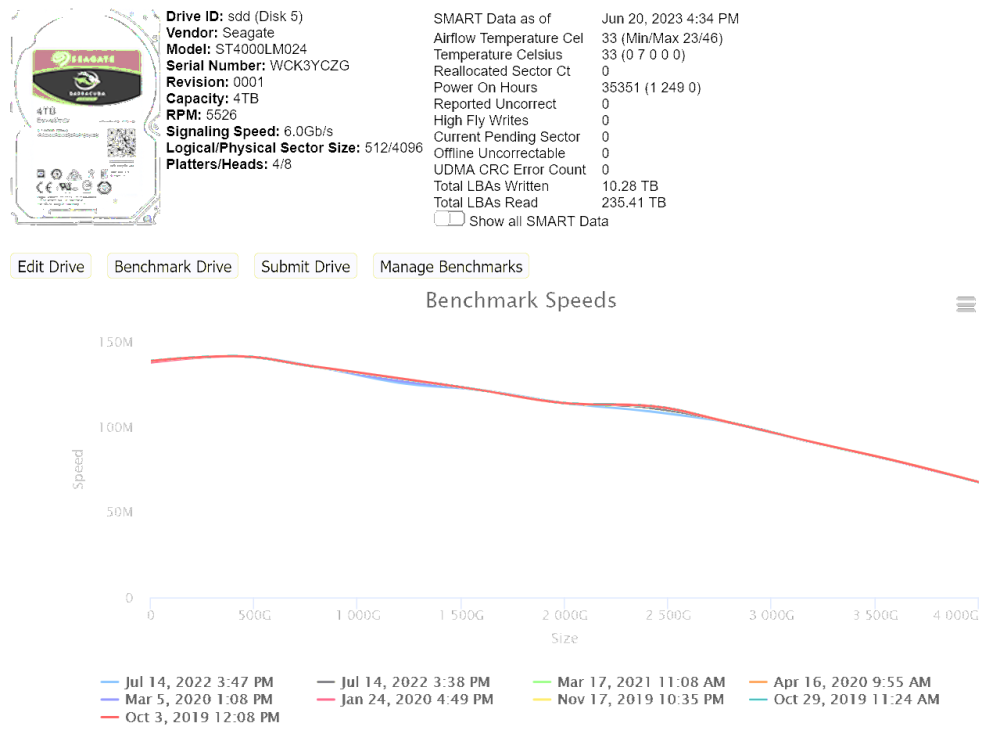
I have two of them in my server and they both perform identically: a peak of ~140MB/s and around 60MB/s at the slower end of the spindle. See below:
-
Hi all. I found out something very useful yesterday that I didn't realise, so in case it's not general knowledge, I thought I'd help out others by passing it on. I've been one of the many people that suffer from poor NextCloud performance - most notably when trying to browse my large photo collection. Part of the solution came from using a third party Photos app for Android, part from pre-generating the image cache, and part from optimising PHP-FPM performance. But despite all this, there was still really long wait times whenever I'd scroll to a new point in my photo timeline. In looking for a solution yesterday, I came across this thread that documents just how severe the overhead performance cost is when using a /mnt/user/ directory (and therefore shfs) in Unraid: So last night I simply swapped the mappings on all my Docker images to point to /mnt/cache/appdata/ instead of /mnt/user/appdata/ (and also the Nextcloud files directory directly to the SSD that it resides on instead of via the user share). That's it. That's all I did. It took about 10 minutes. And now the Photos app loads like it should, with only small load times when I jump to a new spot on the timeline before the images appear all at once. In addition, the scan times for my Logitech Media Server have improved by ~30%. I haven't yet tested Plex scan times, but there's likely to be an improvement there, too. I know that we're meant to point them to the user shares so that if they ever fill up the cache drive they will write to the array instead of erroring out, but I'm willing to monitor the space on the cache and manually invoke the mover if it ever fills up - it's well worth the epic improvement to responsiveness! So yes, I don't know if this is common knowledge and my epiphany should have really been a face palm, but I thought I would post it here just in case someone else finds it useful. Feel free to let me know if this is madness, too.
-
It's for Mac compatibility. But yeah, maybe I should just look at getting NTFS on my Mac. Cheers for the tip. I can't figure out how to run a SMART test on the disk, as there doesn't seem to be an option anywhere, and my Windows disk monitoring software wouldn't let me either (maybe it's blocked on this model?). I did plug it into my Windows machine and ran a disk check and repair though. I have now plugged it back into Unraid and the UD disk check has passed. I synced it again to see if it copies over the identified corrupt files, but it did not (it did copy over other files correctly, though). In saying that, I don't recognise the files listed as corrupt, so they might be in one of the directories that were left over when the wrong backup script fired one time after I plugged it in (UD identified it as my other backup disk and as such ran its backup script and started copying files that aren't meant to be on this disk. I forcefully cancelled that operation, so it makes sense that some of those files would be corrupt). Seems good enough for me at the moment. I'll periodically run a disk check, and if it fails again I'll move over to NTFS. Then if that ever corrupts I'll replace the disk. Thanks for your help and insight.
-
Hi there, I ran the fs check and it returned errors. I ran it again with the "Run with correct flag" button, and it returned the same errors and didn't fix them (maybe coz it's exFAT?): FS: exfat Executing file system check: /usr/sbin/fsck.exfat /dev/sdl1 2>&1 exfatfsck 1.3.0 Checking file system on /dev/sdl1. File system version 1.0 Sector size 512 bytes Cluster size 128 KB Volume size 1863 GB Used space 1719 GB Available space 144 GB ERROR: file '01 - No Clue Of Life.flac' has invalid cluster 0xffffffff. ERROR: file '02 - Lost In The Forest.flac' has invalid cluster 0xffffffff. ERROR: file '04 - Treated By Herbs And Fire.flac' has invalid cluster 0xffffffff. ERROR: file '05 - Dual Expression.flac' has invalid cluster 0xffffffff. ERROR: unknown entry type 0xfb. ERROR: unknown entry type 0x86. ERROR: unknown entry type 0xc5. ERROR: unknown entry type 0xaf. ERROR: unknown entry type 0xb1. ERROR: unknown entry type 0xfc. ERROR: invalid cluster 0x23058b2a in clusters bitmap. ERROR: unknown entry type 0xae. ERROR: unknown entry type 0xc0. ERROR: unknown entry type 0xf7. ERROR: unknown entry type 0xb5. ERROR: unknown entry type 0x8a. ERROR: unknown entry type 0x87. ERROR: unknown entry type 0x98. ERROR: unknown entry type 0xfb. ERROR: unknown entry type 0x8d. ERROR: unknown entry type 0xe3. ERROR: unknown entry type 0xe2. ERROR: unknown entry type 0xf4. ERROR: unknown entry type 0xb2. ERROR: unknown entry type 0xfc. ERROR: unknown entry type 0xad. ERROR: unknown entry type 0x97. ERROR: unknown entry type 0x8b. ERROR: unknown entry type 0xae. ERROR: unknown entry type 0xad. ERROR: unknown entry type 0xf1. ERROR: unknown entry type 0xa7. ERROR: unknown entry type 0xa5. ERROR: unknown entry type 0x96. ERROR: unknown entry type 0x90. ERROR: unknown entry type 0xad. ERROR: unknown entry type 0x91. ERROR: unknown entry type 0xe3. ERROR: unknown entry type 0xd8. ERROR: unknown entry type 0x95. ERROR: unknown entry type 0xcb. ERROR: unknown entry type 0xf5. Totally 8625 directories and 62460 files. File system checking finished. ERRORS FOUND: 42, FIXED: 0. File system corruption detected! How do I go about fixing it? Or should I reformat and start over? Or is this a sign that my disk is failing and should be replaced (it's around 9 years old)? And, how can I be sure of the integrity of my backup data in the future? This isn't the only backup of the files, but if I suffered a failure and needed to use this disk to restore, I would be pretty bummed to find out that something was corrupt on it but I was never notified. Should I just periodically run the fscheck option? Thanks for your help.
-
Hi there. I assume that this is the best part of the forum to post this, but apologies if not. I use UD to trigger a backup script when I plugin one of two USB hard drives. One I plug in every week, and another I do sporadically. Every so often when I connect a disk and it kicks off the script, it begins to instead copy EVERYTHING. It happened again yesterday when I plugged in the sporadic hard drive, so I cancelled the script through the UI's "Abort" button, but it seemed that rsync kept running - not knowing what else to do I rebooted the server, forcing a parity check on reboot 🙄 Today I ran my weekly backup and it ran fine. But then I plugged in the sporadic disk again, and it picked up where it left off yesterday, and continues to copy over everything. So that's about 1.5TB to be copied, which not only takes forever, but makes the disk get hot hot hot, so this is not ideal. Any idea why this could be happening? Could it somehow (though I don't see how) be related to daylight savings starting last Sunday, and this being the first time I've attached the disk since then? (FWIW, the server time updated automatically, and I don't use the disk on any other machine, so I don't see how... but worth pondering). Or is there something silly in my script? The script that fires is as follows (I nabbed from either this forum or somewhere else on the internet - apologies to the original author): #!/bin/bash PATH=/usr/local/sbin:/usr/sbin:/sbin:/usr/local/bin:/usr/bin:/bin PATH=/usr/local/sbin:/usr/sbin:/sbin:/usr/local/bin:/usr/bin:/bin ## Available variables: # ACTION : if mounting, ADD; if unmounting, UNMOUNT; if unmounted, REMOVE; if error, ERROR_MOUNT, ERROR_UNMOUNT # DEVICE : partition device, e.g /dev/sda1 # SERIAL : disk serial number # LABEL : partition label # FSTYPE : partition filesystem # MOUNTPOINT : where the partition is mounted # OWNER : "udev" if executed by UDEV, otherwise "user" # PROG_NAME : program name of this script # LOGFILE : log file for this script case $ACTION in 'ADD' ) # # Beep that the device is plugged in. # beep -l 200 -f 600 -n -l 200 -f 800 sleep 2 if mountpoint -q $MOUNTPOINT; then if [ $OWNER = "udev" ] then beep -l 100 -f 2000 -n -l 150 -f 3000 beep -l 100 -f 2000 -n -l 150 -f 3000 logger Started -t$PROG_NAME echo "Started: `date`" > $LOGFILE logger MyMusic share -t$PROG_NAME echo "MyMusic share" >> $LOGFILE rsync -vrltD --delete --exclude '.Recycle.Bin' /mnt/user/mymusic $MOUNTPOINT 2>&1 >> $LOGFILE logger Syncing -t$PROG_NAME sync -f $MOUNTPOINT beep -l 100 -f 2000 -n -l 150 -f 3000 beep -l 100 -f 2000 -n -l 150 -f 3000 beep -r 5 -l 100 -f 2000 logger Unmounting ExtBackup -t$PROG_NAME /usr/local/sbin/rc.unassigned umount $DEVICE echo "Completed: `date`" >> $LOGFILE logger Music Backup drive can be removed -t$PROG_NAME /usr/local/emhttp/webGui/scripts/notify -e "Unraid Server Notice" -s "Server Backup" -d "Music Backup completed" -i "normal" fi else logger Music Backup Drive Not Mounted -t$PROG_NAME fi ;; 'REMOVE' ) # # Beep that the device is unmounted. # beep -l 200 -f 800 -n -l 200 -f 600 ;; 'ERROR_MOUNT' ) /usr/local/emhttp/webGui/scripts/notify -e "Unraid Server Notice" -s "Server Backup" -d "Could not mount Music Backup" -i "normal" ;; 'ERROR_UNMOUNT' ) /usr/local/emhttp/webGui/scripts/notify -e "Unraid Server Notice" -s "Server Backup" -d "Could not unmount Music Backup" -i "normal" ;; esac Thanks for your help!
-
Great stuff, thanks. I've now recreated the Docker image (as well as the custom Docker network for Swag etc), and everything seems to be working well. I'll keep an eye on everything over the coming days. Thanks so much for your help.
-
Hrmm. I cleared the errors using: root@Percy:~# btrfs dev stats -z /mnt/cache [/dev/sde1].write_io_errs 2539524 [/dev/sde1].read_io_errs 1083292 [/dev/sde1].flush_io_errs 0 [/dev/sde1].corruption_errs 314706 [/dev/sde1].generation_errs 6869 [/dev/sdd1].write_io_errs 0 [/dev/sdd1].read_io_errs 0 [/dev/sdd1].flush_io_errs 0 [/dev/sdd1].corruption_errs 0 [/dev/sdd1].generation_errs 0 And re-scheduled the hourly script to check the pool for errors. Then I went and re-enabled the Docker service, but now I get the error on the Docker page: Docker Service failed to start. Diags attached. percy-diagnostics-20230206-1528.zip
-
Result of scrub: UUID: 54142ec0-63e0-4706-afde-ebb28ee3d5d1 Scrub started: Mon Feb 6 15:14:53 2023 Status: finished Duration: 0:02:26 Total to scrub: 104.18GiB Rate: 730.69MiB/s Error summary: verify=6869 csum=314706 Corrected: 321575 Uncorrectable: 0 Unverified: 0 Under Balance Status it still says: Current usage ratio: 44.8 % --- Full Balance recommended Should I balance it? I'm not entirely sure what it does... I'll reset the error count on the User Script and reschedule it to run hourly. And now I have to decide on if I'll keep or return the new SSD, too...
-
🤦♂️ Ok, have rebooted. Latest diags attached. I should note that last time I booted, I received a warning that the crc error count was now 18. percy-diagnostics-20230206-1422.zip
-
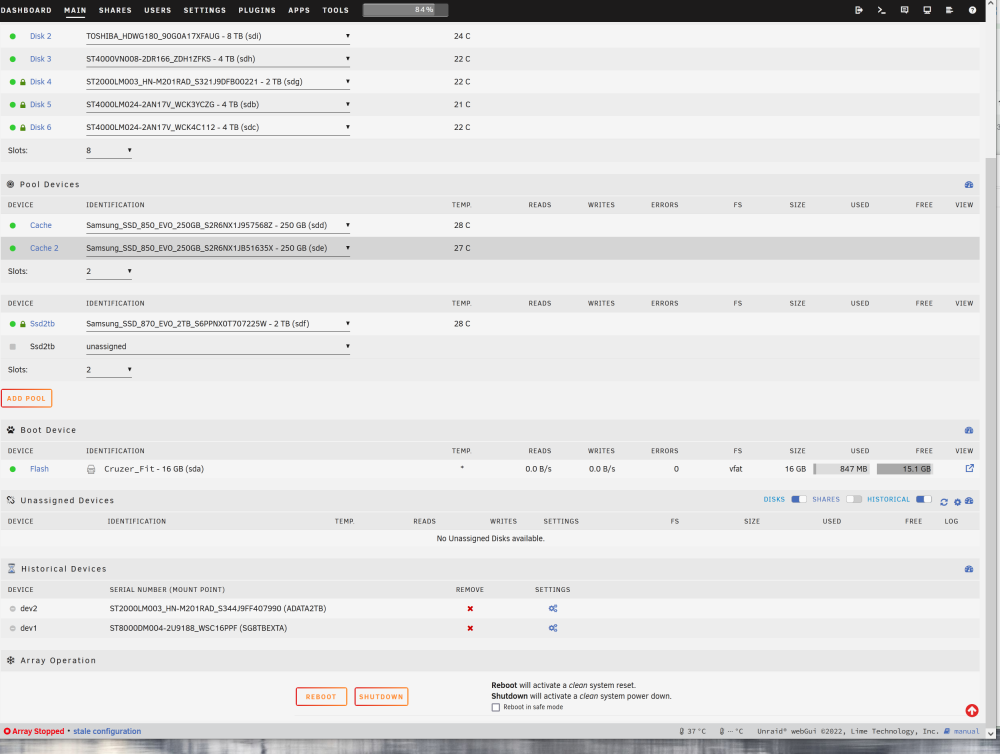
Not so easy to just swap the cable (as it's a SAS > x4 SATA cable), so I placed the old disks on the two spare SATA connections on my expansion card. After entering my encryption key to start the array, Firefox said that it will have to resend the info to show the page, I hit ok, but now all the disk slots are selectable, but there's no option to start/stop the array, only shutdown (see attached) Diagnostics attached. percy-diagnostics-20230206-1347.zip
-
Hi all, On Sunday morning I awoke to see notifications on my phone saying: Warning: crc error count is 1 Warning: crc error count is 2 Warning: crc error count is 5 (there have been none since this initial escalation) And my BTRFS script was also producing "ERRORS on cache pool" (I've since disabled its hourly schedule). I wasn't able to attend to the problem until late this morning (Monday), and the system log has filled up in that time Now when I go into SMART, my 2nd Cache disk has the following message: A mandatory SMART command failed: exiting. To continue, add one or more '-T permissive' options. There's also no temperature showing on the front page for that disk (the other cache disk does show temp). My drives are well beyond their MTBF (warranty of 75TB written, and I've written ~130TB), so I assumed it's them dying and have ordered 2x 1TB replacements, arriving today. To replace them, I am planning on following this guide: That is, adding one of the new disks to the chassis, assigning it in place of the 2nd cache drive, and starting the array. Then once that's finished, shutting down, removing the dead drive, connecting the other new 1TB SSD, then assigning that new disk in place of the final old disk and starting the array. Seems easy. However, before I start, I note on the cache disk page that it says under "Balance Status": Current usage ratio: 44.9 % --- Full Balance recommended Is that because my second disk has dropped out? Our should I perform a balance before I attach the new disk? I've attached my diagnostics for your perusal. Are there any problems with the steps I plan to take? Am I at risk of data loss? Also: Should I have just shutdown and tried re-seating my SATA cable instead of assuming a dead disk? ie is the disk definitely dead? Thanks for your help and insight. EDIT: I should also add that I ran this command before I started typing up this post, then afterwards. As you can see, the error rates are increasing: root@Percy:~# btrfs dev stats /mnt/cache [/dev/sdb1].write_io_errs 2469391 [/dev/sdb1].read_io_errs 1065906 [/dev/sdb1].flush_io_errs 0 [/dev/sdb1].corruption_errs 0 [/dev/sdb1].generation_errs 0 [/dev/sdc1].write_io_errs 0 [/dev/sdc1].read_io_errs 0 [/dev/sdc1].flush_io_errs 0 [/dev/sdc1].corruption_errs 0 [/dev/sdc1].generation_errs 0 root@Percy:~# btrfs dev stats /mnt/cache [/dev/sdb1].write_io_errs 2488143 [/dev/sdb1].read_io_errs 1067924 [/dev/sdb1].flush_io_errs 0 [/dev/sdb1].corruption_errs 0 [/dev/sdb1].generation_errs 0 [/dev/sdc1].write_io_errs 0 [/dev/sdc1].read_io_errs 0 [/dev/sdc1].flush_io_errs 0 [/dev/sdc1].corruption_errs 0 [/dev/sdc1].generation_errs 0 percy-diagnostics-20230206-1131.zip
-
I have this in my Redis logs: I don't know if this is a Redis option to change or a system option to change. Any idea if it's possible (or recommended) to change? Thanks.
-
I realised shortly after posting this that I'd gotten the disk mentioned in the error confused with the name of my cache drive. I thought I'd deleted this post (Moderation Actions > delete), but I guess it didn't work. Looks like Unassigned Devices thought that my external drive was plugged in when it wasn't (and that it needed a TRIM), so I rebooted my server and manually ran a TRIM and it worked without error. Sorry for wasting your time. Mods: feel free to delete this topic.
-
Hi all, A little while ago I added a 2TB Samsung 870 EVO to my machine as a quick disk to run Nextcloud from. After I'd plugged it in and set it all up, I started receiving notifications that TRIM wasn't supported on it. Long story short, it was my controller card, and I was able to downgrade the firmware to a version that supported it, and everything ran fine. See: However, the drive prematurely failed so I RMAd it (failed around Oct 20) and have since replaced it (replaced early Nov). However, after leaving on holidays for a month over December, I started receiving notices that TRIM wasn't supported on that drive, and I don't know why. I get an email with: fstrim: /mnt/disks/SG8TBEXTA: the discard operation is not supported Could it be a difference in the replacement drive? Could it be a change in the OS after an upgrade from 6.11.x? Could it be a problem in the TRIM command? Could it be a change in compatibility with my SAS/SATA card? I just don't know, so I'm turning to you all for your help and information. Diagnostics attached. Many thanks. percy-diagnostics-20230110-1419.zip
-
Yeah, can confirm. It's set at the player not the server level. So in the PlexAmp app, under Settings > Music Quality set both WiFi and Cellular (assuming you have a good data plan) to maximum, and it'll send every track in its native format.
-
If you're looking for a new streaming server, try Plex. They've been working hard on making PlexAmp (their app for streaming music) a joy to use. It's actually amazing. Here's a good feature overview: One thing they've added since that video, though, is "guest DJ" mode, which inserts relevant tracks between tracks on an album or playlist. It works really well, and is a joy to experience. Highly recommended!
-
I think you may only have success keeping players playing in-sync with each other if you use the original Logitech hardware the platform was designed for. The server can monitor their latency and adjust the stream as necessary. I've never tried streaming to anything other than the original Squeezebox hardware, and I dabbled with using a raspberry pi with a DAC (using Squeezelite), but stopped using it when I realised the sync issues. You can pick up old ones off eBay for not much. I bought a few of the display-less Squeezebox "Receiver" (same as the "Duet" but without the very outdated WiFi remote) and now use a raspberry pi running Squeezelite as the display and controller (no need for a DAC: it can control any player in your system). But, YMMV: I may be wrong in these assertions (the sync issues I had were in the milliseconds range).
-
Are you using Squeezebox hardware? Or raspberry pi (or something else). I've never had a problem syncing Squeezebox hardware, but I've found that raspberry pi would fall out of sync easily.
-
Hi there, As per the recommendation from the Fix Common Problems plugin, I'm posting here looking for insight in to the Out Of Memory Error I received overnight. My server usually sits at about 40% RAM usage, so I'm surprised to see such an error. A few months ago I did tweak the 'php-fpm' settings in NextCloud to improve performance, so I'm wondering if maybe I went overboard with that. php-fpm tweaks are: ; Tune PHP-FPM https://docs.nextcloud.com/server/latest/admin_manual/installation/server_tuning.html#tune-php-fpm and values from https://spot13.com/pmcalculator/ pm = dynamic pm.max_children = 100 pm.start_servers = 25 pm.min_spare_servers = 25 pm.max_spare_servers = 75 Diagnostics attached. Many thanks. percy-diagnostics-20220901-1052_out-of-memory.zip
-
I fear that in the future they'll neuter the ability to run the app from Docker to force us to buy their hardware (Cloudkey or UDM). EDIT: especially with this in the release notes for 7.2.91:
-
FYI just upgraded to v7.1.68 as it didn't seem to have many changes. No issues upgrading. Will report back if anything goes haywire.
-
You should be able to ignore that error and continue. Sometimes on the error page you need to click on "Advanced" or something like that, then "Proceed Anyway" (or something like that - this is from memory. tbh, it may not even be the same error). Just thought it might be worth a shot before you restore from backup.
-
Digging this up to say that I recently bought a 2TB Samsung 970 EVO for a Nextcloud cache, and had totally forgotten that my Dell PERC H310 didn't support TRIM until I received the "fstrim: /mnt/ssd2tb: FITRIM ioctl failed: Remote I/O error" email from Dynamix SSD TRIM yesterday morning. While my onboard SAS port does support TRIM, it only has 2x SATAIII ports, with the others being SATAII - and the two SATAIII ports are already taken up by the 2x 850 EVO SSDs in my (regular) cache pool. So, a very big thanks to @ezhik for their work finding out that P16 works well, as well as providing a copy of the firmware and flashing instructions! After some nail-biting to-and-fro trying to flash the card (getting errors when I tried flashing it in my server - it erased fine, of course though lol - but then it worked when I used my desktop PC), I'm now running P16 and TRIM runs without error.