





Oxxy
Members
-
Joined
-
Last visited
Everything posted by Oxxy
-
What you have done so far looks good, responsive and clean. Thanks for your work.
-
I have "desktop service not found' on a new install trying to RDP. Can use mstsc and remmina just fine. Cant see any obvious notes in the documentation. EDIT - i just saw the post right above my comment (its been a long day). I dont really want to run another non hosted container to get RDP to work. I'll check in if you manage to get it all in one docker. It looks good otherwise, but if i have to run guacamole anyway, i'd just use that.
-
Thanks mate, appreciate your time.
-
Hi JorgeB Just wanted to say thanks very much, that seems to have worked. Sorry for the slow reply, had to wait for the parity check. Would the mover tuning plugin be ok to re-install now? I tend to use it periodically, and until I made the recent changes, it always behaved itself. Cheers
-
Hi All I was very time poor and recently replaced my failing cache drive while juggling too many other things. Now the mover doesn't seem to do anything. I am guessing I've just done something silly and appreciate I likely haven't followed the preferred process for a cache drive swap (I had no internet at the time). The order of events: Copied the original cache drive, called 'cache_ssd' to another new drive called 'cache_nvme' Used tool to 'make a new config', left everything in place, only difference was swapped cache drive in the drive assignments. Set all shares to use the newly named cache drive An example of the log output when I run the mover below. mvlogger: Log Level: 1 mvlogger: *********************************MOVER -SHARE- START******************************* mvlogger: Mon Jan 20 16:07:09 AEST 2025 mvlogger: Share supplied Scratch Sharecfg: /boot/config/shares/Scratch.cfg mvlogger: Cache Pool Name: cache_nvme mvlogger: Share Path: /mnt/cache_nvme/Scratch mvlogger: Complete Mover Command: find "/mnt/cache_nvme/Scratch" -depth | /usr/local/sbin/move -d 1 mvlogger: Mon Jan 20 16:07:09 AEST 2025 mvlogger: ********************************Mover Finished***************************** For this example I just placed a new text file into the share, which sits on the cache, but wont actually move. I have a backup of everything on the cache separately and diagnostics attached. I've usually managed to solve all my own problems, but I am stuck here and really want the mover working to have the files protected. Cheers! tower-diagnostics-20250120-1647.zip
-
Appreciate the follow up. I found the original HBA issue by transferring a heap of small files and randomly it would slow to a crawl. Looking at logs shows a heap of mp3sas errors. Thankfully I had spare hardware available. Interesting that this same card (9300-16i) has caused issues for others. The other mover issue, not sure on whats up with that. I noticed a while ago mover wasn't always working for shares that had a space character in the share name. But i did notice the little warning saying the share wasn't protected, when looking at the share on the command line, I could see the folders and they just wouldn't move at all, and attempts had the "No such file or directory" thing.
-
Thanks, I did get the diagnostics sorted, but could see if has a heap of personal information in it, so didnt really want to add them to my post just above. EDIT - I have removed the HBA (9300-16i) and moved to an older one I had lying around. For now its working. I did attach the diagnostics though. tower-diagnostics-20240516-0722.zip
-
Like quite a few other people here, I am getting "No such file or directory' when running the mover. Its been updated, so I am stuck with unprotected data on the cache. I've had to copy it manually somewhere else until this is sorted. Running 6.12.1.
-
I'm getting the exact same thing. I'm not using the server much, have the same card 9300-16i. I upgraded firmware, and it seemed ok at that point after I was checking the logs. Then after trying to transfer a heap of data today, its not happy. A continuous stream of errors with mpt3sas_cm1 (i'm only using cm1) when i noticed transfers started having issues. At the risk of bumping a necro thread, it seems I am having the same/similar issue.
-
I'm sure it will, but folks aren't paid to do this, they will do it when they can. EDIT - i didnt realize it was just a restart for this. Cheers.
-
Thanks mate, i had literally just built another unraid server (for a new project), on new hardware, and the same happened so was going to update the post. Another hurdle seems to be the password cannot be changed, and throws an error. "INVALID_JSON_SCHEMA" in a popup. Thanks for your efforts too.
-
I have the same problem, I tried searching the internet and these forums, I cant login. I have wiped and reinstalled multiple times now, username password wont work, default credentials wont work. I've removed the old images from /appdata. Nothing works, so for now the kids have both lost their previous work, but can't play together.
-
Thanks for the info, I have the same issue as well.
-
EDIT - i deleted everything i wrote. I'd like to thank you for your help. I am just pretty unwell and will take this up again when i don't feel so ordinary. Appreciate your efforts mate.
-
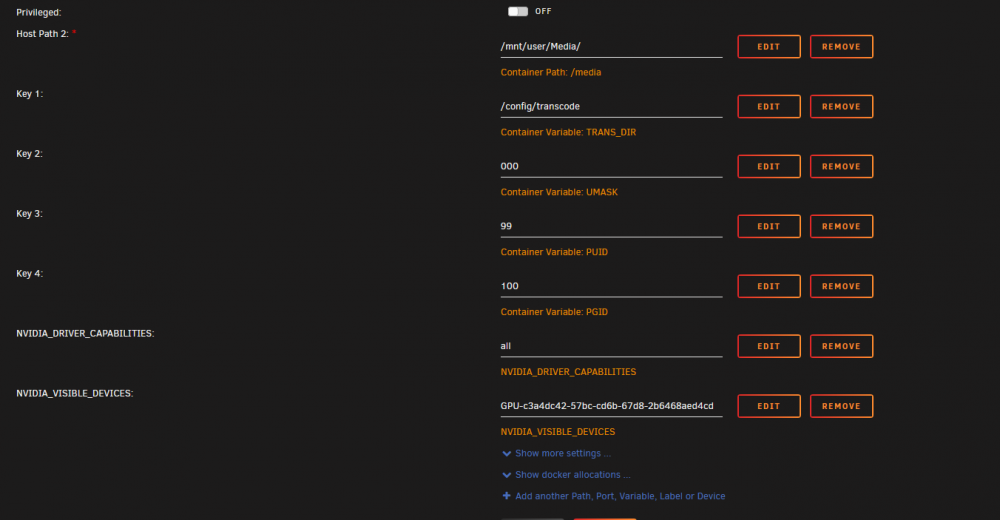
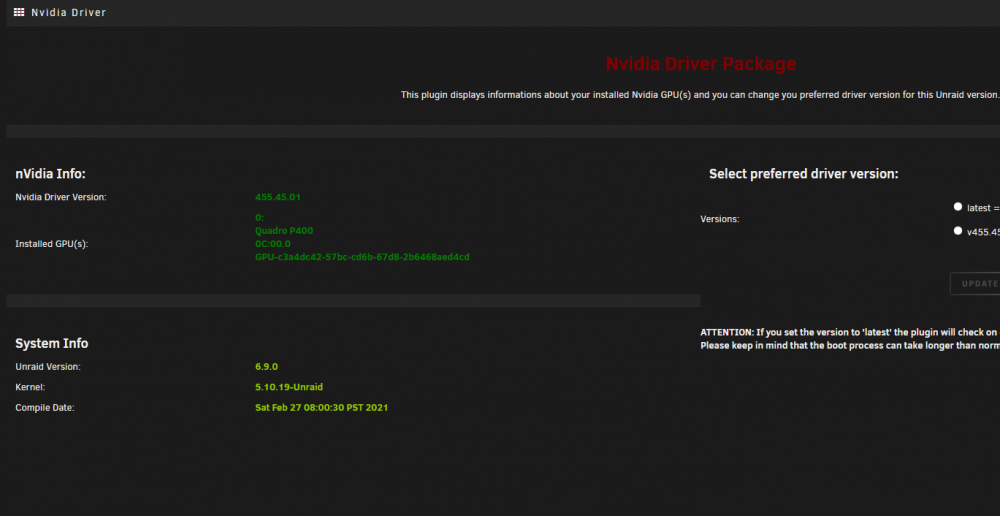
I found the UUID via the 'GPU Statistics' plugin. Normally its meant to be under the info button at top right in advanced? Its not there. But then i found it in big green obvious text on the appropriate nvidia page. What have you done by now? Have you followed the instructions from page one? Yes, i wasnt sure if they were still relevant given i am using the new version of unraid and using the drivers a different way. But i reinstalled the docker the driver and checked it against the instructions. Plex settings attached. The TL;DR is --runtime=nvidia for extra paramters, and two new variables NVIDIA_DRIVER_CAPABILITIES = all NVIDIA_VISIBLE_DEVICES = GPU-c3a4dc42-57bc-cd6b-67d8-2b6468aed4cd The docker is now slow to start. "Can you give me a screenshot from the Plugin page of the Nvidia-Driver?" Yes, attached. And thanks for the reply.
-
I might need some help, I had nVidia P600 passed through to Plex before the latest build, now its broken. I cant seem to find the UUID of the GPU now root@Tower:~# nvidia-smi Wed Mar 3 20:07:05 2021 +-----------------------------------------------------------------------------+ | NVIDIA-SMI 455.45.01 Driver Version: 455.45.01 CUDA Version: 11.1 | |-------------------------------+----------------------+----------------------+ | GPU Name Persistence-M| Bus-Id Disp.A | Volatile Uncorr. ECC | | Fan Temp Perf Pwr:Usage/Cap| Memory-Usage | GPU-Util Compute M. | | | | MIG M. | |===============================+======================+======================| | 0 Quadro P400 Off | 00000000:0C:00.0 Off | N/A | | 31% 44C P0 N/A / N/A | 0MiB / 2000MiB | 0% Default | | | | N/A | +-------------------------------+----------------------+----------------------+ +-----------------------------------------------------------------------------+ | Processes: | | GPU GI CI PID Type Process name GPU Memory | | ID ID Usage | |=============================================================================| | No running processes found | +-----------------------------------------------------------------------------+ And i have the drivers installed via the new plugin (used to be an unraid nvidia build i believe) Seems I have to rebuild plex docker, but cant seem to get the UUID, its not listed in 'info'. Am i doing this wrong? Or missing something?
-
Awesome, thanks. EDIT - Thanks to binhex for the work too !
-
-
Is it possible to get the Shinobi docker to use two storage locations? I.e. if i pass it two unassigned drives (only the first one is the "video storage location", and the second i just added as another path. Cant seem to get it to work. I'd like to split cameras across 2 unassigned drives.

-
Hi All I am running into performance issues. Running an i7 with 24GB RAM, and 8 Hikvision cameras. CPU is mostly pegged at 100% For the stream i have it set to copy, with no audio, ditto for recording. I have followed SpaceInvaderOne's guide on passing through an nVidia GPU to try and leverage HW acceleration, ditto with QuickSync - still ends up with 100% usage. I'm writing to an unassigned drive, as per the guide (4TB Purple) Stream Type - Poseidon, via WebSocket I have tried Video Codec ... Copy H.264 NVENC H.264 QuickSync Video H.264 VA-API Intel Acceleration I have tried these settings in 'Input' and 'Recording', but now i feel like I am going around in circles. Is there something silly i am missing? Also, when i used any sort of HW acceleration setting, the Monitor windows are all black. I'd like to move to Unraid an Shinobi, but not if 8 cameras are going to peg an i7 and 100% 24/7. Thoughts? EDIT - just set the entire thing up again on an AMD 1600AF and 16GB RAM, CPU usage isnt 100%, but its way too high to leave like this 24/7 And log for one of the cameras trying to use nVidia card - "Unknown encoder 'h264_nvenc' ", and "Unknown decoder 'h264_qsv'" for Quicksync
-
Certainly seems so now, maybe one of my addons was blocking it. Thanks for taking the time to reply
-
Any change anyone can upload theses again please. Google drive link seems dead, and the other link requires a subscription. Cheers!
-
Does it log to the cache drive? If so, that was choc full. Mover wasn't moving anything out of it. I moved everything off manually just ealier today. For some silly reason i didnt think to mention it (sorry, juggling a lot) Would that explain it?
-
Thanks for the reply. The remove plugin seems a bit greyed out, certainly when i click on it nothing happens. I stopped the array to see if that needed to be done prior to removal, then the GUI hung. So I used command line to restart it as cleanly as i could. Upon restart, the logs seem to be working. Now the logs are working, seems i have more issues to address! Thanks for the assistance dlandon (and the hard work you do around here). If this happens again, shall i report back?
-
I have had this running for a while, i *think* it worked when i first started setting up unraid, but this has no logs at all. So obviously, I have broken something, or something else is borked. So log screen has no logs, I have also downloaded the logs, and i have an empty file. Had a skim through this thread and not sure i have seen anything relevant to my issue. Shall I reinstall or is there something else i can do to troubleshoot? Cheers!



