





nerbonne
Members
-
Joined
-
Last visited
Everything posted by nerbonne
-
I have tailscale installed as a plugin. I've read to enable direct connections, I need to forward port UDP/41641 to the IP of my unraid box. Problem is that I have dual WAN, WAN1 being a CGNAT 5g connection and WAN2 being a fiber connection which I can port forward with. That being said, WAN1 is the default WAN, which I could change but I dont want to for "reasons". I already have the unraid box IP configured to go out WAN2 in my pfsense router, but that does not seem to force the tailscale connection out WAN2, it seems to use WAN1. Since the plugin has no console, I don't have any way to check this, but the 5g connection has a monthly transfer limit and then becomes slow for the rest of the month, so I know I'm hitting this limit every now and then because the tailscale connection becomes unreasonable slow late in the month on high usage months.
-
I have the same issue for days now. I forgot about it until you posted. I checked my api key and secret and they are fine.
-
No idea but curious why you need a /16 network.
-
Do you have two nic's and, usually the first/main nic is br0. if you have two nic's, is the second nic configured and working?
-
Having the same issue. Has anyone found a solution?
-
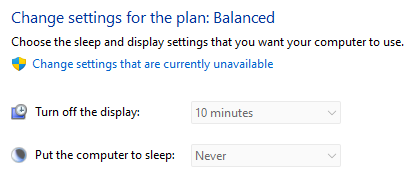
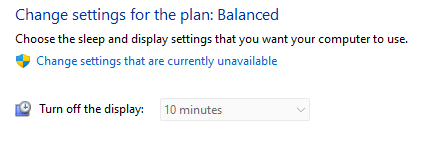
Thats odd, I swear I checked it before. "Put the computer to sleep" was set to 15 minutes. What's even more odd is that my other Win 11 VMs don't even have this option. Problem VM after changing. Other VMs...
-
I have a server with a Win 11 VM and a Win 10 VM on the same cache drive, the Win 11 VM has problems where it will randomly be shown as paused and I have to force stop it and then start it to make it work. The Win 10 VM has no issues. I have two other servers that have both Win 11 and Win 10 VMs and none of them have any issues with pausing. I've read other posts where it's stated that VM pausing is usually a disk issue, but I don't see anything wrong in the SMART data or the sys or VM log. nas1-diagnostics-20240318-1726.zip
-
Can confirm, it is fixed in 2.11.1
-
How do you roll back to 2.10.4?
-
For me it was Brave browser. Using Edge, I haven't had any issues.
-
Just in case anyone else was struggling like I was, don't put a space after the comma in your A names if you have more than one. A space will make the container go into a loop and the A names won't update.

-
What do the logs say when it crashes. When mine was crashing all the time it was because of a corrupt file. Once I fixed that it was fine.
-
Well the Tailscale container went down on it's own thankfully. Removed the UPFLAG and now GUI access is restored.
-
Says solved but don't see a solution. What browser are you using? I had issues like this with Brave browser. Switched to Firefox/Edge, no more issues.
-
Are you using macvlan? If so, that caused me issues on every server until I switched to ipvlan. Also your docker img being 30gb probably doesn't help, it shouldn't need to be over 20gb. What is filling your docker image up?
-
I have a remote unraid box and I added "--advertise-routes=192.168.253.0/24" to the UPFLAGS for Tailscale. Now I can't access the Web GUI or access via SSH at either the LAN IP or the Tailscale IP. Since it's a remote box, does anyone know a way to get back into the box short of connecting a keyboard and typing "docker stop Tailscale". If I remove that node thru my admin console, will that help?
-
just put your public IP which even when dynamic, shouldn't change that often. you'll have to edit the container every time it changes. if it changes frequently, then use a dynamic dns service just not Duck DNS.
-
From past experience duck DNS goes down ALL the time.
-
Storj works fine on dynamic IP as long as you have port forwarding setup properly. I think the only thing you'd need dynamic DNS for is to access the admin page but personally I'd use wireguard so it isn't exposed to the internet. But if you are set on dynamic DNS, no-ip is a good option. Anything is better than DuckDNS.
-
Why are you using DuckDNS anyways. It's uptime is really bad and what purpose does it serve. Storj doesn't need dynamic DNS.
-
I don't remember what fixed this, sorry. I think it had to do with Nextcloud though.
-
I have openvpn.ovpn and login.txt in /etc/openvpn and the login loop is scrolling. Docker container is set to a static IP. Attached is my ovpn file, can you take a look and see if I missed anything? openvpn.ovpn
-
This happens about once every two weeks, and when it does, it fills up the system log. I can't figure out which docker is misbehaving. I stopped all dockers and even disabled the docker server, then restarted nginx using "/etc/rc.d/rc.nginx reload". No affect, still scrolls. The RAM usage is only 60% so it's not actually out of memory I don't think. Diagnostics attached. Jul 14 23:22:04 NAS nginx: 2023/07/14 23:22:04 [error] 22674#22674: *3419810 nchan: error publishing message (HTTP status code 500), client: unix:, server: , request: "POST /pub/disks?buffer_length=1 HTTP/1.1", host: "localhost" Jul 14 23:22:04 NAS nginx: 2023/07/14 23:22:04 [error] 22674#22674: MEMSTORE:01: can't create shared message for channel /disks Jul 14 23:22:05 NAS nginx: 2023/07/14 23:22:05 [crit] 22674#22674: ngx_slab_alloc() failed: no memory Jul 14 23:22:05 NAS nginx: 2023/07/14 23:22:05 [error] 22674#22674: shpool alloc failed Jul 14 23:22:05 NAS nginx: 2023/07/14 23:22:05 [error] 22674#22674: nchan: Out of shared memory while allocating message of size 4317. Increase nchan_max_reserved_memory. Jul 14 23:22:05 NAS nginx: 2023/07/14 23:22:05 [error] 22674#22674: *3419816 nchan: error publishing message (HTTP status code 500), client: unix:, server: , request: "POST /pub/disks?buffer_length=1 HTTP/1.1", host: "localhost" Jul 14 23:22:05 NAS nginx: 2023/07/14 23:22:05 [error] 22674#22674: MEMSTORE:01: can't create shared message for channel /disks Jul 14 23:22:06 NAS nginx: 2023/07/14 23:22:06 [crit] 22674#22674: ngx_slab_alloc() failed: no memory Jul 14 23:22:06 NAS nginx: 2023/07/14 23:22:06 [error] 22674#22674: shpool alloc failed Jul 14 23:22:06 NAS nginx: 2023/07/14 23:22:06 [error] 22674#22674: nchan: Out of shared memory while allocating message of size 4317. Increase nchan_max_reserved_memory. Jul 14 23:22:06 NAS nginx: 2023/07/14 23:22:06 [error] 22674#22674: *3419820 nchan: error publishing message (HTTP status code 500), client: unix:, server: , request: "POST /pub/disks?buffer_length=1 HTTP/1.1", host: "localhost" Jul 14 23:22:06 NAS nginx: 2023/07/14 23:22:06 [error] 22674#22674: MEMSTORE:01: can't create shared message for channel /disks Jul 14 23:22:07 NAS nginx: 2023/07/14 23:22:07 [crit] 22674#22674: ngx_slab_alloc() failed: no memory Jul 14 23:22:07 NAS nginx: 2023/07/14 23:22:07 [error] 22674#22674: shpool alloc failed Jul 14 23:22:07 NAS nginx: 2023/07/14 23:22:07 [error] 22674#22674: nchan: Out of shared memory while allocating message of size 4317. Increase nchan_max_reserved_memory. Jul 14 23:22:07 NAS nginx: 2023/07/14 23:22:07 [error] 22674#22674: *3419824 nchan: error publishing message (HTTP status code 500), client: unix:, server: , request: "POST /pub/disks?buffer_length=1 HTTP/1.1", host: "localhost" Jul 14 23:22:07 NAS nginx: 2023/07/14 23:22:07 [error] 22674#22674: MEMSTORE:01: can't create shared message for channel /disks Jul 14 23:22:08 NAS nginx: 2023/07/14 23:22:08 [crit] 22674#22674: ngx_slab_alloc() failed: no memory Jul 14 23:22:08 NAS nginx: 2023/07/14 23:22:08 [error] 22674#22674: shpool alloc failed Jul 14 23:22:08 NAS nginx: 2023/07/14 23:22:08 [error] 22674#22674: nchan: Out of shared memory while allocating message of size 4317. Increase nchan_max_reserved_memory. Jul 14 23:22:08 NAS nginx: 2023/07/14 23:22:08 [error] 22674#22674: *3419831 nchan: error publishing message (HTTP status code 500), client: unix:, server: , request: "POST /pub/disks?buffer_length=1 HTTP/1.1", host: "localhost" Jul 14 23:22:08 NAS nginx: 2023/07/14 23:22:08 [error] 22674#22674: MEMSTORE:01: can't create shared message for channel /disks Jul 14 23:22:09 NAS nginx: 2023/07/14 23:22:09 [crit] 22674#22674: ngx_slab_alloc() failed: no memory Jul 14 23:22:09 NAS nginx: 2023/07/14 23:22:09 [error] 22674#22674: shpool alloc failed Jul 14 23:22:09 NAS nginx: 2023/07/14 23:22:09 [error] 22674#22674: nchan: Out of shared memory while allocating message of size 4317. Increase nchan_max_reserved_memory. Jul 14 23:22:09 NAS nginx: 2023/07/14 23:22:09 [error] 22674#22674: *3419837 nchan: error publishing message (HTTP status code 500), client: unix:, server: , request: "POST /pub/disks?buffer_length=1 HTTP/1.1", host: "localhost" Jul 14 23:22:09 NAS nginx: 2023/07/14 23:22:09 [error] 22674#22674: MEMSTORE:01: can't create shared message for channel /disks Jul 14 23:22:10 NAS nginx: 2023/07/14 23:22:10 [crit] 22674#22674: ngx_slab_alloc() failed: no memory Jul 14 23:22:10 NAS nginx: 2023/07/14 23:22:10 [error] 22674#22674: shpool alloc failed Jul 14 23:22:10 NAS nginx: 2023/07/14 23:22:10 [error] 22674#22674: nchan: Out of shared memory while allocating message of size 4317. Increase nchan_max_reserved_memory. Jul 14 23:22:10 NAS nginx: 2023/07/14 23:22:10 [error] 22674#22674: *3419842 nchan: error publishing message (HTTP status code 500), client: unix:, server: , request: "POST /pub/disks?buffer_length=1 HTTP/1.1", host: "localhost" Jul 14 23:22:10 NAS nginx: 2023/07/14 23:22:10 [error] 22674#22674: MEMSTORE:01: can't create shared message for channel /disks Jul 14 23:22:11 NAS nginx: 2023/07/14 23:22:11 [crit] 22674#22674: ngx_slab_alloc() failed: no memory Jul 14 23:22:11 NAS nginx: 2023/07/14 23:22:11 [error] 22674#22674: shpool alloc failed Jul 14 23:22:11 NAS nginx: 2023/07/14 23:22:11 [error] 22674#22674: nchan: Out of shared memory while allocating message of size 4317. Increase nchan_max_reserved_memory. Jul 14 23:22:11 NAS nginx: 2023/07/14 23:22:11 [error] 22674#22674: *3419847 nchan: error publishing message (HTTP status code 500), client: unix:, server: , request: "POST /pub/disks?buffer_length=1 HTTP/1.1", host: "localhost" Jul 14 23:22:11 NAS nginx: 2023/07/14 23:22:11 [error] 22674#22674: MEMSTORE:01: can't create shared message for channel /disks Jul 14 23:22:12 NAS nginx: 2023/07/14 23:22:12 [crit] 22674#22674: ngx_slab_alloc() failed: no memory Jul 14 23:22:12 NAS nginx: 2023/07/14 23:22:12 [error] 22674#22674: shpool alloc failed Jul 14 23:22:12 NAS nginx: 2023/07/14 23:22:12 [error] 22674#22674: nchan: Out of shared memory while allocating message of size 4317. Increase nchan_max_reserved_memory. Jul 14 23:22:12 NAS nginx: 2023/07/14 23:22:12 [error] 22674#22674: *3419851 nchan: error publishing message (HTTP status code 500), client: unix:, server: , request: "POST /pub/disks?buffer_length=1 HTTP/1.1", host: "localhost" Jul 14 23:22:12 NAS nginx: 2023/07/14 23:22:12 [error] 22674#22674: MEMSTORE:01: can't create shared message for channel /disks Jul 14 23:22:13 NAS nginx: 2023/07/14 23:22:13 [crit] 22674#22674: ngx_slab_alloc() failed: no memory nas-diagnostics-20230715-0923.zip
-
No one? Well, in the meantime, I switched back to macvlan and my NAS continues to crash... Jul 2 18:12:42 NAS2 kernel: ------------[ cut here ]------------ Jul 2 18:12:42 NAS2 kernel: WARNING: CPU: 6 PID: 897 at net/netfilter/nf_conntrack_core.c:1210 __nf_conntrack_confirm+0xa4/0x2b0 [nf_conntrack] Jul 2 18:12:42 NAS2 kernel: Modules linked in: macvlan xt_mark tun veth xt_nat xt_tcpudp xt_conntrack nf_conntrack_netlink nfnetlink xfrm_user xfrm_algo xt_addrtype br_netfilter md_mod zfs(PO) zunicode(PO) zzstd(O) zlua(O) zavl(PO) icp(PO) zcommon(PO) znvpair(PO) spl(O) tcp_diag inet_diag iptable_nat xt_MASQUERADE nf_nat nf_conntrack nf_defrag_ipv6 nf_defrag_ipv4 wireguard curve25519_x86_64 libcurve25519_generic libchacha20poly1305 chacha_x86_64 poly1305_x86_64 ip6_udp_tunnel udp_tunnel libchacha ip6table_filter ip6_tables iptable_filter ip_tables x_tables af_packet 8021q garp mrp bridge stp llc bonding tls edac_mce_amd edac_core kvm_amd kvm btusb btrtl btbcm btintel crct10dif_pclmul bluetooth crc32_pclmul crc32c_intel igb ghash_clmulni_intel sha512_ssse3 aesni_intel nvme crypto_simd i2c_algo_bit sr_mod i2c_piix4 cryptd input_leds wmi_bmof asus_ec_sensors ecdh_generic rapl joydev cdrom led_class k10temp ccp nvme_core ecc i2c_core ahci libahci wmi button acpi_cpufreq unix Jul 2 18:12:42 NAS2 kernel: CPU: 6 PID: 897 Comm: kworker/u64:11 Tainted: P O 6.1.36-Unraid #1 Jul 2 18:12:42 NAS2 kernel: Hardware name: System manufacturer System Product Name/ROG STRIX X570-I GAMING, BIOS 3602 03/05/2021 Jul 2 18:12:42 NAS2 kernel: Workqueue: events_unbound macvlan_process_broadcast [macvlan] Jul 2 18:12:42 NAS2 kernel: RIP: 0010:__nf_conntrack_confirm+0xa4/0x2b0 [nf_conntrack] Jul 2 18:12:42 NAS2 kernel: Code: 44 24 10 e8 e2 e1 ff ff 8b 7c 24 04 89 ea 89 c6 89 04 24 e8 7e e6 ff ff 84 c0 75 a2 48 89 df e8 9b e2 ff ff 85 c0 89 c5 74 18 <0f> 0b 8b 34 24 8b 7c 24 04 e8 18 dd ff ff e8 93 e3 ff ff e9 72 01 Jul 2 18:12:42 NAS2 kernel: RSP: 0018:ffffc9000035cd98 EFLAGS: 00010202 Jul 2 18:12:42 NAS2 kernel: RAX: 0000000000000001 RBX: ffff8881027f7d00 RCX: 1ac922c56511f0f6 Jul 2 18:12:42 NAS2 kernel: RDX: 0000000000000000 RSI: 0000000000000001 RDI: ffff8881027f7d00 Jul 2 18:12:42 NAS2 kernel: RBP: 0000000000000001 R08: af5d141a55de42a1 R09: 6808344e0185ab68 Jul 2 18:12:42 NAS2 kernel: R10: b66b60a2e2088e72 R11: ffffc9000035cd60 R12: ffffffff82a11440 Jul 2 18:12:42 NAS2 kernel: R13: 000000000000f449 R14: ffff8881030c9b00 R15: 0000000000000000 Jul 2 18:12:42 NAS2 kernel: FS: 0000000000000000(0000) GS:ffff88880e980000(0000) knlGS:0000000000000000 Jul 2 18:12:42 NAS2 kernel: CS: 0010 DS: 0000 ES: 0000 CR0: 0000000080050033 Jul 2 18:12:42 NAS2 kernel: CR2: 000003218c0d7000 CR3: 0000000164a7e000 CR4: 0000000000350ee0 Jul 2 18:12:42 NAS2 kernel: Call Trace: Jul 2 18:12:42 NAS2 kernel: <IRQ> Jul 2 18:12:42 NAS2 kernel: ? __warn+0xab/0x122 Jul 2 18:12:42 NAS2 kernel: ? report_bug+0x109/0x17e Jul 2 18:12:42 NAS2 kernel: ? __nf_conntrack_confirm+0xa4/0x2b0 [nf_conntrack] Jul 2 18:12:42 NAS2 kernel: ? handle_bug+0x41/0x6f Jul 2 18:12:42 NAS2 kernel: ? exc_invalid_op+0x13/0x60 Jul 2 18:12:42 NAS2 kernel: ? asm_exc_invalid_op+0x16/0x20 Jul 2 18:12:42 NAS2 kernel: ? __nf_conntrack_confirm+0xa4/0x2b0 [nf_conntrack] Jul 2 18:12:42 NAS2 kernel: ? __nf_conntrack_confirm+0x9e/0x2b0 [nf_conntrack] Jul 2 18:12:42 NAS2 kernel: ? nf_nat_inet_fn+0xc0/0x1a8 [nf_nat] Jul 2 18:12:42 NAS2 kernel: nf_conntrack_confirm+0x25/0x54 [nf_conntrack] Jul 2 18:12:42 NAS2 kernel: nf_hook_slow+0x3d/0x96 Jul 2 18:12:42 NAS2 kernel: ? ip_protocol_deliver_rcu+0x164/0x164 Jul 2 18:12:42 NAS2 kernel: NF_HOOK.constprop.0+0x79/0xd9 Jul 2 18:12:42 NAS2 kernel: ? ip_protocol_deliver_rcu+0x164/0x164 Jul 2 18:12:42 NAS2 kernel: __netif_receive_skb_one_core+0x77/0x9c Jul 2 18:12:42 NAS2 kernel: process_backlog+0x8c/0x116 Jul 2 18:12:42 NAS2 kernel: __napi_poll.constprop.0+0x2b/0x124 Jul 2 18:12:42 NAS2 kernel: net_rx_action+0x159/0x24f Jul 2 18:12:42 NAS2 kernel: __do_softirq+0x129/0x288 Jul 2 18:12:42 NAS2 kernel: do_softirq+0x7f/0xab Jul 2 18:12:42 NAS2 kernel: </IRQ> Jul 2 18:12:42 NAS2 kernel: <TASK> Jul 2 18:12:42 NAS2 kernel: __local_bh_enable_ip+0x4c/0x6b Jul 2 18:12:42 NAS2 kernel: netif_rx+0x52/0x5a Jul 2 18:12:42 NAS2 kernel: macvlan_broadcast+0x10a/0x150 [macvlan] Jul 2 18:12:42 NAS2 kernel: ? _raw_spin_unlock+0x14/0x29 Jul 2 18:12:42 NAS2 kernel: macvlan_process_broadcast+0xbc/0x12f [macvlan] Jul 2 18:12:42 NAS2 kernel: process_one_work+0x1ab/0x295 Jul 2 18:12:42 NAS2 kernel: worker_thread+0x18b/0x244 Jul 2 18:12:42 NAS2 kernel: ? rescuer_thread+0x281/0x281 Jul 2 18:12:42 NAS2 kernel: kthread+0xe7/0xef Jul 2 18:12:42 NAS2 kernel: ? kthread_complete_and_exit+0x1b/0x1b Jul 2 18:12:42 NAS2 kernel: ret_from_fork+0x22/0x30 Jul 2 18:12:42 NAS2 kernel: </TASK> Jul 2 18:12:42 NAS2 kernel: ---[ end trace 0000000000000000 ]---
-
So I switched my docker from macvlan to ipvlan due to the posts that say it fixed their server crashes. The only issue is that I use MAC filtering at my router to only allowed known MACs to access the internet (reason: kids have firewall rules that prevent wifi access at night). Since ipvlan does not support setting MACs, how do I allow a docker access to the internet when using MAC address filtering? If I understand right, the docker container assumes the same MAC as the host, IE, the bare metal unraid box. I already tried and I can't add two DHCP reservations in my router with the same MAC. In case it's useful, my router is pfsense and I have the "Enable static ARP entries" ticked, this is how I enforce known MACs. I add static DHCP reservations for each device (including docker containers) on my network.

