





nerbonne
Members
-
Joined
-
Last visited
Everything posted by nerbonne
-
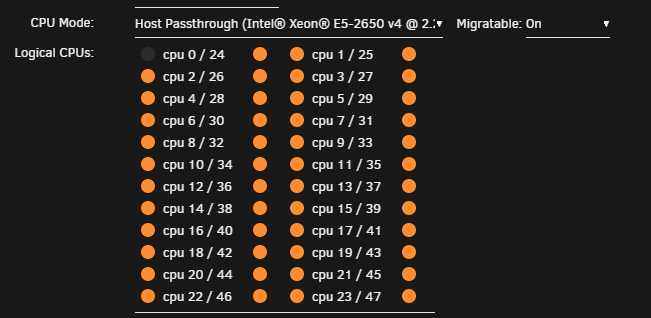
Is there really no way to just select all CPU cores? Every VM I spin up, I really have to click these little, tiny buttons 48 times?
-
Alright, I see most of them marked "does not exist". Still, the Movies share exists on the pool and the ssd-pool, but is set to cache only (ssd-pool), so if the file is being moved and is already on the pool, seems like that is the issue. You need to set it to use the array or move all the files off. M----s shareUseCache="only" # Share exists on pool, ssd-pool
-
Not an expert, but you seem to have two "Movies" shares, one on "pool" and one on "ssd-pool" so when you use the fuser mnt of "user", it's probably confused which you want to write too. Overall you have 141 shares, which seems excessive but don't know your use case....
-
Holy crap! Thanks for the detailed response. I'll get to work on making these changes and let you know how it goes!
-
I got syslog-ng working, but the issue that I'm running into is that unraid syslogs seem to report only as "unraid", so multiple server syslogs get combined together. I have a fairly good tailscale setup with local dns and subnet routing, so getting the logs isnt hard, but collecting them all and displaying them in any useable fashion has proved difficult. What are you guys using to display remote syslogs? I also would like to display logs for my pfsense boxes as well. I'm sure this gets asked alot, but syslog is a pretty common term and pulls up a ton of results. Sorry if this is already covered.
-
Seems like this question has been asked a few times but never solved. I have two drives with alot of files (hard links/backups). I'm getting this warning in the syslog. Nov 15 11:04:35 NAS0 inotifywait[16440]: Failed to watch /mnt/disk10; upper limit on inotify watches reached! Nov 15 11:04:35 NAS0 inotifywait[16440]: Please increase the amount of inotify watches allowed per user via `/proc/sys/fs/inotify/max_user_watches'. Nov 15 11:04:35 NAS0 inotifywait[16532]: Failed to watch /mnt/disk9; upper limit on inotify watches reached! Nov 15 11:04:35 NAS0 inotifywait[16532]: Please increase the amount of inotify watches allowed per user via `/proc/sys/fs/inotify/max_user_watches'.
-
I keep very good records of the IPs on my LAN, the IP is most definitely not in use already. If I disable the VPN, the GUI works. That being said, I set it to bridge as you suggest and that is working. Wireguard won't download the configuration file, it's possibly blocked in the country I'm in. Thanks for your assistance!
-
same issue myself and a few others have, no one can seem to sort it.
-
Nope. I was hoping the maintainer ( @binhex ) would drop in. I appreciate @wgstarks replying to all the questions but hasn't been able to help and I worry that all the activity is hiding the fact that multiple people are having this problem.
-
I assume you mean the 10.10.6.0/23 network? Yes, my desktop PC is IP 10.10.6.7/23
-
Hello all, i'm unable to access the webgui with the vpn enabled. If I disable it, the webgui loads. Others have suggested that this is because the vpn is not connected, but if I access the container via the cli, I can ping 8.8.8.8 and using the command "curl ifconfig.me" returns the public IP of the VPN, not my public IP. So, I dont understand. Attached are the command execution and the supervisord.log with debug enabled. command execution.txt supervisord.log
-
I appreciate the response, but logs indicate it is connected, and running the command "curl ifconfig.me" shows the public IP of the VPN location that I'm connected to, as expected. So I don't think that's it. 10.10.6.184 = container 10.10.6.173 = pihole 10.10.6.66 = router 10.10.6.0/23 = network Logs: dos2unix: converting file /config/openvpn/redacted.ovpn to Unix format... RTNETLINK answers: File exists groupadd: GID '100' already exists useradd: UID 99 is not unique 2024-10-18 13:18:37.714458 [info] VPN_ENABLED defined as 'yes' 2024-10-18 13:18:37.761486 [info] OpenVPN config file (ovpn extension) is located at /config/openvpn/redacted.ovpn 2024-10-18 13:18:37.815272 [info] VPN remote line defined as 'redacted 1197' 2024-10-18 13:18:37.850074 [info] VPN_REMOTE defined as 'redacted' 2024-10-18 13:18:37.883903 [info] VPN_PORT defined as '1197' 2024-10-18 13:18:37.918845 [info] VPN_PROTOCOL defined as 'udp' 2024-10-18 13:18:37.955398 [info] VPN_DEVICE_TYPE defined as 'tun0' 2024-10-18 13:18:37.990350 [info] LAN_NETWORK defined as '10.10.6.0/23' 2024-10-18 13:18:38.024742 [info] NAME_SERVERS defined as '10.10.6.173' 2024-10-18 13:18:38.058739 [info] VPN_OPTIONS not defined (via -e VPN_OPTIONS) 2024-10-18 13:18:38.093395 [info] Adding 10.10.6.173 to resolv.conf 2024-10-18 13:18:38.120715 [info] Starting OpenVPN... Fri Oct 18 13:18:38 2024 WARNING: file 'credentials.conf' is group or others accessible Fri Oct 18 13:18:38 2024 OpenVPN 2.4.7 x86_64-pc-linux-gnu [SSL (OpenSSL)] [LZO] [LZ4] [EPOLL] [PKCS11] [MH/PKTINFO] [AEAD] built on Jul 19 2021 Fri Oct 18 13:18:38 2024 library versions: OpenSSL 1.1.1f 31 Mar 2020, LZO 2.10 Fri Oct 18 13:18:38 2024 TCP/UDP: Preserving recently used remote address: [AF_INET]redacted:1197 Fri Oct 18 13:18:38 2024 UDP link local: (not bound) Fri Oct 18 13:18:38 2024 UDP link remote: [AF_INET]redacted:1197 Fri Oct 18 13:18:38 2024 WARNING: this configuration may cache passwords in memory -- use the auth-nocache option to prevent this Fri Oct 18 13:18:38 2024 [redacted] Peer Connection Initiated with [AF_INET]redacted:1197 Fri Oct 18 13:18:40 2024 OpenVPN ROUTE6: OpenVPN needs a gateway parameter for a --route-ipv6 option and no default was specified by either --route-ipv6-gateway or --ifconfig-ipv6 options Fri Oct 18 13:18:40 2024 OpenVPN ROUTE: failed to parse/resolve route for host/network: 2000::/3 Fri Oct 18 13:18:40 2024 TUN/TAP device tun0 opened Fri Oct 18 13:18:40 2024 /sbin/ip link set dev tun0 up mtu 1500 Fri Oct 18 13:18:40 2024 /sbin/ip addr add dev tun0 10.12.110.34/24 broadcast 10.12.110.255 Fri Oct 18 13:18:40 2024 WARNING: OpenVPN was configured to add an IPv6 route over tun0. However, no IPv6 has been configured for this interface, therefore the route installation may fail or may not work as expected. Fri Oct 18 13:18:40 2024 Initialization Sequence Completed 2024-10-18 13:18:43.174915 [info] WebUI port defined as 8080 2024-10-18 13:18:43.213750 [info] LAN Network defined as 10.10.6.0/23 2024-10-18 13:18:43.248406 [info] Default gateway defined as 10.10.6.66 2024-10-18 13:18:43.279792 [info] ip route defined as follows... -------------------- 0.0.0.0/1 via 10.12.110.1 dev tun0 default via 10.10.6.66 dev eth0 10.10.6.0/23 dev eth0 proto kernel scope link src 10.10.6.184 10.12.110.0/24 dev tun0 proto kernel scope link src 10.12.110.34 10.253.2.0/24 via 10.10.6.2 dev eth0 128.0.0.0/1 via 10.12.110.1 dev tun0 redacted via 10.10.6.66 dev eth0 -------------------- iptable_mangle 16384 1 ip_tables 28672 3 iptable_filter,iptable_nat,iptable_mangle x_tables 45056 16 ip6table_filter,xt_conntrack,iptable_filter,ip6table_nat,xt_tcpudp,xt_addrtype,xt_CHECKSUM,xt_nat,ip6_tables,ipt_REJECT,ip_tables,iptable_nat,ip6table_mangle,xt_MASQUERADE,iptable_mangle,xt_mark 2024-10-18 13:18:43.324846 [info] iptable_mangle support detected, adding fwmark for tables 2024-10-18 13:18:43.395795 [info] Docker network defined as 10.10.6.0/23 2024-10-18 13:18:43.504570 [info] Incoming connections port defined as 8999 2024-10-18 13:18:43.543040 [info] iptables defined as follows... -------------------- -P INPUT DROP -P FORWARD ACCEPT -P OUTPUT DROP -A INPUT -i tun0 -j ACCEPT -A INPUT -s 10.10.6.0/23 -d 10.10.6.0/23 -j ACCEPT -A INPUT -i eth0 -p udp -m udp --sport 1197 -j ACCEPT -A INPUT -i eth0 -p tcp -m tcp --dport 8080 -j ACCEPT -A INPUT -i eth0 -p tcp -m tcp --sport 8080 -j ACCEPT -A INPUT -s 10.10.6.0/23 -i eth0 -p tcp -m tcp --dport 8999 -j ACCEPT -A INPUT -p icmp -m icmp --icmp-type 0 -j ACCEPT -A INPUT -i lo -j ACCEPT -A OUTPUT -o tun0 -j ACCEPT -A OUTPUT -s 10.10.6.0/23 -d 10.10.6.0/23 -j ACCEPT -A OUTPUT -o eth0 -p udp -m udp --dport 1197 -j ACCEPT -A OUTPUT -o eth0 -p tcp -m tcp --dport 8080 -j ACCEPT -A OUTPUT -o eth0 -p tcp -m tcp --sport 8080 -j ACCEPT -A OUTPUT -d 10.10.6.0/23 -o eth0 -p tcp -m tcp --sport 8999 -j ACCEPT -A OUTPUT -p icmp -m icmp --icmp-type 8 -j ACCEPT -A OUTPUT -o lo -j ACCEPT -------------------- Adding 100 group Adding 99 user 2024-10-18 13:18:43.625544 [info] UMASK defined as '002' 2024-10-18 13:18:43.665503 [info] Starting qBittorrent daemon... Logging to /config/qBittorrent/data/logs/qbittorrent-daemon.log. 2024-10-18 13:18:44.707726 [info] qBittorrent PID: 188 2024-10-18 13:18:44.718303 [info] Started qBittorrent daemon successfully...
-
RE: qbittorentvpn container If I have vpn set to yes, I cannot access the webgui. How do you get to the webgui when using the vpn? Here is my docker run command. .173 is my pihole, using that or 8.8.8.8 didnt make any difference. docker run -d --name='qbittorrentvpn' --net='br0' --ip='10.10.6.184' --pids-limit 2048 --privileged=true -e TZ="removed" -e HOST_OS="Unraid" -e HOST_HOSTNAME="removed" -e HOST_CONTAINERNAME="qbittorrentvpn" -e 'TCP_PORT_8080'='8080' -e 'TCP_PORT_8999'='8999' -e 'UDP_PORT_8999'='8999' -e 'WEBUI_PORT'='8080' -e 'INCOMING_PORT'='8999' -e 'VPN_ENABLED'='yes' -e 'VPN_USERNAME'='removed' -e 'VPN_PASSWORD'='removed' -e 'LAN_NETWORK'='10.10.6.0/23' -e 'NAME_SERVERS'='10.10.6.173' -e 'PUID'='99' -e 'PGID'='100' -e 'UMASK'='002' -l net.unraid.docker.managed=dockerman -l net.unraid.docker.webui='http://[IP]:[PORT:8080]/' -l net.unraid.docker.icon='https://raw.githubusercontent.com/MarkusMcNugen/docker-templates/master/qbittorrentvpn/qbittorrentvpn-icon.png' -v '/mnt/user/public/incoming/':'/downloads':'rw' -v '/mnt/cache/appdata/qbittorrentvpn':'/config':'rw' 'markusmcnugen/qbittorrentvpn'
-
Not sure what name you are trying, but if you use the name of the container as retrieved by this command, it will work: docker ps --format ‘{{.Names}}’
-
@KluthR just wondering if we can add support to split archives. My plex container backup is hundreds of gb, even compressed, and I back it up remotely via rsync after the monthly backup runs. Multiple smaller files would be more ideal in case there is a network interruption.
-
Disregard. Removing "tailscale1" and entering it back and hitting apply did the trick. SSH is working now. *Meant to edit my above post but didnt do it right.
-
I'll see if I can sanitize the logs later and post. I looked at those logs yesterday and it contains my public IPs anywhere I have direct tailscale access, which is quite a few places. Need a way to anonymize them if we are going to be posting them routinely.
-
Did something change in regards to SSH connections? Under 6.12.11, I could connect via SSH from remote tailscale 100.xxx IPs, but after updating to 6.12.13, I'm getting connection refused for SSH although I can access the web GUI remotely from a web browwer.
-
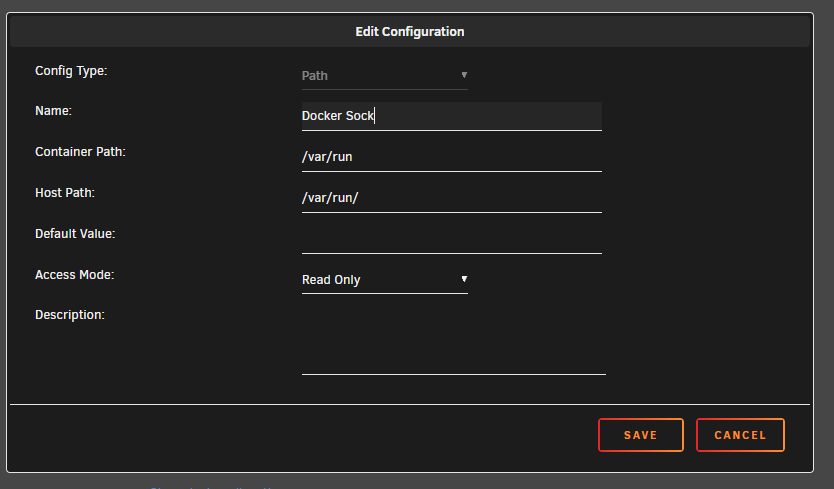
Docker monitoring works fine for me. One thing you do need to do that is not part of the template is add a read only path for /var/run
-
Just want to point out that on step 3, you have to press enter to commit the change. This is not super intuitive. Additionally, if there is a partition between the boot partition and the new space, you'll have to use a tool like Aomei Partition Assistant to merge them.
-
No replies. Guess that means there is no negative info. I'll report back after I build and let you know how it goes.
-
Motherboard: x1 Asus Rog Zenith Extreme Alpha X399 HEDT Gaming Motherboard AMD Threadripper 2 (TR4) EATX DDR4 M.2 10G LAN USB 3.1 Gen2 CPU: x1 AMD YD195XA8AEWOF Ryzen Threadripper 1950X (16-core/32-thread) Desktop Processor Cooler: x1 Noctua NH-U9 TR4-SP3, Premium CPU Cooler for AMD sTRX4/TR4/SP3 (92mm, Brown) RAM: x8 Kingston KSM26ED8/16ME Server Premier - DDR4-16 GB - DIMM 288-pin - 2666 MHz / PC4-21300 - CL19-1.2 V - unbuffered - ECC I already have drives, gpu, case, hba, backplane, PSU, etc. Supermicro SC846 with a desktop i9-9900 non ECC ram right now. Basically, do you see any compatibility issues with this Mobo, CPU, RAM?
-
I'm looking for the same thing but inexpensive and IPMI dont really go together, sadly. Hopefully someone will chime in and we can both find something.
-
I've switched to dynu.com and I have a working template that I will post to the app store as soon as I figure it out.
-
chgrp root /tmp/tmux-0 && chown root /tmp/tmux-0

