





ssjucrono
Members
-
Joined
-
Last visited
-
Also wondering same thing? RTX 3090 is getting throttled in steam-headless
-
I found out the issue. I was using the wrong interface. I was using virtbr0 which was 192.168.122.x. I needed br0 which is 192.168.1.x
-
Hello, I upgraded from 7.0.1 to 7.1.0 today. I removed the CPU Pinning from the 3 VMs I am running. I also moved the machine to the latest q35-9.2. after that my VMs cannot be reached on the network. I can VNC into them fine and they look mostly normal. after that I changed from virtio-net to virtio networking same issue. After that I cleared the network.cfg on the USB Drive. Same issue. I have uploaded my diag zip. I know I am missing something obvious. I am also seeing this in the VM log: 2025-05-07 00:04:15.386+0000: Domain id=4 is tainted: high-privileges Thank you for the help raid-diagnostics-20250506-1859.zip
-
@peterbata When I ran linkwarden and postgresql17. My whole server crashed overnight due to out of memory I think. I have 256GB of RAM, I think there is something going on with linkwarden. I stopped both containers and I have not had that happen since. Seems similar to the Webui being unresponsiveness. Did you ever find a solution?
-
Server has been running well for sometime. I got an out of memory error suddenly. I have 256GB of RAM and not doing anything too crazy. Only thing that changed was I setup linkwarden docker container. not sure if that ate it all up? I have since stopped linkwarden and the postgresql container. I have attached the diagnostics as well. curious to know what happened. Thank you raid-diagnostics-20241217-1021.zip
-
What kernel did you install @Tem? Is it difficult or worth the trade offs? I don't want to break my unraid server
-
Also wondering if it's overheating and just not reporting it? I was going to buy a heatsink and thermal pad for it but didn't want to if it's not the issue.
-
@ich777 okay thank you! The thing that bugs me is it works totally fine with the generic adapter where I only have access to one of the TPUs. I guess I'll ask for a refund on the adapter board. And go bac to the single tpu. Thank you again for all your work in the community it is greatly appreciated
-
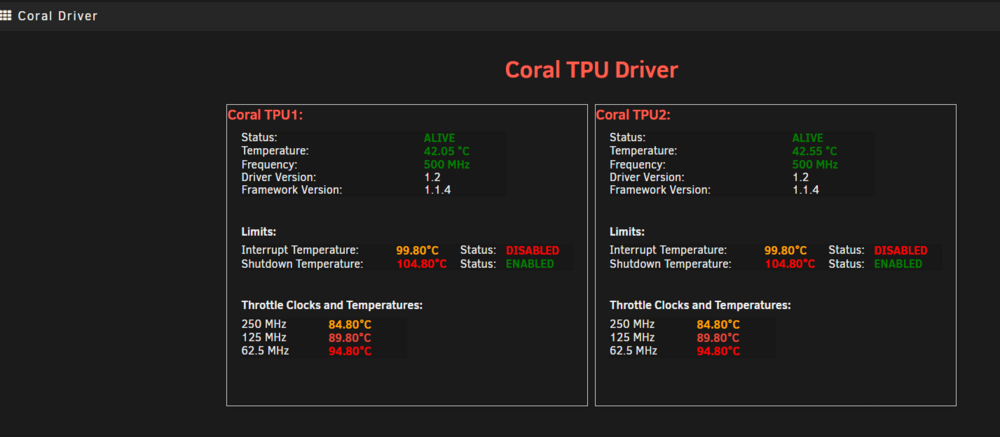
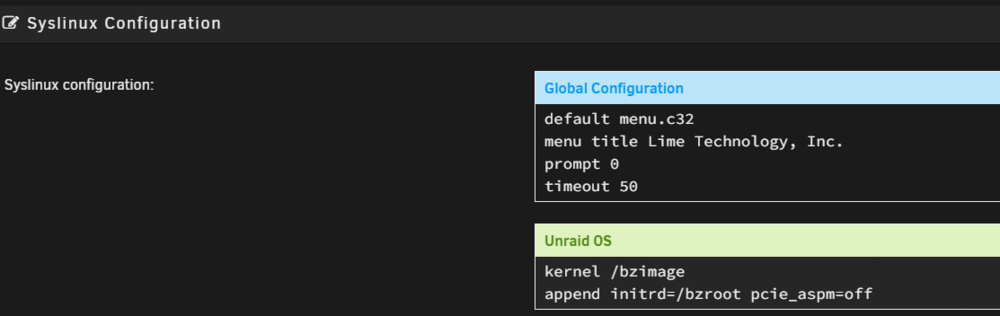
@ich777 I have been trying for sometime now to get my Coral Dual TPU m.2 to work properly with magic-blue-smoke pcie adapter The Coral TPU works fine no problem with a generic PCIE to m.2 adapter. That only allows me to use one TPU. I am trying for the second time to get both TPUs working using Maic-blue-smoke adapter. Currently I have it in my server and it can see both TPUs fine and if I don't run any inference on it it is fine. Once I start using Frigate or CodeProject AI my whole server crashes and I have to hard/unclean shutdown. I have been trying to track this down for a long time. any help would be appreciated. Here is some diagnostics, let me know what else I can provide. I do have pcie_aspm=off set I am wondering if it's a permissions issue on the unraid host? Thank you for any help you can provide ``` root@RAID:~# ls /dev/apex* /dev/apex_0 /dev/apex_1 root@RAID:~# ls /dev/apex* /dev/apex_0 /dev/apex_1 root@RAID:~# lspci -nn | grep 089a 83:00.0 System peripheral [0880]: Global Unichip Corp. Coral Edge TPU [1ac1:089a] 84:00.0 System peripheral [0880]: Global Unichip Corp. Coral Edge TPU [1ac1:089a] root@RAID:~# lspci -nn | grep 089a 83:00.0 System peripheral [0880]: Global Unichip Corp. Coral Edge TPU [1ac1:089a] 84:00.0 System peripheral [0880]: Global Unichip Corp. Coral Edge TPU [1ac1:089a] root@RAID:~# lsmod | grep apex apex 16384 0 gasket 102400 1 apex root@RAID:~# dmesg | grep apex* [ 642.227673] apex 0000:83:00.0: enabling device (0100 -> 0102) [ 642.230442] apex 0000:84:00.0: enabling device (0100 -> 0102) [ 647.318016] apex 0000:84:00.0: Apex performance not throttled due to temperature [ 647.318030] apex 0000:83:00.0: Apex performance not throttled due to temperature ``` UNRAID SYSLOG ``` Aug 12 14:30:20 RAID kernel: x86/PAT: frigate.detecto:45576 map pfn RAM range req uncached-minus for [mem 0x263b910000-0x263b913fff], got write-back Aug 12 15:58:28 RAID kernel: apex 0000:83:00.0: Apex performance not throttled due to temperature Aug 12 15:58:28 RAID kernel: apex 0000:84:00.0: Apex performance not throttled due to temperature Aug 12 15:58:33 RAID kernel: apex 0000:84:00.0: Apex performance not throttled due to temperature Aug 12 15:58:33 RAID kernel: apex 0000:83:00.0: Apex performance not throttled due to temperature Aug 14 13:07:59 RAID kernel: x86/PAT: python3:54426 map pfn RAM range req uncached-minus for [mem 0x248987c000-0x248987ffff], got write-back Aug 14 13:07:59 RAID kernel: x86/PAT: python3:54426 map pfn RAM range req uncached-minus for [mem 0x245e308000-0x245e30bfff], got write-back ``` Coral Temps Don't appear to go over 60 C 024-08-07 13:51:46 Coral Temp: 49.05C 2024-08-07 13:52:01 Coral Temp: 47.30C 2024-08-07 13:52:16 Coral Temp: 47.05C 2024-08-07 13:52:31 Coral Temp: 46.55C 2024-08-07 13:52:46 Coral Temp: 46.55C 2024-08-07 13:53:01 Coral Temp: 46.55C 2024-08-07 13:53:16 Coral Temp: 46.30C 2024-08-07 13:53:31 Coral Temp: 46.55C 2024-08-07 13:53:46 Coral Temp: 48.05C 2024-08-07 13:54:01 Coral Temp: -89.70C This is when my server crashes 024-08-12 15:57:13 Coral Temp1: 44.80C 2024-08-12 15:57:28 Coral Temp2: 47.30C 2024-08-12 15:57:43 Coral Temp1: 44.80C 2024-08-12 15:57:58 Coral Temp2: 47.05C 2024-08-12 15:58:13 Coral Temp1: 44.55C 2024-08-12 15:58:28 Coral Temp2: -89.70C server crash 2024-08-12 16:10:25 Coral Temp1: 43.55C force power off and power on 2024-08-12 16:10:40 Coral Temp2: 44.55C 2024-08-12 16:10:55 Coral Temp1: 44.05C 2024-08-12 16:11:10 Coral Temp2: 48.55C 2024-08-12 16:11:25 Coral Temp1: 45.80C 2024-08-12 16:11:40 Coral Temp2: 47.05C 2024-08-12 16:11:55 Coral Temp1: 45.30C 2024-08-12 16:12:10 Coral Temp2: 46.05C 2024-08-12 16:12:25 Coral Temp1: 44.80C 2024-08-12 16:12:40 Coral Temp2: 45.80C 2024-08-12 17:32:42 Coral Temp2: 55.80C 2024-08-12 17:32:57 Coral Temp1: 55.30C 2024-08-12 17:33:12 Coral Temp2: 55.30C 2024-08-12 17:33:27 Coral Temp1: 54.80C 2024-08-12 17:33:42 Coral Temp2: 54.80C 2024-08-12 17:33:57 Coral Temp1: 54.55C 2024-08-12 17:34:12 Coral Temp2: 55.30C 2024-08-12 17:34:27 Coral Temp1: 54.80C 2024-08-12 17:34:42 Coral Temp2: 55.05C 2024-08-12 17:34:57 Coral Temp1: 55.80C 2024-08-12 17:35:12 Coral Temp2: 56.30C 2024-08-12 17:35:27 Coral Temp1: 57.05C 2024-08-12 17:35:42 Coral Temp2: 57.05C 2024-08-12 17:35:57 Coral Temp1: -89.70C 2024-08-12 17:58:57 Coral Temp1: C 2024-08-12 17:59:12 Coral Temp2: C 2024-08-12 17:59:27 Coral Temp1: C raid-diagnostics-20240814-1447.zip
-
after my original post I ended up getting a refund on bluesmoke's adapter and going back to my generic pcie to m.2 adapter. Using just one of the coral TPUs. That worked fine. I did end up re-purchasing the adpater again from BlueSmoke and just installed. Again it is crashing my whole server. I am digging into it again. So, will research some more and see if I can get anywhere.
-
Same issue with the steamwebhelper. This is a fresh/new install.
-
Yes, I am having issues with EMQX it says it cannot create the files and folders it needs due to permissions issue
-
I have had to hard reboot my server 3 times in the last 2-3 days. IT just stops working not even pingable, it is still powered on though. I have the syslog mirrored to flash but I couldn't find the log. It is a dual xeon server with an asus motherboard I can provide more information if needed. I have attached the diagnostics. If anyone can give me insight that would be great! raid-diagnostics-20240417-2107.zip
-
To fix my issue I used a custom:br0 so it has different IP so no more port conflict
-
Thank you! Duh yes I was messing around with some large dockers and ran out of space a few times. Thank you!


