





Energen
Members
-
Joined
-
Last visited
Everything posted by Energen
-
Very nice, thank you for the tutorial.
-
Never heard of BiglyBT so I'd ask why do you want to use this versus an established docker (rTorrent for example) that is ready to install and use on Unraid? Having a second computer running sonarr/radarr/whatever else defeats [some of] the purpose of having Unraid in the first place.. if you are going to have another computer doing all the work then you might as well just have a NAS hard drive and not Unraid. However, what you could attempt to do is just try to get this BiglyBT running on your own or with some guidance from other sources... that's part of the "fun" with Unraid/Docker. Google biglybt unraid, biglybt docker, stuff like that and see if you can figure anything out. Right off the start it seems like https://github.com/Fullaxx/biglybt might be a good place to start experimenting.
-
The Wireguard app on your phone has nothing to do with Wireguard running on Unraid. You'd need to address this issue to the developer of the Wireguard app.
-
I could be wrong here but I don't think that any setting, whether it is on the docker configuration or contained within Unraid somewhere, would have the effect that you want. Whatever you set on the docker would apply to it's network only, and whatever was set on Unraid would apply to it's network only. If that makes sense.. When you're on your computer you're resolving DNS through your router's dhcp/dns which isn't going to know anything about Unraid or docker containers. So from my point of view you only have 2 options... 1) Every computer you use would have to have [i][u]it's[/i][/u] hosts file changed to include the hostnames you want, or 2) Have a router capable of setting custom hostnames... not sure if this is even a thing.. And I mean... then.... you know.... you could always bookmark the sites in your browser......... and not have to think about it.
-
Extract the files you want manually...
-
Cache drive and array drive is in the same computer so network speed doesn't have any affect on it. More likely is that you are overloading your SSD/NVMe drive's onboard cache which then reduces write speed to the actual write throughput of the drive. Unless I'm misunderstanding where you're moving data to the cache drive from, or vice versa.
-
I won't speak for housewrecker but I can probably take a stab in the dark and say that scanning a folder will never happen with this tool. It retrieves information (movie IDs) from Plex in order to build the related information -- Plex already does the hard work -- GAPS would have no way of knowing any type of movie id or where to scrape info from without Plexs' already-existing ID. Make sense?
-
Haven't come across anyone making a script like this before so I did it for myself ....... finally got around to making a basic script to back up Plex's databases (only). I've always had Plex's appdata folder excluded from CA Backup because I didn't want 100000000000000000's of artwork/info files to be backed up, but I realized that it would be prudent to at least have the databases backed up (library contents, play history, etc). Artwork and info can be recreated when needed. So this is what I quickly did and suits my personal needs... #!/bin/bash mkdir -p "/mnt/user/backups/Plex/$(date +"%d-%m-%Y")" tar -cvaf /mnt/user/backups/Plex/$(date +"%d-%m-%Y")/Plex_Data_Backup.tar "/mnt/user/appdata/PlexMediaServer/Library/Application Support/Plex Media Server/Plug-in Support/Databases" If anyone wants to use this you'll just change the appropriate path names to reflect your system. I have it scheduled to run nightly. There is obviously a need to delete old backups after a period of time as these backups can be multi-gigs in size.
-
I see this is going to be never ending... just take my point and accept it and move on. You said "I've had to go an remove the container, delete the database and redownload." ... when you ONLY need to delete the database, you don't have to remove or redownload the container. Stop container, delete database, start. Finished. So no, not "exactly" what you said you were doing. And my mistake, I don't look at github just to prove a point. The last time I looked at the github page nothing had been updated in quite some time. You certainly wouldn't know of any developmental changes by the lack of communication or responses by the dev regarding the multitiudes of bugs/suggestions in this thread. However, the last docker update, which is the only thing that actually matters, was 6+ months ago. Let me rephrase for accuracy so you don't point it out to try and prove me wrong, the "latest" tag is still 6 months old. Anyways, enjoy.
-
I agree, but there hasn't been any development on this in over a year so we have to make do with what we have...
-
So if that's what you'd rather do then ok, but it's certainly more hassle then setting the very few options there are. Also you can use your imagination and only delete the unmanic.db file and retain the settings.json file so you accomplish both deleting history and retaining your settings. I'm sure you could have figured that out had you looked at the directory first. Sent from my SM-G981U1 using Tapatalk
-
You have to turn off subtitles encoding. Sent from my SM-G981U1 using Tapatalk
-
You only need to delete the contents of the appdata folder for unmanic to clear out any history. Sent from my SM-G981U1 using Tapatalk
-
Start here. https://www.osboxes.org/android-x86/ Might not work very well though.
-
I don't know the specific quality settings it uses. I suppose if I really wanted to figure it out I could dig through the source code but I'm not sure if that would really gain me anything, other than just knowing. My experience is that 95% of my conversions the output file was of a smaller size with no perceivable visual differences upon a quick check on my 24" 1080p LCD using Potplayer on my PC. The other 5% resulted in a larger file then the original, but no quality loss. When I refer to quality loss I mean that I don't see any artifacts or blurring that would indicate a low bitrate encode. I do not mean that I'm taking a 4K source and converting it to a fraction of the size and it still looks like 4K, know what I mean? Sent from my SM-G981U1 using Tapatalk
-
@housewrecker have you changed anything with the RSS feed output? As of late I haven't been able to import the missing list in Radarr...
-
So this goes back to what I originally said about not knowing what quality settings Unmanic is hard-coded with. Doesn't matter what codec or format is used if the quality settings are different. If you take two original videos and encode one at x265 4K and one at x265 1080p, and then use an automated process like Unmanic to convert those videos.. the logic that Unmanic uses says that both of those files are already in the correct format and are ignored. Do you get what I mean by quality settings? In the mean time that 30GB 4K video could have been reduced to 2GB. In the case of Unmanic -- this B (2008).mkv file is ignored.. it's a 1.6GB file. If Unmanic actually processed it at the quality settings it's configured for........ would the ending file be smaller? That's what I'm driving at... the question still remains what 'quality' setting Unmanic uses for the codec it uses. Or are the files skipped because Unmanic actually compares the encoder settings and sees that it's the same? Another example, in Handbrake if you select x265 1080p but one with an avaerage bitrate of 3000 and another with 500, they are technically the same format/codec but obviously different quality. The comparison of codec only would make both of these files the same.
-
So despite the lack of ability to actually configure any encoder settings / resolutions / etc I've been running this between my Unraid docker and Windows with Docker Desktop (does not work 100% accurately, but it works well enough to make use of it) and feeding it a ton of media files that I wanted to see the results on. I'm fairly impressed with the results. I've converted around 300GB+ of media files to a fraction of that and the quality appears to be very good. I have not figured out a way to force a conversion of media files that Unmanic thinks is already in the correct format. Just because it might be in the same format does not mean that I don't want to try to convert it for space saving reasons. @Josh.5 option to force possible?
-
That makes more sense.. I had not tried to access it from outside the network... Sorry for the confusion!! My fault!
-
What is needed, or at least what would be extremely nice, is to be able to just install the template and run it .. out of the box, so to say. I mean having to track down and then configure your own servers to run speed tests against is not good.. why have a working docker template that doesn't do anything? I have no need for a speed test docker.. so I installed it just to check it out because it was new... found that it doesn't work. Delete. That's what most people are going to do. Scanning through the librespeed doc file, apparently you need to add files to the server (appdata folder?) that are not included with this docker but are in the github Wait a minute... hold the horses... I was under the impression that this was a normal speed test docker.. but after some more reading this is not a standalone speed test application... it's a server/client setup. That changes everything. So this app is only for speedtests between multiple servers that you have access to for installing/configuring the backend stuff, or have access to the ip information for from other people running the backend servers. Perhaps that description needs to be changed to reflect that you can't just install this and run speedtests like Speedtest.net (my impression when seeing it).
-
Might take some customization and getting used to if you're used to using Krusader. My first impression is "wow, that's a busy interface". Here's the default screen as soon as I start it up...
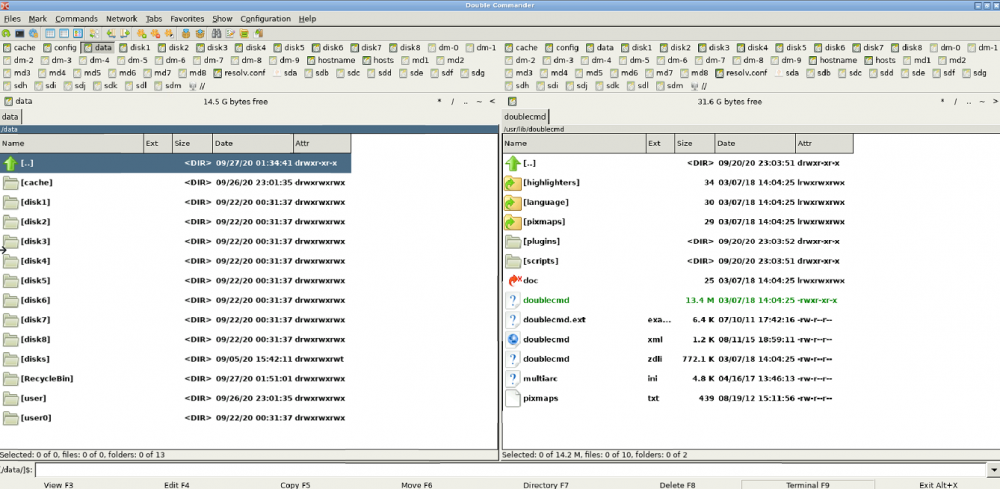
-
Tried it out.. seems nearly useless/pointless in it's current state. To make use of this docker it would seem that you should configure it with more arguments as seen here https://github.com/librespeed/speedtest/blob/docker/doc.md Also, it would seem that it takes some amount of customization to get working in the first place... there appears to be no servers configured by default to run a speed test against. So hmm.. more work and effort involved than it might be worth just for a speed test. The privacy policy leaves much to be desired. It's unclear whether or not the TELEMETRY option turns off all the data collection mentioned in the privacy policy.
-
What we, as an Unraid community, really needs... is an up to date guide on all things SMB speed related topics. There are so many threads with people asking about SMB speed and performance and I don't think there is any single source to go to for answers. I was always like "eh" about my SMB speed, I figured it is what it is, and my 10-50mb transfers were the best I was going to get.. but when I see people with 100-200-300+ mb/s transfers that really gets me wondering what I'm doing wrong. I don't do a ton of transferring where I really need that speed but if I could get it, and should get it, I WANT it. Right now a transfer from my Unraid to my new PC build with an NVMe drive I transfer 1.4gb file ar around 112mb/s which is an improvement over my old system. Copying the file back to Unraid (cache enabled) is the same speed. But it's certainly not 710mb/sec like the image above. Share to share that same 1.4gb was about 500mb/s just now, so that's not terrible (not using mapped drives at the moment), if it matters. So this thread is a good start but if we could somehow gather all the SMB information from the entire forum and make it useable, that would be something special. Another related topic is how your network hardware affects your SMB speeds. That should be included as well. mgutt is using a 10G network adapter so clearly his results cannot be expected for someone using a 100mbit LAN. @mgutt have you tweaked your Unraid smb.conf for the SMB protocol version at all? I'm currently using server min protocol = SMB3_11 client min protocol = SMB3_11 to theoretically use the latest (fastest?) version of SMB for Unraid <-> Windows 10.
-
Good to know, don't think I've ever looked at the advanced view. However, the one shortcoming is that this would only apply if you actively knew there was an update. I guess you could go around in circles about the usefulness of the feature to force checking for updates rather than forcing an update. You either have reason to believe there is an update (so force update would suffice) or are randomly checking for single updates at a greater interval than, let's say, the CA Auto Update plugin. Small example that just so happens to have popped up right now........... Right now my FreshRSS docker is "up to date", and won't be checked until my scheduled update check time (CA Auto Update).. but my FreshRSS feed tells me that there has been a new version released as of this afternoon. So at this point I know there has been an update. I can 'force update' to "see" if the docker has been updated (a linuxserver docker, so maybe it hasn't pulled the update yet, who knows), or I can 'check for updates' to "know" if an update is available or not. If I don't know there's an update then no harm no foul, I don't know that I should even be checking for updates. I guess in the end the same thing is accomplished in either case, it's either updated or it's not. But it's 2020, every app in the world has a "check for updates" option so Unraid should have it too, for individual dockers!
-
Can you mount it with Unassigned Devices? I'm asking because I don't have a dvd drive in my Unraid server to verify. If so then you would be able to access it from Krusader at that point.

