






SimonF
Community Developer
-
Joined
-
Last visited
Everything posted by SimonF
-
Can you nano /usr/local/emhttp/plugins/gpustat/lib/Intel.php and scroll down to about line 47 and change 'handbrake' => ['/usr/bin/HandBrakeCLI'], to 'handbrake' => ['ghb'],
-
You did the touch command as that needs to be done for the file to be created.
-
Just fresh dashboard should auto refresh based on value in settingd
-
Dont reboot just run commands but dashboard has to refresh
-
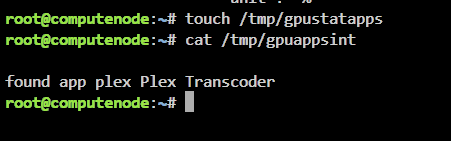
Can you do the following. You will have to wait until a refresh cycle before doing the cat. Cat you send the gpudata* and the cat of the gpuappsint when running handbrake.
-
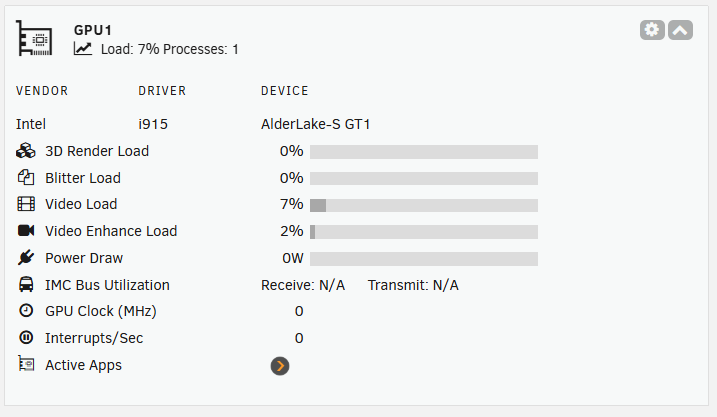
Ignore the GPU name, but this is using your data and a update I have made. Can you test on your system before I create a package. File needs to be put into /usr/local/emhttp/plugins/gpustat/lib/ Intel.php
-
Can you provide cat /tmp/gpudata*
-
Both name and path need to match
-
change plex to use /dev/dri/
-
when you create a VM the directory is created because if you use disk images that is where they are stored by default. It should remove the dataset if you delete the VM.
-
Its using the i915 driver rather than xe so should work ok. This is now it looks for JellyFin on my test server.

-
Sorry typo lspci -k
-
Unlike btrfs rmdir does not work on datasets, If the VM is removed via the gui the dataset should be removed if there is a single image file. If more than one only the first is removed and the directory/dataset is left along with the other images, plan to allow delete all in the future. How was it emptied. it needs to be a data set to support ZFS native snapshots either via the GUI or other solution so all VMs dirs on zfs are Datasets now.
-
What is the driver lspci -ls 0000:00:02.0
-
Are you looking to commit the snap image into the base. You can use qemu-img to do that. https://blog.programster.org/qemu-img-cheatsheet#get-information-about-a-file Snapshots will be none as the snapshotdb will have had the entries removed.
-
Would this be in the original directory? You just need to specify the backing file as the disk. But must be in the original directory.
-
root@computenode:/mnt/user/domains2/Arch9# qemu-img info --backing-chain -U vdisk1.S20250321211701qcow2 image: vdisk1.S20250321211701qcow2 file format: qcow2 virtual size: 5 MiB (5242880 bytes) disk size: 196 KiB cluster_size: 65536 backing file: /mnt/user/domains2/Arch9/vdisk1.img backing file format: raw Format specific information: compat: 1.1 compression type: zlib lazy refcounts: false refcount bits: 16 corrupt: false extended l2: false Child node '/file': filename: vdisk1.S20250321211701qcow2 protocol type: file file length: 192 KiB (197120 bytes) disk size: 196 KiB image: /mnt/user/domains2/Arch9/vdisk1.img file format: raw virtual size: 5 MiB (5242880 bytes) disk size: 1 MiB Child node '/file': filename: /mnt/user/domains2/Arch9/vdisk1.img protocol type: file file length: 5 MiB (5242880 bytes) disk size: 1 MiB root@computenode:/mnt/user/domains2/Arch9# cat /etc/libvirt/qemu/snapshotdb/Arch9/snapshots.db { "S20250321211701": { "name": "S20250321211701", "parent": "Base", "state": "shutoff", "desc": null, "memory": { "@attributes": { "snapshot": "no" } }, "creationtime": "1742591822", "method": "QEMU", "backing": { "hdc": [ "\/mnt\/xfspool\/domains2\/Arch9\/vdisk1.S20250321211701qcow2", "\/mnt\/user\/domains2\/Arch9\/vdisk1.img" ], "rhdc": [ "\/mnt\/user\/domains2\/Arch9\/vdisk1.img", "\/mnt\/xfspool\/domains2\/Arch9\/vdisk1.S20250321211701qcow2" ], "hdd": [ "\/mnt\/xfspool\/domains2\/Arch9\/vdisk2.S20250321211701qcow2", "\/mnt\/user\/domains2\/Arch9\/vdisk2.img" ], "rhdd": [ "\/mnt\/user\/domains2\/Arch9\/vdisk2.img", "\/mnt\/xfspool\/domains2\/Arch9\/vdisk2.S20250321211701qcow2" ], "hde": [ "\/mnt\/vmpoolzfs\/domains\/vdisk3.S20250321211701qcow2", "\/mnt\/user\/domains\/vdisk3.qcow2" ], "rhde": [ "\/mnt\/user\/domains\/vdisk3.qcow2", "\/mnt\/vmpoolzfs\/domains\/vdisk3.S20250321211701qcow2" ], "hdf": [ "\/mnt\/xfspool\/domains2\/Arch9\/vdisk4.S20250321211701qcow2", "\/mnt\/user\/domains2\/Arch9\/vdisk4.img" ], "rhdf": [ "\/mnt\/user\/domains2\/Arch9\/vdisk4.img", "\/mnt\/xfspool\/domains2\/Arch9\/vdisk4.S20250321211701qcow2" ], "hdg": [ "\/mnt\/xfspool\/domains2\/Arch9\/vdisk5.S20250321211701qcow2", "\/mnt\/user\/domains2\/Arch9\/vdisk5.qcow2" ], "rhdg": [ "\/mnt\/user\/domains2\/Arch9\/vdisk5.qcow2", "\/mnt\/xfspool\/domains2\/Arch9\/vdisk5.S20250321211701qcow2" ], "hdh": [ "\/mnt\/vmpoolzfs\/domains\/vdisk2.S20250321211701qcow2", "\/mnt\/user\/domains\/vdisk2.img" ], "rhdh": [ "\/mnt\/user\/domains\/vdisk2.img", "\/mnt\/vmpoolzfs\/domains\/vdisk2.S20250321211701qcow2" ] }, "primarypath": "\/mnt\/xfspool\/domains2\/Arch9", "disks": [ { "@attributes": { "name": "hdc", "snapshot": "external", "type": "file" }, "driver": { "@attributes": { "type": "qcow2" } }, "source": { "@attributes": { "file": "\/mnt\/xfspool\/domains2\/Arch9\/vdisk1.S20250321211701qcow2" } } }, { "@attributes": { "name": "hdd", "snapshot": "external", "type": "file" }, "driver": { "@attributes": { "type": "qcow2" } }, "source": { "@attributes": { "file": "\/mnt\/xfspool\/domains2\/Arch9\/vdisk2.S20250321211701qcow2" } } }, { "@attributes": { "name": "hde", "snapshot": "external", "type": "file" }, "driver": { "@attributes": { "type": "qcow2" } }, "source": { "@attributes": { "file": "\/mnt\/vmpoolzfs\/domains\/vdisk3.S20250321211701qcow2" } } }, { "@attributes": { "name": "hdf", "snapshot": "external", "type": "file" }, "driver": { "@attributes": { "type": "qcow2" } }, "source": { "@attributes": { "file": "\/mnt\/xfspool\/domains2\/Arch9\/vdisk4.S20250321211701qcow2" } } }, { "@attributes": { "name": "hdg", "snapshot": "external", "type": "file" }, "driver": { "@attributes": { "type": "qcow2" } }, "source": { "@attributes": { "file": "\/mnt\/xfspool\/domains2\/Arch9\/vdisk5.S20250321211701qcow2" } } }, { "@attributes": { "name": "hdh", "snapshot": "external", "type": "file" }, "driver": { "@attributes": { "type": "qcow2" } }, "source": { "@attributes": { "file": "\/mnt\/vmpoolzfs\/domains\/vdisk2.S20250321211701qcow2" } } } ] } }root@computenode:/mnt/user/domains2/Arch9# Path is in the image and also it is stored in my snapshotdb.
-
Did you run touch /tmp/gpustatapps Then goto dash board refresh and then files should be in /tmp/ ls /tmp/gpu*
-
This is the bug report. but the issue you are seeing is fixed. run sed -i '/webGui\/nchan\/vm_dashusage/d' /var/run/nchan.pid And then refresh
-
Does intel_gpu_top show any load?
-
It just is a way to disable the flag. It can allow more performance for the VM. At present there is nothing to migrate between hosts using libvirt.
-
It was part of a WOL plugin the dev is no longer supporting to send magic packets from a webpage. You can find any slackware current package an install. This was just the package used buy the plugin. Mine is more for receiving packets to start VMs/Containers. I may look to add the package as part of my plugin.
-
No it does not, look at the pinned post at top for where to get a command package.
-
Fixed in 2025.03.19
-
Yes it both devices have the same name you can do at a port level. but both have different serial numbers so should be able to use name also.



