





bobokun
Members
-
Joined
-
Last visited
Everything posted by bobokun
-
I successfully flashed my H200 into IT mode using the bat files. How do I check from Unraid whether or not my controller is the latest firmware version? Under system devices I see IOMMU group 20:[1000:0072] 07:00.0 Serial Attached SCSI controller: LSI Logic / Symbios Logic SAS2008 PCI-Express Fusion-MPT SAS-2 [Falcon] (rev 03)
-
Is anyone familiar with coding rtorrent? I would like to create a cron script that will delete the torrent and data for unregistered torrents. This is a sample code I found but I don't think it deletes the data, just the torrent file. Anyone know how I would modify this to delete data as well? Thanks https://gist.github.com/onedr0p/8170117d43873c18c34139b7c5904c14
-
Sorry if this question has been asked a lot, is it best practice to use all SATA ports on your motherboard before using the ones on the controller? I have 8 ports on my motherboard, i'm using all 8 (2x for SSD and 6x HDD) but want to add more drives, is it better to use 8xHDD on the controller and leave 2xSSD on the motherboard?
-
Yeah I'm having the same error. Disabling the cloudflare plugin fixes it
-
Anyone getting an error trying to share a folder after updating to 15.0.6? I just receive a generic "Unable to create a link share" message when I try to create a share link. This was working previously prior to the update.
-
My plex docker container has a memory leak and I'm not sure how to fix it. When I restart the docker container it barely uses any memory however it slowly increases and doesn't stop, after 1 or 2 days it's using 5-6GB of RAM. I've tried to delete my docker img and recreate it downloading a fresh docker container for binhex-plex-pass. I would prefer not to start from scratch as I have quite a number of users on my server. Is there anything I can do to figure out what is causing this?
-
Thank you that worked perfectly! I am also having an issue with not setting up caldav/carddav. I've tried searching through the thread and I've added this code to appdata\letsencrypt\nginx\site-confs\default but it's still giving me the error. I've also tried adding the same code to my nextcloud\nginx\site-config\default and it's not working either. Anyone have an idea on how to fix this issue? location = /.well-known/carddav { return 301 $scheme://$host/remote.php/dav; } location = /.well-known/caldav { return 301 $scheme://$host/remote.php/dav; } EDIT: I have fixed this issue! for anyone else who is having this error and is using YOURDOMAIN.COM/nextcloud as the URL you need to change it to this code. Very silly mistake of me but I'm glad all issues are resolved now location = /.well-known/carddav { return 301 $scheme://$host/nextcloud/remote.php/dav; } location = /.well-known/caldav { return 301 $scheme://$host/nextcloud/remote.php/dav; }

-
I have this same error, what was the command you used to fix it? I tried "sudo -u abc php occ db:convert-filecache-bigint" and it gives me an error "Could not open input file: occ"
-
So I uninstalled the plugin before forgetting to cleanup all the squidbait files. I'm trying to search for it in the community applications to install again so I can remove all the files/folders generated by the plugin but I can't seem to find it anymore. What's the best way to remove all these files/folders?
-
My Unraid server has 2 eth ports (On Motherboard) + 1 IPMI Port + 4 port NIC (Intel PCIe Gigabit card). Only the 4 port NIC has been passed to the pfsense VM. 4 Port NIC: Port 1 = WAN Port 2 = LAN (Direct connection to PC) -> This is used to connect to pfsense to configure settings Port 3 = WIFI/SWITCH (Using my old router AC68U in Access Point mode, it also has 4 ports + WAN port which I want to utilize as a switch) Port 4 = Empty The 2 eth ports on my motherboard and IPMI are not physically connected to anything, but I have also tried physically connecting the ethernet port on motherboard and the IPMI port to my AC68U which is connected to port 3 of the 4 port NIC. Ideally I want to avoid physically connecting anything from my motherboard/IPMI port to anything in order to save ports/ethernet cables on the AC68U
-
Thanks for the video series. I've been trying to get everything set up on my unraid server and everything seems to be working except for one thing. My unraid server doesn't seem to be getting an ip address from the pfsense VM. I have passed the 4 port Gigabit Network Card to the VM but my original Gigabit NIC that unraid uses is not being passed to the pfsense. Could that be the reason why it's not assigning my unraid server an ip address? I also have a separate physical network card for IPMI which doesn't seem to be getting an ip address either from the pfsense VM. I've assigned static IP addresses for both my unraid server (under network settings) and also my IPMI in my bios but I don't see it anywhere under DHCP leases in the pfsense menu.
-
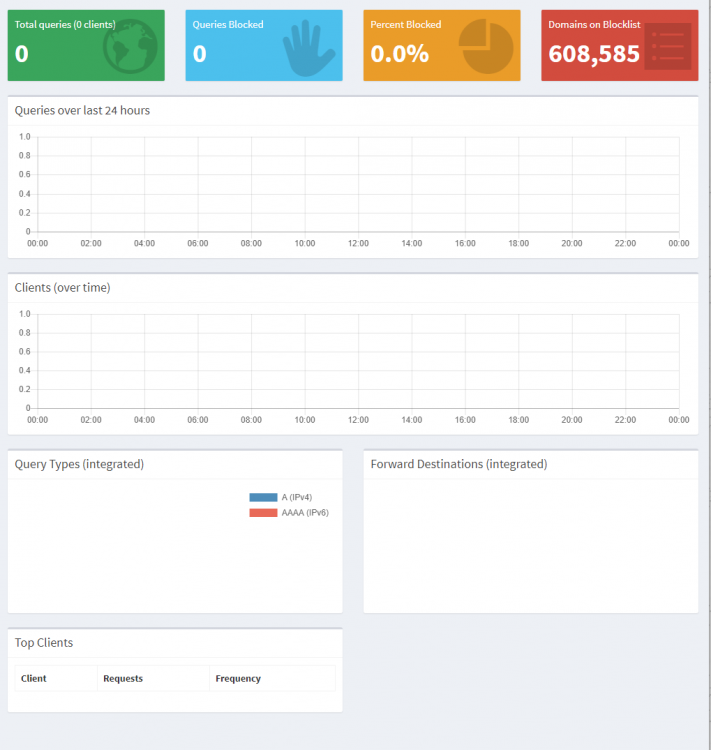
Has anyone figured a way to fix the graphs after the latest update? Graphs aren't updating for me as well.
-
After updating the docker to the new template and updating to unRaid to v6.4 I can't seem to update my lists. It keeps coming back with [✗] DNS resolution is currently unavailable Waiting up to 91 seconds before continuing...
-
What's the easiest way to transition to v3? Did you have to start from scratch or was there an easy way to keep your settings
-
Thank you for this! I had the exact same issue and deleting the Codecs folder solved everything.
-
@balloob are there any plans on upgrading the docker container to Hass.io?Thank you both! I've got it working now by changing the domain to "test.duckdns.org" rather than just duckdns.org. Now everything is working as expectedHmm, seems like a problem with duckdns. Using the example test.duckdns.org, when setting up duckdns with letsencrypt the Domain name is (duckdns.org) and the Subdomains are (test). Adding tor to the subdomains will give me an error with letsencrypt logs. Domain: tor.duckdns.org Type: Connection Detail: Timeout I've tried adding in my subdomains (test,test.tor) but it didn't work either. I might need to go into the duckdns website and create a subdomain through there and it should work.Sorry for so many questions, I'm having some issues with my config. Do I add the nginx config that you pasted into "appdata\letsencrypt\nginx\site-confs\default" config file or do I create a new one calling it tor.test.duckdns.org? I've tried to add it at the bottom of the default one so above I have something that looks like this... server { listen 443 ssl default_server; listen 80 default_server; root /config/www; index index.html index.htm index.php; server_name _; ... } server { listen 443 ssl; root /config/www; index index.html index.htm index.php; server_name tor.*; ssl_certificate /config/keys/letsencrypt/fullchain.pem; ssl_certificate_key /config/keys/letsencrypt/privkey.pem; ssl_dhparam /config/nginx/dhparams.pem; ssl_ciphers 'ECDHE-RSA-AES128-GCM-SHA256:ECDHE-ECDSA-AES128-GCM-SHA256:ECDHE-RSA-AES256-GCM-SHA384:ECDHE-ECDSA-AES256-GCM-SHA384:DHE-RSA-AES128-GCM-SHA256:DHE-DSS-AES12 8-GCM-SHA256:kEDH+AESGCM:ECDHE-RSA-AES128-SHA256:ECDHE-ECDSA-AES128-SHA256:ECDHE-RSA-AES128-SHA:ECDHE-ECDSA-AES128-SHA:ECDHE-RSA-AES256-SHA384:ECDHE-ECDSA-AES256-SHA384:ECDHE-R SA-AES256-SHA:ECDHE-ECDSA-AES256-SHA:DHE-RSA-AES128-SHA256:DHE-RSA-AES128-SHA:DHE-DSS-AES128-SHA256:DHE-RSA-AES256-SHA256:DHE-DSS-AES256-SHA:DHE-RSA-AES256-SHA:AES128-GCM-SHA25 6:AES256-GCM-SHA384:AES128-SHA256:AES256-SHA256:AES128-SHA:AES256-SHA:AES:CAMELLIA:DES-CBC3-SHA:!aNULL:!eNULL:!EXPORT:!DES:!RC4:!MD5:!PSK:!aECDH:!EDH-DSS-DES-CBC3-SHA:!EDH-RSA- DES-CBC3-SHA:!KRB5-DES-CBC3-SHA'; ssl_prefer_server_ciphers on; client_max_body_size 0; ... } But when trying to visit the webpage I'm getting this error. I've restarted my letsencrypt docker as well as rutorrentSo would I need to create a separate duckdns subdomain for my rutorrent? For example right now my I'm using test.duckdns.org and to access my plex or ombi I would go to test.duckdns.org/plex or test.duckdns.org/ombi but I theres no way to get test.duckdns.org/rutorrent to work I would need to create a separate subdomain test2.duckdns.org in order to point towards rutorrent. Please correct me if I'm misunderstanding...Also is that nginx config in your letsencrpyt docker or is it your rutorrent docker?does anyone have permission issues when accessing usershares via smb? I can't delete files that are created by automove plugin in rutorrent. I've already commented out the system.umask.set=022 in rtorrent.rc file.There was an update that released today on sonarr. Can I update this through Sonarr or will I need to wait until the Docker container updates SonarrHas anyone managed to successfully get rutorrent working with reverse proxy (following the letsencrypt and duckdns guide)?? I've been trying to figure out how to get it working but nothing seems to work properly.Figured out what was wrong...it was stupid on my end. I'll post here so others won't make the dumb mistake like I did. In the template it shows that port 53 was assigned twice (Host 1 and Host 2) However I remember reading in this thread saying it's a duplicate and no need for one of those so I stupidly deleted the Host Port 2. Now I realized you need both (One is for UDP and one for TCP)


