





MowMdown
Members
-
Joined
-
Last visited
Everything posted by MowMdown
-
Easiest way to determine if it's a plugin is to boot into safe mode, and spin your disks down. You really should post your diagnostics.zip
-
The ZFS Master plugin is known to spin-up all zfs disks due to it refreshing the zfs snapshots. I don't know if you're using that plugin but if you are it has a setting you can disable to prevent this.
-
Yeah Tdarr also uses ffmpeg. Mine does it during handbrake encoding if I abruptly stop the encode.
-
The filesystem(s) allocate space reserved for metadata upon initial format. For example my 12TB disk formatted in XFS has almost 200GB reserved so that’s not going to be an issue. Secondly HDDs don’t suffer from performance issues when 100% full since it’s not NAND flash. Cache has a separate “minimum free space” setting separate from the shares. The cache MFS is set in the cache pool settings. The share MFS is set in each of the respective share setting one for each share. Also in the split level documentation it does have a note stating that “In the event of there being conflicts between the Minimum free space, Split Level and the Allocation method settings in deciding which would be an appropriate drive to use, the Split level setting always wins. This means that you can get an out-of-space error even though there is plenty of space on other array drives that the share can logically use.”
-
Post Diagnostics.zip Does the disk show up in the BIOS?
-
I'd suggest a minimum of 24 hours or a 1st FAIL
-
Reboots are generally a hardware problem. What PSU are you using are you using any power splitters? Have you ran an extensive memtest?
-
It makes no sense why immich cannot connect to postgres... i really don't see whats wrong. what does the postgres logs say? have you tried deleting the postgres appdata, and restarting postgres before starting immich?
-
The only thing I can suggest is making sure postgres is running BEFORE immich starts up
-
what does the postgres log look like after you start it up? I can't see anything wrong with your docker runs for either container...
-
Please post the docker run for both postgres and immich containers, remove any sensitive info like db passwords if they're not masked
-
I would strongly suggest NOT filling your cache drive to the max, this will cause issues if your docker.img and appdata are on that same cache disk. Docker will stop working if that happens. Unraid can even crash if docker stops working.
-
Keep in mind, if your Minimum Free Space is 50GB and you are writing a 49GB file, it will leave you with 1GB left. The name might be a little deceiving because it's really, "Free space needed to write one last file" If you truely wanted 50GB of free space, you'd want to set it to at least double the amount of the largest file you plan on writing to the disk... If you average 50GB files, make min-free space 100GB so when that 50GB file gets written, you have 50GB left. IMO there is no reason to leave 50GB of free space on an array disk. Fill them up 100%
-
Remove mover tuning plugin and try again
-
Currently only SSO via your unraid.net account is supported. There will likely be support for 2FA in the near future when the Unraid Connect API is overhauled. This is not really "officially" confirmed but I've heard through the grapevine.
-
You have write errors and corruption on your docker.img it looks like. I'd run a memtest and also delete and recreate the docker.img once you get your 2nd cache disk replaced. Jun 24 14:45:52 MILKYWAY kernel: BTRFS info (device loop2): bdev /dev/loop2 errs: wr 85817, rd 0, flush 0, corrupt 289, gen 0
-
It's plex related for sure. I sometimes see these errors too usually when a transcode goes haywire.
-
Post a docker run output for sonarr and radarr as you should have something similar to Unraid users don't typically use the "remote path mappings" within sonarr/radarr. To my understanding remote path mappings are for when sonarr/radarr are ran separate from the storage media.

-
Have you enabled permit exclusive shares in the global settings?
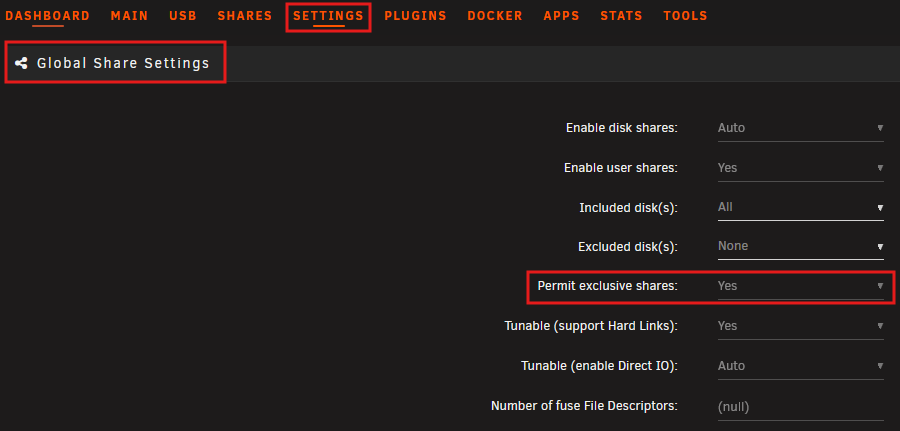
-
For me, it's been plex doing scheduled maintenance on the database. For some reason I notice it during then and afterwords it's back to normal levels.
-
Kind of an odd issue I'm having. If I leave the network cable detached from the system, I do not have a localhost network connection. I can boot into GUI mode and open the built in firefox browser window but I get the error message "Network Unreachable" I cannot actually interact with the webgui. With a network cable attached, before a link can be established to the LAN, it appears the remote syslog server complains there's no connection, to the localhost as I have it configured to use 127.0.0.1, and these two message seems to spam early on in the boot process: Jun 20 00:28:56 PlexRAID rsyslogd: omfwd/udp: socket 1: sendto() error: Network is unreachable [v8.2102.0 try https://www.rsyslog.com/e/2354 ] Jun 20 00:28:56 PlexRAID rsyslogd: omfwd: socket 1: error 101 sending via udp: Network is unreachable [v8.2102.0 try https://www.rsyslog.com/e/2354 ] Not really sure where to start investigating this issue. Not sure what version it started but I started to notice it around updating to 7.1.2 through 7.1.4. Also it does not matter if Wifi is enabled or disabled the error messages show up in either case. plexraid-diagnostics-20250620-1420.zip 6/21 Update: So I nuked my network settings and I also reset BIOS settings to defaults. I've noticed that if no ethernet connection is found (wifi disabled) the Network Management settings are not being applied which means my custom webgui ports are not taking effect. Thus typing in just http://localhost is enough to load the webgui. However the rslyslog error messages are still present.Upon connecting ethernet after booted, still does not allow an internet connection to be established.
-
That would be correct everything within seafile would be stored in the same place.
-
That's odd because I've been using an MSI B550 board without any of these issues.

-
Currently you have it set to "Cache -> Array" so mover will move data off of your cache pool onto your spinning disks. Switching this to "Array -> Cache" will move the data back if it's not in use when mover operates.
-
use /mnt/cache/... instead of /mnt/user/... And/Or set the share to be primary storage cache and secondary storage to none. You will have to move that share to cache first.


