





MowMdown
Members
-
Joined
-
Last visited
Everything posted by MowMdown
-
for example
-
This is what I currently have deployed and it works with my Intel gpu. immich-machine-learning: container_name: immich_machine_learning image: ghcr.io/immich-app/immich-machine-learning:${IMMICH_VERSION:-release}-openvino device_cgroup_rules: - 'c 189:* rmw' devices: - /dev/dri:/dev/dri networks: - proxy-net environment: - PUID=99 - PGID=100 - TZ=${TZ} volumes: - ${ML_CACHE_LOCATION}:/cache env_file: - .env restart: always healthcheck: disable: false
-
Longshot here but... How sure are you that you are not somehow shorting the board via the case/standoffs? Triple check the standoffs are installed in the correct spots and remove any (if possible) that do not align with the motherboards mounting holes.
-
Always post diagnostics and always refer to the unraid documentation, there are plenty of "How to do X" guides for specific issues such as disk replacement and upgrades. Anytime you rebuild a disk from parity, the contents of that disk will be overwritten including the filesystem to match what was recorded into parity. This means if a disk was previously reiserFS, parity will re-create that disk 1:1 resierFS and all. Follow JorgeB's advice and skip claude.
-
Your VPN stopped working. You should go to the binhex FAQ page by clicking on the container icon and clicking on support if you need further assistance.
-
Unless the cost savings is significant, I would not use SODIMM form factor on a desktop platform. Performance-wise it's objectively going to perform slower than standard DIMMs but for a media server it wont really matter. The PCIe bandwidth for the GPU and the GPU VRAM matters most for running a local LLM. 16GB of VRAM is going to be your biggest bottleneck
-
It's almost likely a plugin you have installed. One known plugin that causes this is the "Disk Activity" plugin.
-
In addition to the diagnostics the container's docker run output will also help.
-
There is a plugin you can install apparently. Otherwise you can update to 7.3.3 rc1 for a fix
-
Unraid always performs a parity check after an unclean shutdown (sudden reboot or power loss event)
-
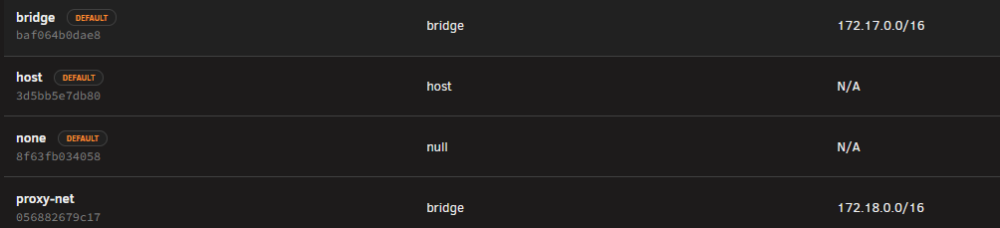
I dont see how you're running out of 254 addresses on the default network size. Are you running more than 254 separate containers? furthermore you can create custom docker networks which would then get their own separate entire pool of IPs for example, look at bridge and proxy-net. these both have 512 addressable IPs per pool
-
You add two variables to the gluetunvpn container per the link I posted under the "qbittorrent example" section Name: Port Up Command Key: VPN_PORT_FORWARDING_UP_COMMAND Value: /bin/sh -c 'wget -O- -nv --retry-connrefused --post-data "json={\"listen_port\":{{PORT}},\"current_network_interface\":\"{{VPN_INTERFACE}}\",\"random_port\":false,\"upnp\":false}" http://127.0.0.1:8080/api/v2/app/setPreferences' Name: Port Down Command Key: VPN_PORT_FORWARDING_DOWN_COMMAND Value: "/bin/sh -c 'wget -O- -nv --retry-connrefused --post-data "json={\"listen_port\":0,\"current_network_interface\":\"lo\"}" http://127.0.0.1:8080/api/v2/app/setPreferences' Just note where it references 127.0.0.1:8080 (in both) you need to change this to the host IP and qbittorrent host port to match your machine else it wont connect.
-
I’m curious why this is needed/is an issue? You should not be using the internal container IPs and there are better ways to address what I suspect you’re trying to do.
-
I’m almost certain any setting you change in the BIOS (including updating the bios or doing CPU swapping) will alter the fTPM ID and cause you to have to do the licensing dance.
-
Make sure the docker.img file is not located on one of your array disks Stop the array, go to settings, global share settings, and enable exclusive shares. In order for a share to go exclusive that share has to only exist on a single pool, if any folders or files are in multiple locations it won’t function as an exclusive share. This will allow you to continue to use /mnt/user/share instead of changing everything to /mnt/pool/share and will significantly lessen the effects of IOWAIT on the system due to FUSE overhead.
-
That’s very odd that it can’t see the drive at all. But yes your assumption is correct. If the drive doesn’t appear in the BIOS, it won’t boot.
-
It shouldn’t affect anything anymore, long time ago there was a bug with Macvlan but that was fixed on unraid 6.12
-
That method only works with OpenVPN For port forwarding with wireguard: https://github.com/qdm12/gluetun-wiki/blob/main/setup/advanced/vpn-port-forwarding.md
-
Yes but you will have to check the upstream driver package to see if it’s supported. The AMD variants were not last time I checked.
-
Unraid will run on pretty much any x86_64 platform. Ugreens are no exception. If you get a UPS stick with known brands, APC, Cyberpower, Eaton, etc...
-
I dont see anything relevant logged, considering enabling the syslog server and post new diags next time it acts up. IP changing is because you are using DHCP instead of having assigned a static IP. This is normal.
-
You could have used it as a boot drive+small pool for appdata or something else or you might be able to disable it in bios...
-
@ich777 not sure if you’ll see this but is there any possibility to trigger the NETDEV WATCHDOG during the plugin installation or activation of said drivers. I had another instance of this occurring but on my other NAS and it turned out the nct6687 driver plugin caused it this time. Now I’m starting to think it’s not the Ugreen drivers but something within the .plg install script at boot causing an issue with the network drivers when we try to load the plugin drivers. Can you reach out and see if we can solve this? Might be able to reinstate the ugreen driver if it’s not related to the driver itself I suspect more people will have this issue updating to 7.4.0beta3
-
They vet the templates for submission but not the actual software you’re about to install from the templates. Now plugins yes those are more/less scrutinized since those run directly on the host system and could have far more reaching effects.
-
I personally would use the tmux plugin for a persistent terminal and then use rsync -aHAXx --numeric-ids --info=progress2 /mnt/disk2/ /mnt/disks/UD_MOUNTPOINT/ as this will copy the data over.


