





MowMdown
Members
-
Joined
-
Last visited
Everything posted by MowMdown
-
This is all that works for me as well. as noted here: https://forums.unraid.net/topic/187661-support-imskully-filerun/#findComment-1542763 If I use those values in my template and create a file inside filerun the file appears like this:

-
system shareUseCache="prefer" # Share exists on cache, disk6 What contents of your system share is located on disk6? It appears your docker image file is located in the system share, if the docker.img is physically on disk6 you're in for a bad time.
-
Having a cache pool mirror never hurts in case one of the drives dies you can keep running until you can replace it, it wont bring your server down.
-
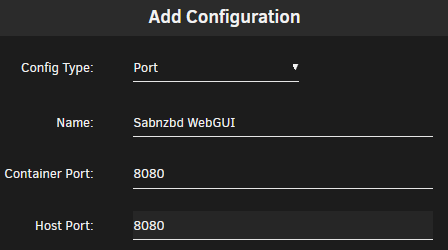
The easiest way to route dockers through another dockers containers VPN is to simply set the network type to "conatiner" and set the container to the dockerVPN For Sabndbz you should set the following up like this except where I have gluetunvpn, you change your's to DelugeVPN. After that, you have to edit your deluge container template and add the WebGUI ports for Sabnzbd like this: That's it. You're done. It should look like this: (i use qbit but yours will say sabzndb) (you should see 8080 for sab here)



-
Yeah you kinda have to set the boot priority list to the USB first. Either that or simply disable all other options from being considered as boot media.
-
You will need to edit the boot device options from the BIOS settings.
-
There's a lot to unpack here, this post is kinda all over the place so bear with me as I try to organize my thoughts based on the information you've provided. We got different things going on here now. Let's start with the initial concern... To me based on the iperf3 test it sent a total of 10GBytes of data at a speed of 9.15Gbps indicated by the results you've provided. You got your 10Gb/s. We know it works. To transfer data to unraid at that speed to a disk drive, you will need to be writing that data to an NVME drive exclusively. Any single disk connected to a SATA port will not be able to hit those speeds. HDDs cap out at around 250MB/s and Sata SSDs cap out at around 500MB/s both well below 1250MB/s (10Gbps) Also keep in mind that to hit 10Gbps it will need to be a single large file transfer with sequential writes. Transferring a bunch of small files will kill the speeds. Just how it works. ---- For the second portion, you're talking about plex being slow, not really sure I can help you with just that tiny bit of information. What does "being slow" mean? Media playback off an HDD doesn't need a whole lot of bandwidth even for 4K remuxes (full fat 4K non-encoded media). You can easily stream a few 4K remuxes off an HDD and be nowhere near maxing out the bandwidth of the drive. Hopefully your plex metadata is in your unraid_files pool as that's where thumbnails and stuff area loaded from. You shouldn't be copying files to the array directly. If you're doing this, you're going to be fighting parity calculating (reading and writing to two disks) while you're also doing reads, this will cause hiccups for media playback. All your incoming newly written data should be hitting the cache pools first. Mover should handle moving data from cache pools to the array, and you should have this scheduled for a time when server activity is low. Also Im noticing you have HDDs as some of your pools, while there isn't anything wrong with that, you need to keep in mind the speed limits of HDDs. 250MB/s max speeds but only when doing large sequential writes it will be much slower if you're doing something like downloading and unpacking archives. NVMe drives aren't capped at 500MB/s they typically are around 3000MB/s but can be much higher depending on the generation of PCIe. PCIe Gen 5 NVMe speeds can hit nearly 7500MB/s reading and 5000MB/s writing. I think your "issue" is maybe part misunderstanding how unraid works and a misalignment of expectations. I can't really see a physical issue here other than I think you just need to optimize where you're writing data to first. ---- Here's how I would arrange things. Use the two NVMe drives (unraid_files) for both appdata and file-transfers/downloads from LAN devices. Use the "cache_drive" pool drive for downloads from the internet if you're downloading from usenet or torrents. Make this your new download_drive. Keep the HDD pools and your array mostly as they are except for the "download_drive" don't use that one for file downloads because it's going to severely limit your speed. Either find a different purpose for it or maybe consider adding it to the unraid array. Lastly, if you want to add more NVMe drives, you will need to get a PCIe add-in-card that houses NVME drives and you also need to make sure bifurcation is supported in the BIOS and set it to "x4 x4 x4 x4" mode. This will be required to occupy the top PCIe x16 slot (closest to the CPU). This will allow you to add in up to 4 NVME drives and they each get x4 slot allocation.

-
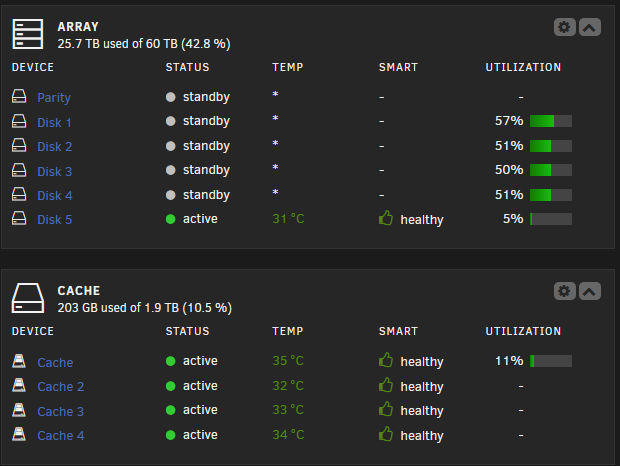
Sata SSDs are basically capped to 500MB/s so about 1/3rd of your 10Gbps NIC. You really would need NVME storage if you really want to hit the 10Gbps number. Mirroring Sata SSD in Raid0 can speed it up but I don't think you'll get 1250MB/s(10Gbps) Also depending on what CPU you have, that could also determine how fast your connection is. Hitting those high speeds puts a lot of load on CPUs. Writing data to a POOL outside of the array should prevent your issues. That's how 99% of us use unraid. See my own server setup below: My ingress is straight to my Cache pool which is dual mirrored. Cache and Cache2 are mirrored and Cache3 and Cache4 are mirrored and then the two mirrors are RAID0 together for speed and resiliency. After this my data is sent to the array each week at night when server activity is low. No bottlenecks even if Sabnzbd is downloading and unpacking files.
-
Copying files to the array is really taxing on the system, you're going to get hit with IOWait which is why you'd want to use a cache pool. You should do everything you can to not transfer data to the array directly, especially when you're also trying to do media playback/streaming from the array.
-
The imagine maintainer is irrelevant. SWAG isn't limited to working only with other linuxserver containers. Unless you have a moral issue with linuxserver in general, I don't see why it matters who's containers you use.
-
1. Passing a test isn't enough IMO, you need to look at the values and assess whether or not you have pending sectors, etc. The things that indicate the drive is dying. 2. If the cables are replaced and UDMA CRC errors are still occurring, it could be a bad controller. 3. The data should not be corrupt as the drive is essentially retrying to send the data until it does so successfully. 4. Check the controller and cables again. UDMA CRC issues are a cable/controller communication issue. Should not have any affect on the health of the drive. Maybe check the drive's physical sata connector too?
-
Not really no. However CF Tunnels is managed entirely on the internet. With NPM you can still access your domains locally if you setup a dns-rewrite. I'd say so. That is if you don't implement any other security measures. Just make sure your cloudflare account has extra security like 2FA.
-
Probably find what you need searching though this Plenty of resources on Youtube as well, such as "Spaceinvaderone" and "ibracorp" Most of SWAGs proxy-confs are pre-created so all you have to do is remove the ".sample" from the file. If the swag container and other containers are in the same docker network, you may have to change the hostname from the docker name to your unraid IP in the config file. https://www.linuxserver.io/blog/securing-swag
-
SWAG = Let's Encrypt + NGINX + Fail2Ban and more. Much more useful than just NGINX by itself. Plus it has things like "Auto Proxy" which can detect dockers you have running and pre-configure them for reverse proxying. Tailscale makes things easy for non-techy people. (just an FYI if you change your mind later)
-
SWAG docker. Immich supports SSO (sign in with google, etc...) but you can always throw something like Authentik or Authelia in front of it. Alternatively, you can use Tailscale to access it instead of open to the wider internet.
-
You can install tmux manager plugin and use mc (midnight commander) in the terminal or you can use the unbalanced plugin or you can use Krusader docker container note: if you do not use tmux and you’re running an operation in terminal, if you close the terminal window the process is killed. Tmux allows it to run essentially in the background even if you close the terminal window.
-
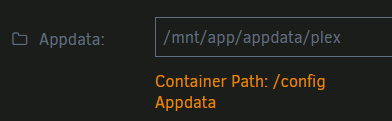
@jedivoodoo Did you create a pool called "app" or did you put this in wrong? Typically it's "/mnt/user/appdata/plex"
-
That's really odd, I've never had an issue with plex starting media from a spun-down disk.
-
No I think you have it right unless the description text is wrong, the IP is for a remote server to accept unraid's own syslog.

-
What is the share's current split level?
-
Yeah that's not something you can really "Stress test." these things kinda just work until they don't.
-
GluetunVPN docker All other dockers you chose can proxy though it. One single connection.
-
Yeah I for SSD cache drives I typically set it to 20% free space (200GB for a 1TB drive) More important for Copy-on-write filesystems like BTRFS and ZFS
-
I see you've included the ability to restore from a local backup, nice!
-
How is the drive connected to the system? How are the other drives connected to the system?




