MowMdown
Members
-
Joined
-
Last visited
Everything posted by MowMdown
-
Right but what are the things you've tried to do that didn't work? It should just be as simple as adding --devices=/dev/dri to the extra parameters section of the template.
-
If you want help you gotta be specific on what exactly you tried to do.
-
"Bonding is a feature that combines multiple physical Ethernet interfaces into a single bonded interface named bond0. This can be used to improve the connection redundancy and/or throughput of the system. Different bonding modes are supported (see below), but some modes require proper switch support." Bridging lets the dockers on a virtual network to communicate over the physical port. br0 allows the host as well as docker0 to communicate over eth0 for instance. If my understanding is correct. Bonding combines eth0 and eth1 for a failover.
-
IMO with unraid 7.1.0 (not yet released as stable) it will be able to import your zfs pool from truenas, I would recommend doing that with your existing 4TB zpool when the time comes. After that I would build out your unraid array with as large disks as you can supply yourself. To get started you can use the 14TB drive as a non-protected data disk and add a 2nd 14TB (or larger) parity disk at a later time just don't store anything on that disk you can't afford to lose in the meantime.
-
With typical RAID say RAID5 (or RAID6 if you have dual unraid parity) the data and parity are stripped across all disks in the RAID. Unraid array is similar except you have a dedicated parity disk contains all the parity information instead of it being distributed(striped) across all disks. No data is striped on the unraid array. This allows you not only to expand your "unraid array" disk by disk as you need but it also allows you to not lose your entire array of information if you end up with more failures than you do parity disks. Each individual drive has it's own filesystem. The sum of bits on each drive makes up parity. For example, If you have 4disks + 1parity and you have a single disk failure, the data on the dead disk can be reconstructed by calculating the value using XOR method from the rest of the disks. Now lets say you have two disks fail. The remaining 2 disks will still be intact with their data because it was not striped. you cannot rebuild from parity but you don't have total loss of all data.
-
I just don't see anything out of the ordinary based on the information you've provided. New files written to the data share should be written to the dram_cache first and then should be moved to the array based on the screenshot you've shared. You do have mover scheduled to run nightly correct?
-
Edit: See my comment below
-
@tomkenobi I got seafile 12 working, you need to download and install the memcached docker container by A75G and add it to the seafile custom docker network you created. Or if you don't want to install memcached in a docker you can just edit the seahub_settings.py and change this CACHES = { 'default': { 'BACKEND': 'django_pylibmc.memcached.PyLibMCCache', 'LOCATION': 'memcached:11211', }, to this CACHES = { 'default': { 'BACKEND': 'django_pylibmc.memcached.PyLibMCCache', 'LOCATION': 'localhost:11211', }, Also, if you run into the issue I did where the admin account will not let you login, you need to get into the container console and run the reset-admin.sh script and set the admin email and password. Located in the /seafile-server-latest/ directory. You should be able to login after that. @dglb99 There seems to be a configuration issue that the default admin email is defaulting to the [email protected] and not respecting the template.

-
Click on your disk number on the main dashboard page, what is the minimum free space on each disk setting? how full is your array? Disregard, array disks don't seem to have a minimum free space setting. Only pools. I see a lot of "share cache full" and "error: No space left on device" messages which to me looks like you are hitting a minimum free space setting on the disks themselves but not the share.
-
Can you boot into the BIOS? What part hangs at boot?
-
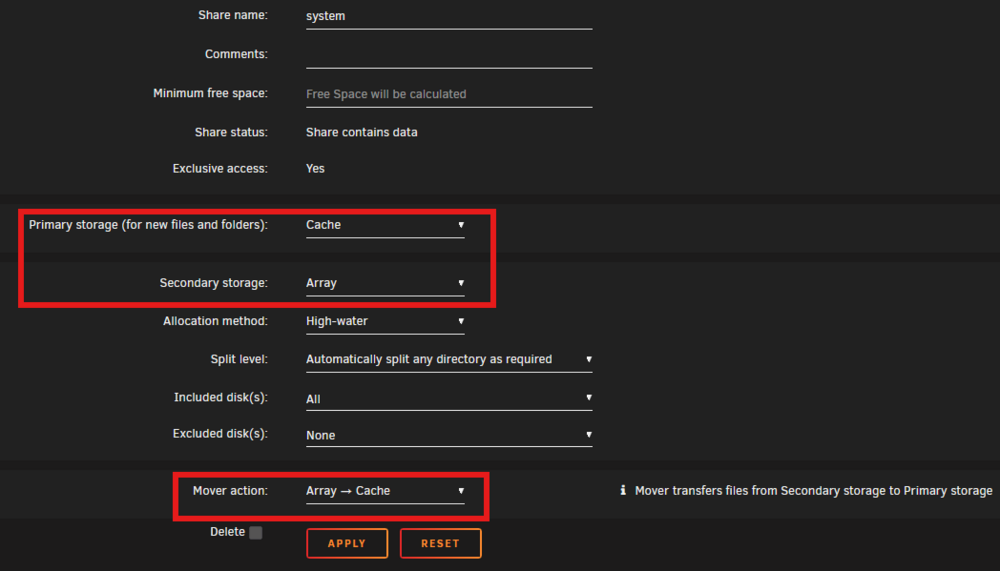
Can you post a screenshot of the share settings for the problematic share? because accord to this the only shares that should remain on dram_cache pool are the unraid default shares, appdata, domains, isos, and system. Everything set to shareUseCache="yes" should be moved to the array by mover. It does look like the shares on the bottom of the list should not exist on the cache pool and data does, so that data should be moved off. appdata shareUseCache="prefer" # Share exists on dram_cache d--a shareUseCache="yes" # Share exists on dram_cache, disk1, disk2, disk3, disk4 domains shareUseCache="only" # Share exists on dram_cache e-------n shareUseCache="no" # Share exists on disk1, disk2, disk3, disk4 g---s shareUseCache="yes" # Share exists on disk3, disk4 isos shareUseCache="prefer" # Share exists on dram_cache system shareUseCache="prefer" # Share exists on dram_cache Y-T shareUseCache="prefer" # Share does not exist W--------0 shareUseCache="no" # Share exists on no_dram_cache W-------0 shareUseCache="no" # Share exists on no_dram_cache
-
I'm not claiming to be an expert but from my observations here is that USB connected drives whether that be in the form of a DAS or just an external drive, these connection methods are prone to issues like what you're experiencing. DAS are fine but typically people use things like specific PCIe HBA cards to connect them to their host and avoid using USB connections. I would wait for someone else to chime in. Someone with a USB connected DAS might chime in and contradict what im saying. Everybody has a different experience with these things.
-
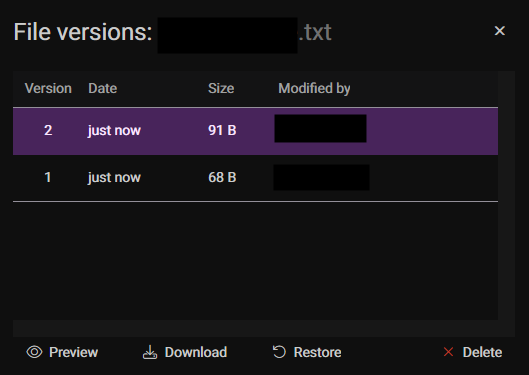
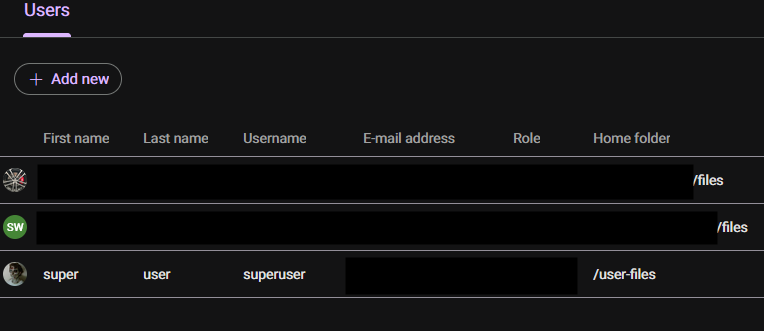
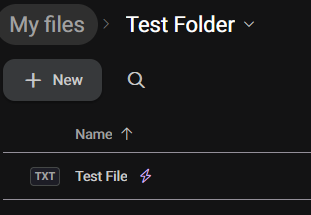
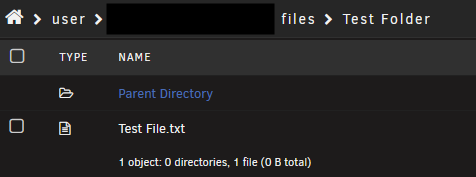
Not to get too off-topic but It has file syncing, versioning, user management, etc. But you're right it is closed sourced. which I get if you're not for that. It's pretty similar to seafile in a lot of ways but one major advantage is that files aren't chunked and are fully accessible wherever you're keeping them. You can access the files right from the unraid share. for the file-syncing it actually uses the nextcloud desktop sync app. works just the same as "seadrive" does. Supports OnlyOffice, WebDAV, file encryption. google cloud doc sync. It's quite fleshed out. I can create and share files with public links etc.
-
Cause like if it's in host mode, the local IP is the host IP and subnet but when it's bridged it's now on the bridge IP and subnet so maybe the API call is calling to something "out of range" so to speak? im just guessing here. Im not sure how your plugin handles the API call.
-
>I have all the regular HDD's in a Mediasonic 8 bay DAS with 3.0 usb and plugged into a 5 gbps port in my m920q server. That's probably the issue. USB connected drivers are not recommended. Too many random issues like this.
-
At least, that's what I suspect is the issue. Because the moment I swapped from host mode to bridge mode, it no longer seems to be able to find my plex server. The settings page where you select your server just stays blank(searching) even with the plex token filled in.
-
Because it probably has a duplicate GUID. This is a known problem with SanDisk USBs if I recall correctly.
-
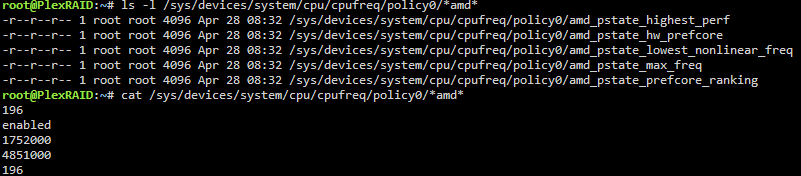
I actually came here to mention something about this but see this comment: https://forums.unraid.net/bug-reports/prereleases/unraid-os-version-710-rc3-available-r3770/#findComment-33604 You will need to use the old ACPI driver if you want the old CPU governors back. Otherwise you get amd-pstate driver which (imo seems better on paper) I will say too with the amd-pstate driver, the turbo-boost option is no longer configurable either. It's just blank. Not sure if that's configurable anymore or not. On my R7-5800X:
-
The plugin settings: It even shows you and example in the text box. Or don't use the docker-root folder structure. Use a docker vdisk instead.

-
I've noticed for this plugin to work plex docker has to be in host mode, if it's in bridge mode or a custom docker network, it doesn't display any servers.
-
Same issue with me, as soon as I log in I get that same error page. Honestly between this, nextcloud, and filerun... this is by far the most flaky of the three services I've tried. (I did manage to get version 11 running for a little while)
-
1. How is the drive physically connected to the server? 2. How busy is the array?
-
This is due to IOWait being represented in the CPU load. If you open the terminal and type in top you will see the statistic for "wa" higher than 1.0 seen here: IOWait is basically CPU waiting on the disk to complete it's tasks before it can resume doing CPU things. This is precisely why people use SSDs in their unraid systems in their cache pools (not part of the array) because you can write much faster to an SSD than an HDD.

-
Need to know a little more what kinds of services are you running on your server? Docker Containers? VMs? Something sort of concerning is your share configuration, if you're not using these shares and they really don't exist, it's best to clean them up. c------e shareUseCache="no" # Share does not exist d--a shareUseCache="no" # Share exists on disk1, disk2, disk3, disk5 g-------e shareUseCache="yes" # Share does not exist L----------------------1 shareUseCache="no" # Share does not exist L------------------------2 shareUseCache="no" # Share does not exist L------------------------3 shareUseCache="no" # Share does not exist L------------------------4 shareUseCache="no" # Share does not exist l---l shareUseCache="no" # Share does not exist m------s shareUseCache="no" # Share does not exist m----------e shareUseCache="no" # Share does not exist M---c shareUseCache="no" # Share does not exist P--x shareUseCache="no" # Share does not exist s-----e shareUseCache="no" # Share does not exist s-----------1 shareUseCache="no" # Share does not exist s------1 shareUseCache="only" # Share exists on skynet t-------t shareUseCache="no" # Share does not exist z-------1 shareUseCache="no" # Share does not exist Your Skynet pool, what contents do you keep on it? The more important question is what contents are on the what I presume is a "data" share on your array?

-
Don't set it to cache only until AFTER you move the files to the cache pool. You will need to completely disable docker and vm service from the main settings menu before you can move the files. See below for how to do it, pay specific attention to the red and match it exactly. Then when you run mover it should move everything as long as no duplicate files exist on cache pool. Also any files still in use won't move either.