





MowMdown
Members
-
Joined
-
Last visited
Everything posted by MowMdown
-
It's not mirrored, it's FUSE. /mnt/user is a unified path that shows you basically all the files on your server under a single location. (all disks and pools that participate in "user shares") /mnt/poolname is a direct path isolated to only that mount point. The files you see are the same file shown through two different lenses. They are not duplicates. https://docs.unraid.net/unraid-os/using-unraid-to/manage-storage/shares/#file-system-structure
-
Go to settings > docker, and stop the service then you should be presented with a checkbox or button that lets you delete it after than when you start docker service up it will re-create it and you will then need to re-install the container images as I previously mentioned.
-
there is corruption detected on your docker.img file either you ran out of space and files were corrupted in it or you need to run a memtest as bad RAM is also a potential contributing factor to the corruption I would start by recreating the docker.img and then using the previous apps link in the APPS section to re-install your containers. Also it looks like you sized it 100GB, was there a reason it was made this large? Then I would suggest running a memtest.
-
This isn't the game, it's the game server which lets you host a game instance to connect to. (think private world) You still have to own the game to actually play it.
-
Unraid automatically handles this for you, you simply have to assign the disk to the boot pool slot #2 when the array is stopped. There is no manual intervention required or commands to be ran. To be clear everything is done using the webGUI, you've never needed to manually (using cli) to make any kind of pools. The only requirement is the disk you are adding has to be equal or larger than the current disk in the pool. you cannot add a smaller device.
-
It's not really a question of "Do you have" but the fact you do actually have a docker container bootlooping. Look at the container uptime on the docker tab and see which one is 0 seconds.
-
Please post diagnostics
-
What version were you on before? Im on 1.43.3.10896 and it's fine for me.
-
GPU stats doesn't report wattage so I have no idea
-
I mean Im running a 5800X (no iGPU) with a A310 in a gen3 x 1 lane PCIe slot as well because video encoding doesnt need much bandwidth. There are a bunch of folks in the unraid discord server that also run intel iGPUs and I have not heard anyone complaining about this but I will keep an eye out.
-
Have you considered filing a bug report with the transcoder software developer? (plex, jellyfin, emby, ffmpeg) I spent the last 4 days doing 4K HEVC HDR -> 1080p SDR tonemapped transcodes on my intel A310 GPU no problems using plex.
-
Minor correction, you would have migrated it to the TPM not the nvme. After you boot unraid on the new motherboard, you just initialize it against the new TPM.
-
You need to remove the values to disable them. Only use one and preferably the last option starting with 300 seconds. Right now three simultaneous things could happen: Unraid shuts down at 0% battery which means it could run until the battery hits zero which is no good. The UPS waits until there is 5 minutes left of runtime to shut unraid down which means if your server uses enough wattage to cause the timer to hit 5 minutes it will initiate a shutdown even if there is 99% battery left. Lastly, time on battery = 0 seconds means as soon as a power loss event occurs, it will immediately attempt to call a shutdown.

-
Eh there's nothing wrong with the AIO container by imagegenius, it's automatically built when immich updates theirs. It just comes down to user error and not RTFMing the immich release notes. Everybody upgrading to v3 needed to do a db migration and if they had read the release notes they would have seen how simple the fix was: https://docs.immich.app/install/upgrading/#migrating-to-vectorchord (literally just editing the repository of the db container to include the extra bits)
-
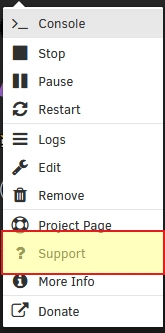
You will want to click on the container icon and click on "Support" and take this to the support section to ask for help with this
-
I think the smart report looks ok. Most of the time a disk is disabled due to other things like a bad power/data connection and not because the disk itself is bad. But yes, stop the array set slot to no device start array in maintenance mode stop array and re-assign disk to slot it was previously in start array (the rebuild happens automatically on array start) Link to Unraid Docs for Disk rebuild for reference Under NO circumstances do you format the disk. The physical disk might report "Unmountable: No filesystem" and that's OK, this will go away once the disk is done being rebuilt.
-
You will have to rebuild the emulated disk back onto the physical disk after youve corrected the emulated disk filesystem and verified the contents match what you expect. There is no way to re-enable a disabled disk without invalidating parity.
-
Hardware issues, like start with the power supply. However you can enable the syslog server for persistent syslogs and yes, unclean shutdows trigger parity checks on startup after the shutdown.
-
fixes can be found in earlier messages in this forum thread. several fixes are listed.
-
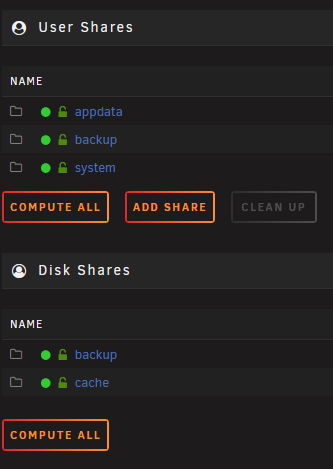
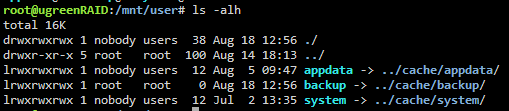
I confused myself but ultimately unraid did the correct thing (which is what I originally suspected would happen). I have two pools /mnt/cache and /mnt/backup and then created a user-share through cli usingmkdir /mnt/user/backup which it correctly put on the cache pool so there was no conflict with my pool named backup. You are correct though, accessing the folder at /mnt/cache/cache and /mnt/user/cache (if settings are correct) would access the same files. FCP just complains about it I guess (I removed FCP long ago)
-
/mnt/user/cache and /mnt/cache/cache should not conflict. It's probably FCP being FCP (outdated warnings) Edit: As a test I created a user share named backup but also have a pool named backup. Actually it looks like unraid automatically symlinked it to my backup pool rather than keeping it a folder on my cache pool where I originally created it... how strange. Edit2: My mistake, it created it correctly on /mnt/cache (not /mnt/backup) that's my bad, all worked out fine.

-
I do find it quite odd that device sdb isn't reporting any partitions.
-
can you post a screenshot of the MAIN page on your nas showing all the disks?
-
Please post the output of wipefs /dev/sdb
-
Right because you have a mirrored boot pool with your data partition you would have to remove the now missing device from BOTH filesystems (btrfs and zfs) before the whole 2nd disk can be removed and re-assigned. Can you post the output of zpool status flash Edit: I found it in the diags: pool: flash state: DEGRADED status: One or more devices could not be used because the label is missing or invalid. Sufficient replicas exist for the pool to continue functioning in a degraded state. action: Replace the device using 'zpool replace'. see: https://openzfs.github.io/openzfs-docs/msg/ZFS-8000-4J scan: resilvered 1.19G in 00:00:03 with 0 errors on Mon Aug 17 23:26:59 2026 config: NAME STATE READ WRITE CKSUM flash DEGRADED 0 0 0 mirror-0 DEGRADED 0 0 0 nvme0n1p3 ONLINE 0 0 0 15148541010099398958 UNAVAIL 0 0 0 was /dev/sdb3 errors: No known data errors


