MowMdown
Members
-
Joined
-
Last visited
Everything posted by MowMdown
-
I run HA on unraid in docker. It's 100% fine and runs without issues. I use it with all of the following "add-ons" Mosquitto Ring2MQTT Zigbee2MQTT Zwave JS UI NodeRED I will say though if you're already running it on dedicated hardware, you're probably better off keeping it there.
-
there is an unofficial plugin called "un-get" you can install in lieu of nerd tools this will have to be installed manually as it's not listed in 'Community Applications' alternatively there is a gui based archive extractor plugin in CA
-
The typical unraid user will not generally benefit from moving away from the traditional unraid array to a zpool setup. The only downside to not doing a zpool is losing out on the data integrity and verification features. Media playback does not benefit from speed of zfs data striping. Media storage does not benefit from the compression on zfs disks. For anything that is wrote once and read many times will not benefit from being stored on a zpool, with the exception I listed previously. As for your cache pools using mirrored pools is the smart move due to cache not having it's own parity system in place in the event of a failed disk. I personally would keep the unraid array and just combining your two 1TB SSDs into a single zfs mirror otherwise you get zero benefits from having single devices zfs zpools as you currently have. Im in the camp of "if you don't know why you need it, you probably don't need it." Another downside of going zfs is unraid does not present any GUI accessible options for disk recovery for zfs zpools. Everything you will need to fix/repair degraded zpools is done through command line. Are you prepared to deal with this in the event of a disk failure? The largest downsides are all your disks must work in tandem which means no individual spin down of disks and also if you lose more disks than parity (raidz level) you lose the ENTIRE zpool worth of data.
-
download the plugin from the repo and put it on the USB disk for offline installation. From the Plugins page on the unraid webgui you can then manually install plugins from there. https://docs.unraid.net/unraid-os/manual/applications/#plugins Plugin Repos can be found here: https://forums.unraid.net/forum/61-plugin-support/
-
I wonder if there is a low power state bug where if the GPU goes idle too long it fails to respond/wake up... I'd try the oldest driver available and see if the issue persists. Also Nvidia related discussion should take place in the Nvidia Driver Support topic of the forums.
-
What happens if you set the disk to btrfs filesystem manually instead of the "auto" setting? add the disk to the array slot, pick the disk name, change fs from auto to btrfs, does that allow the disk to be mounted?
-
New files are first written to primary storage, then, when mover moves those files, they are permanently relocated to the secondary storage. What happens when mover is set to Array -> Cache, those files are brought back to Cache pool in case of an overflow when the cache pool runs out of writable space.
-
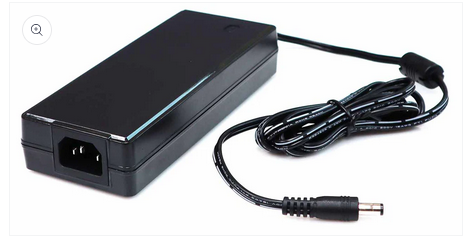
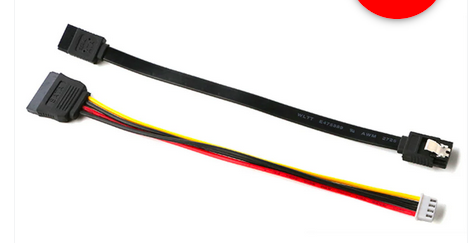
But like how are the actual HDDs connected to the power? This is the PSU for the Odroid but what about the HDDs? Are you using these?
-
what kind of power supply unit (wattage?) are you using to power the disks?
-
Last time I had errors like yours my SSD was dead. Diagnosis doesn't look good. Kingston isn't particularly well known for their "reliable" ssds. A format at this point probably won't fix anything but wait for JorgeB to see this and hope he has a better solution than "buy a new ssd" I would try a new cable and/or port but I dont think she's coming back.
-
It takes a few minutes to run the "extracting" on large several-hundred MB sizes layers. The larger they are the longer it takes.
-
Four separate instances of UPS detecting power loss. Aug 21 20:53:23 Tower apcupsd[3720]: Power failure. Aug 21 20:53:27 Tower apcupsd[3720]: Power is back. UPS running on mains. Aug 21 22:11:03 Tower emhttpd: read SMART /dev/sde Aug 21 22:11:39 Tower emhttpd: read SMART /dev/sdd Aug 21 22:42:19 Tower apcupsd[3720]: Power failure. Aug 21 22:42:20 Tower apcupsd[3720]: Reached remaining time percentage limit on batteries. Aug 21 22:42:20 Tower apcupsd[3720]: Initiating system shutdown! Aug 22 08:12:59 Tower apcupsd[3723]: Power failure. Aug 22 08:13:05 Tower apcupsd[3723]: Power is back. UPS running on mains. Aug 22 08:17:08 Tower apcupsd[3723]: Power failure. Aug 22 08:17:09 Tower apcupsd[3723]: Reached remaining time percentage limit on batteries. Aug 22 08:17:09 Tower apcupsd[3723]: Initiating system shutdown! Aug 22 08:17:14 Tower apcupsd[3723]: Power is back. UPS running on mains.
-
Format the cache drive see why disk8 is full any why unraid can't write new data to it. maybe a share needs less restrictive share splitting or something?
-
post diagnostics.zip please
-
Your cache drive has corruption. Aug 16 20:38:48 Unraid kernel: BTRFS info (device nvme0n1p1): bdev /dev/nvme0n1p1 errs: wr 0, rd 0, flush 0, corrupt 68398, gen 0 Also looks like Disk8 is full and unraid is trying to write data to it. I would run a memtest for 24 hours to check RAM, otherwise run a format on it and start over.
-
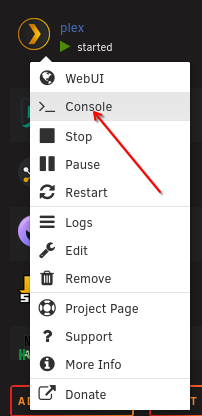
There are two ways to interact with a container: This will open the conatiner console where you can run the commands inside the container shell. Click this button to open up the unraid console and type in docker exec -it plex followed by the command needed for sqlite db recovery (note: the container name in this command needs to be spelled exactly like it's named on your system and is case-sensitive)

-
@ksp Your logs are spammed with all kinds of abnormalities which look like they occur right after plex container is started up, possibly related to the GPU, have you been having any other issues with your system? There's also Aug 9 04:40:07 Hydra root: Fix Common Problems: Error: Invalid folder disk2 contained within /mnt which looks like something is possibly creating a folder and the disk isn't being mounted properly? <--- This might be your issue with missing media when plex scans an empty folder it's thinking the data on disk2 is missing before it somehow finds it? @JorgeB can you take a look and advise?
-
Simply set secondary storage to "None" and continue to use /mnt/user/appdatafor best setup (you can also use /mnt/cache/appdata but there is no need to.) You 100% do not want to move appdata to the array. (which you have configured do to so, this needs fixed) It is also recommended to enable exclusive shares for a performance boost: click settings click global share settings set permit exclusive share: yes
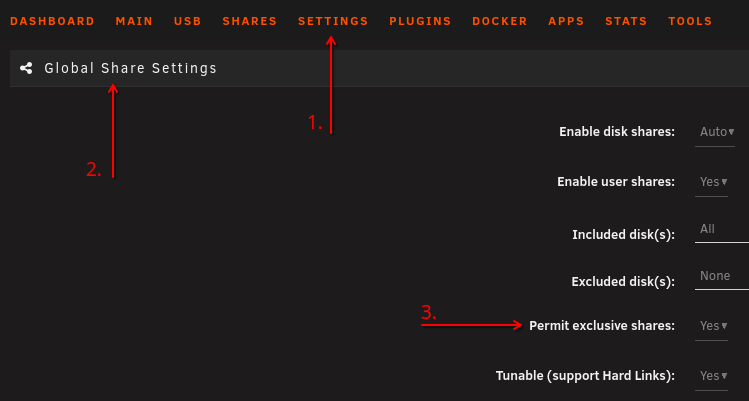
-
Your entire "data" share is configured to use only the array, since you do not have a secondary storage assigned to the data share, mover does not operate on shares with only a primary storage assigned. Files wrote to /mnt/cache/data will not be moved at all. Check all your docker container templates to make sure none are set to use /mnt/cache/data This needs to say "CACHE ---> ARRAY" Run mover and then set back to "array" only

-
Hate to say it but you're using a USB enclosure to connect your disks to unraid and that is not supported. And now you're finding out why.
-
You're going to have to provide a LOT more information if you want help. How are the disks connected to the system? Screenshots of the docker run output. Screenshots of the Shares Tab. Diagnostics.zip It's not something I've personally experienced. Can you browse the shares from within the docker container and physically see the files? Ensure the path exists and the user running Sonarr has the correct permissions to access this file/folder <--- Right here is a clue that permissions are not being applied correctly or something is changing them.
-
You're gonna mount the partition of /dev/sdk1 to /x mount point that you have to create and it's going to mount the disk in a read-only state.
-
Most users, I would say, are configuring their "downloads" is under a single share lets call it "data" Files downloaded would go to /mnt/user/data/downloads/... and would then be hardlinked to /mnt/user/data/media/... when mover runs using the updated mover, both of these files are moved to the same disk that way they only occupy 1 file copy worth of space. So after mover ran, you'd be left with /mnt/disk4/data/downloads/,,, and a hardlink in /mnt/disk4/data/media/...
-
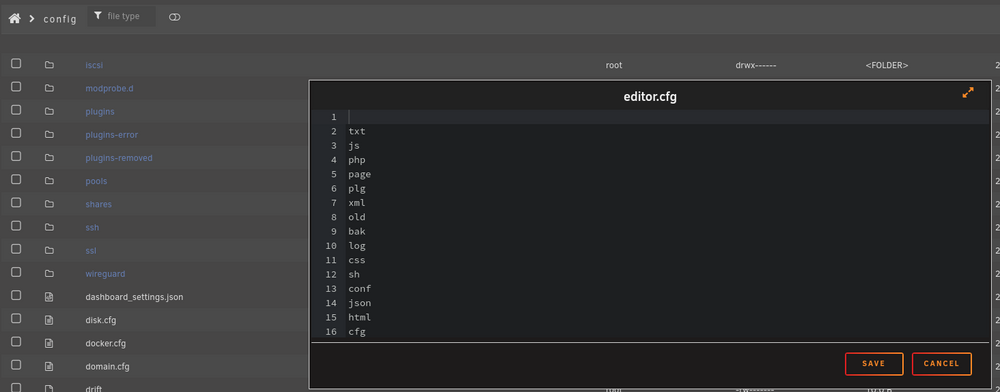
The dynamix file manager editor expander arrows do not seem to resize the editor window. Just reporting it, no further follow up needed.
-
Yeah unfortunately the appdata folders for each docker container will likely prevent an unraid "user" (except root) from altering the contents. Obviously you cannot use "root" as an SMB user so you'll have to use the unraid webGUI and built in dyanmix file manager to configure files. You can add additional file extensions by editing the /boot/config/editor.cfg file on the flash drive