




(Small).png.20e01e54adf9a0993af949e43e312763.png)
CorneliousJD
Members
-
Joined
-
Last visited
Everything posted by CorneliousJD
-
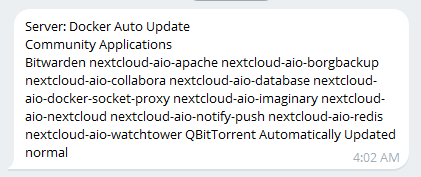
Hi Squid, quick suggestion as we're seeing more and more use of docker-compose containers (especially w/ SpaceInvaderOne's Nextcloud-AIO video) and seeing the constant notifications of those containers auto-updating on a daily basis, perhaps we could get a setting to auto update all EXCEPT containers we exclude? Right now we can turn off auto updates but only include specific containers (but then any newly added containers don't get auto updated by default) A setting to auto update all but exclude specific containers would be great and could solve these problems
-
Sorry all - I have long since stopped using OpenEats in favor of Mealie and haven't used this container myself in years at this point. I have no idea why it would be showing as "3rd party" Though - it's using a DockerHub repo of https://hub.docker.com/r/bramblegb/openeats/ No idea why updating to 7.0 would cause it to stop working either? Very odd.
-
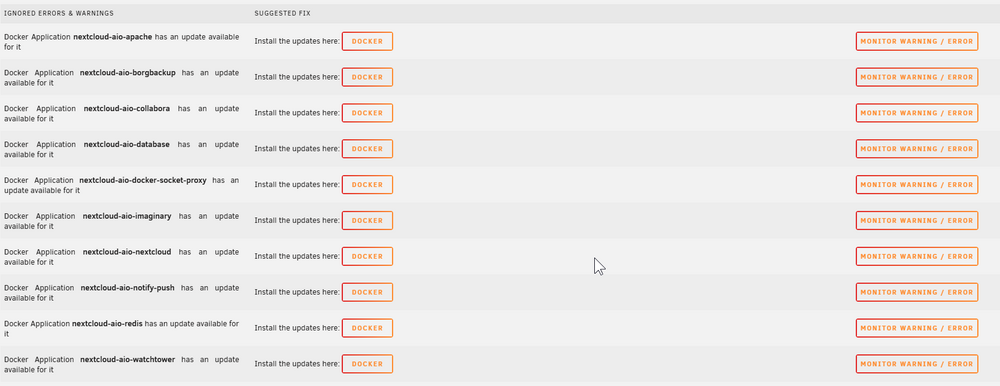
Suggestion - can we somehow disable any alerts related to Nextcloud-aio-* for updates? Because the AIO master container is the one handling the updates, unraid thinks there's always an update avaialble for these 10 containers on my system (others may have more) but they for sure all start with nextcloud-aio-* -- the only one that IS managed by unraid is nextcloud-aio-mastercontainer It would be nice if we had a way to not have to manually ignore each of the 10, and either have these auto-ignored by fix common problems, or a checkbox to ignore items matching a text string, so we could put in "nextcloud-aio-" as the string or something? Just thinking out loud here
-
I can probably make this happen but I've just been SO busy with work lately, all my unraid tinkerings have taken a back seat right now -- sounds like I need to nix both templates and replace them with a single one but I'll have to do testing and everything. Otherwise if someone else wants to grab the new container and build a template for it we can get Squid or myself to just remove these two old ones I have published.
-
I'm not the developer. I do suspect there's an incompatibility in the way unraid handles docker and kumas built in method perhaps. I haven't personally investigated.
-
Use the IP and port instead.
-
Ah THIS setting -- I did have it on the default balanced governer. Changing to performance helps *some* but its still quite slow, but it's at least a noticeable improvement. If anyone else has any other suggestions I'm all ears. I don't need to use the VM often but when I do I'd still like it to be more responsive. For example clicking the start menu takes a few seconds to respond/load. Same w/ opening an explorer window.
-
I do, and if you mean via BIOS on the CPU then yes, but if there's a CPU performance option somewhere within unraid then I must be overlooking it? Thanks, I just set both to 16GB, no real change unfortunately.
-
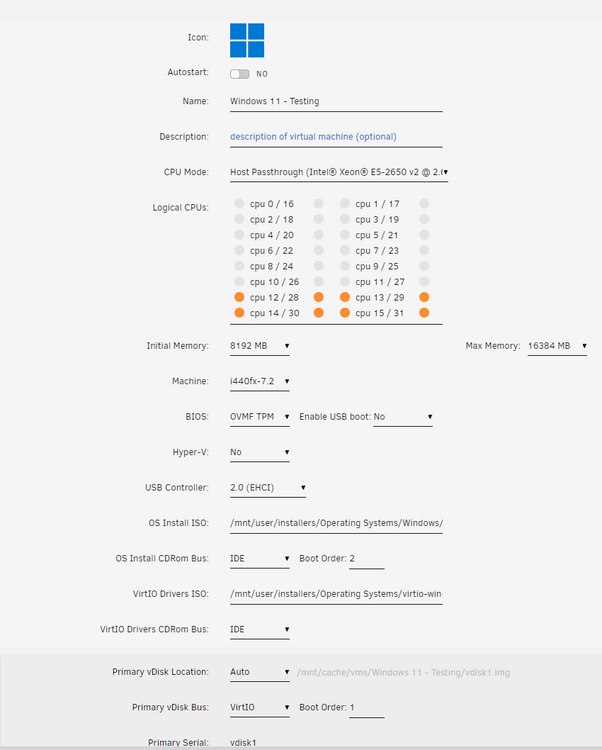
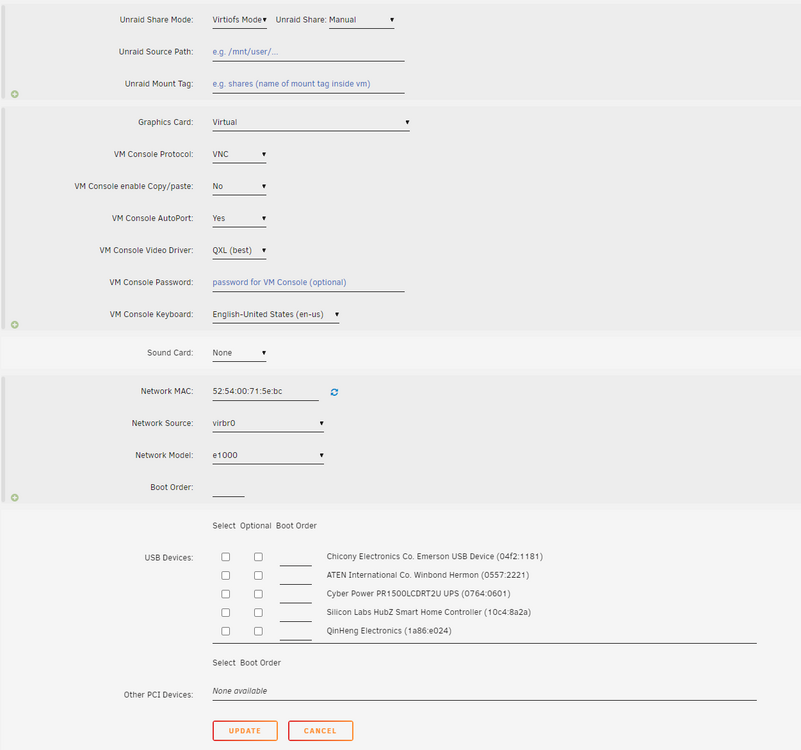
I have a very basic Win 11 VM I just need to use for some testing but it's horribly slow it's nearly unusuable. I've made sure the vdisk.img is on cache-only and I installed the latest VirtIO driver package, but no change. Settings screenshots are below -- any advice is apprecaited!
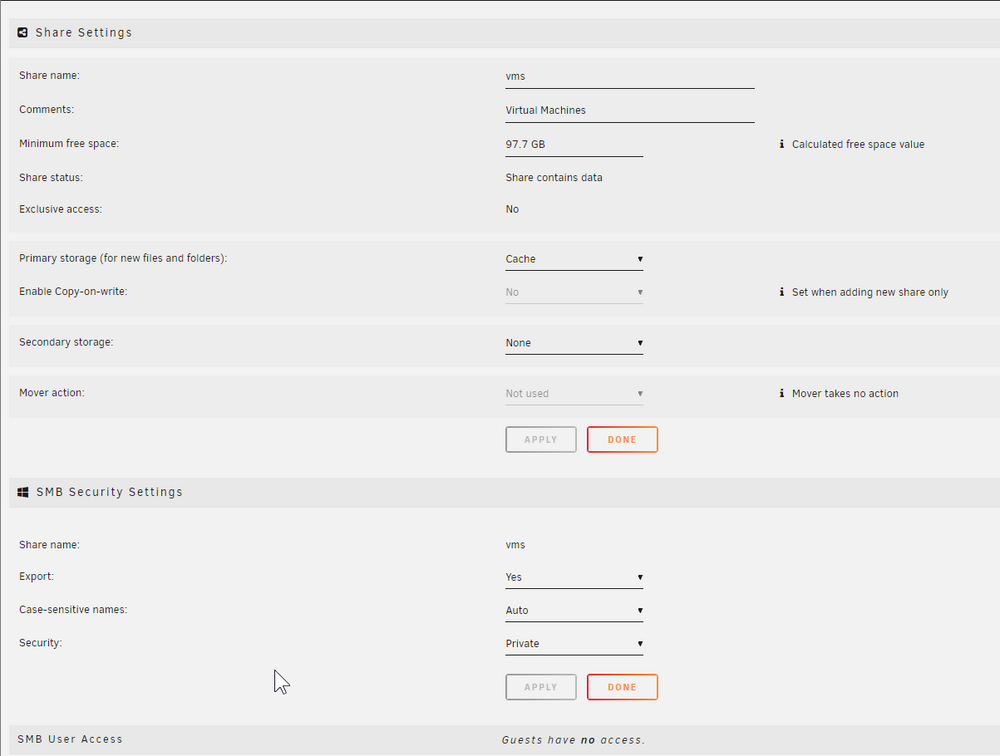
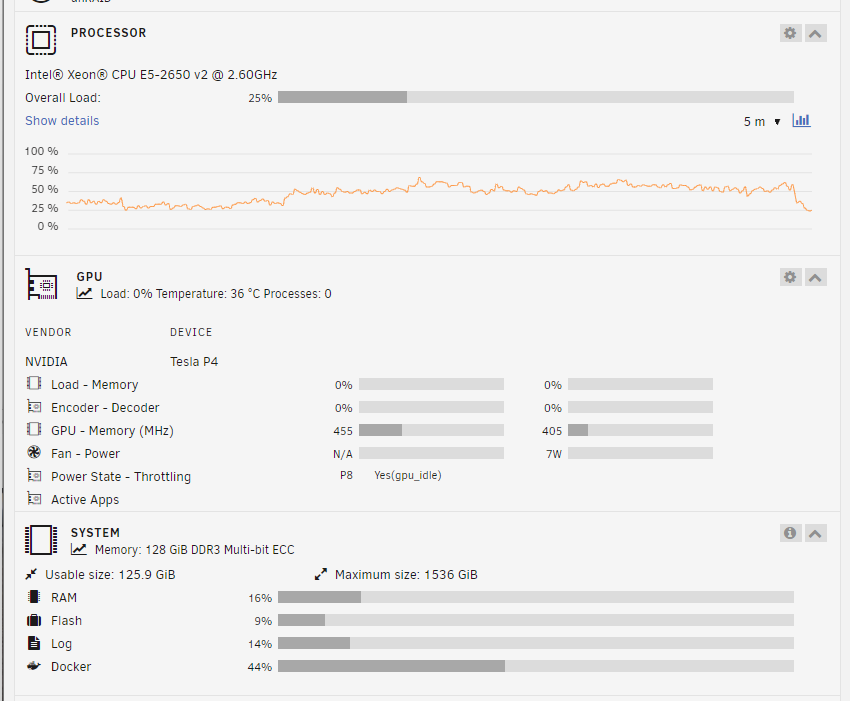
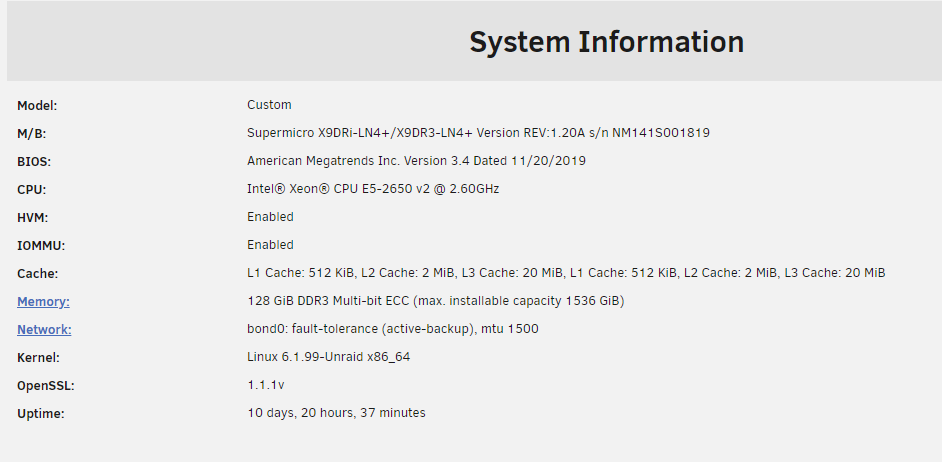
-
Wow, the entitlement here is so real. This thread, right here. The one you've posted in, is the support thread, which contains information for what this container is (and is not) and how it's used. AND that I am NOT the person who developed it. I simply put the template into CA in case anyone else wanted to use it. Feel free to build your own in the future instead.
-
Yes you guys just need the Joplin server (there USED to be an app in CA for it but it's been removed) or just run it serverless since it uses flat files. no actual need for a server. the idea behind this (not developed by me) was to just have a way to view your notes in a web browser was all. This is not a server side software -- it just ran the app w/ a VNC window so you could view it.
-
Yeah, you can run it on host mode. Or give it its own IP too? Up to user discretion
-
This worked great on official container, i was missing the --runtime-nvidia part and couldn't get it working w/out that and thought i was losing my mind
-
Ok thanks - that's where my confusion was, the Latest and Open Source were the same version number, and I assumed that it was auto-selecting the open source option. I understand how that I look at it a bit deeper (Today is the first day I've seen this plugin page option) Sorry for the confusion, but thanks for the explanation!
-
Wonderful, thanks for the quick reply. I'll be using it just for HW transcoding and maybe some LLM tinkering in the future. I'm just not clear if I need the nvidia.conf file in the modprobe.d since "latest" right now seems to be the open source driver -- it mentions workstation cards and geforce cards, but the Tesla is technically neither, and is a "Datacenter card" I think I'm going to just bit the bullet and order the card now.
-
I've tried looking through this thread but there's nearly 160 pages now. Can someone tell me if I install a Tesla P4 card (datacenter card) into my server, which driver should I be choosing? I'm not particularly confident that I know the option differences here, what are the pros/cons to the production/new feature/open source drivers? Will any of the 3 work w/ the Tesla P4?
-
Hi there, I am going to be ordering a Tesla P4 to do hardware transcoding with but I'm finding only very old info about how to get Plex to see it and use it. I'd very much prefer to stick w/ the official container, but I'm unsure what new variables I need to add, and which specific devices I'd need to pass thru, if any? Old spaceinvaderone videos just had device UUIDs being added via variables but not actual devices being passed thru. I'm also not sure which driver version I should be picking/using w/ a Tesla GPU with the latest nvidia driver plugin. Is the official production one needed for Tesla GPUs (or preferred?) or should I stick w/ open source driver? Any help is appreciated!
-
I wanted to make sure to post here for anyone else who finds this later, but i think this may be resolved. So there was definitely an issue somewhere, my MariaDB got corrected and that may have been the culprit in the end? I re-created docker folder as docker.img and re-added containers and they all added fine ,server was stable, but upon rebooting w/ docker autostarts on, it went to 100% again. I was patient this time and let it sit and it stabilized after 10-15 mins or so. I know I have a lot of containers and this is likely to be epxected. Whatever was initially going on though, the server wasn't stabilizing and it was sitting at 100% CPU for hours, so perhaps a combination of fixing my MariaDB (restored from backup) and/or re-creating docker folder as docker.img ended up resolving everyting. I'm at about 24 hours of stability w/out hitting high CPU now. Thanks JorgeB for the help. (Again!)
-
Nearly every single container is telling me there's a shared mapping, is this normal? It doesn't seem right. Lidarr's appdata for example isn't mapped anywhere else
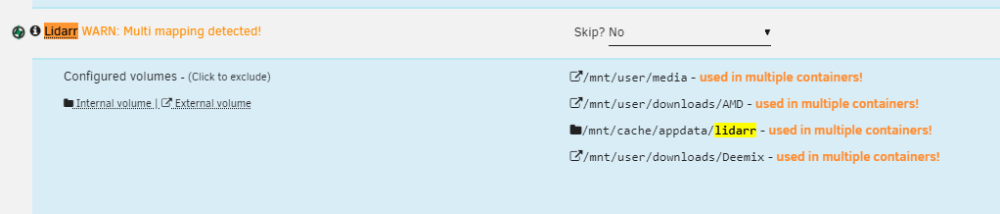
-
I've completed everything above, during recreating my docker.img file I loaded everything back from previous apps in CA and they all ran fine, sitting at like 30% CPU usage. I setup my autostartup on docker containers I wanted auto-starting and rebooted and I'm back at 100% CPU again... I'm at a total and utter loss here. Is there anything I can look into? The server becomes unusable after it sits like this for a while.
-
Interesting, I'll move back to a docker.img file -- i figured without that layer of the img file that i might see better performance w/ just a folder instead, plus never hitting limits (as you can see I have a LOT of containers running) I'll let the current btrfs balance finish first then kill off the docker folder and re-create a docker.img instead in /mnt/cache/system/docker/docker.img and re-fire up containers and see what happens from there.
-
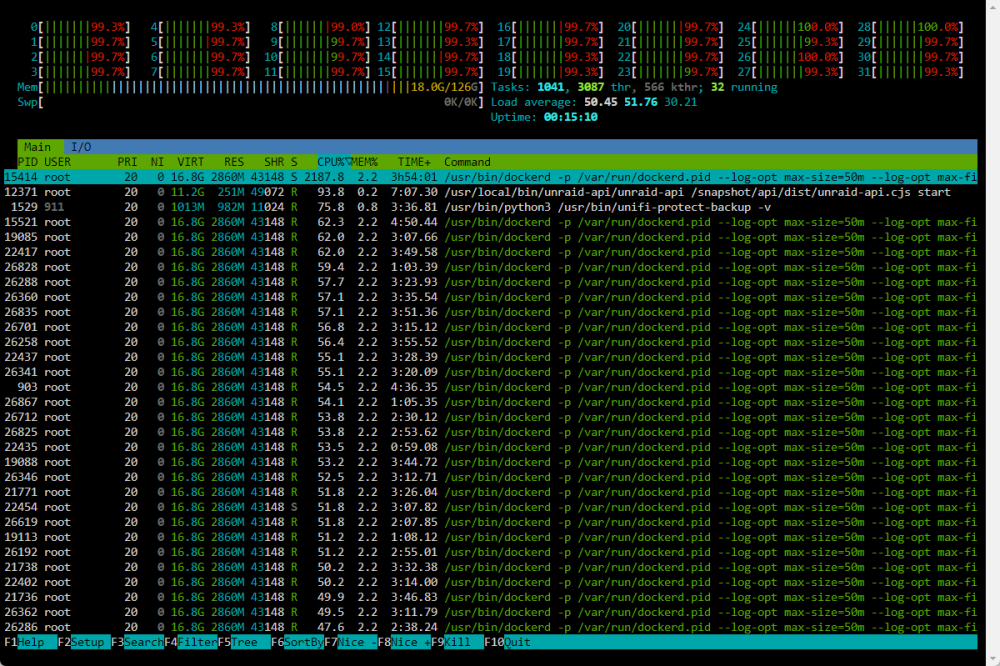
I left docker running and turned them all off one by one and watched my CPU but no changes, I ended up having every single container in a stopped state and CPU was still at 100% with dockerd being the culprit still. Very strange to me. I'm running a btrfs balance right now and CPU is back to 100% usage but it was shooting up before I started that even. Currently working so it's difficult to dedicate a ton of time to this during the work day but I'm starting to now regret my decision to go NVMe because everything was absoultely fine before this. I'm wondering if its somehow related?
-
I left the server on overnight and woke up to much lower CPU usage, but I'm still wondering what could have caused this - the server became so sluggish it took an extremely long time to do anything. Also btw the top command showed 0.0 wa (IOWait) during all of this, forgot to include that screenshot.
-
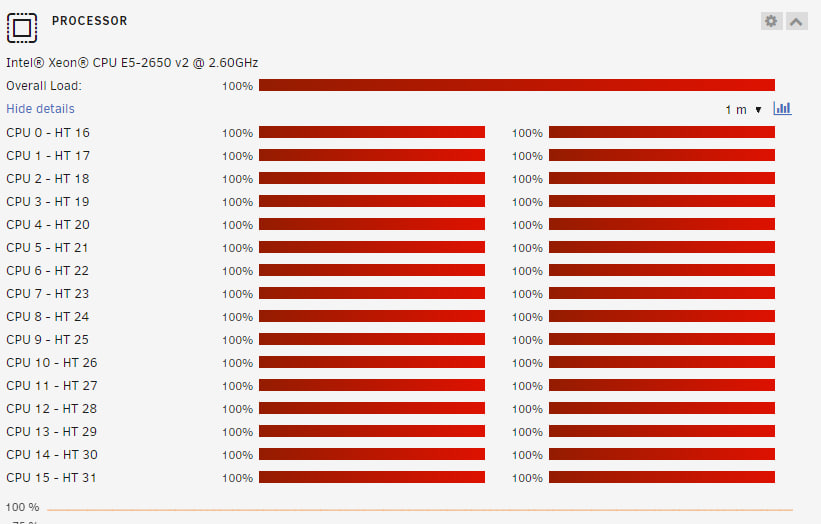
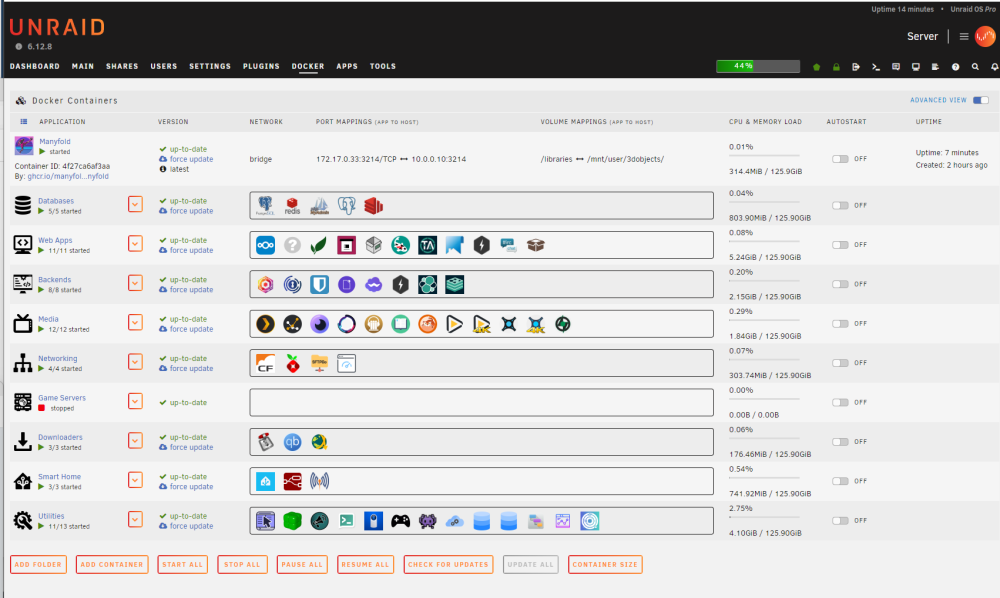
I'm at my witts end here on this one, totally at a loss. Been at this for hours tonight and I think I need to admit I need some help here. I replaced my cache drives w/ new ones, but found out that they didn't support deterministic trim, so I swapped them out for a Asus Hyper M.2 v2 PCIe 3.0 card that holds 4x M.2 NVMe SSDs, and did PCIe bifurcation to 4x/4x/4x/4x and that worked great. I swapped the NVMe drives in to the cache pool one at a time. It took about 12 hours for each drive to rebuild. I did notice my CPU pushing 100% usage pretty much the entire time, but I didn't think much of it because it was rebuilding the cache drives. At this time I also swapped everything from using /mnt/user/appdata/ to /mnt/cache/appdata/ to eek out some extra speed. I changed every container touching appdata to this and also my docker settings pointing to /mnt/cachce/system/docker (using folder, not docker.img) and /mnt/cahce/appdata/ I rebooted the server for good measure (glad I did because I found it tried to boot from NVMe and not my flash anymore, whoops!) and then I realized my MariaDB was corrupted and NextCloud stopped working. Weird... okay. moving on, I saw my CPU was stuck at 100% usage when Docker was running. I stopped ALL containers one by one and CPU was still at 100%, which didn't make much sense, all containers in stopped state still had this problem. At a loss, I deleted my docker directory (I'm using a directory, not an img) Everything started coming back up fine after re-adding them from CA, with the exception of course of Nextcloud/MariaDB. Thought I was in the clear and it was a corrupt docker folder at first, but while troubleshooting the MariaDB/Nextcloud issue, I saw my CPU shoot back up to 100% again. Very weird. And that's where I'm stuck now... I ended up removing MariaDB for now entirely and deleting its img but still no luck. As you can see I'm stuck at 100%, but overall usage per container is very low. Diagnostics and screenshots attached below. server-diagnostics-20240307-2308.zip
-
Excellent, thank you. And thanks for your help on my SSD trim question too. This is a direct result of your help there. Much appreciated. I'll be getting this card and some NVMe drives for cache then.
(Small).thumb.png.b884b0484e848c502a315fc27b995f59.png)




