L0rdRaiden
Members
-
Joined
-
Last visited
Everything posted by L0rdRaiden
-
@primeval_god Could you please add the option to use a global env? It would be easier to manager in a single file things like common variables, IPs, etc
-
Any solution to this? https://forums.unraid.net/topic/47266-plugin-ca-fix-common-problems/page/97/#findComment-1552392
-
I haven't changed direct setting yet but this are my stats after 7 days of uptime. The services pool is made by nvme. Still the direct value is too low to justify that the arc is still in 6GB after a week, when usually it was full at 21GB Maybe L2ARC has something to do? --- Estadísticas del ARC (Cache en RAM) --- Hits (Lecturas desde ARC): 453976458 Misses (Lecturas que no estaban en ARC): 1801262 Hit Ratio del ARC Global: 99% ----------------------------------------- Tamaño actual del ARC: 6.41 GiB Límite mínimo configurado (zfs_arc_min): 953 MiB Límite máximo configurado (zfs_arc_max): 22.35 GiB --- Estadísticas del L2ARC (Cache en SSD/NVMe) --- Hits (Lecturas desde L2ARC): 90766 Misses (Lecturas que no estaban en L2ARC): 60691 Hit Ratio del L2ARC: 59% ----------------------------------------- Espacio en dispositivos L2ARC actualmente usado: 71.65 GiB Espacio en dispositivos L2ARC disponible para cachear: B --- Estadísticas de Lecturas/Escrituras desde ARC y acceso directo por Pool --- Pool: data ARC Read Bytes: 143.31 GiB ARC Write Bytes: 52.35 GiB Direct Read Bytes: 0 B Direct Write Bytes: 0 B Pool: services ARC Read Bytes: 71.20 GiB ARC Write Bytes: 215.34 GiB Direct Read Bytes: 2.04 GiB Direct Write Bytes: 21 MiB The script #!/bin/bash # Script para obtener estadísticas clave de ZFS ARC, L2ARC, acceso directo y compresión. # Compatible con múltiples pools y datasets. # --- Configuración --- # Lista de pools ZFS para extraer estadísticas de /proc/spl/kstat/zfs/<pool name>/iostats POOL_NAMES=("data" "services") # Lista de datasets para verificar la compresión. DATASETS_TO_CHECK_COMPRESSION=( "data/personal" "services/docker" "services/vm" ) # --- Funciones de utilidad --- format_bytes_smart() { local bytes=$1 local gib_threshold=$((1024 * 1024 * 1024)) local mib_threshold=$((1024 * 1024)) local kib_threshold=$((1024)) if (( bytes < kib_threshold )); then echo "${bytes} B" elif (( bytes < mib_threshold )); then echo "$((bytes / 1024)) KiB" elif (( bytes < gib_threshold )); then echo "$((bytes / 1024 / 1024)) MiB" else echo "$bytes" | awk '{printf "%.2f GiB", $1 / 1024 / 1024 / 1024}' fi } # --- Verificación de requisitos --- if [ ! -f /proc/spl/kstat/zfs/arcstats ]; then echo "Error: No se encontró /proc/spl/kstat/zfs/arcstats." echo "Asegúrate de que el módulo ZFS está cargado." exit 1 fi # --- Obtener estadísticas del ARC y L2ARC --- arcstats_output=$(cat /proc/spl/kstat/zfs/arcstats) hits=$(echo "$arcstats_output" | awk '/^hits / {print $NF}') misses=$(echo "$arcstats_output" | awk '/^misses / {print $NF}') arc_current_size=$(echo "$arcstats_output" | awk '/^size / {print $NF}') l2_hits=$(echo "$arcstats_output" | awk '/^l2_hits / {print $NF}') l2_misses=$(echo "$arcstats_output" | awk '/^l2_misses / {print $NF}') l2_size=$(echo "$arcstats_output" | awk '/^l2_size / {print $NF}') l2_free=$(echo "$arcstats_output" | awk '/^l2_free / {print $NF}') if [ -z "$l2_size" ]; then l2arc_present=false l2_hits=0 l2_misses=0 l2_size=0 l2_free=0 else l2arc_present=true fi arc_min_limit_bytes=$(cat /sys/module/zfs/parameters/zfs_arc_min 2>/dev/null || echo "0") arc_max_limit_bytes=$(cat /sys/module/zfs/parameters/zfs_arc_max 2>/dev/null || echo "0") # --- Calcular Hit Ratios --- total_accesses=$((hits + misses)) arc_hit_ratio=$(( total_accesses > 0 ? hits * 100 / total_accesses : 0 )) l2_total_accesses=$((l2_hits + l2_misses)) l2arc_hit_ratio=$(( l2_total_accesses > 0 ? l2_hits * 100 / l2_total_accesses : 0 )) # --- Mostrar Resultados --- echo "--- Estadísticas de ZFS ARC/L2ARC y Compresión ---" echo "" echo "--- Estadísticas del ARC (Cache en RAM) ---" echo " Hits (Lecturas desde ARC): $hits" echo " Misses (Lecturas que no estaban en ARC): $misses" echo " Hit Ratio del ARC Global: ${arc_hit_ratio}%" echo " -----------------------------------------" echo " Tamaño actual del ARC: $(format_bytes_smart $arc_current_size)" echo " Límite mínimo configurado (zfs_arc_min): $(format_bytes_smart $arc_min_limit_bytes)" echo " Límite máximo configurado (zfs_arc_max): $(format_bytes_smart $arc_max_limit_bytes)" echo "" echo "--- Estadísticas del L2ARC (Cache en SSD/NVMe) ---" if [ "$l2arc_present" = true ]; then echo " Hits (Lecturas desde L2ARC): $l2_hits" echo " Misses (Lecturas que no estaban en L2ARC): $l2_misses" echo " Hit Ratio del L2ARC: ${l2arc_hit_ratio}%" echo " -----------------------------------------" echo " Espacio en dispositivos L2ARC actualmente usado: $(format_bytes_smart $l2_size)" echo " Espacio en dispositivos L2ARC disponible para cachear: $(format_bytes_smart $l2_free)" else echo " No se detectó L2ARC configurado." fi echo "" echo "--- Estadísticas de Lecturas/Escrituras desde ARC y acceso directo por Pool ---" for pool in "${POOL_NAMES[@]}"; do iostats_file="/proc/spl/kstat/zfs/$pool/iostats" if [ ! -f "$iostats_file" ]; then echo " Pool '$pool': No se encontró $iostats_file. ¿Es un nombre de pool válido?" continue fi arc_read_bytes=$(awk '$1 == "arc_read_bytes" {print $3}' "$iostats_file") arc_write_bytes=$(awk '$1 == "arc_write_bytes" {print $3}' "$iostats_file") direct_read_bytes=$(awk '$1 == "direct_read_bytes" {print $3}' "$iostats_file") direct_write_bytes=$(awk '$1 == "direct_write_bytes" {print $3}' "$iostats_file") echo " Pool: $pool" echo " ARC Read Bytes: $(format_bytes_smart $arc_read_bytes)" echo " ARC Write Bytes: $(format_bytes_smart $arc_write_bytes)" echo " Direct Read Bytes: $(format_bytes_smart $direct_read_bytes)" echo " Direct Write Bytes: $(format_bytes_smart $direct_write_bytes)" echo "" done echo "--- Estadísticas de Compresión ---" echo "Nota: Mostrando compresión para los datasets listados en el script." echo "" for dataset in "${DATASETS_TO_CHECK_COMPRESSION[@]}"; do echo " Dataset: $dataset" zfs get -H -o value compressratio "$dataset" 2>/dev/null | { read -r compressratio if [ -z "$compressratio" ]; then echo " Ratio de compresión: No encontrado o error al obtener." else echo " Ratio de compresión: $compressratio" fi } done echo "" echo "-------------------------------------------------"
-
How much used storage do you have in your nvme pools?
-
If with the new version of Unraid that comes with zfs 2.3.x and you have upgraded your pools you are having a lower ARC consumption, specially if you have NVMe or fast drives, SSD, this might be the setting that it's causing it. Just for you to know, so you don't waste more time troubleshooting. https://discourse.practicalzfs.com/t/openzfs-2-3-0-release-direct-i-o-question-also-i-dont-understand-how-distros-package-zfs-apparently/2159 https://openzfs.github.io/openzfs-docs/man/v2.3/7/zfsprops.7.html#direct The question could be, even if it's less performant could be interesting to disable it just to not to wear the nvme with readings? It's better in any nvme zpool setup? or it has its use cases? it's worth to enable it with 2 NVMe with zfs mirror?
-
But still you have to install an agent in the host if you want to monitor unRAID. If I remember well the docker instructions are for the wazuh platform, webui etc
-
You can, I do it with Sophos XG firewall Home Edition. If you wan to go a step further in security/performance, you can pass-trough the physical NICs to the VM. At least 2 one for WAN and another one for LAN. Then the LAN with a Cable goes to the switch and from the switch everywhere, including unraid. So at least you will need 3 physical NIC in your Unraid Server for this 2 work. Of course for additional security you can do VLANs configuring them in the FW, switch and UNRAID A recommendation is having and additional NIC just for administration access to unraid. Forget pfsense is not opensource anymore or free, use Sophos XG or OpenSense Those people has no idea, UNRAID is a NAS mainly but has VM like proxmox with basically the same features, or the features that could be required to do this. So if you understand what you are doing, is totally fine.
-
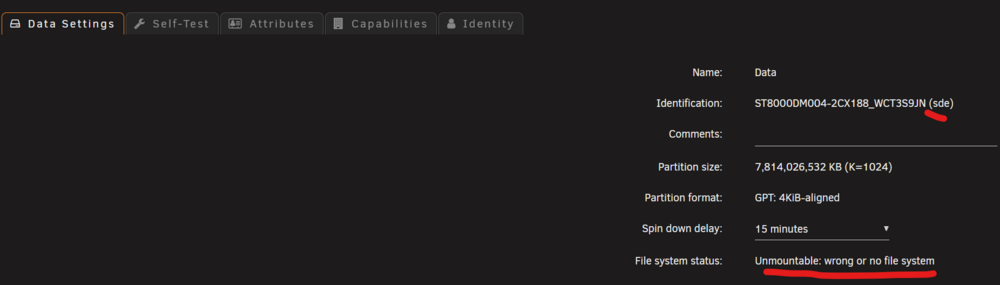
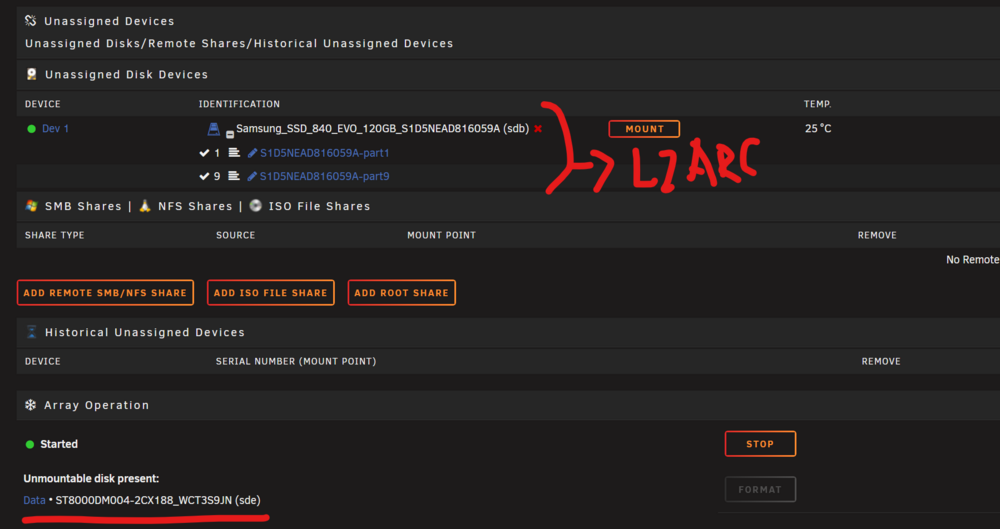
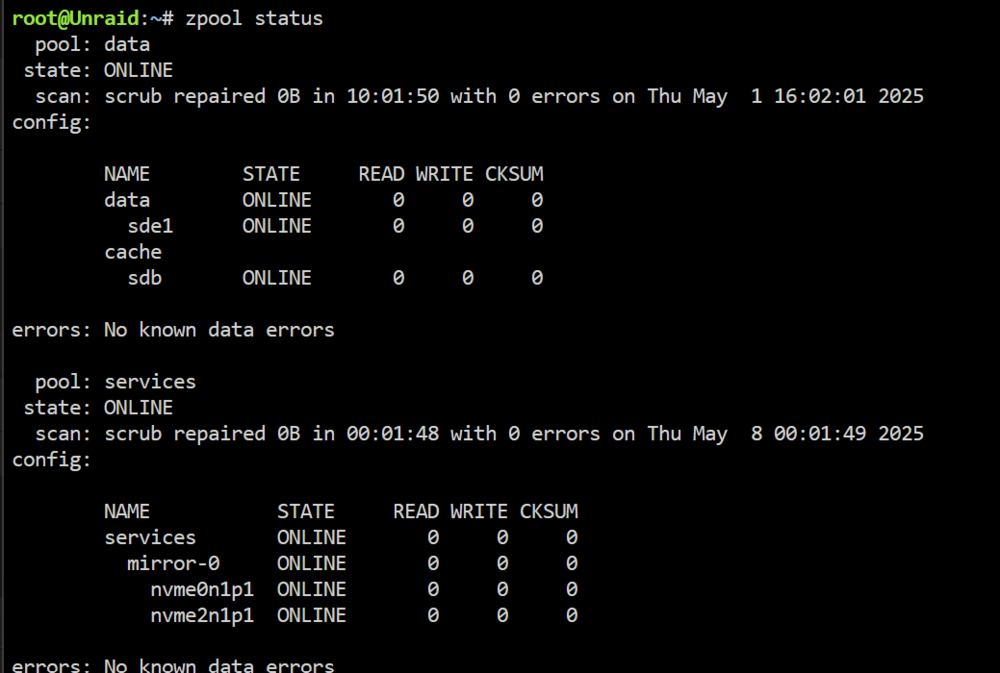
every time a reboot I have to do "zpool import data" services pool works fine. Diagnostics attached It works fine after zpool import data But UI doesn't recognize it properly and is not able to import it properly after reboot. unraid-diagnostics-20250510-1416.zip
-
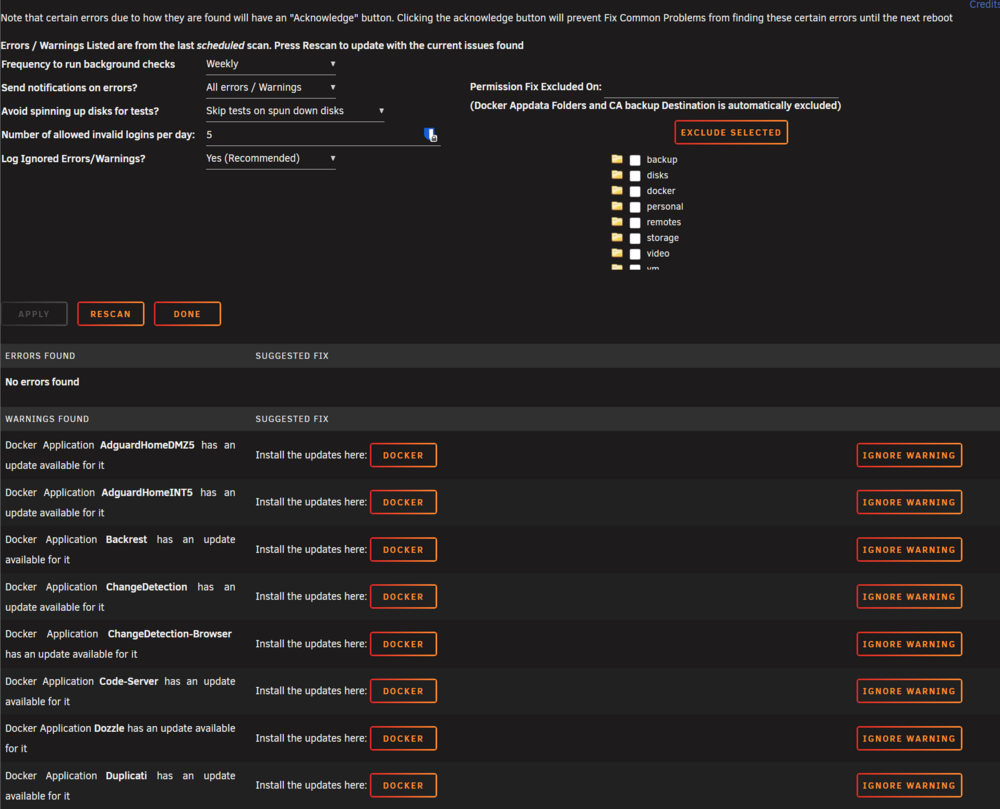
@Squid for the people using docker compose or managing dockers without unraid directly could you add a setting to ignore updates errors? For some reason if you use docker compose Unraid is not able to read the images versions and we get this warnings all the time
-
Is this still the case? Do I have to manually import my pool with L2ARC on every boot? I am using 7.1.1 @JorgeB
-
I got an unexpected freeze/reboot could be because of this?
-
I got this error after updating to 7.0.1 from 6.12.x i have never seen this error in the past Mar 6 13:03:36 Unraid kernel: mce: [Hardware Error]: Machine check events logged Mar 6 13:03:36 Unraid kernel: mce: [Hardware Error]: CPU 23: Machine Check: 0 Bank 5: bea0000000000108 Mar 6 13:03:36 Unraid kernel: mce: [Hardware Error]: TSC 0 ADDR 1ffffa087075e MISC d012000100000000 SYND 4d000000 IPID 500b000000000 Mar 6 13:03:36 Unraid kernel: mce: [Hardware Error]: PROCESSOR 2:870f10 TIME 1741262594 SOCKET 0 APIC 1d microcode 8701034 Any help please? unraid-diagnostics-20250306-1620.zip
-
Honestly I would much more concern about the lack of hardening at all of Unraid, in addition to run docker as root, and the mess of linux users and permissions in Unraid. Not to mention the vulnerabilities of the containers people are running, something that could be scanned easily with Docker Scout but is not either supported by Unraid. Hardening: https://www.cisecurity.org/benchmark/distribution_independent_linux https://github.com/fgeek/harden.sh https://docs.docker.com/engine/security/rootless/ Vulnerability and hardening scanner: https://github.com/aquasecurity/trivy Vulnerability scanner, easy to integrate in Unraid but only for containers: https://docs.docker.com/scout/ Address at least the hardening, rootless docker (podman?) and the users/permissions mess at least, would be to be committed with security.
-
This is an extremely bad security practice, allow a plugin to automatically modify my server without my intervention or approval. What is the plugin is compromise? The installation of patches should require human intervention to accept Does this plugin do hot patching? or is always going to require a reboot? Does this sound familiar?? Vulnerability 4: Community Applications Repository Takeover Description GitHub repositories used by the Community Applications app feed could be transferred to another owner, opening the possibility of hijacking the application templates. Details Type: Improper Access Control Impact: Code Execution Attack Vector: Requires an attacker to transfer a GitHub repository associated with a Community Application, which could then be used to submit malicious templates to the feed. Affected Versions: Application feed prior to 11/12/2024 Resolution: Policies were hardened around renaming repositories. Updates to the Community Application Feed backend deployed on 11/12/2024 resolved this issue. Acknowledgments George Hamilton Mitigation The Community Applications app feed now detects repository transfers and blocks for manual review. No action needed by users, although we recommend upgrading to the latest Community Applications plugin.
-
Thanks a lot, have you done any change in the scripts or anything? Or should I go with this?
-
Did you fixed this?
-
3 backup solutions run via docker compose (compose manager, komo.do) so you can pick You need the env file, and probably change the common settings and networks. Remove/change labels accordingly to your setup My advice, use backrest, it's based on restic ############################################################### # Backup ############################################################### # Common settings ############################################# x-default: &config restart: always cpuset: 10,22,11,23,8,20,9,21 security_opt: - no-new-privileges:true x-dns: &dns dns: - ${dns50} x-labels: &labels com.centurylinklabs.watchtower.enable: "true" net.unraid.docker.managed: "composeman" net.unraid.docker.shell: "sh" # Services #################################################### services: ## Kopia ###################################################### kopia: container_name: ${kopia_name} image: kopia/kopia:latest user: "0:0" #root command: - server - start - --disable-csrf-token-checks - --insecure - --address=${kopia_ip}:51515 - --server-username=$kopia_webuser - --server-password=$kopia_webpass # - --htpasswd-file /app/config/.htpasswd <<: [*config, *dns] networks: eth1: ipv4_address: ${kopia_ip} ports: - 51515:51515 volumes: # Mount local folders needed by kopia - ${dockerdir}/Kopia/config/:/app/config - ${dockerdir}/Kopia/cache:/app/cache - ${dockerdir}/Kopia/logs/cli-logs/:/app/logs # Mount path for browsing mounted snaphots - ${dockerdir}/Kopia/tmp:/tmp:shared # Mount local folders to snapshot - /mnt/services:/data/srv:ro - /boot:/data/os:ro # Mount repository location - /mnt/user/backup/Kopia:/repository environment: - TZ - KOPIA_PASSWORD # Repository password - USER # Repository user labels: <<: *labels net.unraid.docker.icon: "https://raw.githubusercontent.com/imagegenius/templates/main/unraid/img/kopia.png" net.unraid.docker.webui: "https://${kopia_name}.${mydomain}" traefik.enable: true traefik.docker.network: eth1 traefik.http.routers.kopia.entrypoints: https443 traefik.http.routers.kopia.service: kopia traefik.http.routers.kopia.rule: "Host(`${kopia_name}.${mydomain}`)" traefik.http.routers.kopia.tls: true traefik.http.routers.kopia.middlewares: local-ipwhitelist@file, rate-limit@file traefik.http.services.kopia.loadbalancer.server.port: 51515 homepage.group: Backup homepage.name: ${kopia_name} homepage.icon: kopia.png # https://github.com/walkxcode/dashboard-icons/tree/main/png https://gethomepage.dev/configs/services/#icons homepage.href: https://${kopia_name}.${mydomain} homepage.description: Backup service homepage.weight: 1 homepage.showStats: false homepage.widget.type: kopia homepage.widget.url: "https://${kopia_name}.${mydomain}" homepage.widget.username: ${kopia_webuser} homepage.widget.password: ${kopia_webpass} homepage.widget.snapshotHost: kopia homepage.widget.snapshotPath: /data/srv/docker ## Backrest - Restic ########################################## backrest: container_name: ${backrest_name} image: garethgeorge/backrest:latest <<: [*config, *dns] networks: eth1: ipv4_address: ${backrest_ip} ports: - 9898:9898 volumes: - ${dockerdir}/Backrest/data:/data - ${dockerdir}/Backrest/config:/config - ${dockerdir}/Backrest/cache:/cache - /mnt/services:/userdata/services:ro # [optional] mount local paths to backup here. - /boot:/userdata/unraidos:ro # [optional] mount local paths to backup here. - /mnt/user/backup/Backrest:/repos # [optional] mount repos if using local storage, not necessary for remotes e.g. B2, S3, etc. environment: - BACKREST_DATA=/data # path for backrest data. restic binary and the database are placed here. - BACKREST_CONFIG=/config/config.json # path for the backrest config file. - XDG_CACHE_HOME=/cache # path for the restic cache which greatly improves performance. - TZ labels: <<: *labels net.unraid.docker.icon: "https://raw.githubusercontent.com/alex-red/unraid-ca-templates/master/templates/images/backrest-icon.png" net.unraid.docker.webui: "https://${backrest_name}.${mydomain}" traefik.enable: true traefik.docker.network: eth1 traefik.http.routers.backrest.entrypoints: https443 traefik.http.routers.backrest.service: backrest traefik.http.routers.backrest.rule: "Host(`${backrest_name}.${mydomain}`)" traefik.http.routers.backrest.tls: true traefik.http.routers.backrest.middlewares: local-ipwhitelist@file, rate-limit@file traefik.http.services.backrest.loadbalancer.server.port: 9898 homepage.group: Backup homepage.name: ${backrest_name} homepage.icon: backrest-light.png # https://github.com/walkxcode/dashboard-icons/tree/main/png https://gethomepage.dev/configs/services/#icons homepage.href: https://${backrest_name}.${mydomain} homepage.description: Backup service homepage.weight: 2 homepage.showStats: false ## Duplicati ################################################## duplicati: container_name: ${duplicati_name} image: lscr.io/linuxserver/duplicati:latest <<: [*config, *dns] networks: eth1: ipv4_address: ${duplicati_ip} ports: - 8200:8200 volumes: - ${dockerdir}/Duplicati:/config - /mnt/user/backup:/backups - /mnt:/source:ro - /boot:/UnraidOS:ro # - /mnt/user/backup/Duplicati/tmp:/tmp environment: - PUID=0 - PGID=0 - TZ - SETTINGS_ENCRYPTION_KEY=${duplicati_cryptsettings} - DUPLICATI__WEBSERVICE_PASSWORD=${duplicati_pass} # - CLI_ARGS= #optional labels: <<: *labels net.unraid.docker.icon: "https://raw.githubusercontent.com/linuxserver/docker-templates/master/linuxserver.io/img/duplicati-icon.png" net.unraid.docker.webui: "https://${duplicati_name}.${mydomain}" traefik.enable: true traefik.docker.network: eth1 traefik.http.routers.duplicati.entrypoints: https443 traefik.http.routers.duplicati.service: duplicati traefik.http.routers.duplicati.rule: "Host(`${duplicati_name}.${mydomain}`)" traefik.http.routers.duplicati.tls: true traefik.http.routers.duplicati.middlewares: local-ipwhitelist@file, rate-limit@file traefik.http.services.duplicati.loadbalancer.server.port: 8200 homepage.group: Backup homepage.name: ${duplicati_name} homepage.icon: duplicati.png # https://github.com/walkxcode/dashboard-icons/tree/main/png https://gethomepage.dev/configs/services/#icons homepage.href: https://${duplicati_name}.${mydomain} homepage.description: Backup service homepage.weight: 2 homepage.showStats: false # Networks #################################################### networks: eth1: name: eth1 external: true
-
Basically the day after the migration all the pass-through devices to a vm (2 network card) stopped working Unraid 7 after migration: didn't work, or worked for a day Unraid regresion to 6.12.14: didn't work either Restore unraid 6.12.14 from backup previous to migration: didn't work (same logs with errors) Over the above unraid flash restore, I replaced the libvirt.img and It works instantly, no more error logs. Attached in this post diagnostics of Unraid working. Diag files and more details in this thread. If more information is required maybe we can continue in this thread
-
I reported a bug related with unraid 7 here, troubleshoting and "solution" please review if you need anything else to fix it. I have previous and post migration libvirt images if needed
-
Ok, I found the solution, the migration to unraid 7 probably mess with the sophos vm XML file or changed something in libvirt.img I guess, so I restored the libvirt.img from a previous backup and now it works. Even restoring unraid drive from a previous backup didn't work, after all the possible combinations the only thing that worked was to restore libvirt.img from a status previous to the migration. Unraid 7 after migration: didn't work, or worked for a day and a half Unraid regresion to 6.12.14: didn't work either Restore unraid 6.12.14 from backup previous to migration: didn't work (same logs with errors) Over the above unraid flash restore, I replaced the libvirt.img and It works instantly, no more error logs. Attached in this post diagnostics of Unraid working. So there must be something in the migration that breaks this XML or something in libvirt.img configuration with new defaults or whatever. Can you someone identify what? because I would like to know to fix it a migrate to Unraid 7 I have previous and post migration libvirt images if needed <?xml version='1.0' encoding='UTF-8'?> <domain type='kvm' id='1'> <name>Sophos XG</name> <uuid>55f17f18-b6e1-22a9-0e86-e0bc7ebf5fed</uuid> <metadata> <vmtemplate xmlns="unraid" name="Linux" icon="default.png" os="linux"/> </metadata> <memory unit='KiB'>6291456</memory> <currentMemory unit='KiB'>6291456</currentMemory> <memoryBacking> <nosharepages/> </memoryBacking> <vcpu placement='static'>4</vcpu> <cputune> <vcpupin vcpu='0' cpuset='0'/> <vcpupin vcpu='1' cpuset='1'/> <vcpupin vcpu='2' cpuset='2'/> <vcpupin vcpu='3' cpuset='3'/> </cputune> <resource> <partition>/machine</partition> </resource> <os> <type arch='x86_64' machine='pc-q35-7.1'>hvm</type> </os> <features> <acpi/> <apic/> </features> <cpu mode='host-passthrough' check='none' migratable='on'> <topology sockets='1' dies='1' cores='2' threads='2'/> <cache mode='passthrough'/> <feature policy='require' name='topoext'/> </cpu> <clock offset='utc'> <timer name='rtc' tickpolicy='catchup'/> <timer name='pit' tickpolicy='delay'/> <timer name='hpet' present='no'/> </clock> <on_poweroff>destroy</on_poweroff> <on_reboot>restart</on_reboot> <on_crash>restart</on_crash> <devices> <emulator>/usr/local/sbin/qemu</emulator> <disk type='file' device='disk'> <driver name='qemu' type='raw' cache='writeback'/> <source file='/mnt/services/vm/Sophos XG/sophosxgfw.img' index='1'/> <backingStore/> <target dev='hdc' bus='virtio'/> <boot order='1'/> <alias name='virtio-disk2'/> <address type='pci' domain='0x0000' bus='0x02' slot='0x00' function='0x0'/> </disk> <controller type='usb' index='0' model='ich9-ehci1'> <alias name='usb'/> <address type='pci' domain='0x0000' bus='0x00' slot='0x07' function='0x7'/> </controller> <controller type='usb' index='0' model='ich9-uhci1'> <alias name='usb'/> <master startport='0'/> <address type='pci' domain='0x0000' bus='0x00' slot='0x07' function='0x0' multifunction='on'/> </controller> <controller type='usb' index='0' model='ich9-uhci2'> <alias name='usb'/> <master startport='2'/> <address type='pci' domain='0x0000' bus='0x00' slot='0x07' function='0x1'/> </controller> <controller type='usb' index='0' model='ich9-uhci3'> <alias name='usb'/> <master startport='4'/> <address type='pci' domain='0x0000' bus='0x00' slot='0x07' function='0x2'/> </controller> <controller type='sata' index='0'> <alias name='ide'/> <address type='pci' domain='0x0000' bus='0x00' slot='0x1f' function='0x2'/> </controller> <controller type='pci' index='0' model='pcie-root'> <alias name='pcie.0'/> </controller> <controller type='pci' index='1' model='pcie-root-port'> <model name='pcie-root-port'/> <target chassis='1' port='0x10'/> <alias name='pci.1'/> <address type='pci' domain='0x0000' bus='0x00' slot='0x02' function='0x0' multifunction='on'/> </controller> <controller type='pci' index='2' model='pcie-root-port'> <model name='pcie-root-port'/> <target chassis='2' port='0x11'/> <alias name='pci.2'/> <address type='pci' domain='0x0000' bus='0x00' slot='0x02' function='0x1'/> </controller> <controller type='pci' index='3' model='pcie-root-port'> <model name='pcie-root-port'/> <target chassis='3' port='0x12'/> <alias name='pci.3'/> <address type='pci' domain='0x0000' bus='0x00' slot='0x02' function='0x2'/> </controller> <controller type='pci' index='4' model='pcie-root-port'> <model name='pcie-root-port'/> <target chassis='4' port='0x13'/> <alias name='pci.4'/> <address type='pci' domain='0x0000' bus='0x00' slot='0x02' function='0x3'/> </controller> <controller type='pci' index='5' model='pcie-root-port'> <model name='pcie-root-port'/> <target chassis='5' port='0x14'/> <alias name='pci.5'/> <address type='pci' domain='0x0000' bus='0x00' slot='0x02' function='0x4'/> </controller> <controller type='pci' index='6' model='pcie-root-port'> <model name='pcie-root-port'/> <target chassis='6' port='0x15'/> <alias name='pci.6'/> <address type='pci' domain='0x0000' bus='0x00' slot='0x02' function='0x5'/> </controller> <controller type='pci' index='7' model='pcie-root-port'> <model name='pcie-root-port'/> <target chassis='7' port='0x16'/> <alias name='pci.7'/> <address type='pci' domain='0x0000' bus='0x00' slot='0x02' function='0x6'/> </controller> <controller type='virtio-serial' index='0'> <alias name='virtio-serial0'/> <address type='pci' domain='0x0000' bus='0x01' slot='0x00' function='0x0'/> </controller> <serial type='pty'> <source path='/dev/pts/0'/> <target type='isa-serial' port='0'> <model name='isa-serial'/> </target> <alias name='serial0'/> </serial> <console type='pty' tty='/dev/pts/0'> <source path='/dev/pts/0'/> <target type='serial' port='0'/> <alias name='serial0'/> </console> <channel type='unix'> <source mode='bind' path='/var/lib/libvirt/qemu/channel/target/domain-1-Sophos XG/org.qemu.guest_agent.0'/> <target type='virtio' name='org.qemu.guest_agent.0' state='disconnected'/> <alias name='channel0'/> <address type='virtio-serial' controller='0' bus='0' port='1'/> </channel> <input type='tablet' bus='usb'> <alias name='input0'/> <address type='usb' bus='0' port='1'/> </input> <input type='mouse' bus='ps2'> <alias name='input1'/> </input> <input type='keyboard' bus='ps2'> <alias name='input2'/> </input> <graphics type='vnc' port='5900' autoport='yes' websocket='5700' listen='0.0.0.0' keymap='es'> <listen type='address' address='0.0.0.0'/> </graphics> <audio id='1' type='none'/> <video> <model type='qxl' ram='65536' vram='65536' vgamem='16384' heads='1' primary='yes'/> <alias name='video0'/> <address type='pci' domain='0x0000' bus='0x00' slot='0x01' function='0x0'/> </video> <hostdev mode='subsystem' type='pci' managed='yes'> <driver name='vfio'/> <source> <address domain='0x0000' bus='0x0b' slot='0x00' function='0x0'/> </source> <alias name='hostdev0'/> <rom bar='off'/> <address type='pci' domain='0x0000' bus='0x03' slot='0x00' function='0x0'/> </hostdev> <hostdev mode='subsystem' type='pci' managed='yes'> <driver name='vfio'/> <source> <address domain='0x0000' bus='0x0b' slot='0x00' function='0x1'/> </source> <alias name='hostdev1'/> <rom bar='off'/> <address type='pci' domain='0x0000' bus='0x04' slot='0x00' function='0x0'/> </hostdev> <hostdev mode='subsystem' type='pci' managed='yes'> <driver name='vfio'/> <source> <address domain='0x0000' bus='0x0d' slot='0x00' function='0x0'/> </source> <alias name='hostdev2'/> <rom bar='off'/> <address type='pci' domain='0x0000' bus='0x05' slot='0x00' function='0x0'/> </hostdev> <hostdev mode='subsystem' type='pci' managed='yes'> <driver name='vfio'/> <source> <address domain='0x0000' bus='0x0d' slot='0x00' function='0x1'/> </source> <alias name='hostdev3'/> <rom bar='off'/> <address type='pci' domain='0x0000' bus='0x06' slot='0x00' function='0x0'/> </hostdev> <memballoon model='none'/> </devices> <seclabel type='dynamic' model='dac' relabel='yes'> <label>+0:+100</label> <imagelabel>+0:+100</imagelabel> </seclabel> </domain> unraid-diagnostics-20250114-2021.zip
-
File attached, thanks for the interest. If you need anything else let me know I'm not sure yet if the issue is with the network interfaces with passtrhough to the virtual machine or the network interfaces visible to Unraid (without passtrhough). I'm trying to find out via trial and error unraid-diagnostics-20250114-1551.zip
-
I upgraded to unRAID V7 and now I am having issues with the passthrough of my network cards to my VM. This has been working fine for years and have started to fail a few days after upgrading to V7. I have tried everything I have even reverted to the previous version but the problem still persist. Can someone help me yo troubleshoot? These are the logs libvirt 2025-01-13 22:30:14.492+0000: 14260: warning : qemuDomainObjTaintMsg:7164 : Domain id=2 name='Sophos XG' uuid=55f17f18-b6e1-22a9-0e86-e0bc7ebf5fed is tainted: high-privileges 2025-01-13 22:37:10.034+0000: 14564: error : virNetDevSendEthtoolIoctl:3019 : ethtool ioctl error on vethb2a2663: No such device 2025-01-13 22:37:10.038+0000: 14564: error : virNetDevSendEthtoolIoctl:3019 : ethtool ioctl error on vethb2a2663: No such device 2025-01-13 22:37:10.043+0000: 14564: error : virNetDevSendEthtoolIoctl:3019 : ethtool ioctl error on vethb2a2663: No such device 2025-01-13 22:37:10.047+0000: 14564: error : virNetDevSendEthtoolIoctl:3019 : ethtool ioctl error on vethb2a2663: No such device 2025-01-13 22:37:10.066+0000: 14564: error : virNetDevSendEthtoolIoctl:3019 : ethtool ioctl error on vethb2a2663: No such device 2025-01-13 22:37:10.082+0000: 14564: error : virNetDevSendEthtoolIoctl:3019 : ethtool ioctl error on vethb2a2663: No such device 2025-01-13 22:37:10.114+0000: 14564: error : virNetDevSendEthtoolIoctl:3019 : ethtool ioctl error on vethb2a2663: No such device 2025-01-13 22:37:10.126+0000: 14564: error : virNetDevSendEthtoolIoctl:3019 : ethtool ioctl error on vethb2a2663: No such device unraid Jan 13 23:40:01 Unraid root: Fix Common Problems: Warning: Docker Application DNSCryptProxy has an update available for it Jan 13 23:40:01 Unraid root: Fix Common Problems: Warning: Docker Application Dozzle has an update available for it Jan 13 23:40:01 Unraid root: Fix Common Problems: Warning: Docker Application Jackett has an update available for it Jan 13 23:40:10 Unraid root: Fix Common Problems: Warning: NerdTools.plg Not Compatible with Unraid version 7.0.0 Jan 13 23:41:00 Unraid kernel: Bluetooth: Core ver 2.22 Jan 13 23:41:00 Unraid kernel: NET: Registered PF_BLUETOOTH protocol family Jan 13 23:41:00 Unraid kernel: Bluetooth: HCI device and connection manager initialized Jan 13 23:41:00 Unraid kernel: Bluetooth: HCI socket layer initialized Jan 13 23:41:00 Unraid kernel: Bluetooth: L2CAP socket layer initialized Jan 13 23:41:00 Unraid kernel: Bluetooth: SCO socket layer initialized Jan 13 23:43:30 Unraid kernel: ixgbe 0000:08:00.1 eth2: NIC Link is Down Jan 13 23:43:31 Unraid kernel: ixgbe 0000:08:00.0 eth1: NIC Link is Down Jan 13 23:43:35 Unraid kernel: ixgbe 0000:08:00.1 eth2: NIC Link is Up 100 Mbps, Flow Control: None Jan 13 23:43:35 Unraid kernel: ixgbe 0000:08:00.0 eth1: NIC Link is Up 100 Mbps, Flow Control: None Jan 13 23:45:15 Unraid kernel: ixgbe 0000:08:00.0 eth1: NIC Link is Down Jan 13 23:45:15 Unraid kernel: ixgbe 0000:08:00.1 eth2: NIC Link is Down Jan 13 23:45:20 Unraid kernel: ixgbe 0000:08:00.0 eth1: NIC Link is Up 10 Gbps, Flow Control: None Jan 13 23:45:20 Unraid kernel: ixgbe 0000:08:00.1 eth2: NIC Link is Up 10 Gbps, Flow Control: None Jan 13 23:47:29 Unraid kernel: ixgbe 0000:08:00.1 eth2: NIC Link is Down Jan 13 23:47:30 Unraid kernel: ixgbe 0000:08:00.0 eth1: NIC Link is Down Jan 13 23:47:33 Unraid kernel: ixgbe 0000:08:00.1 eth2: NIC Link is Up 100 Mbps, Flow Control: None Jan 13 23:47:33 Unraid kernel: ixgbe 0000:08:00.0 eth1: NIC Link is Up 100 Mbps, Flow Control: None Jan 13 23:48:26 Unraid kernel: ixgbe 0000:08:00.0 eth1: NIC Link is Down Jan 13 23:48:27 Unraid kernel: ixgbe 0000:08:00.1 eth2: NIC Link is Down Jan 13 23:48:30 Unraid kernel: vfio-pci 0000:0b:00.0: vfio_bar_restore: reset recovery - restoring BARs Jan 13 23:48:31 Unraid kernel: ixgbe 0000:08:00.1 eth2: NIC Link is Up 10 Gbps, Flow Control: None Jan 13 23:48:31 Unraid kernel: ixgbe 0000:08:00.0 eth1: NIC Link is Up 10 Gbps, Flow Control: None Jan 13 23:48:32 Unraid kernel: vfio-pci 0000:0b:00.0: vfio_bar_restore: reset recovery - restoring BARs Jan 13 23:49:29 Unraid kernel: igb 0000:06:00.0 eth0: entered promiscuous mode Jan 13 23:49:31 Unraid kernel: igb 0000:06:00.0 eth0: left promiscuous mode Jan 13 23:49:49 Unraid ool www[167256]: /usr/local/emhttp/plugins/dynamix/scripts/emcmd 'cmdStatus=Apply' Jan 13 23:49:49 Unraid emhttpd: Starting services... Jan 13 23:49:49 Unraid emhttpd: shcmd (107): /etc/rc.d/rc.samba reload Jan 13 23:49:50 Unraid emhttpd: shcmd (111): /etc/rc.d/rc.avahidaemon reload Jan 13 23:53:56 Unraid ntpd[2205]: error resolving pool 0.pool.ntp.org: Name or service not known (-2) Jan 13 23:54:08 Unraid ntpd[2205]: error resolving pool 2.pool.ntp.org: Name or service not known (-2) Jan 13 23:54:20 Unraid ntpd[2205]: error resolving pool 3.pool.ntp.org: Name or service not known (-2) Jan 13 23:54:32 Unraid ntpd[2205]: error resolving pool 1.pool.ntp.org: Name or service not known (-2) Jan 13 23:55:00 Unraid ntpd[2205]: error resolving pool 0.pool.ntp.org: Name or service not known (-2) Jan 13 23:55:12 Unraid ntpd[2205]: error resolving pool 2.pool.ntp.org: Name or service not known (-2) Jan 13 23:55:16 Unraid kernel: ixgbe 0000:08:00.1 eth2: NIC Link is Down Jan 13 23:55:16 Unraid kernel: ixgbe 0000:08:00.0 eth1: NIC Link is Down Jan 13 23:55:19 Unraid kernel: ixgbe 0000:08:00.1 eth2: NIC Link is Up 100 Mbps, Flow Control: None Jan 13 23:55:20 Unraid kernel: ixgbe 0000:08:00.0 eth1: NIC Link is Up 100 Mbps, Flow Control: None Jan 13 23:55:24 Unraid ntpd[2205]: error resolving pool 3.pool.ntp.org: Name or service not known (-2) Jan 13 23:55:36 Unraid ntpd[2205]: error resolving pool 1.pool.ntp.org: Name or service not known (-2) Jan 13 23:55:40 Unraid kernel: ixgbe 0000:08:00.0 eth1: NIC Link is Down Jan 13 23:55:41 Unraid kernel: ixgbe 0000:08:00.1 eth2: NIC Link is Down Jan 13 23:55:44 Unraid kernel: vfio-pci 0000:0b:00.0: vfio_bar_restore: reset recovery - restoring BARs Jan 13 23:55:45 Unraid kernel: ixgbe 0000:08:00.1 eth2: NIC Link is Up 10 Gbps, Flow Control: None Jan 13 23:55:45 Unraid kernel: ixgbe 0000:08:00.0 eth1: NIC Link is Up 10 Gbps, Flow Control: None Jan 13 23:55:46 Unraid kernel: vfio-pci 0000:0b:00.0: vfio_bar_restore: reset recovery - restoring BARs ……………………………….. Jan 14 00:35:04 Unraid kernel: vfio-pci 0000:0b:00.0: invalid VPD tag 0xff (size 0) at offset 0; assume missing optional EEPROM Jan 14 00:35:04 Unraid kernel: vfio-pci 0000:0d:00.0: invalid VPD tag 0xff (size 0) at offset 0; assume missing optional EEPROM Jan 14 00:35:06 Unraid kernel: ixgbe 0000:08:00.0 eth1: NIC Link is Down Jan 14 00:35:06 Unraid kernel: ixgbe 0000:08:00.1 eth2: NIC Link is Down Jan 14 00:35:10 Unraid kernel: vfio-pci 0000:0b:00.0: vfio_bar_restore: reset recovery - restoring BARs Jan 14 00:35:11 Unraid kernel: ixgbe 0000:08:00.1 eth2: NIC Link is Up 10 Gbps, Flow Control: None Jan 14 00:35:11 Unraid kernel: ixgbe 0000:08:00.0 eth1: NIC Link is Up 10 Gbps, Flow Control: None Jan 14 00:35:12 Unraid kernel: vfio-pci 0000:0b:00.0: vfio_bar_restore: reset recovery - restoring BARs ………………………. Jan 14 07:07:42 Unraid webGUI: Successful login user root from 10.10.10.21 Jan 14 07:10:21 Unraid kernel: ixgbe 0000:08:00.1 eth2: NIC Link is Down Jan 14 07:10:21 Unraid kernel: ixgbe 0000:08:00.0 eth1: NIC Link is Down Jan 14 07:10:22 Unraid kernel: clocksource: timekeeping watchdog on CPU17: hpet wd-wd read-back delay of 136260ns Jan 14 07:10:22 Unraid kernel: clocksource: wd-tsc-wd read-back delay of 133396ns, clock-skew test skipped! Jan 14 07:10:25 Unraid kernel: ixgbe 0000:08:00.1 eth2: NIC Link is Up 100 Mbps, Flow Control: None Jan 14 07:10:25 Unraid kernel: ixgbe 0000:08:00.0 eth1: NIC Link is Up 100 Mbps, Flow Control: None Jan 14 07:11:20 Unraid kernel: ixgbe 0000:08:00.0 eth1: NIC Link is Down Jan 14 07:11:20 Unraid kernel: ixgbe 0000:08:00.1 eth2: NIC Link is Down Jan 14 07:11:21 Unraid kernel: 8021q: adding VLAN 0 to HW filter on device macvtap0 Jan 14 07:11:24 Unraid kernel: vfio-pci 0000:0b:00.0: vfio_bar_restore: reset recovery - restoring BARs Jan 14 07:11:25 Unraid kernel: ixgbe 0000:08:00.1 eth2: NIC Link is Up 10 Gbps, Flow Control: None Jan 14 07:11:25 Unraid kernel: ixgbe 0000:08:00.0 eth1: NIC Link is Up 10 Gbps, Flow Control: None Jan 14 07:11:26 Unraid kernel: vfio-pci 0000:0b:00.0: vfio_bar_restore: reset recovery - restoring BARs Jan 14 07:11:28 Unraid kernel: vfio-pci 0000:0b:00.1: vfio_bar_restore: reset recovery - restoring BARs Jan 14 07:11:30 Unraid kernel: vfio-pci 0000:0b:00.1: vfio_bar_restore: reset recovery - restoring BARs Jan 14 07:11:31 Unraid kernel: vfio-pci 0000:0d:00.0: vfio_bar_restore: reset recovery - restoring BARs Jan 14 07:11:34 Unraid kernel: vfio-pci 0000:0d:00.0: vfio_bar_restore: reset recovery - restoring BARs Jan 14 07:11:35 Unraid kernel: vfio-pci 0000:0d:00.1: vfio_bar_restore: reset recovery - restoring BARs Jan 14 07:11:38 Unraid kernel: vfio-pci 0000:0d:00.1: vfio_bar_restore: reset recovery - restoring BARs Jan 14 07:12:14 Unraid kernel: ixgbe 0000:08:00.0 eth1: NIC Link is Down Jan 14 07:12:14 Unraid kernel: device macvtap0 entered promiscuous mode Jan 14 07:12:14 Unraid kernel: device eth0 entered promiscuous mode Jan 14 07:12:18 Unraid kernel: ixgbe 0000:08:00.0 eth1: NIC Link is Up 10 Gbps, Flow Control: RX/TX
-
@Squid can you add an option to change the order of the scripts? also it would be nice to be able to see which scripts are enable (via cron or running) and which aren't, like a green circle or something, it's just a visual aid
-
Well is your fault to make the plugin with an easy learning curve, now we want more as we learn. Hehehe just kidding thanks for the effort I appreciate that you will consider it
-
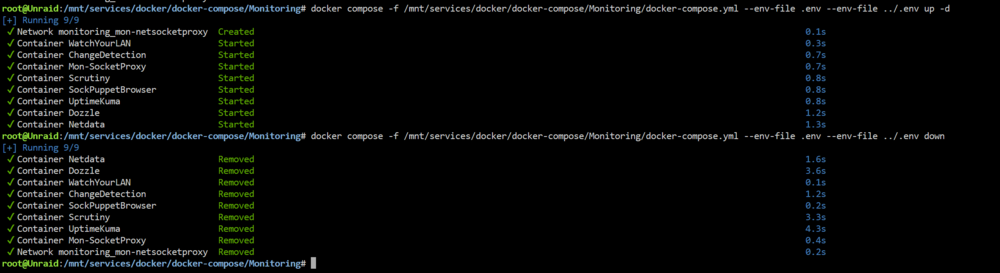
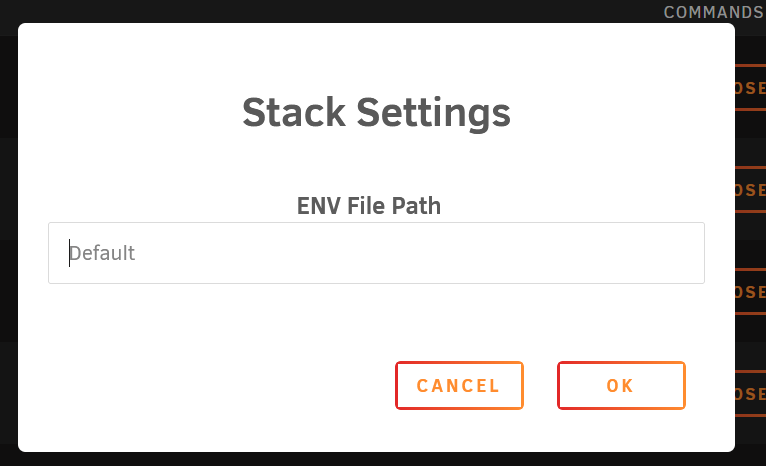
I finally found the solution but it would be perfect if it would be integrated in compose manager The change is "simple" it simply requires to add additional parameters to the up/down compose command docker compose -f /mnt/services/docker/docker-compose/Monitoring/docker-compose.yml --env-file /mnt/services/docker/docker-compose/Monitoring/.env --env-file /mnt/services/docker/docker-compose/.env up -d docker compose -f /mnt/services/docker/docker-compose/Monitoring/docker-compose.yml --env-file /mnt/services/docker/docker-compose/Monitoring/.env --env-file /mnt/services/docker/docker-compose/.env down Can you add support to this? like allowing several env files in the stack?