slimshizn
Members
-
Joined
-
Last visited
Everything posted by slimshizn
-
No, Ended up just formatting and going on with life. Luckily my photos are backed up in multiple places. Anyone who wants to encrypt makes sure you backup the headers. Here's a couple threads. ****************I highly recommend the script*********************. https://forums.unraid.net/topic/101731-precautions-before-encrypting-array-disks-with-luks/ https://forums.unraid.net/topic/109308-script-backup-luks-headers-of-encrypted-devices/
-
azeroth-diagnostics-20221120-1228.zip
-
Bump
-
Started a new topic as this has moved to a different issue entirely. https://forums.unraid.net/topic/131193-unmountable-volume-not-encrypted/
-
I started out with two failed drives. I have one up and running just fine, the other has the above issue "Unmountable: Volume not encrypted" I've followed the Wiki: https://wiki.unraid.net/index.php/Check_Disk_Filesystems#xfs_repair Now I'm waiting here. Phase 1 - find and verify superblock... bad primary superblock - bad magic number !!! attempting to find secondary superblock... I just need to have someone's expertise in recovering the disk. It's sitting with the above attempting to find secondary superblock going on 10 hours now. Not sure if that is a normal amount of time to wait or if someone could provide me with information on lengths of time for this to work. Thank you.
-
Going on 9 hours so far, just making sure that this will have an output eventually and should let it continue to run, or I should stop it and find another way to fix the disk? I tried removing it from the array, starting it, stopping it, re adding, and starting. The array shows "unmountable: volume not encrypted" Here are some threads I've looked through https://wiki.unraid.net/index.php/Check_Disk_Filesystems#xfs_repair Essentially I've done what the wiki has told me to do, and now am stuck at "attempting to find secondary superblock..." "..................................................................................." on and on.
-
I also sent a support email out and linked this post trying to get more attention to the matter since I'm sitting at a week offline.
-
"Swap file start during array mount is disabled" is also showing up besides "Array Started" at the bottom right now. I'm guessing since I'm in maintenance mode. Haven't seen that before. Just a host of issues I need to work through to get back up and running. Going on a week now with my server down and out.
-
Phase 1 - find and verify superblock... bad primary superblock - bad magic number !!! attempting to find secondary superblock... I just started it. I'll let it run. With it being 12TB, should I be waiting days?
-
Ran across https://forums.opensuse.org/showthread.php/537139-How-to-perform-xfs_repair-on-encrypted-partition. The disk is encrypted and shows unlocked in the gui. Not sure if that matters.
-
So the data drive has become unmountable, so I'm running xfs_repair in maintenance mode. With a 12TB drive, I'm guessing it will take a while? waiting on a ton of `.....` for about 2 hours now.
-
LSISAS2008: FWVersion(20.00.07.00)
-
It's showing correctly.
-
Thank you for the response. Could you clarify what you mean by build on top?
-
Okay if it's just a connection or power issue, best way to get these back to a working state in the array?
-
azeroth-diagnostics-20221114-1210.zip
-
Woke up to two failed drives. I have two paritys so at least looks like I can recover, but another drive started shooting up in error count and hasn't shown failed yet. The two initial drives have the exact same error count. This all happened during a parity check. I've had to replace a data drive before, assuming same procedure with my current issue? Looking for the best way to go about this of course. Thank you.
-
Updating through community applications tab leaves the old images to cleanup in the docker tab. Is this normal?
-
I haven't had to balance my setup yet. I'm still using the base rclone guide with great results. I need to read through here to get an understanding of what's changed in your setup overall. Please bare with me, if you need me to test on my end let me know.
-
Seems like the recent release broke it(for me). Tried running a fresh install. Not getting anywhere.
-
Share your config files and edit out what you don't want shown eg. blah.domain.com
-
Make sure that your configuration files such as default.conf, etc all have the .conf extension and all should be good. Recent change.
-
https://docs.ibracorp.io/ibracorp/all-guides-in-order/documentation/security Also the 2nd comment in here had a link.............
-
I've been using CrowdSec as a docker container and can see this only being a plus. While large companies around the world are being owned left and right, I have been on the lookout hard for ways to make sure that anything that has availability to the internet is protected. IBRACORP security repository implemented docker containers for CrowdSec and the traefik bouncer. I've been running CrowdSec, and the Cloudflare bouncer for a few weeks now, and have noticed a lot of activity. I would definitely love to see native support for this built into Unraid. +1 here
-
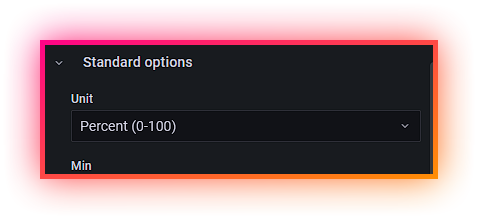
Just tried this out for pihole. Works great, but not with the original dashboard. Found this one on Grafana. https://grafana.com/grafana/dashboards/14283-pi-hole-exporter/ Works better, and has an option to select the datasource. Edit: Had to change the % ads blocked from percentage 0.0 - 1.0 to 0 - 100