





Michael_P
Members
-
Joined
-
Last visited
Everything posted by Michael_P
-
Your CCTV drive is dying for sure, for the OOM it looks like you've got a lot going on for 32GBs, re-allocate where you can and limit your containers
-
It's only a warning, you can just ignore it. Also, if your containers are routinely running OOM such that you need to add a limit in the first place, you should consider changing its config so that it's not doing as much work in RAM, or add more RAM.
-
Looks like syncthing hit the container's memory limit and was killed
-
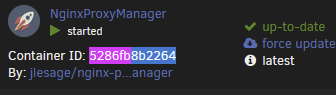
Yeah, it'd be one of your containers. In the output, the processes kicked off by the container will be listed in its hierarchy, so wherever you found that python process, follow it up to the container where you can see its ID. Then, on the docker page in unraid, switch to advanced view to show the IDs and match it up. Here's an example from my server showing what my proxy manager is running The part I've highlighted matches the container shown in unraid

-
Looks like whatever container you have running python 2.64 would be the place to start. If you don't know which one it is, you can run ps -auxf to figure it out
-
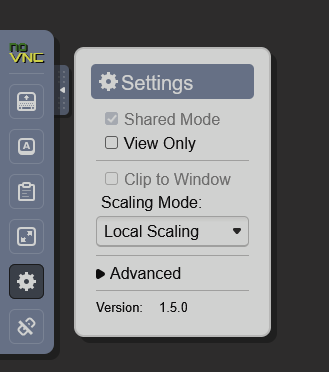
Change the scaling mode in the sidebar for your VNC session
-
It could be that it's been operating within available RAM the whole time, and then tried to do too much at once. Double check to make sure the cache location is correctly mapped to disk. Also, reboot the server so the log is cleared and FCP stops warning you about the past OOMs
-
One of your containers is firing off a bunch of ffmpeg processes, so if you have one that's converting media then change its config so it caches to disk instead of RAM
-
And make sure to reboot, or FCP will keep warning you about the OOMs that have already occurred
-
Tdarr is hitting the memory limit and is being killed. Either switch to transcoding to a disk, or reduce the number of simultaneous transcodes
-
Tdarr is what I'd use, and https://docs.tdarr.io/docs/plugins/classic-plugins/index/Tdarr_Plugin_MC93_Migz3CleanAudio is the plugin
-
This is the way. Urbackup is great, but once it gets confused it's really difficult to get it sorted out again. If you can get the container to start, you can try running: urbackupsrv remove-unknown -u root from the console which may or may not find the original backups (and will take forever to look depending on your backup sets).
-
Looks like it happened back on the 19th of August, there were a few plex transcodes in process so if you have those going to RAM then that contributed to it. When the host went OOM the reaper killed your home assistant VM to keep the host up, but doesn't look like anything to worry about. Reboot to clear the log so FCP stops warning you and if it happens again you can limit the memory allowed to your containers/VMs.
-
Unless you're sending an encrypted blob every backup cycle, the host will have the ability to see the contents. If you don't want to set up a tunnel, Urbackup is a possible candidate as it can be a backup target over the internet.
-
Try running on one stick for a while, then the other, to see if it continues. Also, make sure your board's BIOS is up to date
-
OK, i'm still leaning power then
-
Another slot on a different row?
-
Eliminate any power splitters in use, too. Use only the connectors on the lead to the PSU per backplane, if you split them, it will cause voltage dips and reset the drive Aug 25 01:25:51 orbit kernel: sd 2:0:7:0: Power-on or device reset occurred
-
Your container is hitting the memory limit and being killed, and the system is reporting that Runps -auxf > ps.txt to pipe it to a file (run within a share path so it will create the file there) that will show you what is launching the python process that's causing the issue.
-
I don't even try the stable releases anymore LOL
-
Possibly, but only if the error happened in memory.
-
Probably just an error in transmission, parity was written with what it was sent - a corrupted file, so if all the 0's and 1's are in the right spot there are no errors in parity. Bit rot is when a bit on the drive is flipped randomly over after time, which is unlikely. More likely is dodgy RAM sends the wrong bit to storage on write, or sends the wrong bit to the CPU on read.
-
Power delivery issue looks likely, if you're running splitters - don't.
-
OK, in your case I would suggest you look at something like truenas where the benefits of striping would be of more use to you than unraid's ability to add random drives to increase your capacity. You could do it with pools in unraid, but it wouldn't be optimal. The speed from traditional striped RAID arrays is proportional to the number of drives being striped, you can make use of the combined speed of the drives vs single drive performance of non-striped arrays like unraid
-
Sounds like a solid plan, but instead of the 1080ti for transcoding, look into one of the single slot intel cards like the a310 or a380 - waaaay less power draw and will run circles around the 1080 for transcoding. If this is your first server, keep in mind that it can be very noisy, the high pitch annoying kind of noise. And they can consume a fair bit more power, too.




