casperse
Members
-
Joined
-
Last visited
Everything posted by casperse
-
The USB is fine and the conf files is also written: sensors.conf # sensors chip "coretemp-isa-0000" label "temp1" "CPU Temp" chip "jc42-i2c-0-1a" label "temp1" "MB Temp" And drivers.conf jc42 I am just not seeing any temperatures (Only at selection of the probes) Can it be the MB or the chipset? - It's a new MB for the Xeon E-2100G CPU's Gigabyte C246-WU4
-
Yes IE, Firefox & Chrome same thing. ( The NVidia plugin was first installed today and not activated yet, the Temp problem have been there from the very beginning secound plugin I installed after UAD
-
Hi @trurl thanks I did try this on the official stable release and I could see the same behaviour? The usb is working fine every other plugin I have installed also works perfectly... tower-diagnostics-20190211-1802.zip This is a brand new UnRAID build and I would love to see how hot it is running Everyone's help is as always much appreciated
-
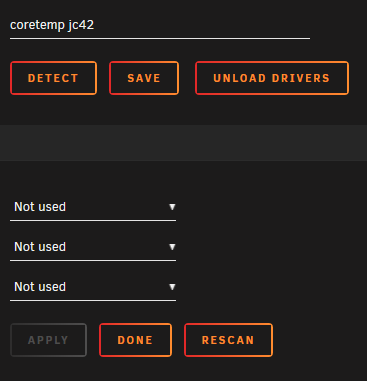
@bonienl Hi I have tried to create a small video to show you what happens. To me it looks like the plugin is working perfectly until I press the apply button? Then everything is gone and I cant get the temp sensors back again? Please let me know if you need any log files to investigate this Unraid temp.mp4
-
Hi All I love this Clear plugin, the only thing I really miss is a queue In the process of preclearing 36 drives and that would be such a nice thing to have Sorry I didn't find a special feature request topic, if there is one then please move this post Thanks again for a great plugin
-
Okay I have to see how that impacts the CPU load - I can see that HW transcoding is finally working!, so only sound transcoding is needing CPU power Strange its so high though... anyway it is working, I can access the SMB shares and play the files, I just need to type the suddirs manuall in the source. So no biggie! - I think your right SMB layer was creating huge problems for the SHIELD TV dev. team and it took almost 6 months before the Plex servers SMB shares was working. Anyway back to refreshing the move of my Plex metadata... (Also I plan to move the media files to UnRAID that is why I have all the folders twice as smb and locally
-
Sorry here you go: What does the privileged setting do? Is it like setting a Higher process priority than the other Dockers? Again thanks for your time!



-
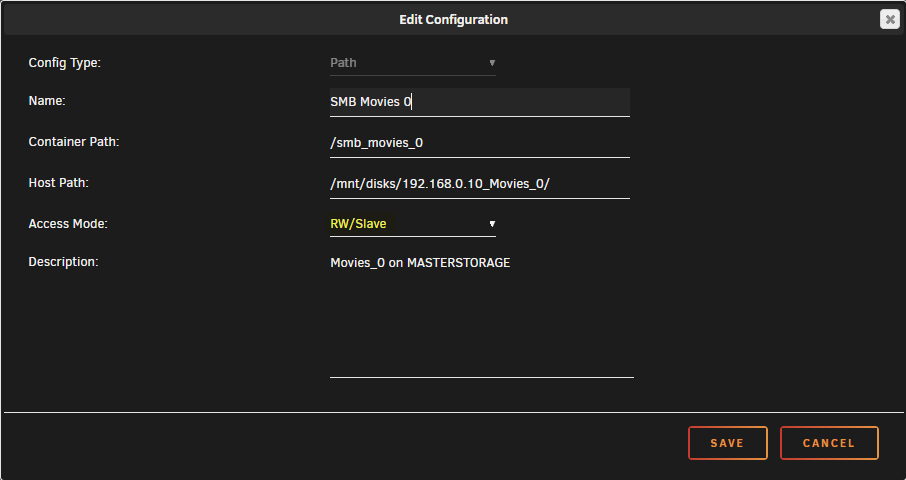
Sorry isn't this the docker mount that I posted? The mount is: - Thats in the docker UI Not sure I know what you mean?

-
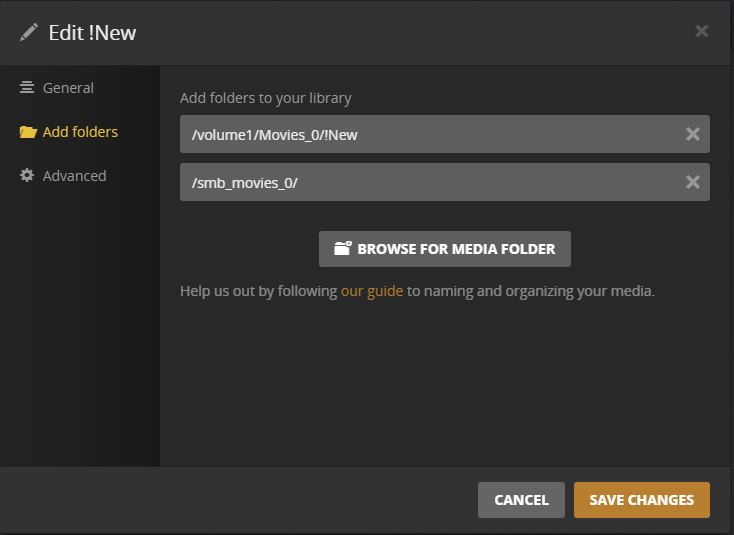
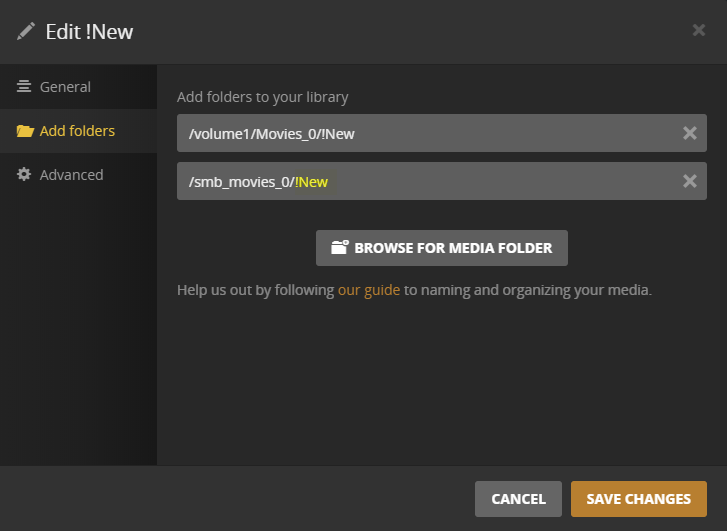
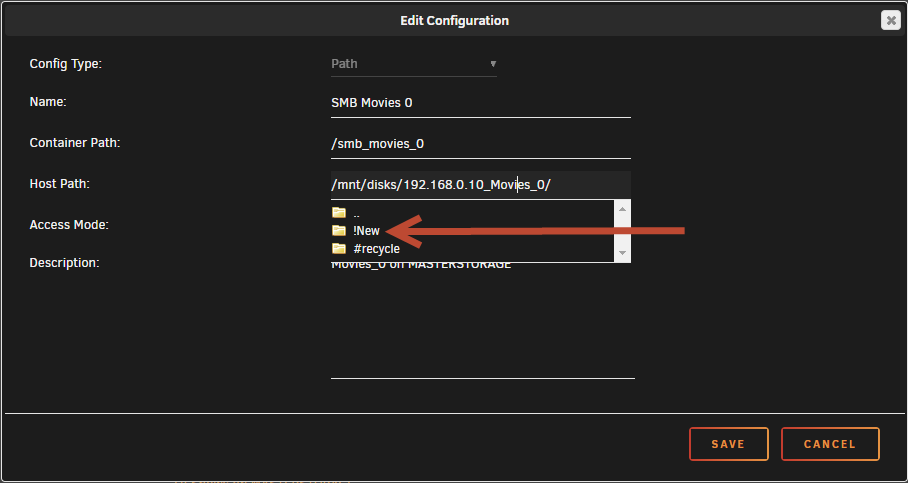
Hi All I am running the latest Linux Plex docker on the new UNRAID RC 6.7.0-rc2 2019-01-24 And I have moved my Plex data to UNRAID from my Synology (Following the normal guide) One thing that is really strange is that all the SMB shares that I have mounted in UNRAID is working! But I can NOT browse the shares and select the correct folder? (I saw the same problem in a early SMB setup on my Shield TV) So to illustrate my problem adding the share on Plex I get this: The mount is: So I have to add the "!New" like this Any input to why I cant browse the shares in Plex through UNRAID Docker? I have changed the SMB shares to: RW/Slave and I can actual browse the folder in docker setup!? As always your feedback is much appreciated!
-
Hi All So if I already have all the openvpn files from my host vendors VPN (They use OpenVPN) Can I set it up, using the Container Variable: VPN_PROV: custom? And then following the great video on how to set this up Update I get the following files from my provider: ca.crt credentials.conf openvpn.ovpn username.crt username.key
-
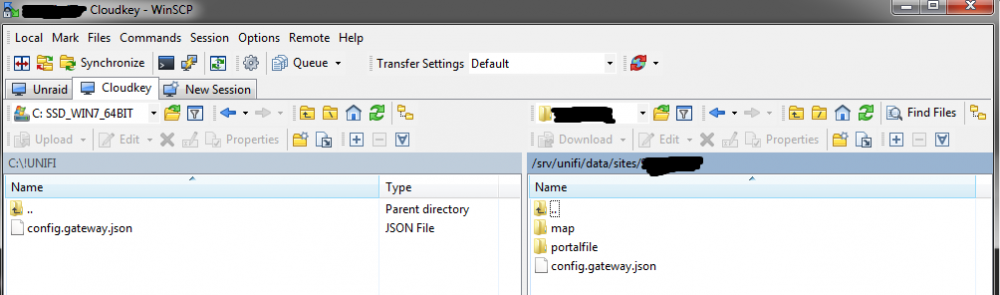
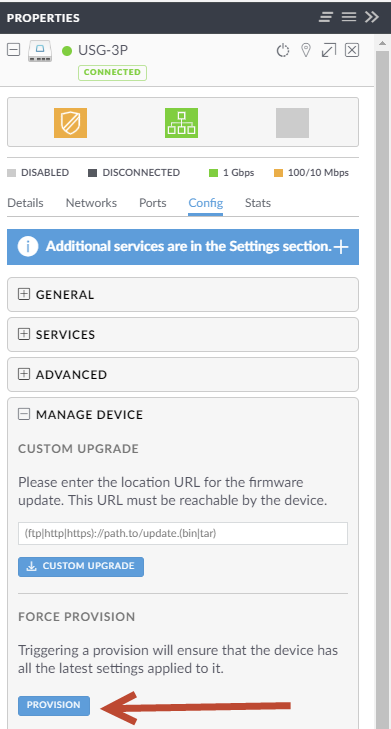
Hi All Just wanted to create this step by step if somebody else wants to fix the UNIFI USG static host record in DNS forwarder once and for all.... When following this great video created by Space invader one Enabling Let's Encrypt under "Identification" will give you an error if you using UNIFI and you would need to create a config.gateway.json for your controller. (Update: They still haven't created this functionality in their UI, even if its been requested since 2017 !!!) 1) you need a validated config.gateway.json file that you can place on your controller (Cloud key in my example) config.gateway.json 2) Use WinSCP to copy the file to the folder: /srv/unifi/data/sites/[SITE CODE}/ (You can see your sitecode in your http string) 5) Reprovision your USG under: Controller Devices > USG > Config > Manage Device > Force provision. Now when doing future updates to your UNIFI controller the config.gateway.json will keep the USG static host record in DNS forwarded
-
YES! setting the UAD/SMB as hidden did exactly what I wanted! - I am new to Unraid and now on my 29 day trial, but looks like I have to go shopping for a Pro license! - Again many Thanks for clarifying!
-
Quick Q. I added the SMB shares using the "Add remote SMB share" because I wanted to copy files to UNRAID using some file manager and because I thought this was how I could share files to a Plex docker running on my new Unraid server? But I just noticed that all the mounted shares are now showing up as shares on my network under Tower? And reading the below info (Thanks) It seems I might have done this wrong? or do I create them without mounting the SMB shares (Not wanting them available in Windows share \\Tower ) Sorry if I am complicating things love this plugin!
-
I would really like to see if I cant get the plugin to work (Havent given up yet!) Looking into the conf. files I do have the following: /config/plugins/dynamix.system.temp/drivers.conf coretemp jc42 Also just tried: jc42 /config/plugins/dynamix.system.temp/sensors.conf # sensors chip "jc42-i2c-0-18" label "temp1" "CPU Temp" But I don't see any core temps anywhere? Also the dropdown fields are empty again? Does it hide information somewhere? Because deleting the plugin and installing it again keeps the dropdowns empty Only at the first install and me renaming the sensor from "coretemp jc42" to "jc42" I got the dropdown populated with all the sensors! Haven't been able to get them back since? sensors-detect Driver `jc42': * Bus `SMBus I801 adapter at efa0' Busdriver `i2c_i801', I2C address 0x18 Chip `IDT TSE2004' (confidence: 5) * Bus `SMBus I801 adapter at efa0' Busdriver `i2c_i801', I2C address 0x1a Chip `IDT TSE2004' (confidence: 5) Driver `coretemp': * Chip `Intel digital thermal sensor' (confidence: 9)
-
Ok solution was to first allow ping on Unifi USG https://help.ubnt.com/hc/en-us/articles/115003146787-UniFi-USG-Firewall-How-to-Enable-ICMP-over-WAN And then create a FW rule on the Synology for Ping https://www.randomhacks.co.uk/how-to-allow-incoming-pings-through-synology-firewall/ That fixed the SMB indicator!
-
So its Ping? The server is online if I write the //192.168.0.... it connects So maybe some special FW rule to allow ping (Is this normal SMB configuration I dont have any setup like this on my other servers?) Any way not sure what to do next, maybee its a network issue not sure Unify allows network ping by default Again Thanks for your quick reply!
-
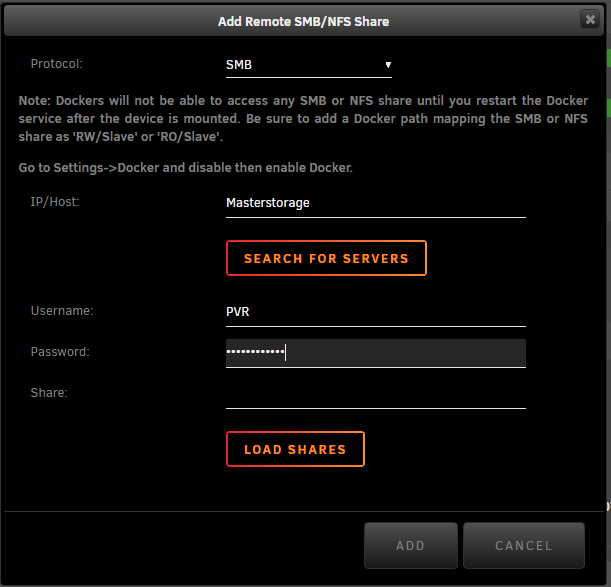
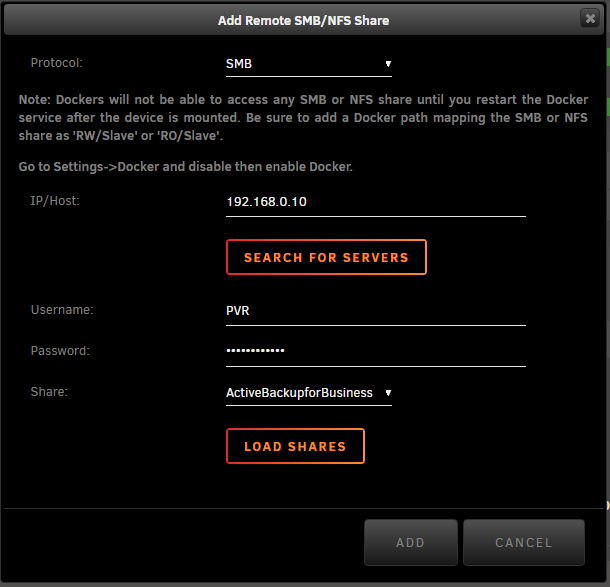
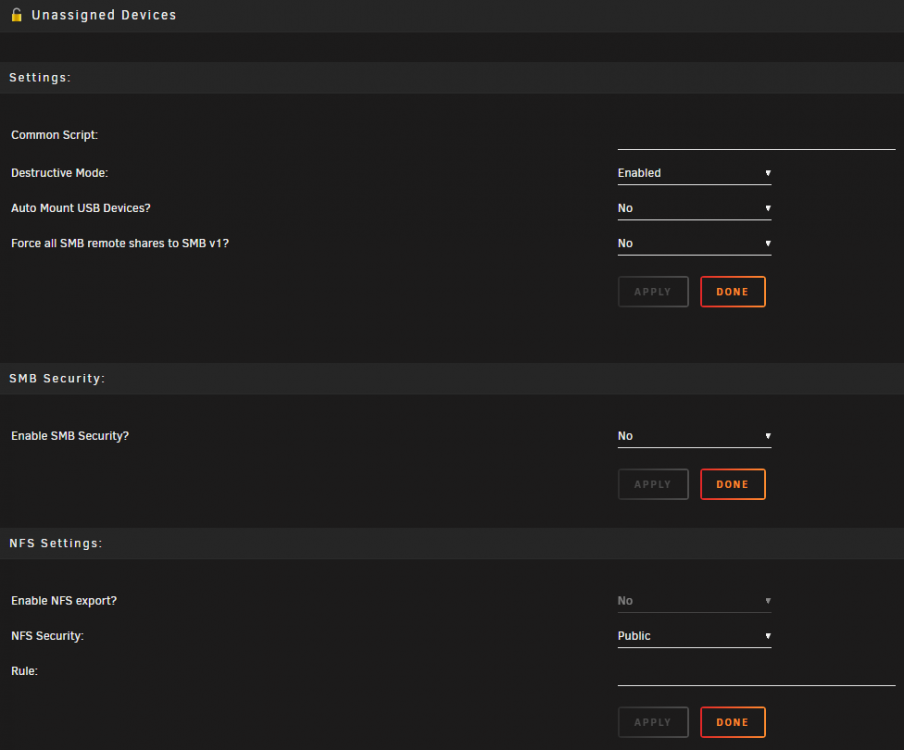
Surething first Then it translate it to the IP (Nice) And I add the mount And the mount config file: [//192.168.0.10/ActiveBackupforBusiness] protocol = "SMB" ip = "192.168.0.10" path = "ActiveBackupforBusiness" user = "PVR" pass = "********" share = "ActiveBackupforBusiness" And the Diagnostic file tower-diagnostics-20190207-1405.zip Please let me know if I can provide any other information (and how to get it 🙂 And settings page:

-
I will post further communication in this thread: Thanks!
-
No I am already running this version 😪
-
Hi @dlandon I have tried updating everything

-
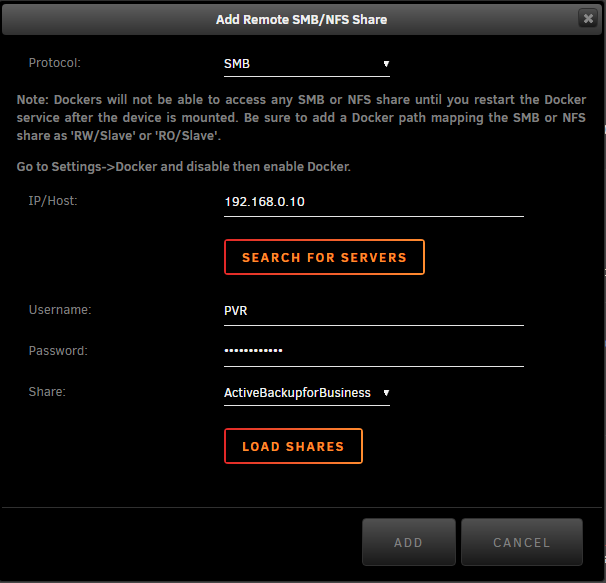
Hi Mounting a SMB share in the new RC it now translates the Hostname to a IP (NICE this is new!) Writing username and password provides me with the dropdown box of all my shares (Synology box) FYI: I have enabled SMB1-2-3 on the Synology box Sofar so god... But I can't mount the drive? (I don't have any problem mounting SMB to my Synology from my Shield android box, Kodi, Raspberry etc....´) I read the FAQ, and also tried forcing it to SMB1 I have looked in the SMB file samba_mount.cfg and it looks ok? [//192.168.0.10/ActiveBackupforBusiness] protocol = "SMB" ip = "192.168.0.10" path = "ActiveBackupforBusiness" user = "PVR" pass = "********" share = "ActiveBackupforBusiness"

-
@dorian can you share any light on this? I think its really strange that my Shield android box and my Kodi raspberry all connects perfectly to my Synology but for some reason Unraid dosent work. The new release candidate change the hostname to the corresponding IP and it also find all the shares in the dropdown menu But after adding the share its greayed out and I cannot mount the SMB path?
-
@Maor detect button just keeps writing "coretemp jc42" and shows no sencores in the dropdown menu Changing the name to "jc42" worked for a second I could select sensors but hitting the Apply button made them all disappear again? Same thing the first time I did a detect and then all gone? Could be a small bug, beacuse everything was detected perfectly and then hitting Aply and it was gone
-
How did you get this working? If I write Hostname and user and password then it will list all the shares and I can save the SMB connection. But it will not be mounted: If I try to use the IP address it will not list any shares I can select? No errors in the logfile

-
Hi All I hope this is the right place to ask this... I got the temp working and then the probes was gone and I haven't been able to get them back? I just got the new Gigabyte motherboard C246-WU4 supporting the new Intel’s Xeon E-2176G and sofar its been working great with UNRAID I have deleted the plugin and re-installed it but havent been able to get the sensors back again? Running the command: root@Tower:~# sensors-detect got the below output. And yes I have also tried to go through the https://wiki.unraid.net/index.php/Setting_up_CPU_and_board_temperature_sensing but without any success. Driver `jc42': * Bus `SMBus I801 adapter at efa0' Busdriver `i2c_i801', I2C address 0x18 Chip `IDT TSE2004' (confidence: 5) * Bus `SMBus I801 adapter at efa0' Busdriver `i2c_i801', I2C address 0x1a Chip `IDT TSE2004' (confidence: 5) Driver `coretemp': * Chip `Intel digital thermal sensor' (confidence: 9) Do you want to generate /etc/sysconfig/lm_sensors? (yes/NO): yes Copy prog/init/lm_sensors.init to /etc/init.d/lm_sensors for initialization at boot time. You should now start the lm_sensors service to load the required kernel modules. Unloading i2c-dev... OK If anyone have any input on what to do next? Again thanks for a great plugin and this great support community its really extraordinary! Cheers Casperse