





casperse
Members
-
Joined
-
Last visited
Everything posted by casperse
-
I found a permission error in the log file from Radarr and removed change permission in my setup. But transfer is still really really slow, this is 561MB at 17:06 and the file was created 16:46 = 20 min! Are my mount point wrong? Update: now 3 hours later still executing the transfer Diagnostic files:diagnostics-20190501-1756.zip


-
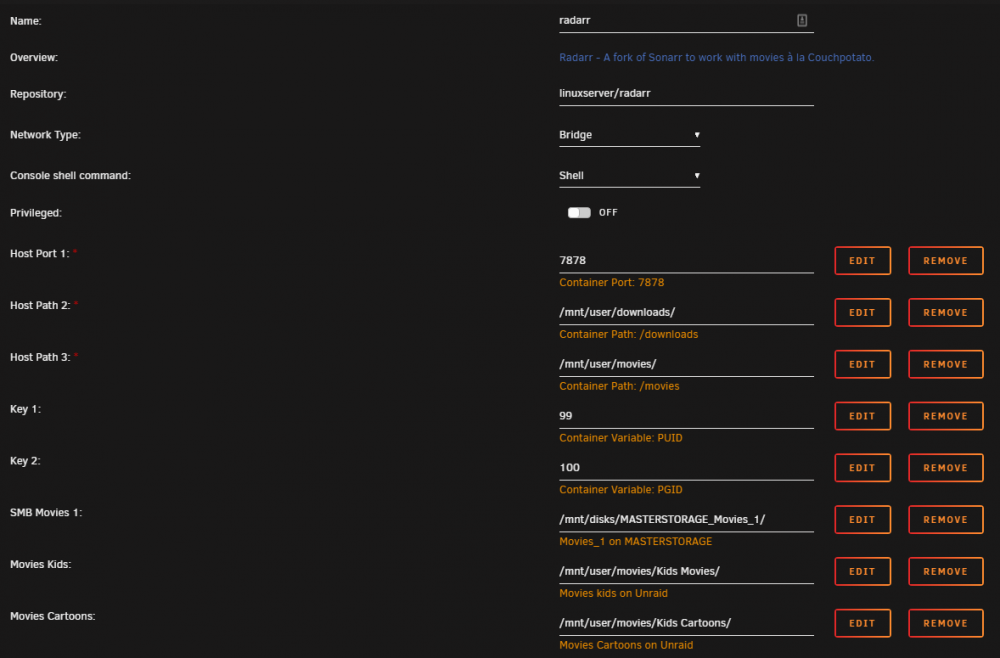
@wh0_cares I am in kind of the same situation, and I need some help increasing speed of copying (It takes hours, when Radarr copies after sort and renaming) My Movie folder is on a different system and mounted correctly (Ping enabled etc) My download folder is using the cash drive M2 and move is done nightly (So they should already be gone before move is initiated) Appdata is Cash only Download cash Yes Radarr mappings: It's not the network speed, copying from UNraid to the Mounted folder by PC or binhex-krusader works quick and without problems - Radarr just don't like mounted volumes? As always any input or things I can try is most welcome 🙂
-
Hi All I have 3 mounts to my other server and I have some of the same problems it doesn't time out? Only way to get them working is stopping the array (Which could be because that stops all dockers?) Is there any way by console to stop UAD? and restart the service like stopping a single docker and not stopping the array? (Sorry if this has been asked before long thread) Best regards Casperse Please wait... collecting diagnostic information (this may take several minutes).......
-
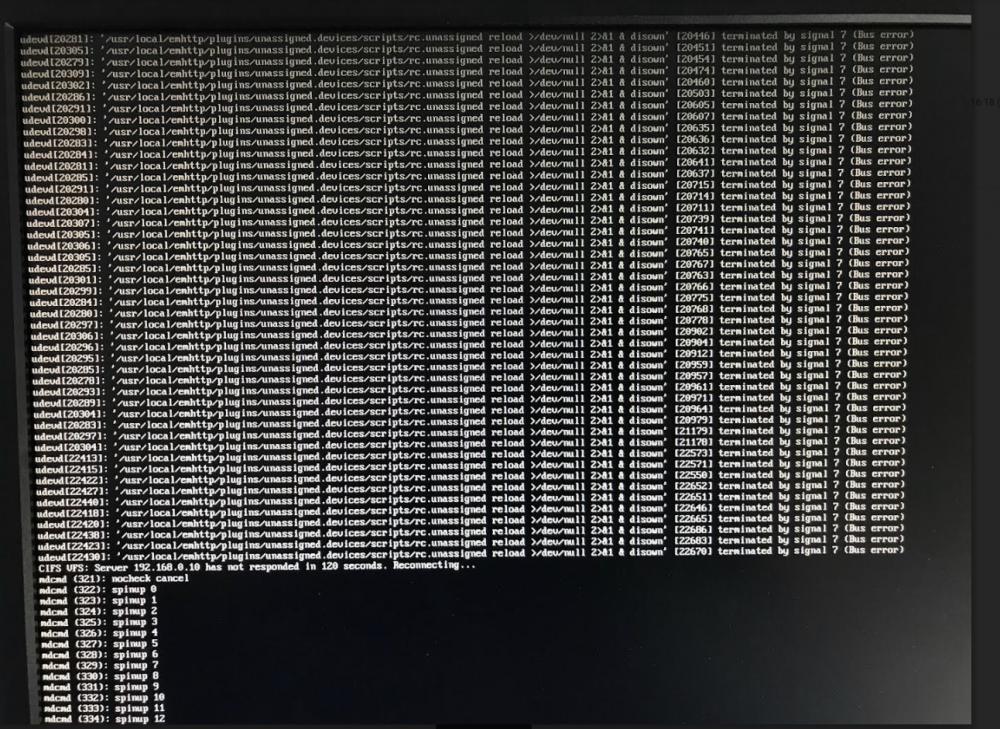
Just updated and then the UAD icon was "looking" for my mount points the last 15 min and then went unresponsive? I then went to the console and found this - sorry camera phone (Locked I could not write anything) I then tried Putty, and got ind and tried to do a "powerdown" hoping it will close down nicely.... UPDATE: I can see that the 192.168.0.10 cant connect thats the mount to my other server...but that shouldnt lock it down right? Okay, ended up cutting the power, and bootet with GUI, stopped all auto mounts and then started the array I then manually mounted each drive and its up and running again (Havent rebooted the server in a very long time so maybee it juste needed to be flipped
-
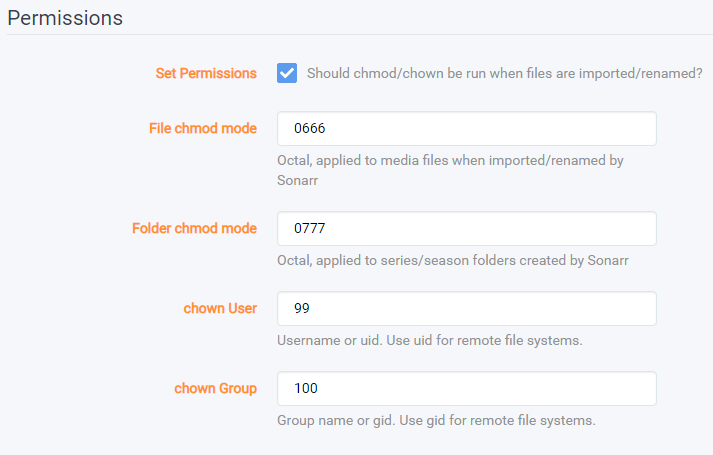
Hi All Lidarr is running fine for me except for one thing! Folder access rights? when Lidarr creates folders for music I cant write to them before after having run the Unraid "New Permissions" for my music shared folder? I can't find any setting to set user and chmod in the UI, so my Q is can I set some special parameter string for Lidarr in the docker configuration? As always your feedback is much appriciated
-
SOLUTION: On a older version of UAD 4-6 weeks ago I had to mount all my drives using the IP address (Same user and access rights) The new updated one I don't have to write any IP it finds the Host-name and then everything works! (Old Bug?)
-
Do I need to create a Nobody user account? (The mounted drives using UAD is done with a user that have write access!)
-
@Squid Any insight in what I could try? The volume is mounted and working, somehow Radarr just doesn't want to write in the Synology folder
-
I don't know what made it work? tried so many things - deleted DB im Ombi, re-installed it SSL on and off.... In the end I removed "Base URL" and now it connects? (I dont know if this was it but the last thing I did?)
-
UPDATE: Removing SSL and changing the port (Some how Ombi imported the wrong port number 32402 ?) solved it for Radarr NO DICE! : Radarr connects but Sonarr V3 does not? I have tried re-installing it but no success? If anyone have this working then I would like to know how? Both Ombi and Sonarr is running on the same Unraid server as Dockers ,and on the same bridged network I have turned on the V3 X in ombi
-
Hi All I have Ombi and Plex linux releases running in dockers on Unraid. When trying to add the servers I can see the server and select the server. But connection is refused, also load of libraries any idea to what could be wrong?
-
Its a Synology shared drive in BTRFS
-
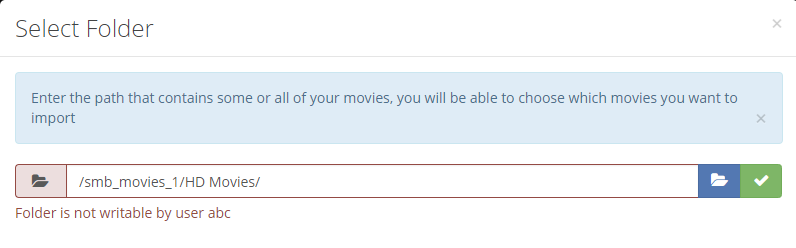
I have a problem, that might just be a "newbie" thing Setting up Sonarr went without any problem but Radar gives me an error on a remote shared drive "Folder is not writable by user abc" It's a drive shared in the docker from unasigned devices as Slave R/W is this the problem?
-
Hi I just followed the Sync - Sonarr video guide from @SpaceInvaderOne LINK (Great video as always!) And when the files are synched and the files are moved/renamed I still see the folder with the files in the synch folder Do I need to run a custom script deleting these files? or will Sonarr delete them when seeding stops? (All the files are still on the seedbox so would be great just to have Sonarr move them?) Or it might be a Permissions issue that stops Sonarr from deleting them on the Unraid server? Would this help: UPDATE: I found that FileBot moves them and also renames the files and subtitles with 3 letter country codes and some other nice stuff (More options) what I haven't found is a solution to how I can get Sonarr to call the FileBot when needed? and send the correct TVDB ID to Filebot, since this information is already in Sonarr - I know - I make it to complicated....
-
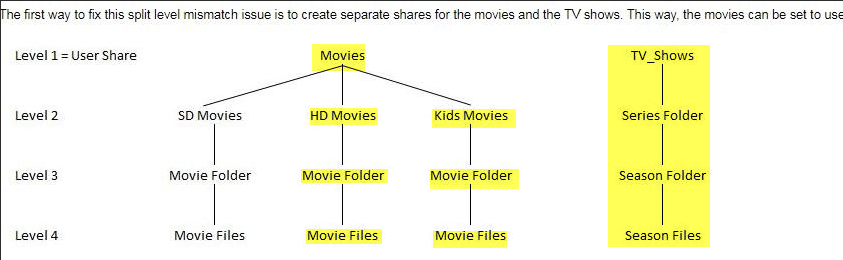
Ok bad choice of words 😊 but you know what I mean saying "Sub-dir" I just wanted to have one single folder with the movie in that folder and if possible poster, nfo files etc,,,, And my homework was exactly what your link says: Losing a drive would then mean losing, a "full" set of movies with info, making it possible to identify what was lost. And for TV Shows I think the level is (ok) its the way copying is done in Unix.... just have to keep using External transfers to the unRAID server


-
Yes you are completely correct - it just finished with 68 empty folders... so cleaning up and starting unBALANCE up again.
-
No move - I only copy from SMB share to local Unraid share folder! Yes the move was done with unBALANCE and that worked perfectly, and just to remove the over allocation on drive 1 - only problem is that now Krusader have filled up drive 1 again... I think it works perfectly initiating the transfer on my Synology --> Unraid so maybe just keep it flowing in one direction
-
I did read this and came to the conclusion that split level 2 was perfect (All is mkv files) so dir is in a relative flat structure But maybe I need to count the sub dir of the shares? Movies/Kids Movies/Movie name/Movie file.mkv --> Would this be split level 2 or 3? No The transfers are from Mounted share inside Krusader to the shared Unraid folder, so it should move to the next drive... Update it just moved to the next drive but it didnt leave any room left on the disc (I have set 50G free space on all shares?) Looking at the folder it looks fine all movies in each folder on the same drive - like I wanted ?

-
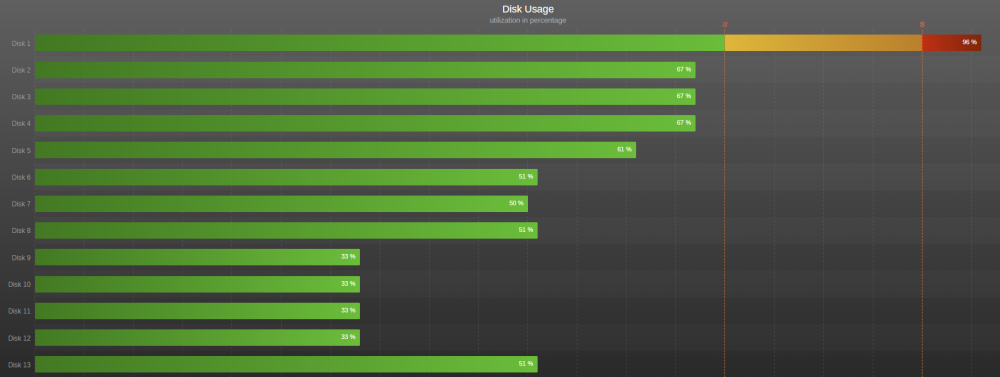
I just did a unBALANCE and then restarted Krusader and startet the transfer to the share under user (Not user0) I dont have any cash on this share and I dont have any parity drives (Waiting to add them after the copying is finished) But Krusader is now again filling up disc nr 1 - transferring from my old server by SMB it looks like it levels the data? Any help is much appreciated
-
Did I select the wrong share? shouldn't it be under "user" I just used binhex-krusader to copy a very large media folder and for some reason it just filled up a single drive and stopped? I have copied to the "root\UNRAID\user\movies" and I have the shared folder setting to "High-Water" any way to do the copy with krusader and not filling up the individual disks? Its movies: So split level is 2
-
I don't know if this makes any difference but I started with a rollback to v.6.6.6 stable and then to RC4?
-
@clowrym I just tried again on the Rc4 and it works now!
-
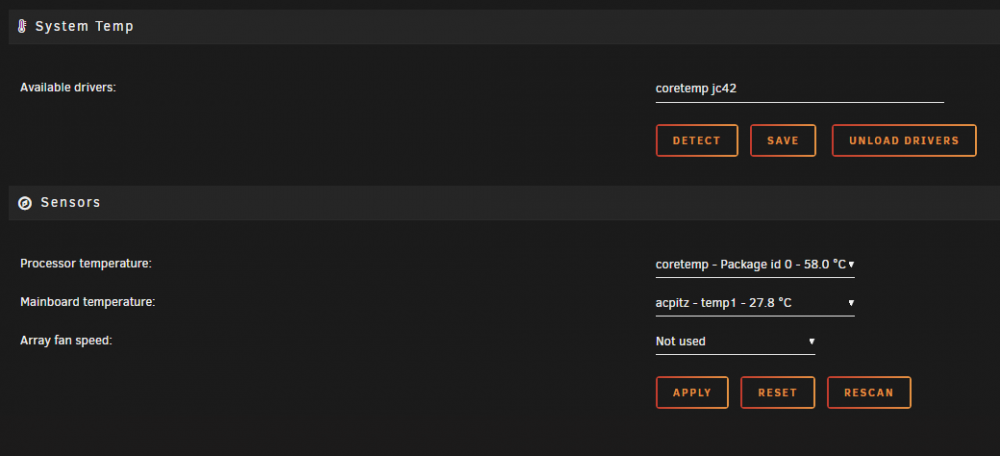
Same here had to try it Delete: root/etc/sensors.d/ this folder was empty? - could that be the problem? root/flash/config/plugins/dynamix.system.temp/*.* Uninstall and reinstall but this time I couldn't even get the initial list of sensors?
-
I just did! while having two of them running :-) works perfectly starts up as paused and nice touch about setting limits and not having a fixed one - love it
-
WAow! now it can run while I am away for the weekend - Thanks @gfjardim your the man!






