casperse
Members
-
Joined
-
Last visited
Everything posted by casperse
-
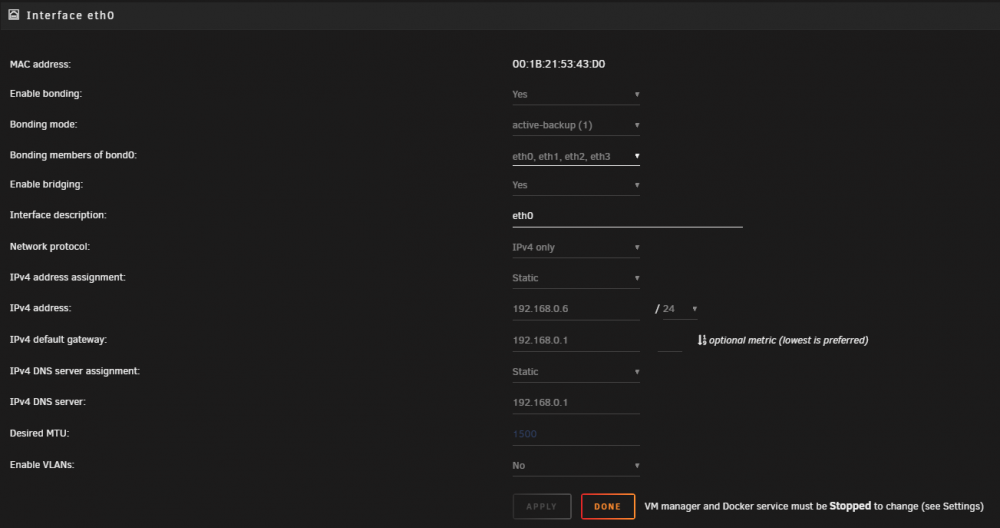
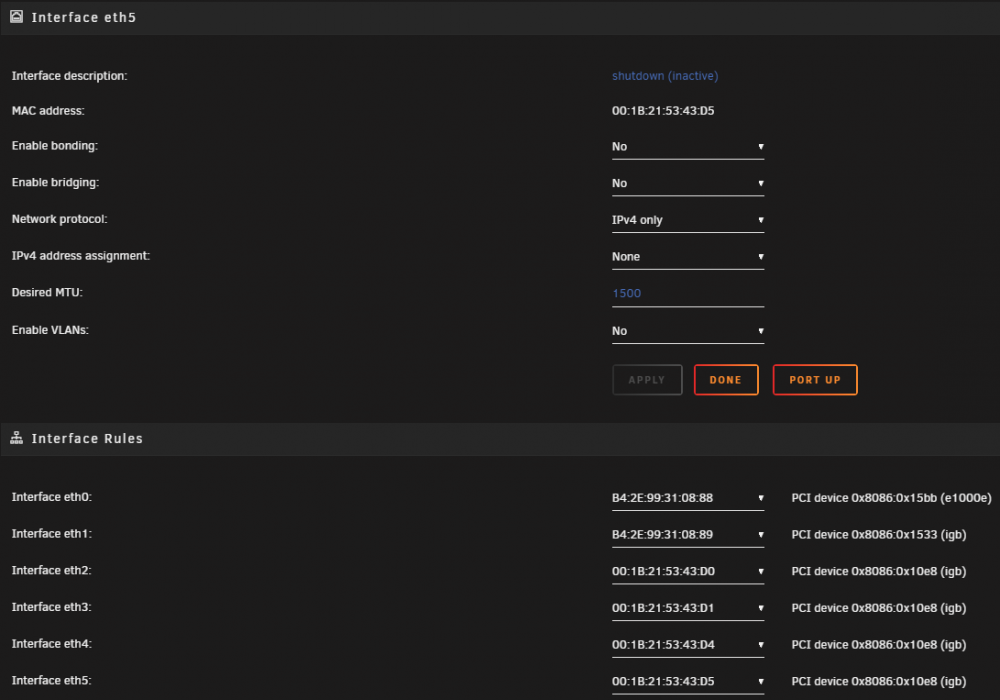
Hi All I also purchased myself a Intel 4 NIC for a pfsense but I cannot get it removed from Unraid and made visible on the VM The netcard is in these two groups: 0a:00.0 Ethernet controller: Intel Corporation 82576 Gigabit Network Connection (rev 01) 0a:00.1 Ethernet controller: Intel Corporation 82576 Gigabit Network Connection (rev 01) 0b:00.0 Ethernet controller: Intel Corporation 82576 Gigabit Network Connection (rev 01) 0b:00.1 Ethernet controller: Intel Corporation 82576 Gigabit Network Connection (rev 01) 0a:00.0 0200: 8086:10e8 (rev 01) 0a:00.1 0200: 8086:10e8 (rev 01) 0b:00.0 0200: 8086:10e8 (rev 01) 0b:00.1 0200: 8086:10e8 (rev 01) I have tried both: vfio-pci.ids=8086:10e8 pci-stub.ids=8086:10e8 I have read through many post and I keep getting this under network... The two first is on the MB and the 4 NIC is shown like this "Shutdown (Inactive) shouldn't they be gone? Also I can't see them show up when creating a VM like people show on their youtube videos? (The card works because I used it before in Unraid, and I have removed it from the Bridge and network conf)

-
Ok after many more reboots - and some patience waiting for all the dockers to startup I now finally have a working network (And I will never touch it again! 😊) Got the 4 NIC disabled with the "blue text" and deleted both files again. I then did a static IP again (I normally have DHCP to MAC address) Doesn't make much sense because I could go to the UI every time accessing the fixed IP but my Dockers would just not work and now they do... Thanks for your input! Deleting everything is still the key...
-
I am on my 11 reboot I have traced all my latest changes and are reversing them all.... Following the video guide I disabled the 4 NIC by adding this code: vfio-pci.ids=8086:10e8 And I disabled the: IOMMU ACS Override to find the correct pci id (Would this destroy my dockers internet connections?) I then replaced the files with the old ones on the flash drive network.cfg network-rules.cfg and rebooted same problem And I keep getting the DNS error? must be some routing missing?
-
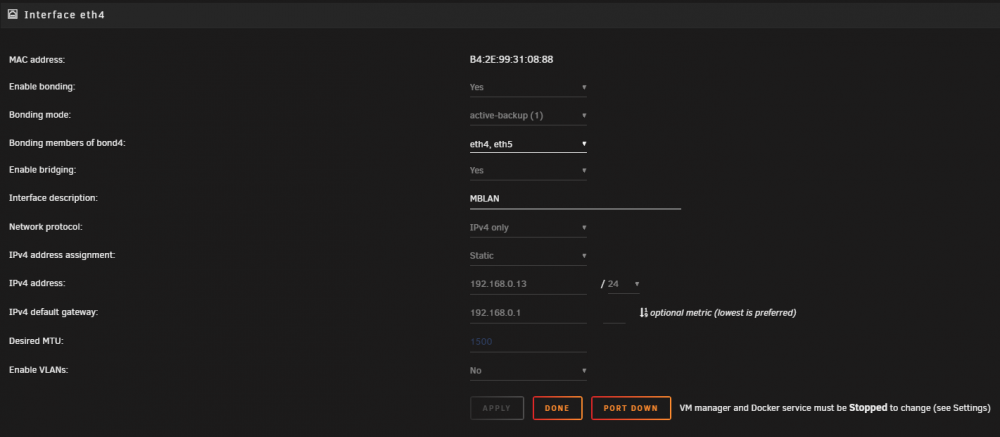
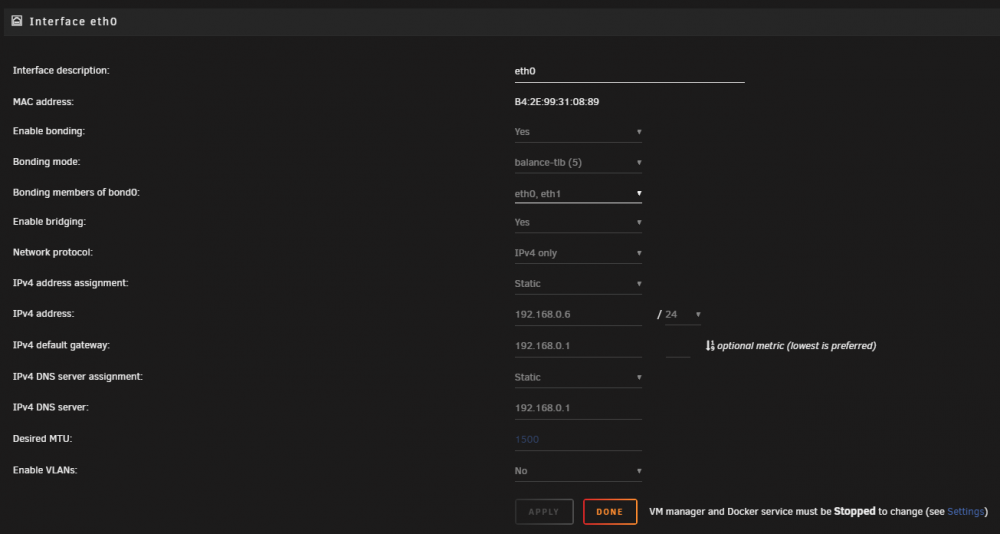
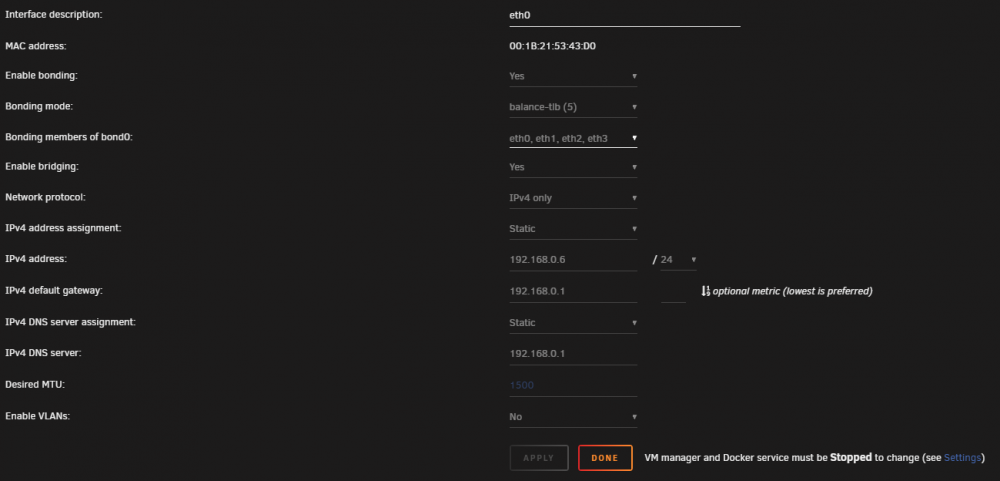
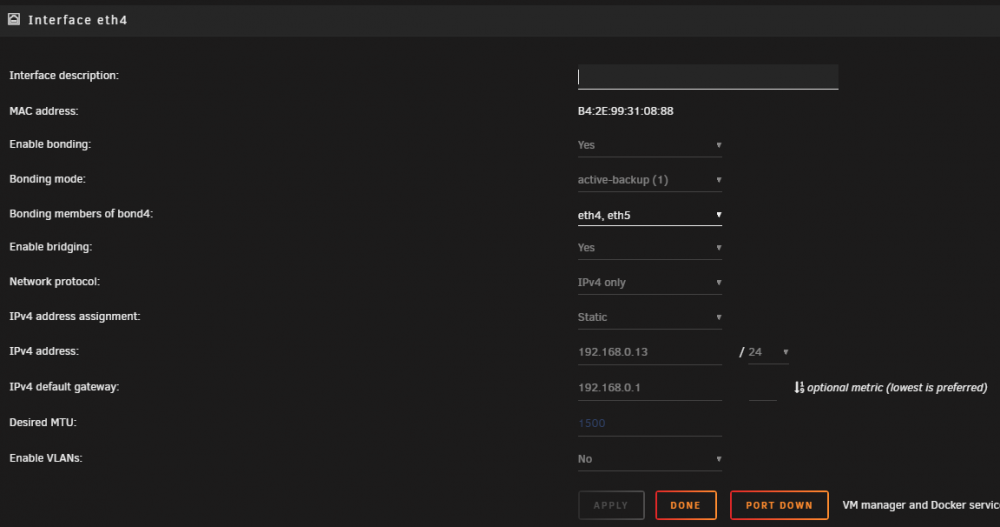
I know the error is in these settings: New network.cfg (Removed 4 NIC for pfsense VM.....) # Generated settings: IFNAME[0]="br0" BONDNAME[0]="bond0" BONDING_MIIMON[0]="100" BRNAME[0]="br0" BRSTP[0]="no" BRFD[0]="0" DESCRIPTION[0]="eth0" BONDING_MODE[0]="5" BONDNICS[0]="eth0 eth1" BRNICS[0]="bond0" PROTOCOL[0]="ipv4" USE_DHCP[0]="no" IPADDR[0]="192.168.0.6" NETMASK[0]="255.255.255.0" GATEWAY[0]="192.168.0.1" DNS_SERVER1="192.168.0.1" USE_DHCP6[0]="yes" DHCP6_KEEPRESOLV="no" IFNAME[1]="br4" BONDNAME[1]="bond4" BONDNICS[1]="eth4" BONDING_MODE[1]="1" BONDING_MIIMON[1]="100" BRNAME[1]="br4" BRNICS[1]="bond4" BRSTP[1]="no" BRFD[1]="0" PROTOCOL[1]="ipv4" USE_DHCP[1]="no" IPADDR[1]="192.168.0.13" NETMASK[1]="255.255.255.0" GATEWAY[1]="192.168.0.1" SYSNICS="2" OLD ONE: # Generated settings: IFNAME[0]="br0" BONDNAME[0]="bond0" BONDING_MIIMON[0]="100" BRNAME[0]="br0" BRSTP[0]="no" BRFD[0]="0" BONDING_MODE[0]="5" BONDNICS[0]="eth0 eth1 eth2 eth3" BRNICS[0]="bond0" DESCRIPTION[0]="eth0" PROTOCOL[0]="ipv4" USE_DHCP[0]="no" IPADDR[0]="192.168.0.6" NETMASK[0]="255.255.255.0" GATEWAY[0]="192.168.0.1" DNS_SERVER1="192.168.0.1" USE_DHCP6[0]="yes" DHCP6_KEEPRESOLV="no" IFNAME[1]="br4" BONDNAME[1]="bond4" BONDNICS[1]="eth4 eth5" BONDING_MODE[1]="1" BONDING_MIIMON[1]="100" BRNAME[1]="br4" BRNICS[1]="bond4" BRSTP[1]="no" BRFD[1]="0" PROTOCOL[1]="ipv4" USE_DHCP[1]="no" IPADDR[1]="192.168.0.13" NETMASK[1]="255.255.255.0" GATEWAY[1]="192.168.0.1" SYSNICS="2" Unraid server without Network is like a car without wheels :-)
-
Hi @Squid Ok so I would still have to go to settings and apply what would then be the default settings? I seem to have caused myself a lot of problems after my changes some dockers work and others doesn't work both are using bridge? I copied the network cfg back and rebooted unraid... in Fix Common Problems - I can see this: My network settings are the same as before pointing to my router as DNS... (I have tried to change them to above DNS same result) Should I delete the file again....

-
I just did that on v.6.8.0 and it didnt create a new file and I had to get the UI up on the console :-) And create the file again... Is there any other way to reset network settings?
-
That is great! - Is it possible to add several openvpn configuration countries to the folder? would it then jump to another one when restarted or updated?
-
One more question... 😉 I have enabled VPN and Privoxy as a proxy does this work outside the Deluge "UI"? I am asking because I found this notice about DNS leaks in Deluge https://forum.deluge-torrent.org/viewtopic.php?t=54322 Might be a stupid Q don't know one would test this in a docker
-
I forgot to read the comments below the video..... SOLVED: Netherland does not support port forwarding - so changed it to switzerland and now I can start deluge :-)
-
Ok reading through the FAQ and following the great video guide I keep getting the "Stop" - Like this killswitch works! :-) I also forwarded all the ports requested by the docker, I enabled the debug log and see something about port 3? I did add my new username and password from PIA and I downloaded the OpenVPN files and placed them in the Appdata (and user rights are ok) Sorry if I missed this in the thread.... Following the video "Netherland" should be a god choice but in the debug I see this: 2020-01-09 15:26:36,527 DEBG 'start-script' stdout output: [warn] PIA endpoint 'nl.privateinternetaccess.com' is not in the list of endpoints that support port forwarding, DL/UL speeds maybe slow SOLVED: Netherland sosent support port forwarding - so changed it to switzerland
-
Thanks for your quick response - Main reason to get Express was the added speed but not in this scenario, so PIA is still the best option?
-
I wanted to use ExpressVPN but was told that they don't support port forwarding? so it wouldn't work with DelugeVPN? - torrents Dit you get ExpressVPN working? and could you share any "Custom" setup needed to get it working? Thanks
-
Could you share how to get the Network activity down and getting VIRTIO to work? the e1000e is not so efficient
-
You got 6.2 working? and its still running under Unraid 6.8 could you share what you have used: XML Bootloader PAT - dsm installation initial version? UPDATE: I got it working now! on the latest and greatest DSM! :-) For others I missed the timeout in the bootloader set it to 10 sec and select VM when you boot in the VNC Also I changed the Set machine as Q35-3.0? and it works!
-
Ok after contacting the Xpenology forum I decided to go back to DSM 6.1.7 and it works! https://xpenology.com/forum/topic/24168-dsm-621-on-unraid-vm/?tab=comments#comment-129798 But any attempt to use any of the loaders used for DSM 6.2.X gives above error? I have looked through all the XML files and havent found any "Smoking" gun PLEASE: Anyone who has the new 6.2 working under Unraid 6.8.0 could you please share your: loader XML and what PAT file you initial installed... Seem to be the key to get this working :-)
-
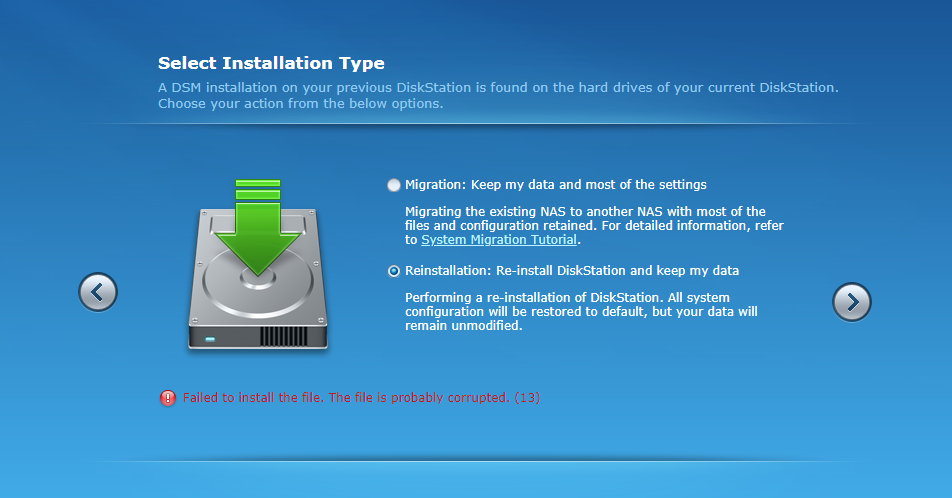
OK finally managed to get it found by using the actual IP But any package I try to install I get this: Do you have any special setup for inputting a VID and PID? (if then how?) (I also added the serial generated and I added the mac address to the synoboot.img still get the same error? Only thing I didn't couldn't update was the VID and PID (Is this needed on a virtual USB stick?)
-
Hi everyone I seem to be stuck - the "find.synology.com" dosent work? but if I go to my router I can see a new Diskstation with a IP that I cant access? Have read this thread over and over again and the solution eludes me? I am using the standard bridge? (And my Unraid server works perfectly with other VM's) I also need to pause and do a force stop - normal stop of the VM doesn't work? is this normal? BTW: I also tried changing the Bus to 4 <?xml version='1.0' encoding='UTF-8'?> <domain type='kvm'> <name>XPEnology</name> <uuid>027c5da5-0973-5a2c-a9d5-d93baed45c62</uuid> <description>XPEnology</description> <metadata> <vmtemplate xmlns="unraid" name="CentOS" icon="centos.png" os="centos"/> </metadata> <memory unit='KiB'>1048576</memory> <currentMemory unit='KiB'>1048576</currentMemory> <memoryBacking> <nosharepages/> </memoryBacking> <vcpu placement='static'>8</vcpu> <cputune> <vcpupin vcpu='0' cpuset='0'/> <vcpupin vcpu='1' cpuset='6'/> <vcpupin vcpu='2' cpuset='1'/> <vcpupin vcpu='3' cpuset='7'/> <vcpupin vcpu='4' cpuset='2'/> <vcpupin vcpu='5' cpuset='8'/> <vcpupin vcpu='6' cpuset='3'/> <vcpupin vcpu='7' cpuset='9'/> </cputune> <os> <type arch='x86_64' machine='pc-q35-4.1'>hvm</type> <loader readonly='yes' type='pflash'>/usr/share/qemu/ovmf-x64/OVMF_CODE-pure-efi.fd</loader> <nvram>/etc/libvirt/qemu/nvram/027c5da5-0973-5a2c-a9d5-d93baed45c62_VARS-pure-efi.fd</nvram> </os> <features> <acpi/> <apic/> </features> <cpu mode='host-passthrough' check='none'> <topology sockets='1' cores='4' threads='2'/> </cpu> <clock offset='utc'> <timer name='rtc' tickpolicy='catchup'/> <timer name='pit' tickpolicy='delay'/> <timer name='hpet' present='no'/> </clock> <on_poweroff>destroy</on_poweroff> <on_reboot>restart</on_reboot> <on_crash>restart</on_crash> <devices> <emulator>/usr/local/sbin/qemu</emulator> <disk type='file' device='disk'> <driver name='qemu' type='raw' cache='writeback'/> <source file='/mnt/user/domains/XPEnology/synoboot.img'/> <target dev='hdc' bus='usb'/> <boot order='1'/> <address type='usb' bus='0' port='1'/> </disk> <disk type='file' device='disk'> <driver name='qemu' type='raw' cache='writeback'/> <source file='/mnt/user/domains/XPEnology/vdisk2.img'/> <target dev='hdd' bus='sata'/> <address type='drive' controller='0' bus='0' target='0' unit='3'/> </disk> <controller type='pci' index='0' model='pcie-root'/> <controller type='pci' index='1' model='pcie-root-port'> <model name='pcie-root-port'/> <target chassis='1' port='0x10'/> <address type='pci' domain='0x0000' bus='0x00' slot='0x02' function='0x0' multifunction='on'/> </controller> <controller type='pci' index='2' model='pcie-root-port'> <model name='pcie-root-port'/> <target chassis='2' port='0x11'/> <address type='pci' domain='0x0000' bus='0x00' slot='0x02' function='0x1'/> </controller> <controller type='pci' index='3' model='pcie-root-port'> <model name='pcie-root-port'/> <target chassis='3' port='0x12'/> <address type='pci' domain='0x0000' bus='0x00' slot='0x02' function='0x2'/> </controller> <controller type='pci' index='4' model='pcie-root-port'> <model name='pcie-root-port'/> <target chassis='4' port='0x13'/> <address type='pci' domain='0x0000' bus='0x00' slot='0x02' function='0x3'/> </controller> <controller type='virtio-serial' index='0'> <address type='pci' domain='0x0000' bus='0x02' slot='0x00' function='0x0'/> </controller> <controller type='sata' index='0'> <address type='pci' domain='0x0000' bus='0x00' slot='0x1f' function='0x2'/> </controller> <controller type='usb' index='0' model='ich9-ehci1'> <address type='pci' domain='0x0000' bus='0x00' slot='0x07' function='0x7'/> </controller> <controller type='usb' index='0' model='ich9-uhci1'> <master startport='0'/> <address type='pci' domain='0x0000' bus='0x00' slot='0x07' function='0x0' multifunction='on'/> </controller> <controller type='usb' index='0' model='ich9-uhci2'> <master startport='2'/> <address type='pci' domain='0x0000' bus='0x00' slot='0x07' function='0x1'/> </controller> <controller type='usb' index='0' model='ich9-uhci3'> <master startport='4'/> <address type='pci' domain='0x0000' bus='0x00' slot='0x07' function='0x2'/> </controller> <interface type='bridge'> <mac address='xx:xx:xx:xx:xx:xx'/> <source bridge='br0'/> <model type='e1000'/> <address type='pci' domain='0x0000' bus='0x01' slot='0x00' function='0x0'/> </interface> <serial type='pty'> <target type='isa-serial' port='0'> <model name='isa-serial'/> </target> </serial> <console type='pty'> <target type='serial' port='0'/> </console> <channel type='unix'> <target type='virtio' name='org.qemu.guest_agent.0'/> <address type='virtio-serial' controller='0' bus='0' port='1'/> </channel> <input type='tablet' bus='usb'> <address type='usb' bus='0' port='2'/> </input> <input type='mouse' bus='ps2'/> <input type='keyboard' bus='ps2'/> <graphics type='vnc' port='-1' autoport='yes' websocket='-1' listen='0.0.0.0' keymap='en-us'> <listen type='address' address='0.0.0.0'/> </graphics> <video> <model type='qxl' ram='65536' vram='65536' vgamem='16384' heads='1' primary='yes'/> <address type='pci' domain='0x0000' bus='0x00' slot='0x01' function='0x0'/> </video> <memballoon model='virtio'> <address type='pci' domain='0x0000' bus='0x03' slot='0x00' function='0x0'/> </memballoon> </devices> </domain>
-
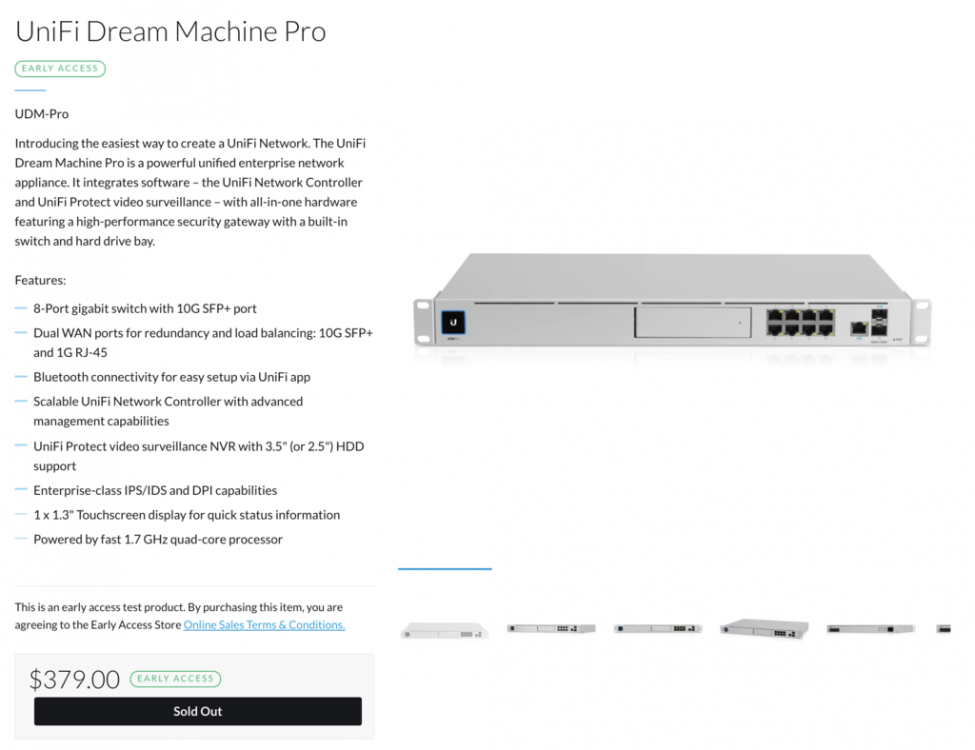
@Tinlad Yes after 3 days with Unifi support (I totally forgot about this file) I (embarrassed) found the error As a result of this I have removed it and is now running only with the settings done by the Unifi UI I have AGAIN requested them to add this in their UI... as a setting (For over a year now) Anyway I am looking to upgrade to the new: My hope is that I can migrate to this without to many issues....
-
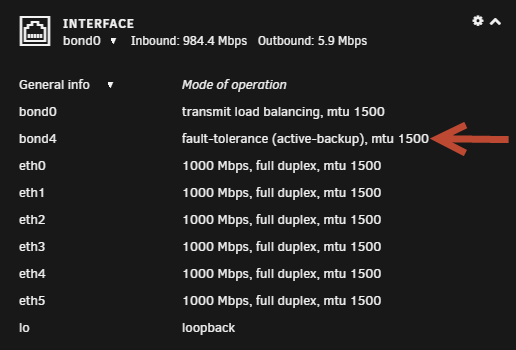
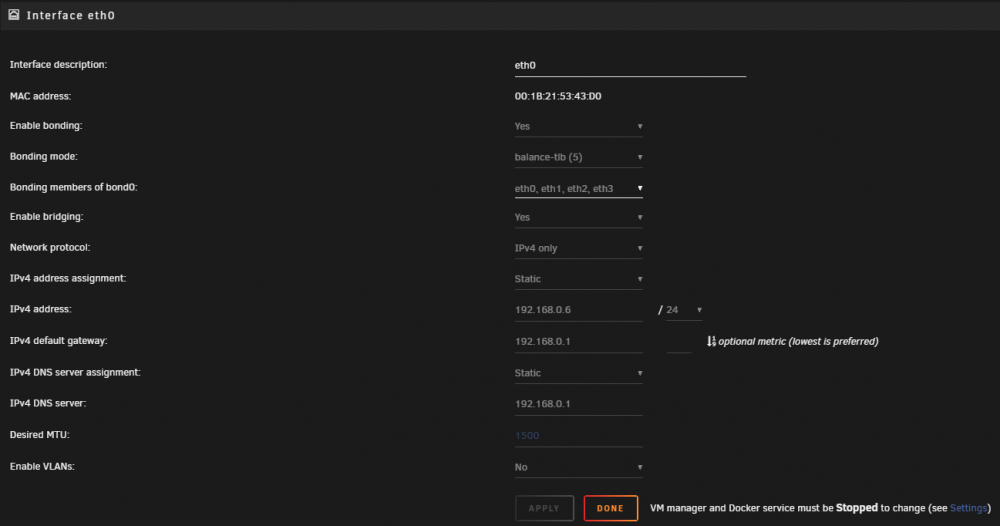
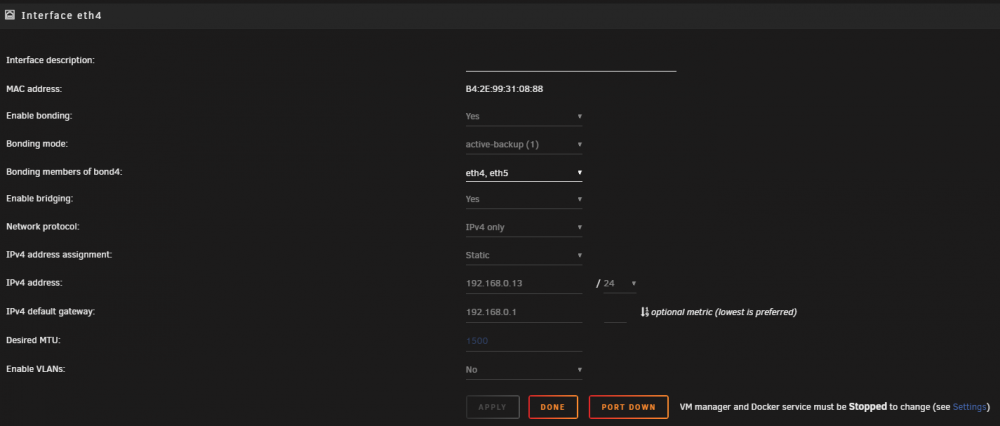
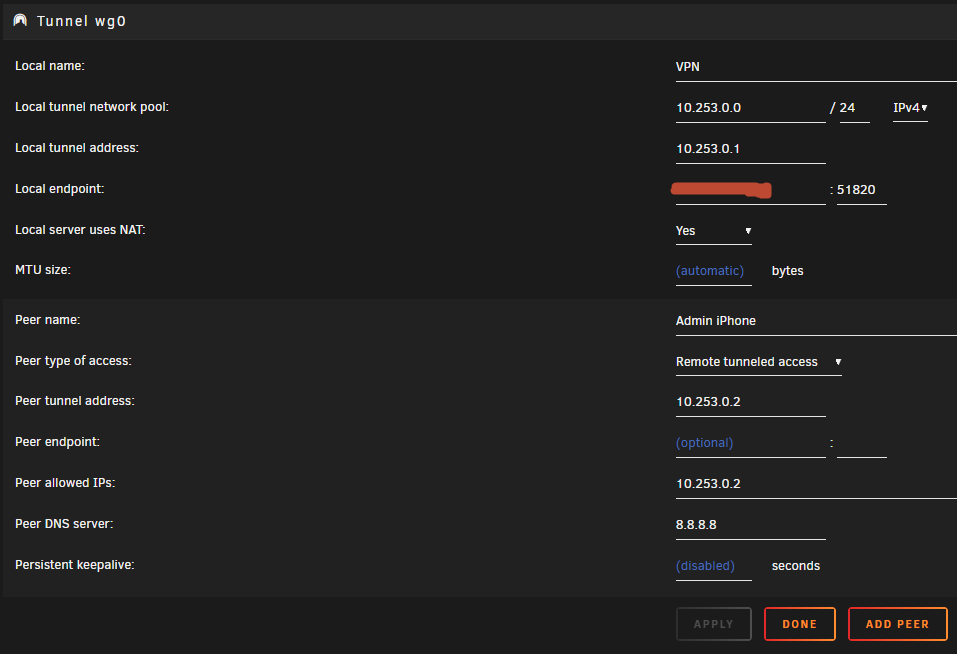
I managed to get everything working its really fast and I LOVE IT! BUT it only works if I connect to my "fault-tolerance (active-backup) IP not the "main ip" ? I have tried so many things but this is the only one working, any idea to why? and how I can change the priority for Wireguard? Network setup: eth4 Wireguard: Any suggestions?
-
Sorry no that didnt work spoke too soon
-
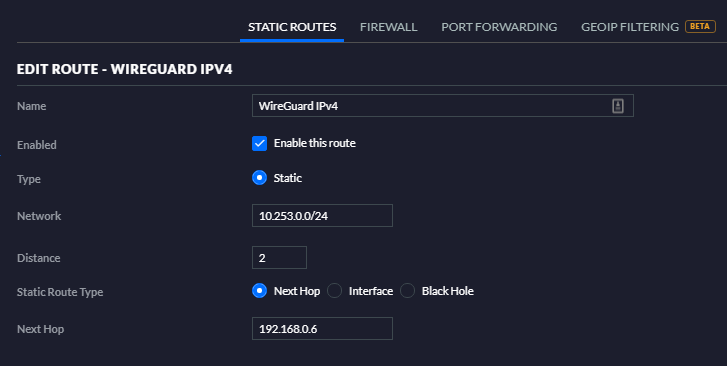
SORRY spoke to fast Update No that didnt work either the handshake was cashed @bonienl Changed the static route to my primary IP and also the forwarding, changed NAT to NO and then no access
-
Ok so I just tried my other IP on my Unraid server (have a backup) and then it just worked? (Bridge is enabled!) How can this be? what sets the priority of my IP's for the Unraid server? Have I configured the network wrong? Primary IP (Should be) 192.168.0.6 Is it a bug? running 6.8 - rc3 Secondary IP: 192.168.0.13 <---- Wireguard connects to this one?
-
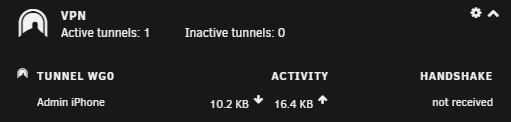
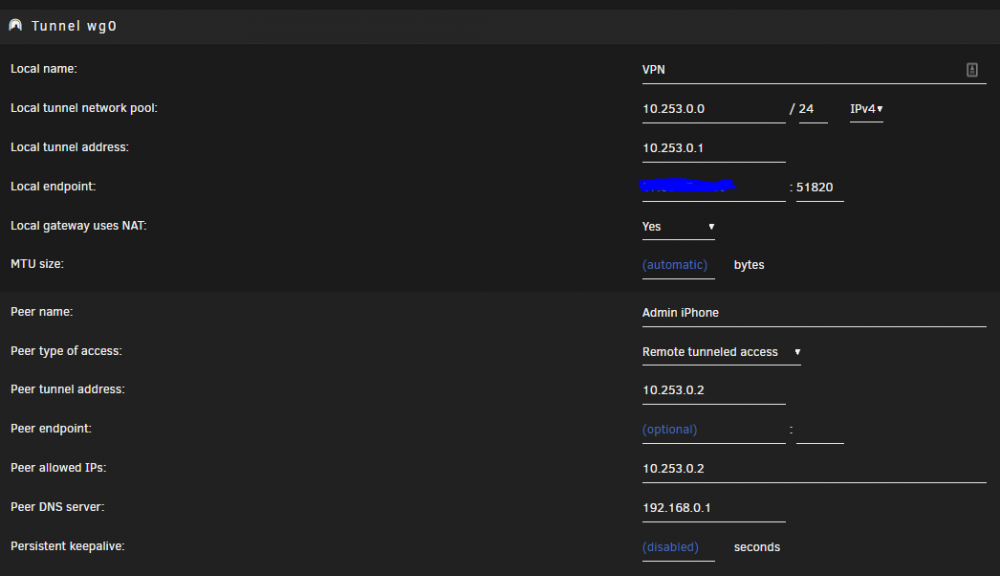
Any suggestions I have read through the post and I can't see anything wrong... I am only testing by phone app. Also tried to change tunnel to LAN but I still get no handshake? (Logfile on device says no to handshake) Regards Casperse Unifi settings: Port forwarding:

-
Hi All I don't seem to see the option to change the "local tunnel network pool" anymore in Advanced view Also tried to delete the plugin and install it again, nut the last update made i vanish from my plugin list maybee by design? Should I delete the config folder on the flash drive to get back to "start"? UPDATE: Delete the folder rebooted the server, did the configuration again - found that Local tunnel was in the Peer name (Sorry) I am now connected but no handshake? Added the port and also the static route, and I see some activity so what could I be missing?
-
Any input on how to add all networks to Plex (Multiple access?) I think I had this when it was running on my Syn NAS....