





dalben
Members
-
Joined
-
Last visited
Everything posted by dalben
-
Sounds all a bit too much for me. I’ll have to live with the minor annoyances I have until this becomes child proof enough that I can drive it. Thanks for the previous help Ken-ji. Much appreciated.
-
So the ability to have a container with its own IP still accessing the host via a separate VLAN is now crippled? That sucks.
-
Thanks! OK. that explains it all. Let me ask vpn.ac if there is a way around this. I can download torrents fine but i'm hardly uploading anything at all. Not good for my ratio.
-
I got the Transmission VPN working with my service, VPN.AC, eventually. It took some fiddling but it's connecting. Currently trying to decipher these hard coded paths which is doing my head in. But the one piece that's causing problem is the Port. It says "closed". What ports do you have in the Transmission Listening Port value? What related ports did you add for the Container/Docker and your firewall?
-
I've now got time to work on this again. A quick question on the above. Can I run 2 docker networks at the same time? Ideally I want to setup the new docker network with individual IPs are slowly mograte the dockers one at a time to make sure everything works before I go too far. If it is, do I follow your two commands above but add another network create for eth0/br0 that doesn't have the --parent flag ? Totally out of my depth here......
-
Thanks KenJi-San. i spent most the weekend on this but now back to the way it was, all in bridge mode. Some Details here: My wasted weekend looking at your post is see I did do a couple of things wrong so I’ll give it another go soon. I don’t have any vlans setup yet so that’s a bit of reading but the switch the server will be connected to is L3 and that’s connected to a USG if needed.
-
I'm now going with the single NIC solution and getting this error when I try and create the network: Error response from daemon: failed to allocate gateway (192.168.1.1): Address already in use One the unRAID server, the DNS is set to 192.168.1.1 Can I assume that's what creating the error above? If not, what else could it be? I'm using the following command: I got it going finally. Something was conflicting with the unRAID GUI's ability to set something like this up I guess. Anyway I have everything running on eth0 Two quirks: Once I have dockers with their own IP, I get access denied for any docker when I try to launch the webgui that is still configured with the Servers IP my kodi database uses SMB and the source path is //TDM/mnt etc. Kodi can't find that directory. Would that be because there's no link access from the dedicated IP to the Server, or is it because tdm, the servers host name, isn't resolving? #2 is painful right now. I'd be tempted to put Kodi back to the old shared IP but as above that would mean I can't access it anymore. Alternatively I could setup a bridge as the switch the server is on supports vlan. Would that solve the issue ?
-
Thanks kenji, that all makes sense now but I'm sure I'll stuff up along the way. Has anyone tried the bridge method with the Unifi container on a different ip subnet to the controllers and router? I do see advantages to having the dockers on their own subnet as long as it doesn't cause more problems. Either way I am going to have to change the settings of all dockers that talk to each other.
-
I was hoping there was an answer to this because I'm also interested. My server has 1 NIC now but I've got an Intel dual gb card sitting here doing nothing. I was hoping I could slot it in, give it a static IP, and then use that for the docker connection. My thoughts were I could carve out some leases from my DHCP and give them to Docker. i.r. DHCP range on my router (USG) would be .10 to .219, then I give .220 to .253 to docker containers. Is that possible? The example of a dual NIC setup only shows the dockers having their own dedicated network with different IPs to the rest of my network.
-
Ok, cool, then to looks all good. Thanks
-
I’ve had it running fine for a couple of days now. A bit of tweaking and updating the excluded paths and I’m down to a 3gb tar which Is very quick to complete. One that doesn’t seem to be working is the flash backup. I have the path in there but no Tar to speak of. Any idea where I can look?
-
I have a System Temp driver issue. It's a new ASROCK Z370m PRO4 board. When I run sensor-detect I get the following: Intel digital thermal sensor... Success! (driver `coretemp') Trying family `VIA/Winbond/Nuvoton/Fintek'... Yes Found `Nuvoton NCT6683D eSIO' (address 0xa10, but not activated) From my research, the Nuvoton NCT6683D eSIO needs the nct6683 driver. I don't think it's in the build. Here's the end of the sensors-detect run Driver `coretemp': * Chip `Intel digital thermal sensor' (confidence: 9) Do you want to generate /etc/sysconfig/lm_sensors? (yes/NO): To load everything that is needed, add this to one of the system initialization scripts (e.g. /etc/rc.d/rc.local): #----cut here---- # Chip drivers modprobe coretemp /usr/bin/sensors -s #----cut here---- You really should try these commands right now to make sure everything is working properly. Monitoring programs won't work until the needed modules are loaded. Unloading i2c-dev... OK My drivers.conf contents: coretemp My sensors.conf: # sensors chip "coretemp-isa-0000" label "temp1" "CPU Temp" chip "coretemp-isa-0000" label "temp2" "MB Temp" The System Temp plugin only shows those two sensors above. sensors command returns: root@tdm:~# sensors coretemp-isa-0000 Adapter: ISA adapter CPU Temp: +33.0°C (high = +80.0°C, crit = +100.0°C) MB Temp: +33.0°C (high = +80.0°C, crit = +100.0°C) Core 1: +31.0°C (high = +80.0°C, crit = +100.0°C) Core 2: +33.0°C (high = +80.0°C, crit = +100.0°C) Core 3: +31.0°C (high = +80.0°C, crit = +100.0°C) Really not sure where to go from here. I tried using the plugin to detect but coretemp is it's only find. This site looks like it's the driver page for the Nuvoton NCT6683D eSIO chip. https://github.com/groeck/nct6683 3 years old so I don't know if these drivers need to be requested in UNRAID or not. Any help would be most welcome as the server will sit in a cupboard in the tropics and I need to be able to see what the temp is like.
-
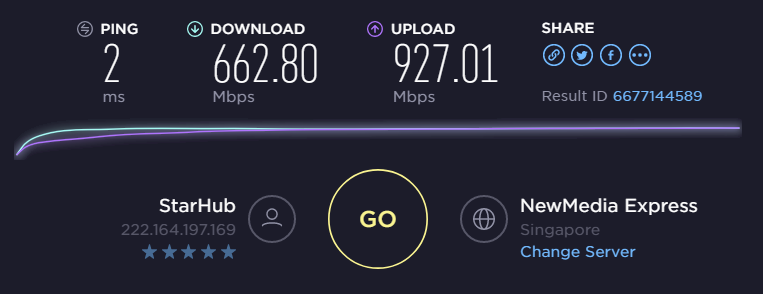
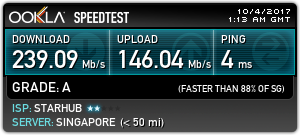
Ah, I was just about to ask a similar thing. On a Gigabit connection the difference is quite severe as can be seen below. No worries as long as I now know not to look at this plugin in isolation. Now, should I call my provider and apologise.....
-
When I try that I Get: path 'medusa' already exists and is not an empty directory. Fixed it by not doing the cd /app step.
-
Oh, I should have reported here. Using Konqueror inside a custom tab window, I can't use the CTRL or Shift keys to select multiple items.
-
Nice app. I was wondering if there was anyway to let the AppStore know that I already bought the Android version on playstore and just wanted an iOS version for my iPad mini instead of just my android phone.
-
Time to bite the bullet and create a new DB I think. This one has been around for a few years. Shouldn't be too painful as I have all meta-data locally thanks to TMM. The onlything I can't work out is how I keep the watched status.
-
Really ? So that's the reason I haven't been able to auto-scan the movies folders via headless since day dot? Any way around this? Or do I need to kill the DB and rescan from scratch? If it's rescan from scratch, can I use Local Info as the scraper and later switch it to an online scraper and not cause the same issues I have now?
-
One thing missing with new format is the indicator of whether an app has already been installed. Shouldn't be a problem but with my failing memory it was handy to know whether I had something already installed.
-
I have the same. The only way to get them back was by selecting Table view
-
Doing some reading DLink are a bit vague on how the webcams make it to their server. I'll deregister the cameras and see what happens when then.
-
In the other (incorrect) thread I was asked to check the A record. A DNS lookup shows it's ok. I'm using dns-o-matic to keep dns host record up to date.
-
I installed this docker last night and got the following errors. It mentions www.dlink.com but I don't run dlink routers. I do have some dlink webcams that are exposed to the intraweb via the dlink myhome software but there is no port forwarding of 443 required for that. I'm wondering if letsencrypt is hanging onto a previous cert tied to the IP my domain has at the moment. [cont-init.d] 10-adduser: exited 0. [cont-init.d] 20-config: executing... [cont-init.d] 20-config: exited 0. [cont-init.d] 30-keygen: executing... using keys found in /config/keys [cont-init.d] 30-keygen: exited 0. [cont-init.d] 50-config: executing... 2048 bit DH parameters present SUBDOMAINS entered, processing Sub-domains processed are: -d www.<mydomain> Generating new certificate WARNING: The standalone specific supported challenges flag is deprecated. Please use the --preferred-challenges flag instead. Saving debug log to /var/log/letsencrypt/letsencrypt.log Starting new HTTPS connection (1): acme-v01.api.letsencrypt.org Obtaining a new certificate Performing the following challenges: tls-sni-01 challenge for www.dlink.com tls-sni-01 challenge for <mydomain> /usr/lib/python2.7/site-packages/OpenSSL/rand.py:58: UserWarning: implicit cast from 'char *' to a different pointer type: will be forbidden in the future (check that the types are as you expect; use an explicit ffi.cast() if they are correct) result_code = _lib.RAND_bytes(result_buffer, num_bytes) Waiting for verification... Cleaning up challenges Failed authorization procedure. <mydomain> (tls-sni-01): urn:acme:error:unauthorized :: The client lacks sufficient authorization :: Incorrect validation certificate for tls-sni-01 challenge. Requested aec5e3e7f34dde8c7cce57e6d1771dc1.81ab33f90fa1bed9df091e4aa8ed108d.acme.invalid from <myip>:443. Received 1 certificate(s), first certificate had names "www.dlink.com", <mydomain> (tls-sni-01): urn:acme:error:unauthorized :: The client lacks sufficient authorization :: Incorrect validation certificate for tls-sni-01 challenge. Requested 8fffff13a46234f55f4bdcdb7b5e7b07.19a22a976cb3972071f41176337ae159.acme.invalid from <myip>:443. Received 1 certificate(s), first certificate had names "www.dlink.com" IMPORTANT NOTES: - The following errors were reported by the server: Domain: <mydomain> Type: unauthorized Detail: Incorrect validation certificate for tls-sni-01 challenge. Requested aec5e3e7f34dde8c7cce57e6d1771dc1.81ab33f90fa1bed9df091e4aa8ed108d.acme.invalid from <myip>:443. Received 1 certificate(s), first certificate had names "www.dlink.com" Domain: <mydomain> Type: unauthorized Detail: Incorrect validation certificate for tls-sni-01 challenge. Requested 8fffff13a46234f55f4bdcdb7b5e7b07.19a22a976cb3972071f41176337ae159.acme.invalid from <myip>:443. Received 1 certificate(s), first certificate had names "www.dlink.com" To fix these errors, please make sure that your domain name was entered correctly and the DNS A record(s) for that domain contain(s) the right IP address. /var/run/s6/etc/cont-init.d/50-config: line 108: cd: /config/keys/letsencrypt: No such file or directory [cont-init.d] 50-config: exited 1. [cont-finish.d] executing container finish scripts... [cont-finish.d] done. [s6-finish] syncing disks. [s6-finish] sending all processes the TERM signal. [s6-finish] sending all processes the KILL signal and exiting.
-
I installed this docker last night and got the following errors. It mentions www.dlink.com but I don't run dlink routers. I do have some dlink webcams that are exposed to the intraweb via the dlink myhome software but there is no port forwarding of 443 required for that. I'm wondering if letsencrypt is hanging onto a previous cert tied to the IP my domain has at the moment. [cont-init.d] 10-adduser: exited 0. [cont-init.d] 20-config: executing... [cont-init.d] 20-config: exited 0. [cont-init.d] 30-keygen: executing... using keys found in /config/keys [cont-init.d] 30-keygen: exited 0. [cont-init.d] 50-config: executing... 2048 bit DH parameters present SUBDOMAINS entered, processing Sub-domains processed are: -d www.<mydomain> Generating new certificate WARNING: The standalone specific supported challenges flag is deprecated. Please use the --preferred-challenges flag instead. Saving debug log to /var/log/letsencrypt/letsencrypt.log Starting new HTTPS connection (1): acme-v01.api.letsencrypt.org Obtaining a new certificate Performing the following challenges: tls-sni-01 challenge for www.dlink.com tls-sni-01 challenge for <mydomain> /usr/lib/python2.7/site-packages/OpenSSL/rand.py:58: UserWarning: implicit cast from 'char *' to a different pointer type: will be forbidden in the future (check that the types are as you expect; use an explicit ffi.cast() if they are correct) result_code = _lib.RAND_bytes(result_buffer, num_bytes) Waiting for verification... Cleaning up challenges Failed authorization procedure. <mydomain> (tls-sni-01): urn:acme:error:unauthorized :: The client lacks sufficient authorization :: Incorrect validation certificate for tls-sni-01 challenge. Requested aec5e3e7f34dde8c7cce57e6d1771dc1.81ab33f90fa1bed9df091e4aa8ed108d.acme.invalid from <myip>:443. Received 1 certificate(s), first certificate had names "www.dlink.com", <mydomain> (tls-sni-01): urn:acme:error:unauthorized :: The client lacks sufficient authorization :: Incorrect validation certificate for tls-sni-01 challenge. Requested 8fffff13a46234f55f4bdcdb7b5e7b07.19a22a976cb3972071f41176337ae159.acme.invalid from <myip>:443. Received 1 certificate(s), first certificate had names "www.dlink.com" IMPORTANT NOTES: - The following errors were reported by the server: Domain: <mydomain> Type: unauthorized Detail: Incorrect validation certificate for tls-sni-01 challenge. Requested aec5e3e7f34dde8c7cce57e6d1771dc1.81ab33f90fa1bed9df091e4aa8ed108d.acme.invalid from <myip>:443. Received 1 certificate(s), first certificate had names "www.dlink.com" Domain: <mydomain> Type: unauthorized Detail: Incorrect validation certificate for tls-sni-01 challenge. Requested 8fffff13a46234f55f4bdcdb7b5e7b07.19a22a976cb3972071f41176337ae159.acme.invalid from <myip>:443. Received 1 certificate(s), first certificate had names "www.dlink.com" To fix these errors, please make sure that your domain name was entered correctly and the DNS A record(s) for that domain contain(s) the right IP address. /var/run/s6/etc/cont-init.d/50-config: line 108: cd: /config/keys/letsencrypt: No such file or directory [cont-init.d] 50-config: exited 1. [cont-finish.d] executing container finish scripts... [cont-finish.d] done. [s6-finish] syncing disks. [s6-finish] sending all processes the TERM signal. [s6-finish] sending all processes the KILL signal and exiting.
-
I get the same message in my logs, but it doesn't, scan any folders where the content is Movies

