





dalben
Members
-
Joined
-
Last visited
Everything posted by dalben
-
Definitely an issue I've had with XBMC/Kodi dockers from even before ls rolled one out. It just doesn't scan the movie folders
-
No, I'm running Jarvis. I need to replace my 5yo Xbmc appliances that stopped updating after Jarvis before I try Krypton.
-
Correct, CP handles notifications for single updates but no scrape. I do that from my PC. I assume you aren't using Krypton but Jarvis? I'm hoping Krypton works better (no more segfaults at least) than the current Jarvis.
-
The movie being overlooked has been a bug for a while. I let CP handle that or fire up kodi on my pc and run a manual update.
-
If there is anyone out there that who has the skills to turn a docker into an easy installer unraid container, and wants Minecraft PE servers, this looks quite sexy https://hub.docker.com/r/ixilon/nukkit/
-
Thanks, I'll try that tonight
-
How does one get an updated docker that rejects that? I followed the instructions that are listed in the docker setup screen on Unraid which still mentions Version but no mention of the me method? Do I need to delete the docker and recreate it, or is it something that can be pushed during a weekly update?
-
Thanks. I rarely go back to an OP of a thread that I've been following for a while. Does this mean the Version variable is redundant/deprecated?
-
My container/docker has a Version variable setting. It's set to 16 which is what I need as all my devices are on Jarvis. Today I see my container/docker is running 17 (Krypton). 1) Does the Version variable no longer work? 2) How do I get back to Jarvis ?
-
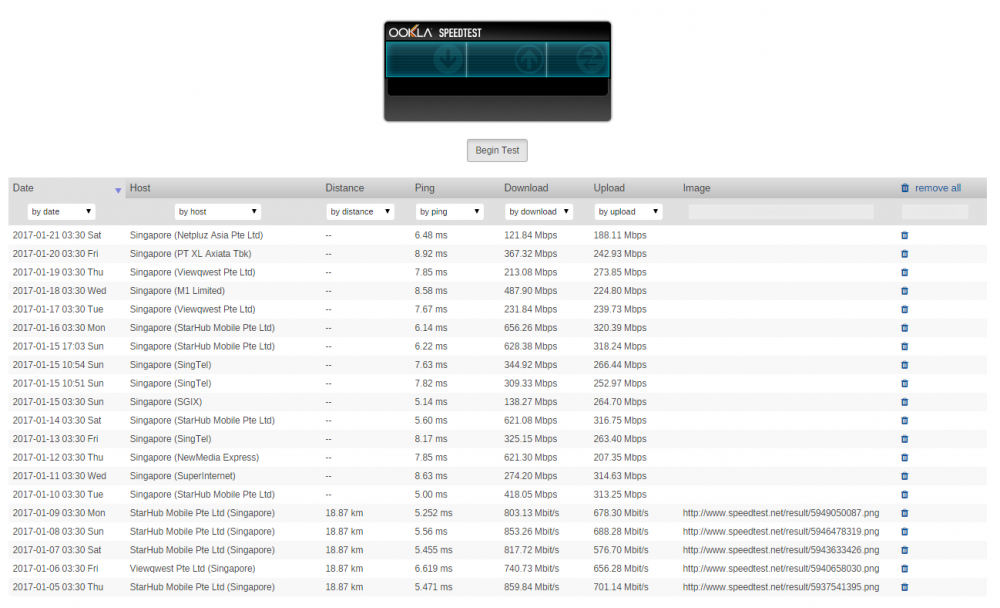
I'm seeing an issue since the latest update, Jan 7th. Here's the speedtest page. I haven't moved house, ISP, Router or anything, I think. I updated the plugin on the 9th so the first run was on the 10th where the data seems missing (and my speeds appear to drop) EDIT: Well I found the setting and reverted back to script v.1.0.1 and it's back to the way I had it before. Considered this closed (unless you feel 1.0.2-c should be working then I'm happy to help debug and try stuff)
-
+1 A vanilla flexget would be great.
-
I get the same error. Deleted and recreated but no luck. Still there. Has anyone managed to get pocketmine working with this docker?
-
Um, I was indthink r the impression SSD di GWS don't need preclearing, but in saying that I have never tried as I've never thrown one into the array.
-
Are you by any chance using protected shares ? Don't think so Though I'm not too sure what you mean.
-
I updated this today and still get the following in the log: ------------------------------------- _ _ _ | |___| (_) ___ | / __| | |/ _ \ | \__ \ | | (_) | |_|___/ |_|\___/ |_| Brought to you by linuxserver.io We gratefully accept donations at: https://www.linuxserver.io/index.php/donations/ ------------------------------------- GID/UID ------------------------------------- User uid: 99 User gid: 100 ------------------------------------- [cont-init.d] 10-adduser: exited 0. [cont-init.d] 30-config: executing... [cont-init.d] 30-config: exited 0. [cont-init.d] done. [services.d] starting services [services.d] done. mkdir failed on directory /var/cache/samba: Permission denied mkdir failed on directory /var/cache/samba: Permission denied That permission denied error keeps going on and on and on... Anyone else seeing this or is it just my system ?
-
Um, yeah. Which is a bit odd seeing it's the official stable release.
-
More common terms these days are EOL and EOS. End Of Life. A product is superseded and it is no longer sold or enhanced by the vendor. End Of Support is when the vendor ceases to support and supply bug and security fixes. In this case, 6.1.9 would go EOL when 6.2 goes live. But it sounds like LT want EOL and EOS to happen at the same time. I can understand why but it's not normally done.
-
Installed the update today. Now I get the following in the log file over and over, but it seems to be runningfine. mkdir failed on directory /var/cache/samba: Permission denied
-
You're right. They want the NodeJS so they can use a server for their iPad versions. If you get a chance to get a container setup. let me know, I'd love to try it/use it/have anything thing I can use to threaten removing from my kids when they play up
-
That did it. Awesome, thanks very much! Any chance you can publish your docker with NodeJS ? My kids cant deal with the fact their world on the iPad cant be seen from their PC.
-
The file tree that I'm using doesn't support that without a rewrite of its api (ie: if I dig into a subdirectory of it, it returns the name of the subdirectory instead of the path including the parent.) What you're going to have to do is specify it in the rsync options instead. Off the top of my head (at work so can't check), you would add something like this --exclude sabnzbd/downloads I have an rsync script I cobbled together that uses and exclude file which excludes the subdirectories I want excluded. I'll have a play and see if I can incorporate the reading of that exclude file. Thanks It just use that script instead of the built in one. CA will stop and start the apps automatically and then run your script Sent from my LG-D852 using Tapatalk Cool, thanks.
-
The file tree that I'm using doesn't support that without a rewrite of its api (ie: if I dig into a subdirectory of it, it returns the name of the subdirectory instead of the path including the parent.) What you're going to have to do is specify it in the rsync options instead. Off the top of my head (at work so can't check), you would add something like this --exclude sabnzbd/downloads I have an rsync script I cobbled together that uses and exclude file which excludes the subdirectories I want excluded. I'll have a play and see if I can incorporate the reading of that exclude file. Thanks
-
Not sure if it's been mentioned but in the Backup Appdata plugin, I can't find a way to exclude subdirectories withing the root level subdirectories. I want to exclude all cache types directories because come backup/restore time, restoring cache files are a luxury I don't need. Is there any way to drill down to these types of subdirectories ?
-
From LT themselves.... Thanks, looks like it's time to start a new docker.img again. Might be a good time to migrate from/apps to /appsdata as well
-
Was having some issues where CouchPotatoe was unable to show the update status and was wanting to be updated constantly. So I killed the container and went to rebuild it. Here's the error I'm getting when I add the container from scratch root@localhost:# /usr/local/emhttp/plugins/dynamix.docker.manager/scripts/docker run -d --name="CouchPotato" --net="bridge" -e TZ="Asia/Singapore" -e HOST_OS="unRAID" -e "PUID"="99" -e "PGID"="100" -e "EDGE"="1" -p 8083:5050/tcp -v "/mnt/cache/apps/couchpotato/":"/config":rw -v "/mnt/cache/downloads/":"/downloads":rw -v "/mnt/user/videos/Movies/":"/movies":rw -v "/mnt/user/":"/mnt/user":rw linuxserver/couchpotato Unable to find image 'linuxserver/couchpotato:latest' locally latest: Pulling from linuxserver/couchpotato 6ffe5d2d6a97: Already exists f4e00f994fd4: Already exists e99f3d1fc87b: Already exists a3ed95caeb02: Already exists a3ed95caeb02: Already exists ededd75b6753: Already exists 1ddde157dd31: Already exists a3ed95caeb02: Already exists 9fdc4b327358: Already exists a836128d06ab: Already exists 7583a35fe4e8: Already exists 54fa6a12cb7f: Already exists 5eaefc085e12: Already exists 5b2b3e7c12ea: Pulling fs layer 1d8a78996c21: Pulling fs layer fa208e14d1af: Pulling fs layer dc15022ba358: Pulling fs layer dc15022ba358: Waiting 1d8a78996c21: Verifying Checksum 1d8a78996c21: Download complete fa208e14d1af: Verifying Checksum fa208e14d1af: Download complete 5b2b3e7c12ea: Download complete 5b2b3e7c12ea: Pull complete 5b2b3e7c12ea: Pull complete 1d8a78996c21: Pull complete 1d8a78996c21: Pull complete fa208e14d1af: Pull complete fa208e14d1af: Pull complete dc15022ba358: Download complete dc15022ba358: Pull complete dc15022ba358: Pull complete docker: layers from manifest don't match image configuration. See '/usr/bin/docker run --help'.

